Commercial real estate data extraction: T-12s, rent rolls, leases and OMs
For CRE lenders, investors and servicers: which documents to extract, the operating statement lines and rent roll fields that matter, the checks that tie them together, and how to automate the work.

Key takeaways
- Commercial real estate data extraction turns a deal or loan file into structured data: T-12 and operating statement lines, rent roll units, lease terms and the offering memorandum's figures.
- The T-12 and the rent roll carry most of the numbers: what the property earned over the last 12 months, and what it's set up to earn today.
- Map every operating statement to one standard set of lines, so each property manager's labels land in the same place in your model.
- Extraction is half the job. The documents have to tie out: the rent roll foots, the T-12 adds up to its NOI, and rent roll income agrees with the T-12 within your tolerance.
- Automation turns keying into exception review: people check only the values that fail a check or that the model is unsure about.
On this page
- The documents in a CRE file, and what each one gives you
- How CRE data extraction works
- T-12s and operating statements: the lines to extract
- Checks that tie the rent roll, T-12 and leases together
- Leases and the rest of the file
- Manual vs automated CRE data extraction
- The bottom line
- Frequently asked questions
Commercial real estate data extraction turns the documents in a deal or loan file into structured data: income and expense lines from the T-12 and operating statements, unit rows from the rent roll, terms from the leases and purchase agreement, and the figures in the offering memorandum (OM) and appraisal. Lenders, investors and servicers use it to fill an underwriting model or loan system, and to check that the documents agree before anyone relies on the numbers.
This guide covers what to extract from each document, how extraction works, the operating statement lines and checks that matter, and how to automate the work.
The documents in a CRE file, and what each one gives you#
An acquisition or loan file usually includes these six property documents, and each answers a different question about the property.
T-12 and operating statements
What the property earned: gross potential rent, vacancy and concessions, other income, each expense line and NOI, by month or by year. See the T-12 in real estate.Rent roll
What it's set up to earn today: every unit or suite with its tenant, square feet, lease dates, contract and market rent, concessions, deposit and balance due. See rent roll analysis.Leases and amendments
The terms behind each rent roll line: parties, premises, term, rent schedule, options, expense recoveries and deposit. See lease abstraction.Offering memorandum
The broker's package: unit mix, occupancy, in-place and pro forma income, and price guidance. The figures are the seller's, so check them against the T-12 and rent roll. See how to read an OM.Purchase agreement or LOI
The deal terms: parties, price, earnest money, due diligence and closing dates, and contingencies. A letter of intent or proposal carries them in draft.Appraisal
An independent value, with the cap rate, market rents, expense estimates and the comparables behind them.
Lenders also collect borrower documents, such as tax returns and bank statements: see document automation for lending. Property managers work with a different set, such as invoices, utility bills and certificates of insurance: see intelligent document processing in real estate.
How CRE data extraction works#
Every file moves through the same stages, whether an analyst does them by hand or software does.
- Offering memorandum
- T-12 and operating statements
- Rent roll
- Leases
- 01Classify and split the package
- 02Extract lines and unit rows
- 03Map to your chart of accounts
- 04Tie the documents out
- 05Review exceptions
- Collect the full packageThe OM, the T-12, prior years' operating statements, the current rent roll, leases with their amendments, and an aged receivables report.
- Classify and splitSeparate each document and each statement period, so a T-12 isn't read as an annual statement.
- Extract every line and rowMonthly columns and totals from the T-12, and every row of the rent roll, even when the table runs across pages.
- Map to your chart of accountsProperty managers label lines differently: "Repairs & Maint.", "R&M" and "Building repairs" should all land on repairs and maintenance.
- Tie out and reviewRun the checks below. A person reviews only what fails or what the model is unsure about, with the source line in view.
- Load the modelSend the mapped data to your underwriting model or loan system.
T-12s and operating statements: the lines to extract#
An operating statement is a property's income statement, and a T-12 is one that covers the trailing 12 months, usually month by month. Lenders ask for both. Fannie Mae's multifamily guide, for example, tells lenders to use best efforts to get three years of operating statements, and to check updated statements and rent rolls for unexplained changes from earlier versions.
Extract every line as the property manager reported it, then map it to a standard set, such as the lines in the CRE Finance Council's operating statement analysis report, the format commercial mortgage servicers use to report normalized borrower statements:
| Section | Lines to extract | Watch for |
|---|---|---|
| Rental income | Gross potential rent, vacancy loss, concessions, bad debt | Concessions or bad debt netted into rent, or left out |
| Other income | Parking, laundry and vending, fees, utility reimbursements | One-off items, such as an insurance payout or a lease termination fee |
| Effective gross income | Net rental income plus other income | A total that doesn't match the lines above it |
| Operating expenses | Real estate taxes, insurance, utilities, repairs and maintenance, management fees, payroll, marketing, professional fees, general and administrative | A missing management fee, or capital work booked as repairs |
| Net operating income | Effective gross income minus operating expenses | A stated NOI that doesn't equal the math |
| Below NOI | Replacement reserves, capital expenditures, debt service | Any of these above the NOI line |
The CRE Finance Council's master coding matrix shows the mapping in practice: concessions count toward vacancy loss, equipment repairs go to repairs and maintenance, and depreciation, interest income and gains on sale come out. Keep the borrower's figure, your adjustment and the normalized figure side by side, as its NOI adjustment worksheet does, so a reviewer can see every change.
Checks that tie the rent roll, T-12 and leases together#
Many errors only show up when the documents are compared. The rent roll is a snapshot on one date and the T-12 covers a year, so they rarely match exactly: set a tolerance, and send anything outside it to review.
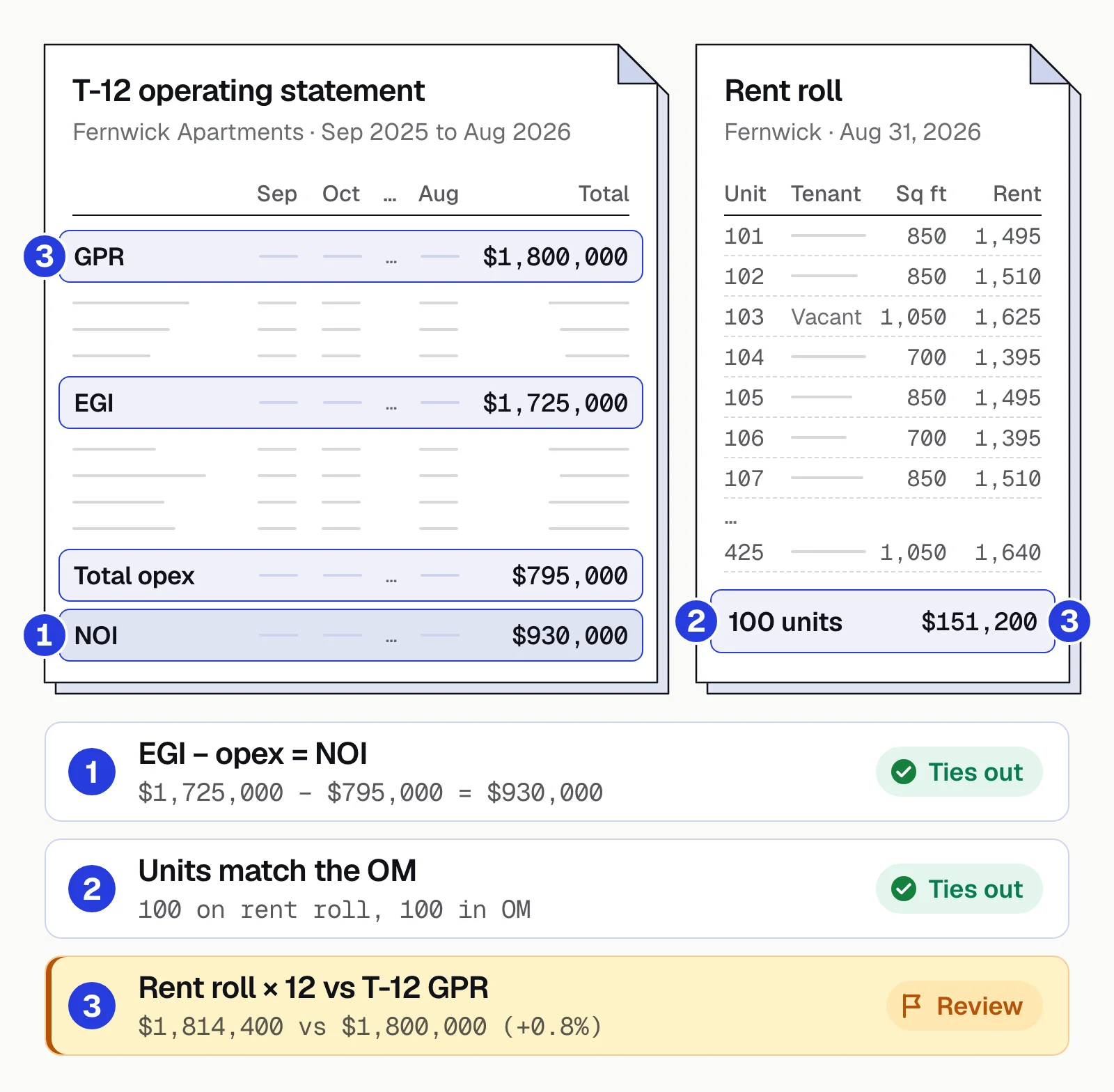
- The rent roll footsUnit rows add up to the rent roll's own totals for units, square feet and monthly rent.
- The T-12 adds upTwelve months sum to each annual total, and effective gross income minus operating expenses equals the stated NOI.
- Rent roll income matches the T-12Rents in place plus market rent for vacant units, times 12, against the T-12's gross potential rent. That's how Fannie Mae's guide builds gross rental income.
- Occupancy agreesOccupied units on the rent roll against the T-12's vacancy loss and the OM's stated occupancy.
- Leases match the rent rollRent in effect, expiration date and square feet for each tenant. A mismatch often means an amendment is missing from the file or from the rent roll.
- The OM holds upThe OM's in-place income and occupancy against the T-12 and rent roll. Keep its pro forma figures separate.
Leases and the rest of the file#
Leases hold the terms behind every rent roll line: the rent schedule, options, expense recoveries and critical dates. They're long, every landlord's form is different, and amendments change the rent or term, so read each lease and its amendments as one set.
| Field | Extracted value | Source |
|---|---|---|
| Landlord | Lakeview Commerce Center LLC | § 1.1 · p. 1 |
| Tenant | Cobalt Ridge, Inc. | § 1.2 · p. 1 |
| Premises | Suite 300, 3rd floor | § 1.3 · p. 1 |
| Rentable area | 6,000 RSF | § 1.3 · p. 1 |
| Tenant's share | 12.50% of 48,000 RSF | § 1.4 · p. 1 |
| Permitted use | General office | § 1.5 · p. 1 |
Purchase agreements and appraisals vary just as much. Pull the price, deposits and deadlines from the first, and the value, cap rate and market rents from the second. For lease work on its own, see lease abstraction software.
Manual vs automated CRE data extraction#
By hand, an analyst retypes the rent roll and maps the T-12 before any analysis starts, and every deal repeats the work. Automated extraction does the reading, mapping and tie-outs, so people start from checked numbers.
Manual
- Rent rolls retyped unit by unit, T-12s keyed month by month
- Each analyst maps a property manager's labels differently
- Tie-outs happen late, often after the model is built
- A number in the model can't be traced to its page
Automated
- Every line and unit row read, in any layout, scans included
- Lines mapped to your chart of accounts the same way on every deal
- Tie-outs run on every file before it reaches the model
- Clicking a value shows the line it came from
Docsumo is an intelligent document processing (IDP) platform. For CRE underwriting, it splits and classifies the package, reads rent rolls, T-12s, leases and the rest of the loan file in any layout, because language models structure what OCR reads, and joins tables that run across pages. Fields below the confidence threshold you set go to your own reviewers with the source line highlighted, and on the Enterprise plan, cross-document validation checks values across the file. Data reaches your model or loan system through the API and webhooks, or downloads to Excel. It doesn't build the pro forma or value the property, and it's software your team runs, not an outsourced spreading service.
Arbor, a real estate investment firm, runs its insurance compliance documents through Docsumo.
- 99%accuracy on insurance compliance documents at Arbor
- 3,000+hours a month saved at Arbor
- 95%+of documents processed straight through, without manual review
- <5 minper document, down from 2+ hours
The bottom line#
Every CRE deal repeats the same document work: read the T-12 and rent roll, map the lines, check the leases and the OM, and tie it all out. Automate the reading and the checks, keep a link from every number to its page, and leave the judgment calls, such as normalizing expenses and setting market rents, with your underwriters.
Book a demo with one of your own deal packages, or start a free trial.
Frequently asked questions#
What is commercial real estate data extraction?
It's pulling structured data out of the documents in a CRE deal or loan file: income and expense lines from T-12s and operating statements, unit or suite rows from rent rolls, terms from leases, and figures from offering memorandums, purchase agreements and appraisals. The data then feeds underwriting models, loan systems and portfolio reporting.
What's the difference between a T-12 and an operating statement?
An operating statement is a property's income statement for any period, such as a calendar year. A T-12, or trailing 12-month report, is an operating statement for the last 12 months, usually shown month by month. Lenders typically ask for prior years' statements as well as a recent T-12: Fannie Mae's multifamily guide, for example, tells lenders to use best efforts to get three years of operating statements.
Can AI extract data from commercial leases?
Yes. AI document processing reads leases in any landlord's form, scanned or digital, and returns the parties, dates, rent schedule, options and expense terms as fields. Read the amendments with the lease, because a later amendment can change the rent or the term: see our guide to lease abstraction.
How do you validate extracted CRE data?
Check each document against itself (rent roll rows add up to its totals, the T-12's months add up to the annual figures), then check the documents against each other (the rent roll against the T-12, leases against the rent roll, both against the OM). Send any value the model is unsure about to a person, with the source line in view, and log who changed what.
What tools extract data from OMs, rent rolls and T-12s?
Three kinds: deal modeling tools that fill an acquisitions model from the broker's package, CRE lending platforms that spread the statements inside their own loan software, and document extraction platforms such as Docsumo that send low-confidence fields to a reviewer with the source line and feed the model or loan system you already use. Our comparison of CRE underwriting software covers ten of them.
Does Docsumo replace ARGUS or our underwriting model?
No. Docsumo reads and checks the documents, then sends structured data to your model or loan system through its API and webhooks. The pro forma, valuation and loan sizing stay in the model your team already uses.