Invoice data extraction and parsing: fields, methods and how to automate it
For AP teams and developers: which invoice fields to capture, how extraction methods compare, what a good parser returns, and the checks that make the data safe to post.

Key takeaways
- Invoice data extraction, also called invoice parsing or invoice data capture, turns an invoice into structured data: vendor, invoice number, dates, PO number, line items, tax and totals.
- The main methods are manual entry, template OCR, rule-based parsing, AI models and hybrid systems. Of the automated methods, only AI and hybrid systems handle new vendor layouts without setup.
- Line items are the hardest part: tables that span pages, wrap across lines and use different column names for every vendor.
- Extraction isn't finished until the data is validated: line items sum to the subtotal, totals reconcile, the vendor exists and the invoice isn't a duplicate.
- Measure extraction by field-level accuracy on your own invoices, not by a vendor's headline number.
On this page
- Fields to extract from an invoice
- Legal, commercial and rent invoices
- Invoice data extraction methods compared
- What good extraction output looks like
- Why line items are the hard part
- Checks to run on extracted invoice data
- How to automate invoice data extraction
- Best practices for managing extracted invoice data
- The bottom line
- Frequently asked questions
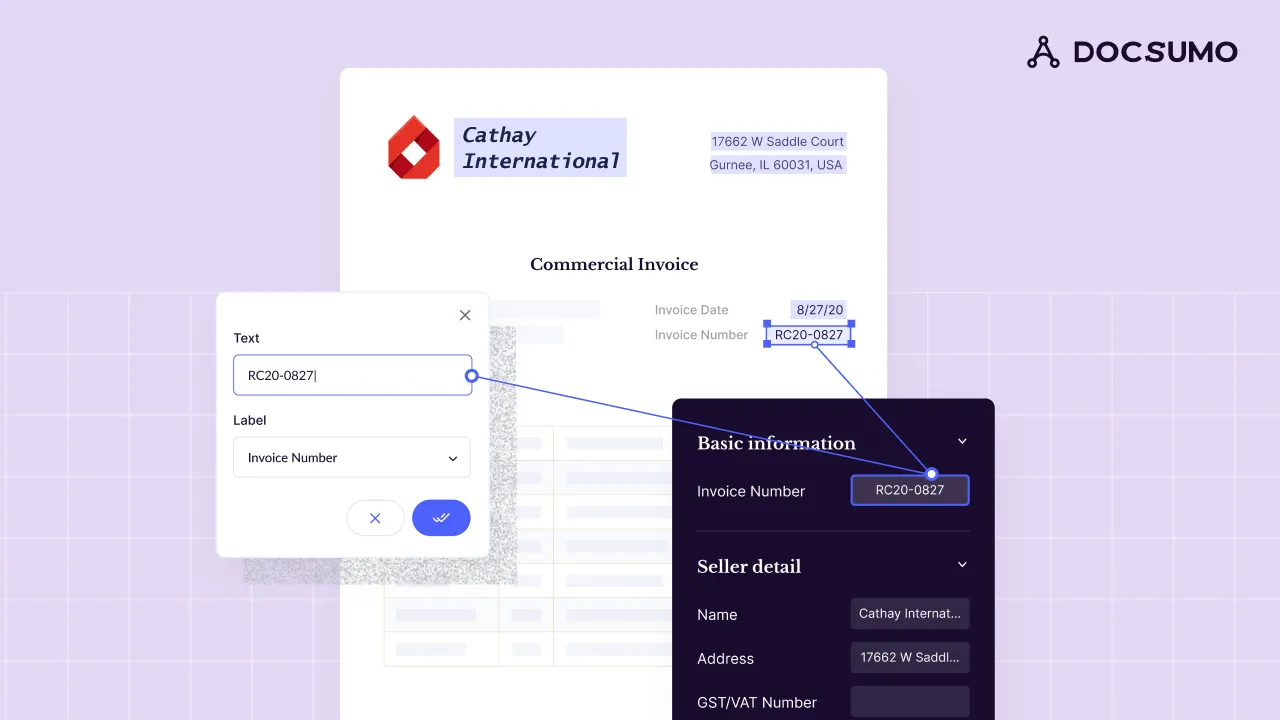
Invoice data extraction, also called invoice parsing or invoice data capture, turns the information on an invoice into structured data: vendor details, invoice number, dates, PO number, line items, tax and totals. AP teams use it to stop keying invoices into the ERP, and developers call an invoice parser API to feed the data into their own systems. Modern tools combine OCR with AI models, so they read new vendor layouts without a template for each one.
This guide covers the fields to capture (legal and commercial invoices included), how the methods compare, what good output looks like, the checks to run and how to automate it.
Fields to extract from an invoice#
| Group | Fields | Used for |
|---|---|---|
| Vendor | Name, address, tax ID, remit-to address and bank details | Matching to the vendor master; catching changed bank details |
| Buyer | Bill-to entity and address, ship-to address | Routing to the right entity and cost center |
| Invoice header | Invoice number, invoice date, due date, payment terms, PO number, currency | Duplicate checks, PO matching, payment scheduling |
| Line items | Description, SKU or item code, quantity, unit of measure, unit price, line amount, line tax | 2-way and 3-way matching, GL coding, spend analysis |
| Totals | Subtotal, discounts, freight, tax by rate, total due | Posting and reconciliation |
Legal, commercial and rent invoices#
Some invoices carry fields a general invoice model doesn't expect. List them before you test a tool.
Legal invoices
The matter number, billing period and every time and expense entry: timekeeper, hours, rate and UTBMS task, activity and expense codes. A LEDES 1998B file, the most widely used legal e-billing format in the US, carries the same fields.Commercial invoices
US import invoices must show the port of entry, seller and buyer, each item's description, quantity and price, the currency, charges such as freight, and the country of origin (19 CFR 141.86).Rent invoices
Property, unit and billing period, then base rent, pass-through charges such as common area maintenance, late fees and any balance carried forward.Credit memos, pro formas and statements
Not bills to pay. Classify them first, or a statement gets paid on top of the invoices it lists.
Invoice data extraction methods compared#
| Method | How it works | Strengths | Limits |
|---|---|---|---|
| Manual entry | A person, in-house or at a data capture service, keys each field | No setup; handles anything | Slow, costly and error-prone at volume |
| Template OCR | OCR plus fixed zones set up for each vendor layout | Accurate on a few stable layouts | A template per vendor; breaks when a layout changes |
| Rule-based parsing | Keywords and regular expressions find values in the OCR text | Good for digital PDFs with predictable wording | Brittle across vendors; weak on tables |
| AI models | ML models trained on invoices, or large language models reading the OCR text, find fields by context and layout | New layouts and line items without a template | Need validation and review of uncertain fields |
| Hybrid | AI extraction plus rules and checks against your own data | Best accuracy and control in production | More to configure up front |
For an AP team with dozens or thousands of vendors, AI or hybrid is the practical choice; template OCR only suits a handful of layouts that never change. More on the OCR step in invoice OCR.
What good extraction output looks like#
Whatever the method, you want every field named, line items as rows, and a confidence score on each value that links back to its place on the page.
| Field | Extracted value | Read |
|---|---|---|
| Vendor name | Northeast Kitchen Equipment | |
| Invoice number | NKE-9921 | |
| Invoice date | 2026-08-12 | |
| Due date | 2026-09-11 | |
| Payment terms | Net 30 | |
| PO number | 5498 (handwritten) |
| Field | Extracted value | Read |
|---|---|---|
| Vendor address | 37 Bridge St, Westbrook, ME | |
| Bill to | Harbor Street Bakery LLC | |
| Ship to | 22 Thames St, Portland, ME | |
| Remit to | PO Box 3170, Portland, ME |
| Field | Extracted value | Read |
|---|---|---|
| Item code | WT-3072 | |
| Description | Stainless work table, 30 x 72 in | |
| Quantity | 2 | |
| Unit of measure | EA | |
| Unit price | 385.00 | |
| Amount | 770.00 |
| Field | Extracted value | Read |
|---|---|---|
| Subtotal | 23,250.00 | |
| Sales tax rate | 5.5% | |
| Sales tax | 1,278.75 | |
| Freight | 121.25 | |
| Total due | 24,650.00 |
For developers, the same invoice as JSON, trimmed to 2 of its 11 lines:
{
  "document_type": "invoice",
  "vendor_name": "Northeast Kitchen Equipment",
  "invoice_number": "NKE-9921",
  "invoice_date": "2026-08-12",
  "due_date": "2026-09-11",
  "payment_terms": "Net 30",
  "po_number": "5498",
  "currency": "USD",
  "line_items": [
    { "item_code": "MX-60", "description": "60 qt planetary mixer", "quantity": 1, "unit": "EA", "unit_price": 8450.00, "amount": 8450.00 },
    { "item_code": "WT-3072", "description": "Stainless work table, 30 x 72 in", "quantity": 2, "unit": "EA", "unit_price": 385.00, "amount": 770.00 }
  ],
  "subtotal": 23250.00,
  "sales_tax": 1278.75,
  "freight": 121.25,
  "total_due": 24650.00
}
Why line items are the hard part#
Header fields appear once. Line items are tables, and every vendor builds them differently.
Column names vary
"Qty", "Quantity" and "Units" can be the same column.Descriptions wrap
One item can run over two or three lines and is still one row.Tables run across pages
Often with repeated headers and page subtotals that aren't line items.Fees sit outside the table
Discounts, freight and fees appear as extra rows or in the footer.Totals look alike
Subtotal, total due and balance due sit together; only the math shows which is which.Scans add noise
Skew, stamps and handwriting, such as a PO number written on at receiving.
Docsumo joins tables that run across pages into one table, with headers mapped. If you match or code invoices by line, test line items on their own; more in table extraction from PDFs.
Checks to run on extracted invoice data#
- MathEach line is quantity × unit price, the lines sum to the subtotal, and subtotal + tax + freight − discounts equals the total.
- VendorThe vendor is in your vendor master, and the remit-to bank details match what's on file.
- DuplicatesThe same vendor and invoice number, or the same vendor, amount and date, hasn't been processed before. See duplicate invoice detection.
- PO matchQuantities and prices match the purchase order and, for goods, the receipt. In Docsumo, 2-way and 3-way matching is on the Enterprise plan. See 2-way vs 3-way matching.
- DatesThe invoice date isn't in the future, and the due date matches the payment terms.
- TaxTax rates are valid for the ship-to location.
In Docsumo, duplicate invoices are flagged, and checks such as the math and vendor rules are steps you set up in the workflow. Fields the model is unsure about go to a reviewer, and clicking one highlights its source line on the page.
How to automate invoice data extraction#
- Collect invoices in one placeThe AP inbox, supplier portal uploads and scans feed one queue. Docsumo takes invoices by email, upload or API.
- Classify and splitSeparate invoices from credit memos and statements, and split multi-invoice PDFs. In Docsumo, auto-classification and splitting is on the Business plan.
- Extract header fields and line itemsDocsumo extracts invoice data, line items included, and reports 99% field-level accuracy on 250+ document types.
- ValidateRun the checks above against your vendor master and PO data.
- Review exceptionsA person sees only what fails a check or falls below its confidence threshold.
- Export or postExport to Excel, or send the data to your ERP through API and webhooks.
- MeasureTrack field-level accuracy, straight-through rate and exception reasons every month.
Processing invoices isn't cheap: Ardent Partners' State of ePayables 2025 puts the average cost to process one at $9.84, and Best-in-Class AP teams process invoices at 79% lower cost than their peers. More in AP benchmarks.
- 95%+of documents processed straight through, without manual review
- <5 minper document, down from 2+ hours
- 65%+cost reduction at Valtatech, with 99%+ touchless invoices
Invoice parser APIs and SDKs
An invoice parser API does the same work from code, and an SDK wraps those calls in a library for your language. You send a PDF or image, get the header fields and line items back as JSON, and a webhook tells you when each document is ready. Check that line items come back as rows, not text, with a confidence score on each value. Docsumo sends extracted data through its API and webhooks, and fields it's unsure about go to a reviewer first. To compare options, see data extraction APIs.
Best practices for managing extracted invoice data#
- Keep the source linked. Store each invoice with its extracted data, so auditors can trace every value.
- Standardize vendor names against your vendor master, so spend reports aren't split across spellings.
- Control access. Invoices hold bank details and pricing: use role-based access and a vendor with a SOC 2 Type 2 report.
- Watch exception trends. A vendor that always fails a check usually needs a fix upstream, such as a PO process or corrected master data.
For the full workflow, see accounts payable automation and AI invoice processing.
The bottom line#
Invoice data extraction turns invoices into data your ERP can use. Capture header fields and line items, use a method that reads new layouts without templates, and validate everything before it posts. Test on your own invoices and measure field-level accuracy: that number decides how much manual work is left. Docsumo reads and checks invoices and passes the data on; it doesn't pay vendors.
Book a demo with a few of your own invoices, or start a free trial.
Frequently asked questions#
How do I extract data from an invoice?
Upload the invoice to an extraction tool, which reads the text with OCR, identifies each field and the line-item table, and returns the data as JSON, CSV or Excel, or sends it to your ERP through an API. Review any low-confidence fields before posting.
What is an invoice parser?
Software, usually offered as an API or SDK, that reads an invoice PDF or image and returns its fields and line items as structured data such as JSON. OCR alone only turns the page into text; a parser also works out which text is the invoice number, which is the total and which rows are line items.
What is invoice data capture?
Another name for invoice data extraction. It captures the vendor, invoice number, dates, line items and totals from each invoice so nobody has to key them. Some companies outsource it to data capture services; software does it without keying and sends only uncertain fields to a person.
Is there an AI tool that can read invoices?
Yes. Intelligent document processing (IDP) platforms and invoice parser APIs combine OCR with AI models, so they read invoices from any vendor and return the fields and line items as data. Docsumo is one: it extracts header fields and line items, and sends fields it's unsure about to a reviewer.
Can I extract invoice data into Excel?
Yes. Most extraction tools export to Excel, Docsumo included. For ongoing volume, sending the data straight to your accounting system or ERP through an API saves another manual step.
How accurate is automated invoice extraction?
It depends on the tool and your invoices. Test on a few hundred of your own invoices and measure errors per field. Docsumo reports 99% field-level accuracy on 250+ document types.
Sources
- Ardent Partners: State of ePayables 2025, AP benchmarks and best-in-class performance (Jan 2026)
- LEDES Oversight Committee: LEDES 1998B e-billing format
- UTBMS.com (LEDES Oversight Committee): UTBMS task, activity and expense code sets
- eCFR: 19 CFR 141.86, contents of invoices for imported merchandise
First published . Last updated .