Table extraction from PDFs and images: how it works and which method to use
For operations and engineering teams who need the rows and columns out of PDFs, scans and photos. See how each method works, which tool fits which job, and how to check the output.

Key takeaways
- Table extraction finds a table on a page and rebuilds its rows and columns. It returns the contents as structured data such as CSV, Excel or JSON.
- It happens in two stages. Table detection finds where the table is. Table structure recognition works out which cell each value belongs to. Scans and images need OCR first.
- The hard cases are merged cells, borderless layouts, tables that span pages, poor scans and a different layout from every sender.
- Methods run from rules and templates to machine learning, deep learning and vision-language models. Free libraries such as Camelot, pdfplumber and PyMuPDF work well on native PDFs you control.
- Extraction isn't finished until the table is validated. Rows should add up to the total, balances should reconcile, and uncertain cells should go to a person.
On this page
- What is table extraction?
- How table extraction works
- Why tables are hard to extract
- Table extraction techniques
- How to extract a table from a PDF
- How to extract a table from an image
- How to validate extracted table data
- How to choose table extraction software
- How Docsumo extracts tables
- How many cells did your reviewers have to fix?
- Frequently asked questions
Table extraction finds a table in a PDF, scan or image. It works out the table's rows and columns and returns the contents as structured data such as CSV, Excel or JSON. It runs in two stages, table detection and table structure recognition. A page that is an image needs OCR first.
What is table extraction?#
Invoices, bank statements, rent rolls and claim forms keep their most useful data in tables. That means line items and transactions, or units and charges. A PDF only stores instructions such as "put this text here, draw this line there". The file does not record which text belongs to which row or cell. Table extraction works out the rows and columns again. The table data inside the PDF then comes out as rows and columns, with each value in the right cell.
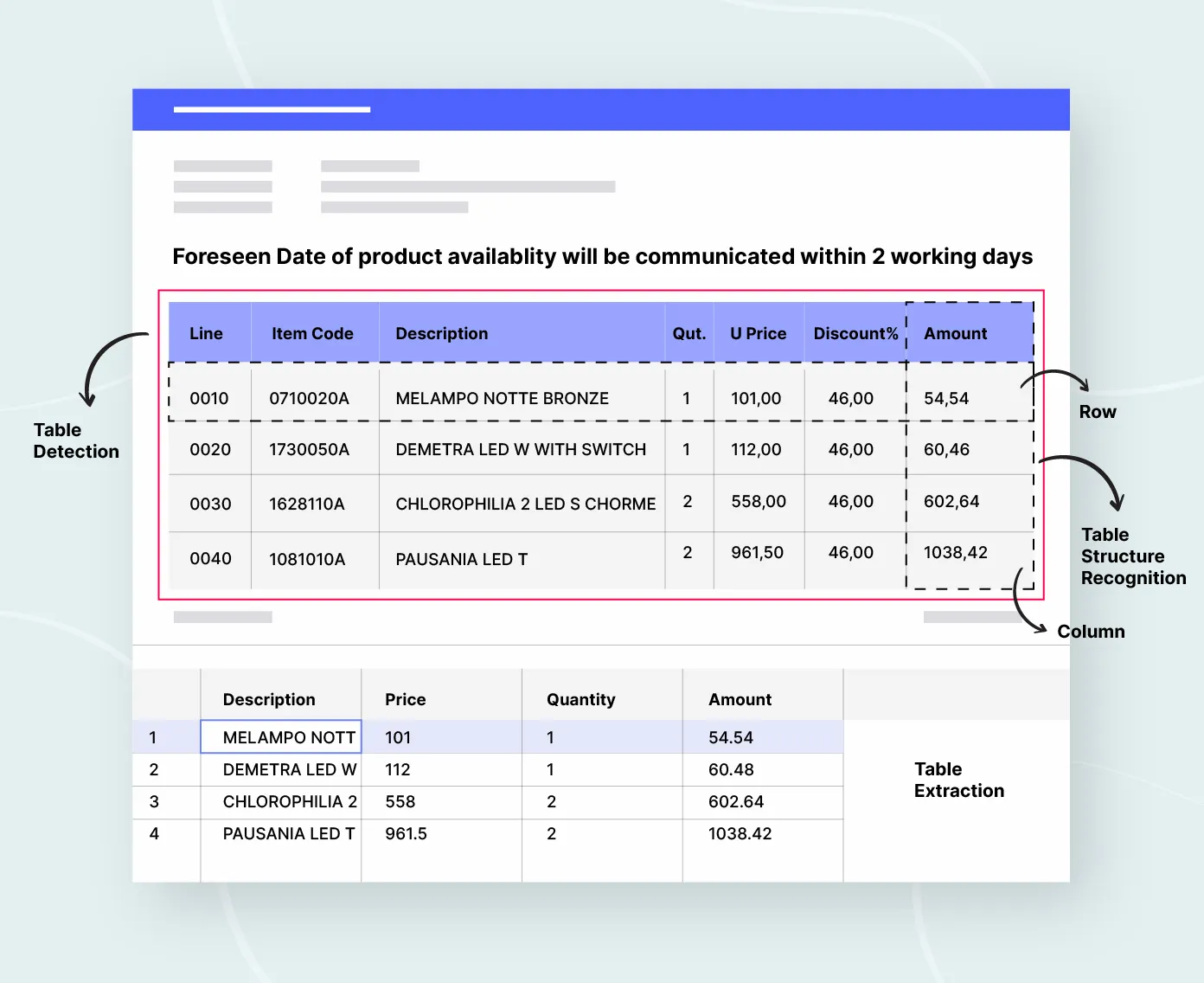
Table detection finds where each table sits on the page. Table structure recognition then finds the rows and cells inside it, including headers and merged cells. The type of file you start with changes how the process begins.
Native PDFs
Made by software, with a text layer, so tools read the characters and their positions directly.Scanned PDFs
A picture of a page with no text layer. OCR reads the characters first, and its errors carry into the table.Images and photos
Screenshots, phone photos and faxes. These are scans, plus skew, shadows and uneven light to correct.
How table extraction works#
Whatever the method, the pipeline is the same. Get the text, find the table, rebuild its grid, then clean and check the result.
- Native PDFs
- Scanned PDFs
- Images and photos
- 01OCR if needed
- 02Detect the table
- 03Recognize rows and columns
- 04Map headers and clean rows
- 05Validate
Tools differ most in the last two steps, cleaning and validation. Cleaning means removing subtotals and repeated headers, joining tables that continue across pages, and matching each column to a field in your system. Validation means checking that the numbers add up.
Why tables are hard to extract#
Five things break simple extractors.
Merged cells and nested headers
A header that covers several smaller columns, or a small table inside one cell, makes simple tools put values in the wrong column.Tables that span pages
Tools that read one page at a time don't link the rows on page 2 to the header on page 1.Borderless layouts
Spacing replaces ruling lines, so tight columns run together.Scan quality
Blur, skew, rotated pages and low resolution cause OCR misreads that every later step inherits.A different layout from every sender
One vendor's invoice has 5 columns, the next has 8, and templates break as senders multiply.
Table extraction techniques#
There are four main ways to extract tables. Each newer method was built to fix the limits of the one before.
Rules and templates
Ruling lines, spacing and header words such as Qty and Amount mark out the table; every new layout needs new rules.Machine learning
A program learns which parts of a page are tables. It uses signals an engineer chooses, such as lines, how closely text is packed and whether text lines up in columns.Deep learning
Networks learn the features themselves. CascadeTabNet (2020) finds tables and their cells in one model. Microsoft's Table Transformer learned from nearly one million tables taken from scientific articles.LLMs and vision-language models
They read a table in context and can infer a missing header, but cost more and can return values that aren't on the page.
| Criteria | Rule-based | Machine learning | Deep learning | LLM and vision |
|---|---|---|---|---|
| Training data | None | Labeled examples | Large labeled sets | None to start; examples help |
| New layouts | New rules each time | Moderate | Good, if trained on similar documents | Good |
| Main risk | Breaks on layout changes | Feature upkeep | Weak on unfamiliar document types | Values that aren't on the page |
| Cost to run | Very low | Low | Moderate | Highest |
In production they're often combined, with confidence scores and validation rules deciding which cells a person checks.
How to extract a table from a PDF#
For a one-off, Excel's Data > Get Data > From File > From PDF lists the tables in a PDF that has a text layer. In code, free Python libraries read that text layer well; scanned PDFs need OCR first, except where noted.
| Library | Best for | Scanned PDFs |
|---|---|---|
| Camelot | Ruled tables (lattice) and whitespace-separated tables (stream) in native PDFs | Only with its optional ML and OCR add-on |
| tabula-py | Simple, well-structured tables; a Python wrapper for tabula-java (needs Java) | No |
| pdfplumber | Detailed access to characters, lines and tables through find_tables and extract_tables | No; it has no OCR |
| PyMuPDF | Page.find_tables(), with line- and text-based strategies and export to pandas | Not on its own |
| img2table | Tables in images and PDFs, including borderless tables | Yes, with an OCR engine you choose |
With a library, you build the multi-page joining and header mapping yourself, and the validation and review too. For a worked pdfplumber example, see how to extract data from PDF.
How to extract a table from an image#
A photo or screenshot has no text layer, so OCR comes first. Pick the route that fits how often you do it.
- One table, nowExcel's Data > From Picture turns an image or a screenshot into cells and asks you to review them before inserting. That's where to catch misreads.
- A script you controlThe Python library img2table finds tables in images and PDFs, borderless ones included, with an OCR engine such as Tesseract, PaddleOCR or EasyOCR.
- Many images, every dayA document AI platform corrects skew, reads the table, scores each cell and sends the uncertain ones to a person.
Whatever the route, straighten the image, crop to the table and use the highest resolution you have.
How to validate extracted table data#
Extraction is half the job; validation is what makes the data safe to use.
- Rows add up to the totalLine items that sum to 10,050 against an extracted total of 10,500 send the record to review before it reaches the ERP.
- Balances reconcileOn a bank statement, the opening balance plus credits minus debits equals the closing balance.
- Documents agreeInvoice lines match the purchase order; rent roll totals match the operating statement.
- Every page is therePage counts and running totals confirm that a multi-page table isn't missing rows.
- Uncertain cells go to a personHigh-confidence rows go through; the rest go to review.
How to choose table extraction software#
What are you extracting?
Before you commit, test the tool on your own files.
- Use your worst filesMerged headers, borderless tables, tables across three or more pages, rotated pages and poor scans. Clean samples make every tool look good.
- Score cells, not documentsCount right values and missed cells. A tool can find every table and still drop rows.
- Score the structureA right value in the wrong column is still wrong. The TEDS score compares the extracted table's structure and content with the original.
- Count rows on long tablesExtra rows mean repeated headers were kept; missing rows mean a page wasn't joined.
- Count the fixesHow many cells a person had to correct is the number that matters in production. More in how to measure OCR accuracy.
What we'd do. Don't rely on the accuracy figure on any vendor's page, ours included. Run each tool on the same set of your own worst files. Then count how many cells a person had to fix. That count reflects your own layouts, scan quality and multi-page tables, which no published number can.
How Docsumo extracts tables#
Docsumo's Document AI extracts every line item and transaction row from documents such as invoices and bank statements, scans and handwritten text included. Tables that run across pages are joined into one table, with the headers mapped. Values the model is unsure about go to a reviewer, who can click each one to see its source line on the page. The rows reach your systems through the API and webhooks or an Excel export. It's built for business documents at volume, so for a single table from a research paper, a free library or Excel will do.
- 99%field-level accuracy across 250+ document types
- 95%+of documents processed straight through, without manual review
How many cells did your reviewers have to fix?#
Table extraction is detection plus structure recognition, with OCR first for scans and images. Free libraries handle native PDFs you control. At volume, confidence scores and validation rules, plus a reviewer for uncertain cells, make the output safe to post. Test on your messiest documents before you choose.
Book a demo with a few of your own documents, or start a free trial.
Frequently asked questions#
What is table extraction?
Table extraction finds the tables in a PDF, scan or image. It turns them into structured rows and columns for a spreadsheet, database or business system. OCR alone returns the characters. Table extraction also works out which row and column each value belongs to.
How do I extract a table from a PDF?
If the PDF has a text layer, Excel's Data > Get Data > From File > From PDF lists its tables. Python libraries such as Camelot and pdfplumber do the same in code. A scanned PDF needs OCR first. Many PDFs from many senders call for a document AI platform with an API and a review queue.
How do I extract a table from an image or a scanned PDF?
Run OCR first, because an image has no text layer. Excel's Data from Picture handles a one-off; in code, img2table pairs an OCR engine with table detection. Send low-confidence cells to review, because scan quality drives accuracy.
How do I extract tables that span multiple pages?
Use a tool that joins tables across pages. It spots the continuation, which may be the same columns, a repeated header or a row cut off at the page break. It carries the header forward and drops the repeated header rows. To test one, count the rows. Extra rows mean repeated headers were kept, and missing rows mean a page wasn't joined.
What is the best OCR for tables?
For business documents at volume, a document AI platform such as Docsumo (our product) adds checks and a review queue. For scans and photos you script yourself, cloud APIs such as Amazon Textract, Azure Document Intelligence and Google Document AI return tables as JSON. Native PDFs need no OCR at all. Camelot or pdfplumber reads the text layer.
What is a data extraction table?
In research, a data extraction table is the form a systematic review team fills in for each study it includes. It records the same details from every study, such as study design, participants, interventions and outcomes. It's a different thing from table extraction, which pulls tables out of documents.
Sources
- Prasad et al.: CascadeTabNet (arXiv, 2020)
- Smock et al., Microsoft Research: PubTables-1M and Table Transformer (arXiv, 2021)
- Zhong et al.: Image-based table recognition, PubTabNet and the TEDS metric (arXiv, 2019)
- Camelot: GitHub repository and README
- tabula-py: GitHub repository
- Tabula: GitHub repository (text-based PDFs only)
- pdfplumber: GitHub repository
- PyMuPDF documentation: Page.find_tables()
- img2table: GitHub repository
- Microsoft Support: Insert data from picture (Excel)
- Microsoft Support: Import data from data sources (Power Query), From PDF
- AWS: Amazon Textract features
- Microsoft: Azure Document Intelligence overview
- Google Cloud: Document AI overview
- UNC Libraries: Systematic reviews, step 7: extract data
First published . Last updated .