What is intelligent document processing (IDP)?
For operations, finance and IT teams that process documents in volume. See each step of IDP, the AI behind it and how to test a tool on your own files.

Key takeaways
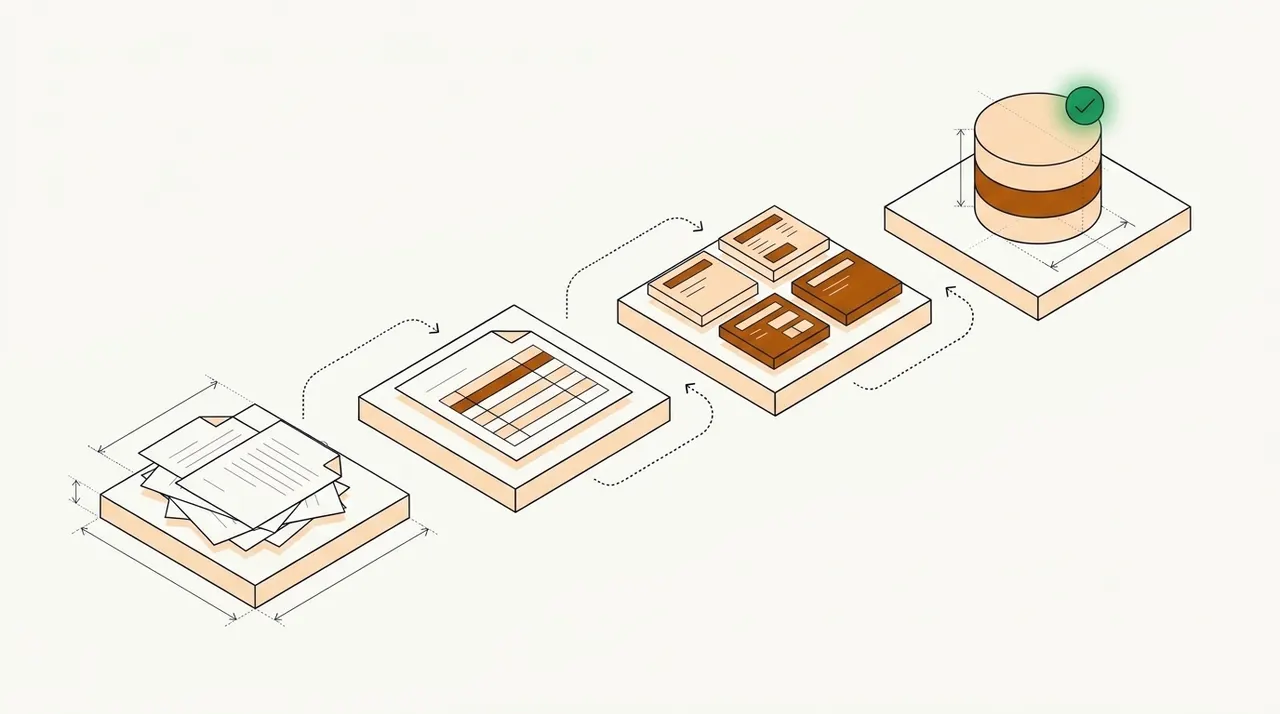
- Intelligent document processing (IDP) is software that reads business documents, sorts them, pulls out the data and checks it before it reaches your systems.
- Each document goes through six steps, intake, classification, extraction, validation, human review and export. OCR is only the first part of extraction.
- Inside IDP, machine learning, NLP and LLMs each do one job, and checks plus human review catch their mistakes.
- Unlike template OCR, IDP reads semi-structured and unstructured documents by label and meaning, so a new vendor's invoice doesn't need a new template.
- Judge a tool by field-level accuracy on your own documents and by how many documents get through with no one touching them.
On this page
- What is intelligent document processing?
- How intelligent document processing works, step by step
- IDP technology and AI: what each part does
- IDP for unstructured and semi-structured documents
- IDP vs OCR vs RPA
- Where IDP is used
- Benefits of intelligent document processing
- Limits of IDP, and how to handle them
- When IDP pays off
- How to evaluate an IDP tool
- Before your first IDP pilot
- Frequently asked questions
Intelligent document processing (IDP) is software that reads your documents and turns them into data you can use. It uses OCR, machine learning and large language models to sort each document, pull out the fields and check them. People then review only the values the software isn't sure about.
Below, we walk through each step, then cover the AI behind IDP and how to test a tool on your own files.
What is intelligent document processing?#
Document processing is the work of turning incoming documents into data a business can use. Someone reads each document, types the values into a system and checks them. Done by hand, it's data entry. IDP does the same work with software. It reads invoices, bank statements, tax forms, claim forms and contracts, along with most other business documents.
The "intelligent" part is AI. Older capture tools needed a fixed template for each layout, so every new vendor or bank meant a new template. IDP learns what each field looks like, so it can read a layout it hasn't seen before. That matters because the same kind of document rarely looks the same twice. Every bank formats its statements its own way, and every vendor designs its own invoice.
The result is structured data, not a searchable PDF. A processed invoice becomes a record with the vendor name, invoice number, dates, line items and total. Each value carries a confidence score and its place on the page. The record can then go to an ERP, a loan system or a spreadsheet.
How intelligent document processing works, step by step#
Most IDP systems run the same six-step workflow, whatever the document. Vendors name the steps differently, but the order holds.
- Email inboxes
- Upload portals
- Scanners
- Cloud storage and API
- 01Ingest
- 02Classify
- 03Extract
- 04Validate
- 05Review exceptions
Intake and pre-processing
Documents arrive in more than one way. Customers email them, upload them to a portal or send them through an API, and a mailroom scans the paper ones. IDP gathers them into one queue, so nothing sits unseen in a personal inbox.
Pre-processing then cleans up each page. The software straightens skewed scans, removes specks and turns sideways pages upright. Poor scans cause many bad reads, so this step matters more than it looks. More in image enhancement.
Classification and splitting
Next, IDP works out what each document is. A classifier gives it a label, such as invoice, bank statement or W-2, and a confidence score for that label. The label decides which fields to extract and which checks to run.
Many files hold more than one document. A loan packet can combine pay stubs, a W-2, bank statements and a driver's license in one PDF. Splitting finds where each document starts and ends, so each one is read with the right model.
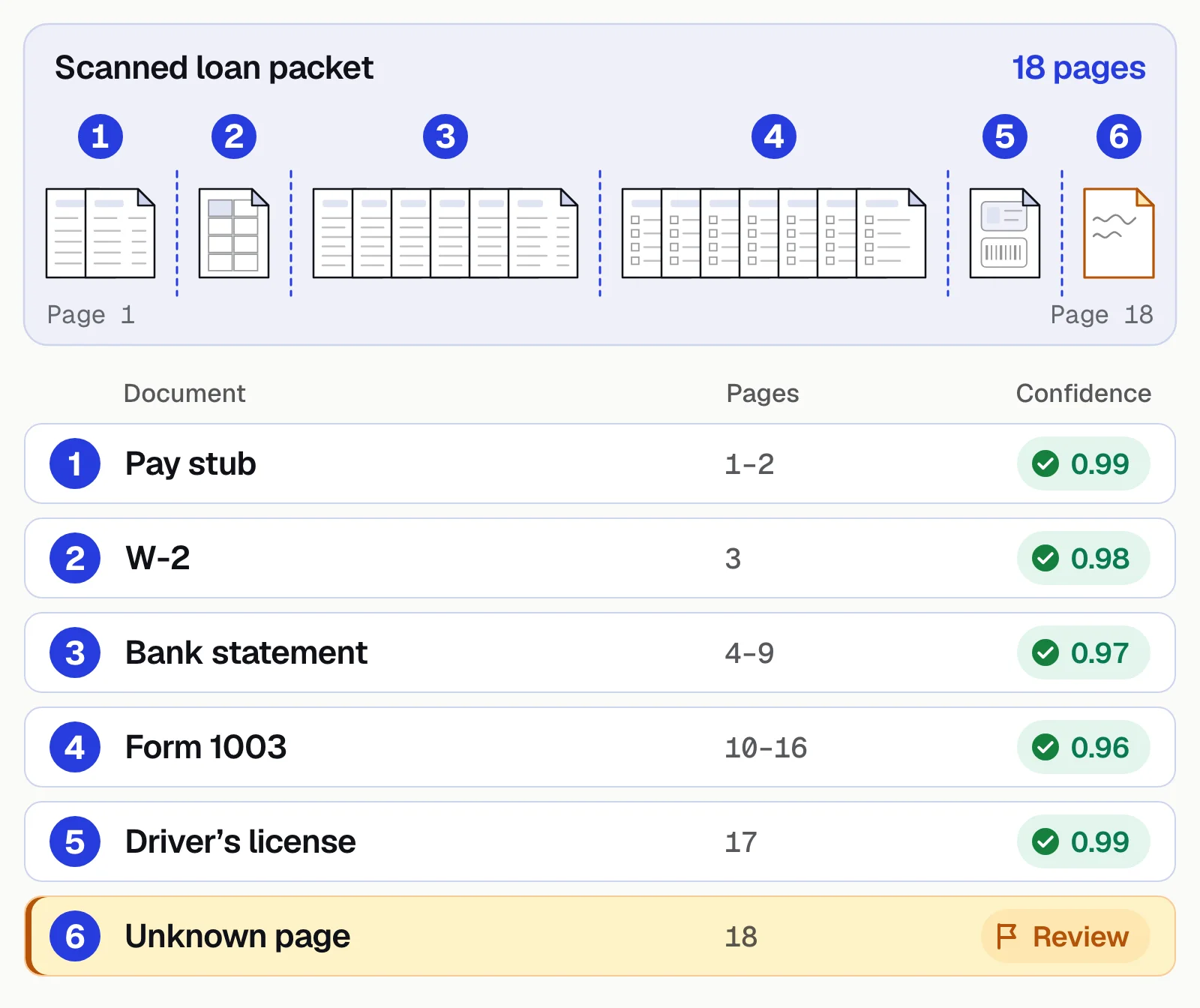
Older classifiers needed many labeled samples of each type. Classifiers built on language models can start from a list of type names. A page that fits no type should wait for a person rather than take the nearest label. More in document classification.
Extraction
Extraction pulls out the values you need. OCR first turns the page image into text. Layout and language models then work out which text is which field, such as the invoice number, the due date or the total. Tables keep their rows and columns, and a table that runs across pages should come out as one table.
Each value gets a confidence score, a number that says how sure the model is. Scores for each field matter more than one score for the whole document. A document can be almost all right and still have the wrong total.
Extraction also covers key-value pairs, checkboxes, signatures and handwriting. Handwriting varies the most, so test it on your own samples.
Validation and checks
A value can be misread, or read correctly and still be wrong. Validation catches both, with checks at four levels.
- Within a field. A date is a real date, and an account number has the right number of digits.
- Within a document. Line items add up to the subtotal, and subtotal plus tax equals the total.
- Across documents. Pay stub income matches the deposits on the bank statement, and an invoice matches its purchase order.
- Against your own data. A lookup confirms that a vendor or carrier is on your approved list.
A value that fails a check goes to review with the reason attached.
Human review of low-confidence fields
Some values will always be uncertain, such as a smudged digit or a handwritten PO number. IDP sends those to a person and lets the rest through. Each field has a confidence threshold. A value above it is accepted, and a value below it goes to the review queue.
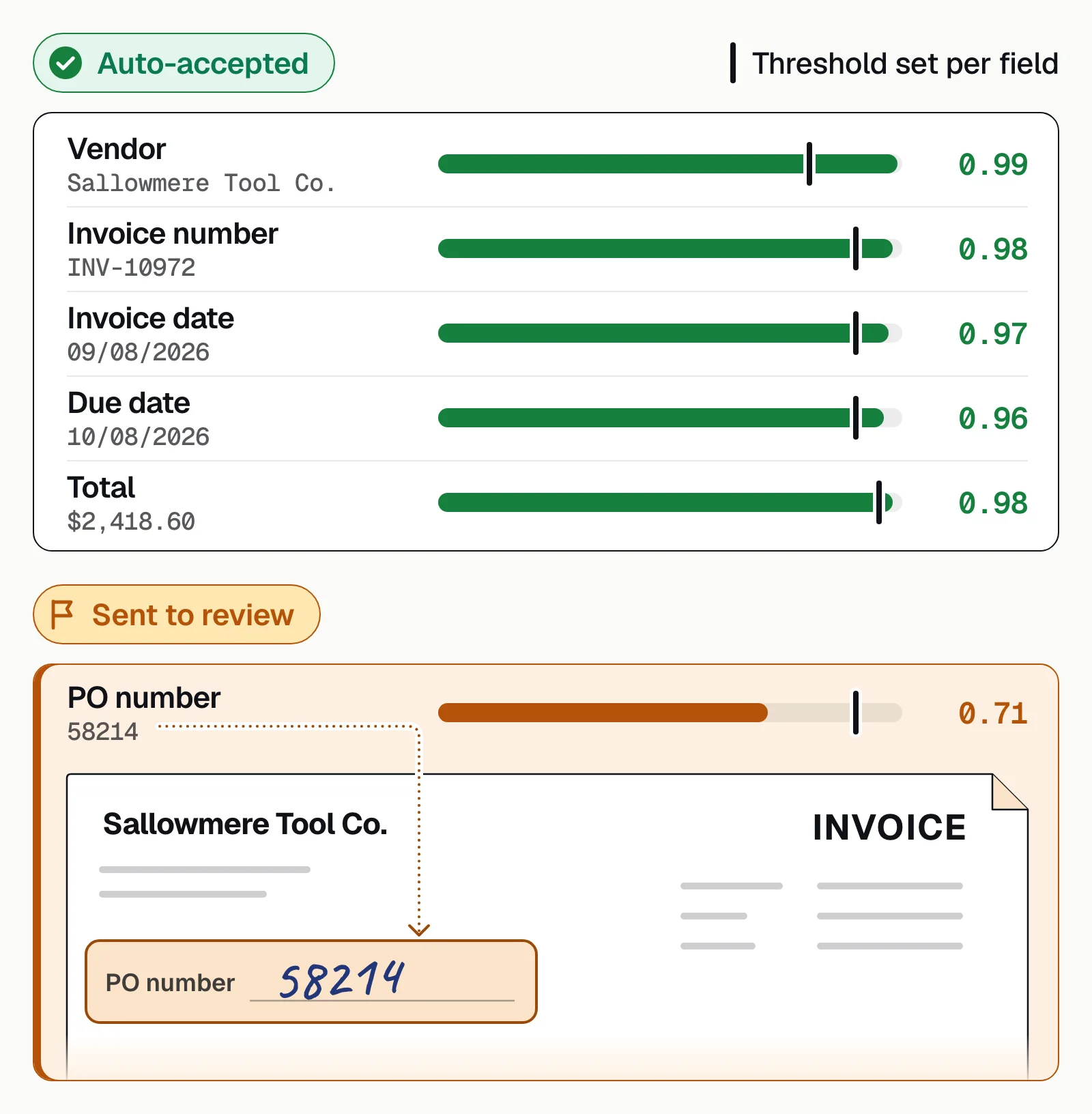
Thresholds are a trade-off. Set them too low and errors slip through. Set them too high and reviewers recheck values that were right. A good review screen shows each flagged value next to the spot on the page it came from. Each correction then goes back to the model. More in human-in-the-loop review.
Export and integration
The last step sends clean data to where it's used. Most IDP tools offer an API and webhooks, so a loan system, ERP or claims system gets each record as soon as it's approved. If the receiving system has no API, teams export to Excel or CSV, or use an RPA bot to key the data in.
Some workflows add a step before export, such as sorting bank transactions into categories or summarizing a medical record. Plan this step early. If clean data can't reach your system of record, the middle of the process is automated and both ends are still manual.
Many IDP tools also report how long each document took and how many fields needed review. Those numbers show which document types still take the most of your team's time.
Docsumo is an intelligent document processing (IDP) platform. It takes documents from intake to export in one place, and they come in by email, upload or the API. On the Business plan, it classifies and splits files, and you name the document types you want, with no training set. Low-confidence fields go to your own reviewers, and cross-document validation is on the Enterprise plan.
IDP technology and AI: what each part does#
No single model does the whole job in IDP. Each technology below handles one part, and rules check the result.
OCR and ICR
OCR turns an image of text into characters a computer can search and copy. ICR does the same for handwriting. Neither knows what the text means. OCR can read every digit on an invoice and still not know which number is the total.
Inside IDP, OCR is the first part of extraction, not the whole of it. It's also where a bad scan does the most damage, which is why the clean-up step comes first.
Computer vision and layout models
Computer vision looks at the page as an image. It finds tables, columns, checkboxes, stamps and signatures. Layout models combine that view with the text. So a number under the heading "Amount due" is read as the amount due, wherever it sits on the page.
Machine learning
Machine learning learns from examples instead of fixed rules. In IDP it does two jobs. It classifies documents, and it learns where fields usually sit and what they look like. When a reviewer corrects a value, that correction can become a new example, so results on your own documents improve over time.
Natural language processing
NLP reads text by meaning. It finds names, dates, amounts and places in running text, a task called named entity recognition. It also finds clauses in contracts, such as a notice period, and reads the free text in emails and letters. NLP is what lets IDP handle documents with no fixed fields.
Large language models
Large language models (LLMs) are the newest part of IDP. They can read a layout they've never seen and follow a plain-English instruction, such as "find the policy number". They can also summarize a long record. That cuts setup time for new document types, because you need fewer labeled samples, or none.
LLMs have a known weakness. They can give a confident answer that's wrong. Production systems pair them with confidence scores, rules and human review, so a wrong value is caught before it reaches your systems. More in LLMs in document processing.
Rules and workflow
Rules aren't AI, but they catch what the models miss. Math checks, format checks and lookups find errors a model can't see, such as a total that doesn't match its line items. Workflow software then routes each document, assigns reviews and keeps an audit trail.
IDP for unstructured and semi-structured documents#
Documents fall into three groups, by how fixed their layout is.
Structured
Fixed forms, such as IRS tax forms and ACORD certificates.Semi-structured
The same data in different layouts, such as invoices, bank statements and pay stubs.Unstructured
Free text, such as contracts and emails, where data is found by meaning.
Template OCR works on the first group. Most business volume is semi-structured, which is where template OCR breaks. Unstructured documents need a different approach again.
What changes with semi-structured documents
On a form, each field sits in the same box every time. On an invoice, the total might sit at the bottom right, in a summary table or after the words "Balance due". IDP finds it by its label and the text around it, not by its position. That's how one model reads invoices from vendors it has never seen.
Tables change too. One bank shows debits and credits in two columns, while another uses one column with minus signs. IDP maps each table to the same columns, so the output looks the same whatever the source. It also converts dates, amounts and names to one format. More in semi-structured data.
What changes with unstructured documents
Unstructured documents have no fields at all. A contract, an email or a medical record holds its data in sentences. Here IDP relies on NLP and LLMs to find the values you ask for, such as the parties, the renewal date or a diagnosis.
Answers can be spread over several pages, and the same fact can be worded many ways. Some answers also need judgment, such as whether a clause differs from your standard terms. So checks and review matter more than they do on a form. A good setup shows the reviewer the sentence each value came from.
Long documents add one more option. An LLM can summarize a long medical record or pick out the clauses in a contract. Treat a summary as a draft for a person to check. More in structured vs unstructured vs semi-structured data.
IDP vs OCR vs RPA#
OCR, RPA and IDP are often sold together, and the names get mixed up. Each does a different job.
| Aspect | OCR | RPA | IDP |
|---|---|---|---|
| What it does | Turns an image of text into characters | Repeats clicks and keystrokes in other software | Reads documents and returns checked data |
| Knows which value is which | No | No | Yes |
| New layouts | Needs a template for each layout | Breaks when a screen or file changes | Reads layouts it hasn't seen |
| Checks the data | No | Only the rules you script | Confidence scores, rules and review |
| Output | Searchable text | Data keyed into another system | Structured fields, sent by API |
OCR is one step inside IDP, not an alternative to it. RPA works alongside IDP. When a system has no API, a bot can key IDP's output into it. Template-based capture, the older form of automated document processing, needs a new template for every layout.
Two newer terms cover the same ground. Document AI usually means the AI models that read documents. Agentic document processing adds AI agents that act on the results, such as emailing a sender for a missing page. For a deeper comparison of all four, see IDP vs OCR.
Our take. Don't shortlist by label. Vendors that call themselves IDP, document AI or document intelligence sell the same kind of software. The name tells you little about how well a tool reads your documents. Run the same set of your own files through each tool and compare what comes back.
Where IDP is used#
IDP fits wherever a decision waits on documents. Here is what it reads and checks in six common settings.
Which team are you?
More in intelligent document processing examples.
Benefits of intelligent document processing#
Most of the gain comes from two places. People stop retyping documents, and fewer errors reach your systems.
Less data entry
People handle exceptions instead of retyping PDFs.Fewer errors
Validation catches transposed digits, wrong totals and mismatched names.Faster turnaround
Minutes, not days, when a loan, claim or payment is waiting.Scale without hiring
Month-end peaks are absorbed by software, not overtime.An audit trail
Every value links to its place on the page; every correction is logged.
Docsumo's published results:
- 99%field-level accuracy on 250+ document types
- 95%+of documents AI Approved, extracted and checked with no manual review
- <5 minper document, down from 2+ hours by hand
- 96.67%less processing time at ClearOne Advantage, across 170,000 documents in 9 months
Limits of IDP, and how to handle them#
IDP still makes mistakes, and most of them are predictable. Plan for these five.
Poor scans
Set confidence thresholds so bad reads go to review, not straight through.Document variety
Start with your highest-volume types and add more in phases.Format drift
Track accuracy by sender, so a layout change shows up in days.Mixed packets
If splitting misses a boundary, fields come from the wrong document. Test real combined uploads.Complex tables
Check that rows and columns survive merged cells and page breaks.
Some limits aren't technical. If you handle a few dozen documents a month, or one fixed form that never changes, plain OCR or manual entry may cost less. IDP also doesn't make decisions. It hands your team checked data and leaves the judgment calls to them.
Data security needs a check of its own, because documents carry personal and financial details. Ask where your files are stored, who can see them and whether they're used to train shared models. More in IDP challenges and how to solve them.
When IDP pays off#
- Volume outgrows the teamBacklogs build and customers wait.
- Errors are expensiveA keying mistake in a loan file, claim or payment means rework or a compliance finding.
- Speed wins businessFaster approvals or payments give you an edge.
- Skilled people key dataUnderwriters, analysts and AP specialists type instead of deciding.
Try it with your own numbers.
Hours and budget automation frees up
What automating document data entry saves your team, and the most the software can cost before it stops paying for itself.
- Hours per month today
- Hours per month with automation
- Labor saved per month: your break-even software budget
- Labor saved per year
How it's worked out
- Hours today are documents times minutes by hand. With automation, only the documents that don't go straight through take a person's time, at the review minutes you set.
- Labor saved is the hours saved times the hourly cost. Software that costs less than that a month pays for itself on labor alone.
- It leaves out setup time and the value of faster turnaround.
Analysts put the IDP market at $3.22 billion to $10.41 billion in 2025, growing roughly 27% to 34% a year. Precedence Research gives the low figure and Fortune Business Insights the high one. More in IDP statistics.
How to evaluate an IDP tool#
A demo runs on clean samples, and your documents won't be that clean. Test each tool the way your team will use it.
- Test on your own documentsRun 50 to 200 real files, bad scans and mixed packets included, and measure field-level accuracy. At 10,000 documents a month, the gap between 95% and 99% correct is about 400 more documents to fix.
- Check confidence thresholdsSet per field, with values below them sent to review.
- Check validationRules, master-data lookups and cross-document checks.
- Look at the review screenA flagged field should open on its source line.
- Confirm integrations and securityAPI and webhooks, SOC 2 Type 2, role-based access and audit logs. See Docsumo's integrations and security.
- Compare total costPrice at your real volume, plus the review time left over. See Docsumo's pricing.
If a tool relies on LLMs, ask two more questions. How does it show where each value came from? And what happens when the model isn't sure?
Judge the result by the straight-through processing rate, the share of documents no person touches. To compare vendors, see IDP software compared.
Before your first IDP pilot#
IDP turns documents into checked data and leaves your team only the values that need a second look. For a first pilot, pick one document type that holds up a decision and arrives in volume. Examples are bank statements in lending or invoices in AP. Name the person who will review the exceptions, and agree before you start how you'll count success.
Book a demo with a few of your own documents, or start a free trial.
Frequently asked questions#
What is the difference between IDP and OCR?
OCR turns an image of text into machine-readable characters. IDP uses OCR as one step, then classifies the document, finds the fields you need, validates them and sends them to your systems. See IDP vs OCR for a side-by-side comparison.
Does intelligent document processing use AI?
Yes. Machine learning classifies documents and finds fields, NLP reads text by meaning, and large language models read layouts the system hasn't seen before. OCR reads the characters first, and rules and human review catch what the models get wrong.
Is IDP the same as RPA?
No. RPA repeats clicks and keystrokes in other software, but it can't read a document. IDP reads the document and returns checked data, and an RPA bot can then key that data into a system that has no API.
What documents can IDP process?
Most business documents, including invoices, bank statements, pay stubs, tax forms, insurance forms, contracts and IDs. Docsumo's IDP platform covers 250+ document types. Because LLMs structure the OCR output, it handles other document types too, and reviewer corrections improve the model over time.
Is IDP the same as intelligent document automation or document process automation?
Mostly. Vendors use all three terms for software that reads incoming documents and moves the data on. Document automation on its own often means making new documents, such as contracts, from templates. That's a different job.
How long does it take to implement IDP?
It depends on how many document types you have and which systems the data goes to. A common document type can go live first, while custom checks and integrations need testing on real samples. You can try Docsumo free for 14 days on up to 1,000 pages.
Sources
- AWS: What is intelligent document processing?
- Microsoft Learn: What is Azure Document Intelligence in Foundry Tools?
- Precedence Research: Intelligent document processing market size (updated Jul 2026)
- Fortune Business Insights: Intelligent document processing market (updated Sep 2026)
First published . Last updated .