What is image enhancement? Meaning, techniques and its role in OCR
For teams whose scans and phone photos feed OCR: what image enhancement means, which fixes help text recognition, and when enhancement makes extraction worse.

Key takeaways
- Image enhancement is adjusting a digital image so the result is better for viewing or analysis: brightening it, raising contrast, sharpening edges, removing noise or correcting distortion.
- For OCR, the goal is text a machine can read, not a nicer picture. The core operations are contrast adjustment, binarization, deskewing, noise and border removal, sharpening and dewarping.
- Scan quality sets the ceiling: Tesseract's documentation says it works best on images of at least 300 DPI, and that a skewed page badly hurts how well it finds lines of text.
- Enhancement can make results worse: oversharpening adds halos, binarization can erase table lines, denoising can delete decimal points and AI upscalers can invent characters.
- Fix only what a quality check finds, re-check the page afterward, and send pages that still fail to recapture or review.
On this page
Image enhancement is the process of adjusting a digital image so it's better for viewing or analysis: brightening it, raising contrast, sharpening edges, removing noise or correcting distortion. To enhance a photo means the same thing in everyday use. In document processing the goal is narrower: make the text on a scan or phone photo readable to OCR, not make the page look better to a person.
This guide covers the main techniques, the image defects that cause OCR errors, how automated enhancement works in a document pipeline, and when it makes things worse.
What image enhancement means#
Photo editors enhance for people: vivid color, smooth skin, dramatic light. Document enhancement works for machines. It separates ink from paper, straightens lines and removes marks that OCR might read as characters. The core operations:
Contrast and brightness
Widens the gap between ink and paper, for example with histogram equalization, so faded print and underexposed photos come back into a readable range.Binarization
Converts the page to black and white. One threshold for the whole page fails when the lighting is uneven; adaptive methods set it region by region.Deskewing
Rotates a tilted scan so the text lines run level.Noise and border removal
Clears speckle, fax artifacts and the dark edges a scanner leaves, which OCR can read as extra characters.Sharpening
Makes blurry character edges crisper, classically with an unsharp mask. Too much adds halos around letters.Dewarping
Flattens pages photographed at an angle or curving toward a book's spine.
Why image quality decides OCR accuracy#
OCR matches the shapes of characters, so anything that distorts the shapes causes errors. Tesseract's documentation lists what helps: images of at least 300 DPI, level pages (skew badly hurts how it finds lines of text) and no dark scanner borders, which it can pick up as extra characters. It also binarizes every page internally, and notes that the result can be poor when the background is unevenly dark.
The catch is that OCR doesn't always flag its own mistakes. A misread 8 or 0 can come back looking like ordinary text, so the defect has to be caught before OCR, or by checks after it.
Common image defects in invoice and form processing#
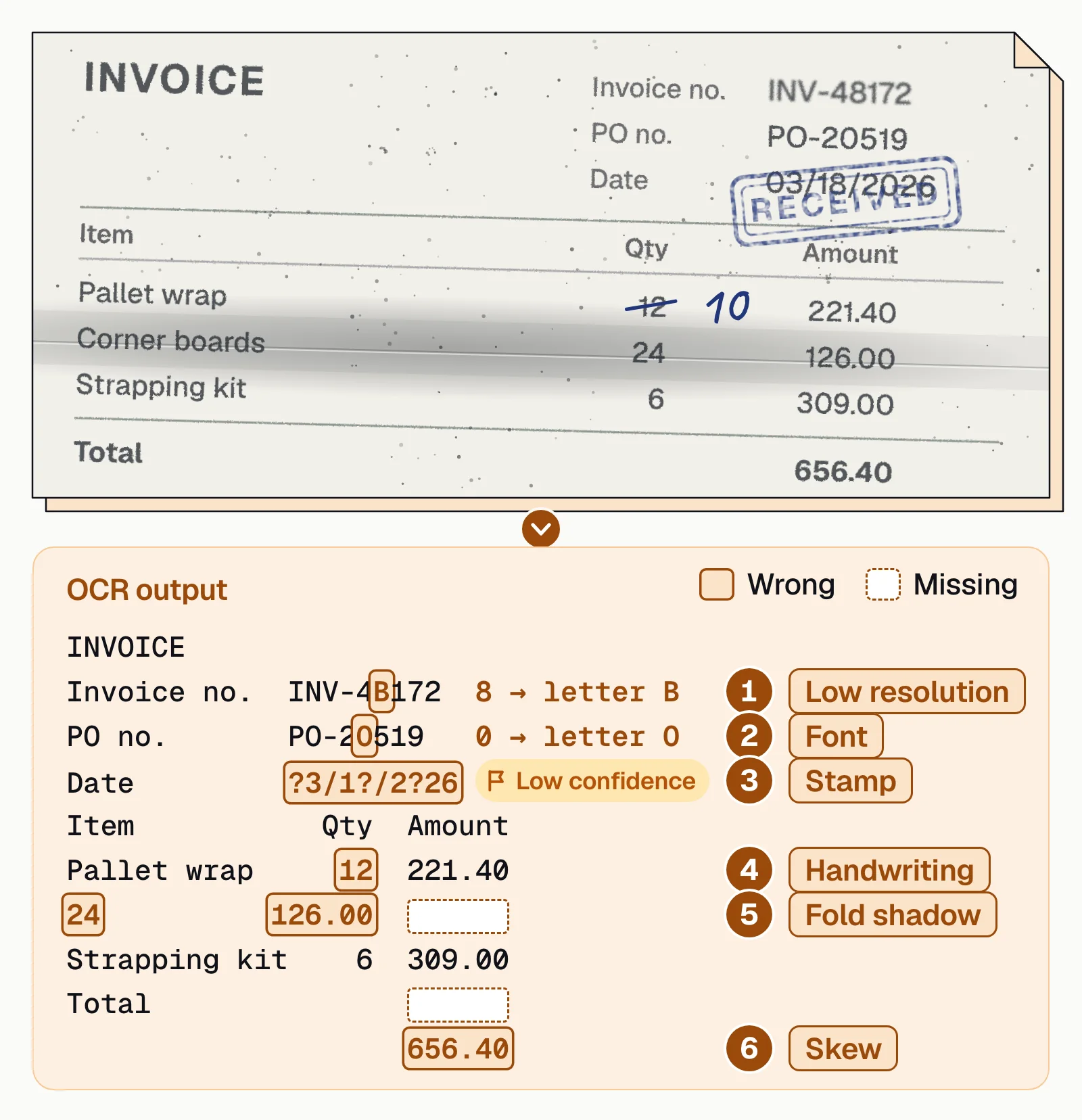
Here's a degraded invoice and what OCR made of it. Four of the six errors come from defects enhancement can target: low resolution, a stamp, a fold shadow and skew. The other two, a look-alike font and a handwritten correction, need better recognition or a person to check them.
Each capture channel fails in its own way:
| Source | Typical defects | What helps |
|---|---|---|
| Flatbed and feeder scanners | Dust, roller marks, uneven light, dark borders | Noise and border removal, brightness correction |
| Phone photos | Tilt and perspective, shadows, glare, motion blur | Dewarping and shadow correction; recapture if glare hides text |
| Faxes and compressed PDFs | Low resolution, speckle, compression blocks | Despeckling, or a rescan at 300 DPI |
| Forms with handwriting | Faint pen or pencil next to printed text | Separate settings for print and handwriting, or review |
How automated enhancement works in document pipelines#
Good pipelines don't run every page through the same fixes. They check each image first and fix only what's wrong.
- Assess qualityMeasure blur, skew, contrast and resolution on each page. Google's Enterprise Document OCR, for example, scores image quality from 0 to 1 and names the defects on low-scoring pages, such as blurry, noisy, dark, faint or glare.
- Fix selectivelyApply only the fixes the defects call for: deskew a tilted scan, even out a shadowed photo, and leave a clean scan alone.
- Re-checkScore the page again after the fix, and keep the enhanced version only if it scores better.
- Route what still failsAsk for a new photo or scan while the sender is still at hand, or send the page to a person to review.
When enhancement fails or makes things worse#
Enhancement can hurt accuracy as easily as help it. Check for these before you turn a fix on for every page:
- Oversharpening halosHeavy sharpening draws light outlines around dark text, which OCR can read as extra strokes or broken letters.
- Binarization erasing table linesPure black and white can wipe out faint gray rules between cells, and extraction loses the structure it uses to match values to column headers.
- Denoising eating decimalsPeriods, commas and decimal points look like specks, so aggressive noise removal can turn $1,234.56 into 1234 56.
- Upscalers inventing charactersAI upscalers trained on photos can draw sharp, plausible characters that weren't on the page. The output looks better and is wrong.
- One setting for every pageSettings that rescue faint handwriting can wash out light printed text, and the reverse. Tune by document type and capture channel.
How to tell whether enhancement helped#
Judge enhancement by what gets extracted, not by how the image looks. Run the same documents with and without it, separately for each capture channel, and compare field-level accuracy, the share of documents that pass your checks without review, and the time it adds per page. OCR accuracy explains how to measure it, and OCR limitations covers the errors enhancement can't fix.
The bottom line#
Image enhancement makes scans and photos easier for OCR to read, but only when it fixes a real defect. Check each page, fix what's wrong, check again, and send what still fails to recapture or review.
Docsumo reads printed and handwritten text on invoices, bank statements and any other document type, and reports 99% field-level accuracy on 250+ document types. Fields the model is unsure about, which is where poor scans show up, go to a reviewer: clicking a field highlights its source line on the page, and reviewers' corrections improve the model. Human-in-the-loop review explains how that review step works.
Book a demo with a few of your worst scans, or start a free trial.
Frequently asked questions#
What is image enhancement?
Image enhancement is the process of adjusting a digital image so the result is better for display or further analysis, for example by removing noise, sharpening or brightening it. In document processing, it prepares scans and photos so OCR can read the text.
What does it mean to enhance a photo?
To enhance a photo is to improve how it looks or how clearly it shows detail: adjusting brightness and contrast, sharpening, removing noise or grain, correcting color or enlarging it. AI photo enhancers do this automatically, but on documents, detail they add when enlarging can be invented rather than recovered.
What are the main image enhancement techniques?
Common techniques are contrast adjustment and histogram equalization, sharpening such as unsharp masking, noise reduction such as median filtering, and morphological operations that thicken or thin shapes. For documents, add binarization, deskewing, border removal and dewarping.
Does image enhancement improve OCR accuracy?
Often, when it fixes a real defect, such as a skewed page, uneven lighting or dark scan borders. It can also hurt, by erasing faint table lines or decimal points, so compare field accuracy on your own documents with and without it. See OCR accuracy.
Can enhancement recover text from a badly damaged document?
No. Enhancement can't recover information the image doesn't contain. If text is covered by a stain, torn away or washed out by glare, no algorithm can rebuild it; rescan or recapture the page instead.
Sources
- MathWorks: Image enhancement
- Tesseract documentation: Improving the quality of the output
- Google Cloud: Enterprise Document OCR (image quality scores)
First published . Last updated .