What is agentic document processing? How AI agents automate document workflows
For operations and automation leads weighing AI agents for document-heavy work: what agentic document processing is, how it differs from traditional IDP and RPA, and how to test a platform on your own files.

Key takeaways
- Agentic document processing is document automation run by AI agents: they classify, extract, cross-check and route documents without a template for each layout, and send only the fields they're unsure about to a person.
- What sets it apart from traditional IDP is checking documents against each other, such as a pay stub against the W-2 in the same loan file, instead of reading each one on its own.
- Every field carries its own confidence score, and the thresholds you set decide what goes straight through and what a person reviews.
- Analysts describe a crowded market: Gartner says it has more than 100 vendors, and Forrester says generative and agentic AI is making them harder to tell apart. Test platforms on your own documents, not on demos.
- LoanLogics' own data puts the error rate in US mortgage loan file content at 11.4% for 2024, counting both wrong or missing information and wrong or missing documents.
On this page
- What a document processing AI agent does
- Agentic document processing vs traditional IDP and RPA
- How an agentic document workflow runs
- What Gartner, Forrester and IDC say
- Where agentic document automation is used
- How to evaluate an agentic document processing platform
- The bottom line
- Frequently asked questions
Agentic document processing is document automation run by AI agents. The agents classify each document, extract its data, check it against the other documents in the case and route the result, without a template for each layout, and anything they're unsure about goes to a person. Your team reviews exceptions instead of keying every page.
This guide covers how it differs from traditional IDP and RPA, how it works, what analysts say about the market, and how to test a platform on your own documents.
What a document processing AI agent does
Traditional intelligent document processing (IDP) extracts the fields it was set up to find, one document at a time, using a template or a model trained for each document type. An agentic system works out what each document is, decides which checks apply and acts on the result. The same idea goes by agentic document automation and agentic document workflows.
In practice, the agents do five jobs:
Classify
Works out what each page is and splits a mixed upload into separate documents, such as a pay stub, a W-2 and a bank statement.Extract
Pulls out the fields and tables that matter, with a confidence score for every field.Cross-check
Compares values across the documents in a case: the borrower's name and income on the pay stub against the W-2, or an invoice total against its purchase order, within tolerances you set.Act
Posts clean data to the next system, then moves the case to its next step, holds it or asks for a missing document.Hand off
Sends uncertain fields and failed checks to a person, with the source on the page highlighted.
Agentic document processing vs traditional IDP and RPA
The table sets the two side by side. Robotic process automation (RPA) belongs in the picture too: its bots move data between systems by following fixed steps, and reading a document takes a separate document module.
| What changes | Traditional IDP | Agentic document processing |
|---|---|---|
| New document types | A template or trained model for each type | Read without a template |
| Layout changes | Templates break until someone fixes them | Usually handled; a drop in confidence flags the change |
| Documents in a case | Read one at a time | Checked against each other |
| Exceptions | A document that doesn't fit its template goes to a person whole | Only uncertain fields and failed checks go to a person |
| Learning | Retraining is a project | Reviewer corrections feed back into the model |
| Where RPA fits | Bots key the extracted data into other systems | Bots or an API post the checked result |
How an agentic document workflow runs
Documents arrive by email, upload or API, often several to a file. The agents run the same stages on every file, and the checked data goes to the system where the decision is made.
- Upload portal
- Scans
- API
- 01Split and classify
- 02Extract with confidence
- 03Check across documents
- 04Route the case
Take a borrower who uploads one scanned PDF with everything in it. The agents cut it into separate documents and score each one, then compare income, names and dates across them before the file moves on.
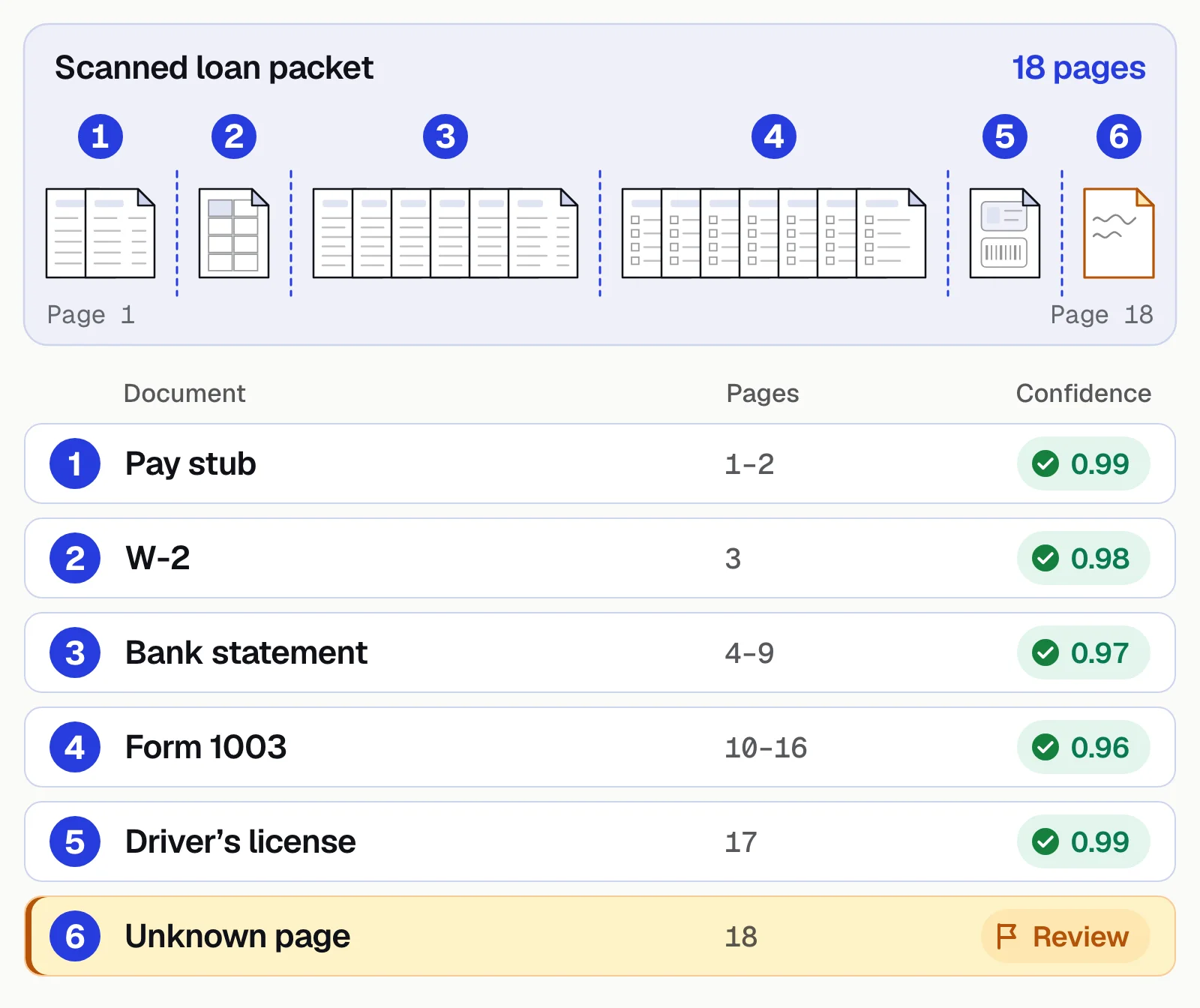
Confidence thresholds decide how much reaches a person. Set them per field: strict for amounts and account numbers, looser for a vendor's name. Start conservative, measure how often straight-through results turn out wrong, then adjust. Some teams run the agents in shadow mode first, with people still checking everything. For the extraction step in more depth, see agentic document extraction.
What Gartner, Forrester and IDC say
Each analyst firm frames the market a little differently:
Gartner
Its Magic Quadrant for Intelligent Document Processing Solutions (September 2025) says the market has more than 100 vendors, including ones from adjacent markets, offering full solutions or single components.Forrester
In its 2025 look at the IDP market, Forrester says generative and agentic AI is becoming "an equalizer that challenges vendors' ability to differentiate," makes it harder for buyers to choose and has reopened build versus buy.IDC
The IDC MarketScape for IDP software (December 2025) says the challenge has moved from reading unstructured documents to getting insight from documents of any structure and building full automation workflows, with "the agentic future rapidly approaching."
With that many vendors making similar claims, a demo proves little. The differences show up on your own documents.
Where agentic document automation is used
It pays off where a decision depends on many documents agreeing with each other.
Lending
Agents check that income and the borrower's name agree across pay stubs, W-2s, bank statements and tax returns. LoanLogics' own data puts the error rate in US mortgage loan file content at 11.4% for 2024. See document processing for lending.Accounts payable
Agents match invoice lines to the purchase order and receipt and hold the invoices that don't agree. Docsumo does this 2-way and 3-way matching on the Enterprise plan. See accounts payable automation.Insurance
Certificates of insurance are checked against a contract's required limits, dates and additional insured wording. Vertikal RMS verifies certificates with Docsumo's ACORD capture. See COI tracking.
How to evaluate an agentic document processing platform
Bring 10 to 15 of your own document types to every trial, including a mixed packet and a few poor scans, and run these checks:
- Documents it hasn't seenInclude odd layouts and a mixed PDF, and watch the splits. A common error attaches the last page of one document to the next one.
- Checks across documentsPlant a pay stub that disagrees with the W-2. Agents can reason their way to a plausible but wrong value, and comparing it with another document is a direct way to catch that.
- Field-level confidenceEvery field should carry its own score, with thresholds you set. A sudden drop on one document type is often the first sign that a layout changed.
- The feedback loopReviewer corrections should improve the model. Ask how fast, and how you'd see it.
- Integration and missing dataAsk what happens when documents arrive out of order, your system rejects a record, or the purchase order to match against hasn't synced yet: a retry, a hold or a person, never a silent failure.
- Audit exportEvery decision should be logged and exportable for auditors: the document version, each extracted value and its confidence, the rules applied, reviewer edits and the final action.
Docsumo is an intelligent document processing (IDP) platform. It splits and classifies packets and keeps an audit log on the Business plan, reads handwritten as well as printed text, checks documents against each other and groups them into cases on the Enterprise plan, and sends low-confidence fields to your own reviewers before posting results through its API and webhooks. It runs in the cloud only, and it supplies the software, not a managed review team. To compare vendors, see the best intelligent document processing software.
- 95%+of documents processed straight through, without manual review
- 99%field-level accuracy across 250+ document types
- <5 minper document, down from 2+ hours
The bottom line
Agentic document processing is IDP that does more than read: agents read documents without templates, compare them across a case and route the result, and people handle only the exceptions. Judge a platform on your worst files, on its checks across documents and on what its audit log records, not on a demo.
Book a demo with a few of your own document packets, or start a free trial.
Frequently asked questions
What is agentic document processing?
Agentic document processing is document automation run by AI agents. They classify, extract, cross-check and route documents without a template for each layout, and send the fields they're unsure about to a person.
What is the difference between agentic document processing and IDP?
Agentic document processing is a newer form of intelligent document processing (IDP). Traditional IDP needs a template or a trained model for each document type and reads each document on its own; an agentic system reads new layouts without a template, checks documents against each other and decides where each case goes next.
What are agentic document workflows?
Agentic document workflows are document processes that AI agents run from intake to routing: splitting, extraction, checks across documents and the decision on where each case goes, with people handling only the exceptions. Agentic document automation usually means the same thing.
How do agentic systems adapt to changing document types and process rules?
They read new layouts without a template, and every field carries a confidence score, so a sudden drop on one document type shows that a layout has changed. Reviewer corrections feed back into the model, and business rules such as tolerances and required documents are usually set as configuration, so they can change without retraining.
What should banks look for in an agentic document processing platform?
Field-level confidence with thresholds you set, checks across the documents in a loan file, an audit log that records every value and reviewer edit, and security certifications such as SOC 2 Type 2. Docsumo is SOC 2 Type 2, HIPAA and GDPR compliant and ISO/IEC 27001:2022 certified, runs in the cloud only and leaves review with your own staff.
Does agentic document processing replace human reviewers?
No. Reviewers stop keying every document and handle only the fields the agents are unsure about and the checks that fail, and their corrections improve the model. Docsumo supplies the software; your own team does the review.
Sources
- Gartner: Magic Quadrant for Intelligent Document Processing Solutions (abstract, published September 3, 2025)
- Forrester: AI changes the intelligent document processing market (Boris Evelson, November 20, 2025)
- IDC: MarketScape: Worldwide Intelligent Document Processing Software 2025-2026 Vendor Assessment (abstract, December 2025)
- LoanLogics: loan file error rates for 2014, 2019 and 2024; combined rate 11.4% in 2024 (press release, July 29, 2025)
First published . Last updated .