What is layout detection? How document layout analysis works
For teams extracting data from invoices, claims and forms: what a document layout is, how layout detection finds and orders each region on a page, and what to test before you rely on it.

Key takeaways
- Layout detection, also called document layout analysis, finds where each kind of content sits on a page, such as text blocks, headings, tables, pictures and page headers, and labels each region.
- It's object detection applied to pages: a model draws a labeled box around each region. The DocLayNet dataset, for example, labels 11 kinds of region across 80,863 pages.
- It runs in four steps: find the regions, label them, set the reading order and rebuild the structure as tables and key-value pairs.
- OCR reads the characters; layout detection tells extraction which text is a heading, a table cell or a total. That's what keeps extraction accurate when every vendor's invoice looks different.
- Models trained on one kind of document lose accuracy on others, so test layout detection on your own documents.
On this page
Layout detection, also called document layout analysis, is the step in document processing that finds where each kind of content sits on a page, such as text blocks, headings, tables, pictures, signatures and page headers, labels each region and works out the order to read them in. It's object detection applied to documents, and it tells OCR and extraction which text is a table cell, a heading or a total. That's what keeps extraction accurate when invoices, claims and forms don't share a template.
This guide covers what a document layout is, how layout detection works step by step, where it matters most and how to evaluate it.
What is a document layout?
A document layout is the arrangement of content on a page: where the header, body text, tables, images, signatures and page numbers sit, and the order a person reads them in. Layout is also how people and software tell documents apart. An invoice, an ACORD form and a bank statement each have a shape you recognize before you read a word.
Layout detection is object detection for pages. Object detection is a computer vision technique for locating the objects in an image, usually by drawing a labeled box around each one, such as a car or a person. Layout detection draws those boxes around the regions of a page instead. The DocLayNet dataset, for example, labels 11 kinds of region across 80,863 pages of financial reports, manuals, patents and other documents: Caption, Footnote, Formula, List-item, Page-footer, Page-header, Picture, Section-header, Table, Text and Title.
How layout detection works
Here's one invoice at each stage: the plain text OCR returns, the regions layout detection finds, and the fields extraction pulls from them.
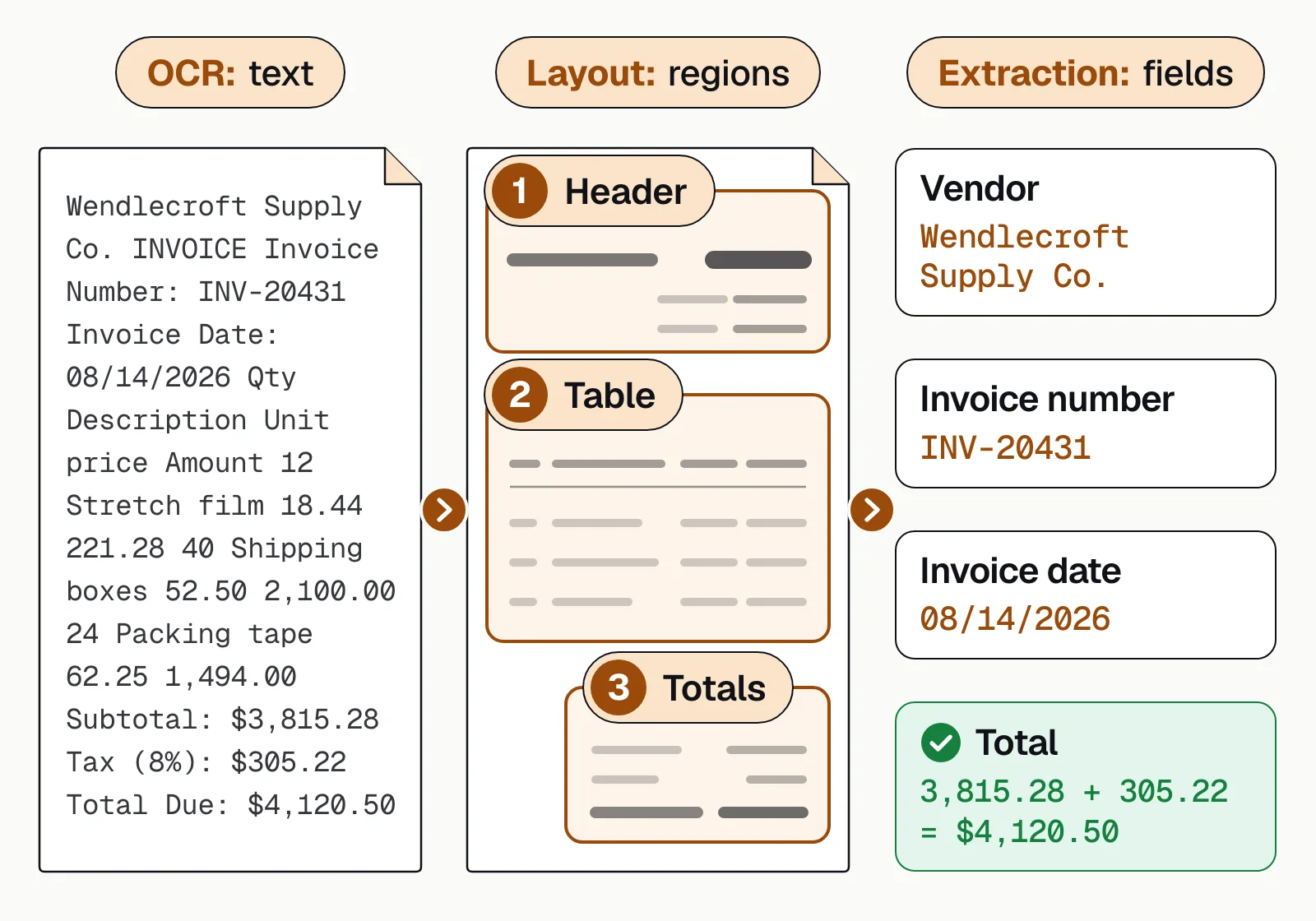
OCR returns the characters, layout analysis finds the header, table and totals in reading order, and extraction names each value and checks that line items plus tax equal the total.
- Find the regionsA model scans the page image and draws a box around each block of content: the header, paragraphs, tables, images, signature lines. This is sometimes called zoning.
- Label each regionEach box gets a type, such as text, title, table, picture, checkbox or signature. Each type is handled differently: a table needs its rows and columns kept, and a checkbox is yes or no.
- Set the reading orderThe regions are put in the order a person would read them. Multi-column pages, sidebars and totals boxes are where a plain top-to-bottom, left-to-right order goes wrong.
- Rebuild the structureRegions, labels and order become structured output: tables with rows and columns, key-value pairs such as "Invoice number: INV-20431", and sections, so extraction knows which value belongs to which field.
Many layout models are object detectors trained on labeled pages. A 2025 study in Scientific Reports used YOLO detectors to find the titles, paragraphs, tables and images on printed pages before reading each region with OCR. PaddlePaddle's PP-DocLayout models recognize 23 types of region, and the largest takes 13.4 milliseconds per page on an NVIDIA T4 GPU.
Layout detection vs OCR
OCR and layout detection answer different questions. OCR asks which characters are on the page. Layout detection asks where each piece of content is and what kind it is. Without layout, OCR returns one stream of text, which is why it struggles with forms, tables and values that run across lines or pages. Layout detection is one step of AI document understanding, which reads the text and layout of a page together.
OCR alone
- One stream of text per page
- Table rows and columns flattened into loose lines
- Two-column pages can be read straight across both columns
- The invoice number looks like any other number in the header
OCR with layout detection
- Text grouped by region: header, table, totals
- Tables kept as rows and columns
- Each column read in order
- Values tied to their labels, ready for extraction
Its pixel-level cousin is image segmentation, which labels every pixel instead of drawing boxes. Layout detection is also the step before table extraction and key-value pair extraction.
Layout detection use cases
Layout detection matters most where the same kind of document arrives in many designs:
Accounts payable invoices
Every vendor puts the invoice number, totals and line items somewhere different. Layout detection can find the header, line-item table and totals on a layout it hasn't seen before, so accounts payable teams don't need a template per vendor.Insurance claim forms
Multi-page forms mix checkboxes, printed fields and handwriting, and form versions change. Layout detection separates each kind of region so each is read the right way. See insurance document processing.Healthcare intake forms
Printed questions, handwritten answers, checkboxes and signature lines share one page. Knowing which region is which lets a system flag a missing signature or an unanswered question.
How to evaluate layout detection
Run a pilot on your own documents before you trust any benchmark. DocLayNet's authors found that models trained only on scientific articles lost accuracy significantly on more varied layouts, and your documents may look like nothing in a public dataset.
- Accuracy on your own documentsTest your real invoices, claims or forms, including the messy ones, and count fields that land in the right place.
- New layouts without new templatesAsk what happens when a vendor redesigns its invoice. If the answer is a new template or retraining, you'll be maintaining templates for good.
- Complex layoutsTest tables that run across pages, multi-column pages, tables inside tables, and handwriting next to print.
- Reading order in other languagesRight-to-left scripts and vertical Japanese text change the order. Test the languages you receive.
- What happens when it's unsureRegions and fields the model isn't confident about should go to a person, not straight into your systems.
- Speed at your volumeAsk for processing time per page on your own documents, not a benchmark figure.
The bottom line
Layout detection turns OCR text into something extraction can use: it finds the regions on a page, labels them, orders them and rebuilds tables and key-value pairs. Test it on your own documents, especially the messy ones.
Docsumo handles any document type, so a new vendor's layout doesn't need its own template, and it reports 99% field-level accuracy on 250+ document types. Tables that run across pages are joined into one table with the headers mapped, and fields below the confidence threshold you set go to a person, who can click a field to see its source line highlighted. See how it reads invoices, or explore Docsumo's document AI.
Book a demo with a few of your own documents, or start a free trial.
Frequently asked questions
What is layout detection?
Layout detection, or document layout analysis, finds the regions on a page, such as text blocks, headings, tables, pictures and signatures, labels each one and sets the order to read them in. Extraction then knows where to look for each field.
What is a document layout?
A document layout is the arrangement of content on a page: headers and footers, text blocks, tables, images, form fields and signatures, and the order they're read in. Each document type has a recognizable layout, which is one way software tells an invoice from a bank statement.
What does object detection accomplish?
Object detection finds the objects in an image and says where each one is, usually by drawing a labeled box around it, such as "car" or "person". Layout detection uses the same approach to find text blocks, tables and other regions on a document page.
How is layout detection different from OCR?
OCR recognizes the characters. Layout detection finds where each region is and what kind it is: it says there's a table in one part of the page, and OCR reads the text inside it. Together, they tell extraction which text is a label, a value or a total.
Does layout detection work on scanned PDFs?
Yes. It works on the page image, so scanned PDFs, photos and digital PDFs all work. Scans and photos need OCR to read the text inside each region; digital PDFs often already contain it.
Does layout detection work on documents in other languages?
Mostly. A table has the same grid in Arabic or Chinese as in English, but the reading order changes: right to left in Arabic and Hebrew, and sometimes top to bottom in Japanese. Test the languages you receive; see multilingual OCR.
Sources
- Li, Lee and Liu: Printed document layout analysis and optical character recognition system based on deep learning (Scientific Reports, 2025)
- Pfitzmann et al.: DocLayNet, a large human-annotated dataset for document-layout analysis (arXiv, 2022)
- Sun et al.: PP-DocLayout, a unified document layout detection model (arXiv, 2025)
- MathWorks: Object detection
First published . Last updated .