

Suggested
Reinforcement Learning Optimization in Document AI: How Models Learn From Feedback
.webp)
AI-powered OCR uses neural networks and machine learning to convert images, scanned documents, and handwriting into editable, searchable text. Unlike traditional rule-based OCR that relies on rigid template matching, AI OCR understands document context, identifies complex layouts like nested tables, and improves over time through corrections.
For example, A logistics company processing thousands of bills of lading daily might receive invoices from 200 different carriers, each with a unique format. Traditional OCR requires a new template for each carrier. AI OCR generalizes from training data and extracts shipment details regardless of layout variations.
Optical character recognition (OCR) converts typed, handwritten, or printed text from images into machine-readable text. AI OCR enhances this foundation with artificial intelligence, machine learning, and neural networks that go beyond simple character matching.
The core difference: traditional OCR asks "what characters are here?" while AI OCR asks "what does this document mean?" AI OCR understands structure, learns from corrections, and handles variability that breaks template-based systems.
A traditional optical character reader might extract "12/15/1990" from a form, but cannot determine whether the date represents a birth date or an expiration date. AI OCR uses context from surrounding fields - labels, position, document type - to classify the date correctly.
Template matching requires predefined rules for each document type. If a vendor moves their invoice number from the top-right to the center, the template breaks.
AI uses neural networks trained on millions of document variations to recognize patterns without rigid templates. Think of template matching like a form with fixed boxes that rejects anything outside the lines. Pattern recognition works more like a human reader who adapts to any handwriting style.
Traditional OCR reads left-to-right, top-to-bottom, regardless of actual document structure. A two-column invoice becomes garbled text mixing unrelated data.
AI OCR identifies tables, columns, headers, and logical reading order. The system preserves relationships between data points - line items linked to quantities linked to totals - so downstream systems receive coherent records.
AI OCR distinguishes between similar-looking fields based on surrounding context. The system can differentiate a "Ship To" address from a "Bill To" address on the same invoice, even when both contain similar formatting.
Traditional OCR extracts both as identical text blocks with no semantic distinction.
AI models improve accuracy over time as they learn from human corrections. A reviewer fixes a misread vendor name once, and the system recognizes the name correctly next time.
Traditional OCR remains static. The same errors repeat indefinitely until someone manually updates the rules.
Inputs arrive via email, API, folder watch, or manual upload. Pre-processing applies deskewing, noise reduction, contrast enhancement, and binarization to optimize image quality.
The output is a normalized image ready for analysis - consistent orientation, cleaned artifacts, enhanced contrast.
AI models perform document layout analysis to identify regions: headers, footers, tables, paragraphs, and form fields. The system builds a structural map preserving spatial relationships.
The output is a segmented document with labeled zones - "this region is a table," "this region is a signature block," "this region is the header."
Neural networks (typically CNNs combined with Transformers) recognize characters within each zone. Models trained on millions of documents handle font variations, degradation, and handwriting. Machine learning models trained on millions of documents handle font variations, degradation, and handwriting.
The output is raw text with character-level confidencescores. Thee output is raw text with character-level confidence scores: "98% confident this character is an 'A', 73% confident this character is a '4' or '9'."
AI performs document classification - identifying invoices, receipts, bank statements, and IDs - without manual tagging. Classification determines which extraction model applies.
The output is a document tagged with its type and routed to the appropriate workflow.
Specialized models extract structured fields: line items from tables, key-value pairs from forms, and handwritten entries from applications. The system maintains relationships between extracted elements.
AI applies business logic: Does the invoice total match line item sums? Is the date in a valid range? Does the vendor name match known records?
The output is validated data with exception flags and confidence scores for each field.
Low-confidence extractions route to human reviewers. Reviewer corrections feed back into model training. Threshold-based rules determine auto-approval versus review routing.
Clean, structured data exports via API, webhook, or file drop to downstream systems - ERP, CRM, LOS. Format matches target system requirements: JSON, XML, or CSV.
AI handles unstructured documents and variability that causes traditional OCR to fail. Fewer errors mean less rework and fewer downstream data quality issues propagating through connected systems.
Batch processing handles millions of pages without proportional staff increases. Parallel processing manages volume spikes during month-end closes or audit seasons.
Higher first-pass accuracy means fewer documents require human intervention. Staff time shifts from data entry to exception handling and decision-making.
Straight-through processing enables documents to flow from intake to system update without human touch when confidence thresholds are met. Same-day processing replaces multi-day backlogs.
Intelligent Document Processing (IDP) is the broader category, and AI OCR is a component within IDP. AI OCR handles recognition and extraction. IDP encompasses the full workflow: intake, classification, extraction, validation, and integration.
Think of AI OCR as the engine and IDP as the complete vehicle. A powerful engine alone, without steering, brakes, and transmission, does not get you anywhere useful.
Enterprise implementations typically require both - OCR alone does not solve workflow orchestration, case management, or cross-document validation.
Docsumo's platform addresses each stage of the AI OCR pipeline through an integrated architecture. Pre-trained models cover common document types, while custom model training handles specialized formats. Validation includes cross-document matching - comparing invoice data against purchase orders, for instance.
Case management groups related documents into review queues with confidence thresholds. API and pre-built integrations connect to CRMs, ERPs, and loan origination systems.
For example: When an invoice arrives, Docsumo classifies the document, extracts line items with table structure preserved, validates totals against line sums, flags discrepancies, and routes to the appropriate review queue or auto-approves based on confidence - then syncs to the connected ERP.
Identifying the highest-volume, most error-prone document type first makes sense as a starting point. Defining accuracy requirements and acceptable SLAs helps narrow platform options. Evaluating platforms against the enterprise checklist above provides a structured comparison. Running a pilot with production-representative documents - not cherry-picked clean samples - reveals real-world performance.
The goal is not perfect automation on day one. Measurable improvement matters: fewer errors, faster processing, staff freed for higher-value work. Get started for free
For complex, variable documents - yes, increasingly. Rule-based OCR remains viable for highly standardized, high-quality inputs like machine-printed forms with fixed layouts where variability is minimal.
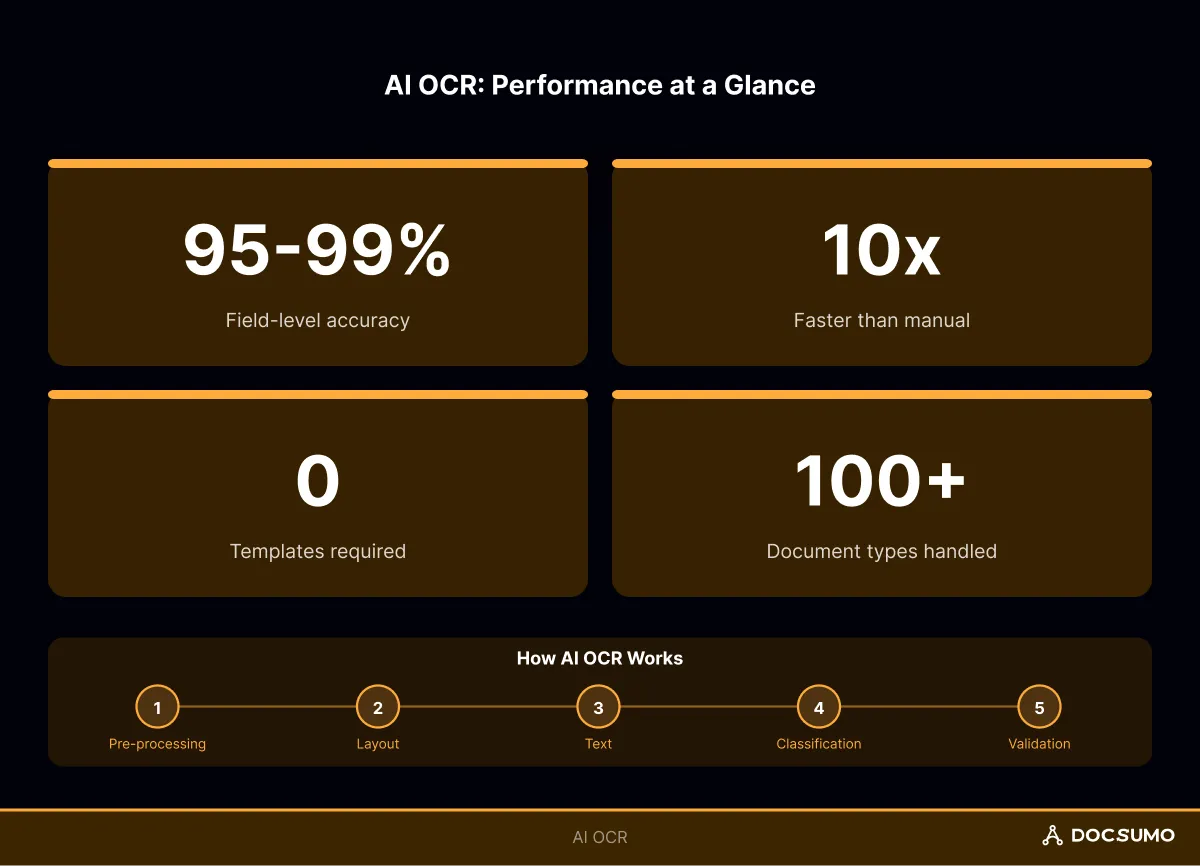
AI OCR typically matches or exceeds trained human accuracy on structured extraction, particularly at scale, where human fatigue increases error rates. Production systems commonly achieve 95-99% field-level accuracy on well-supported document types.
Most enterprise platforms support multi-language recognition, though accuracy varies by language and available training data. Latin-script languages typically perform best, while less common scripts may require additional model training.