Accounts payable OCR software in 2026: 13 tools compared, from AP suites to extraction platforms
For controllers and AP managers choosing AP software with OCR. You'll see the two kinds of product, which fits a mid-market team, and what 13 tools offer according to their own sites.

Key takeaways
- Accounts payable OCR software turns supplier invoices into data. AP suites run the whole invoice-to-pay process; extraction-first platforms focus on the invoice data and send it to your ERP or AP system.
- Pick the category before the vendor. If approvals and payments are the bottleneck, look at a suite. If keying and exceptions are, add an extraction layer in front of the ERP.
- The AP suites here are Tipalti, AvidXchange, Stampli, BILL, Concur Invoice, MineralTree, Medius, Coupa, HighRadius and Yooz, plus Hypatos, which sells AI agents. The extraction-first platforms are Docsumo and Rossum, now part of Coupa.
- A sponsored analyst report from Ardent Partners puts the average cost to process an invoice at $9.84, with an 18.4% exception rate. Best-in-Class AP teams process invoices at 79% lower cost than their peers.
- Test every shortlisted tool on your own hardest invoices. Long line-item tables, poor scans and new layouts show the real differences.
On this page
- What accounts payable OCR software does
- The 13 best accounts payable OCR tools
- Accounts payable OCR software compared
- How 2-way and 3-way matching work
- ERP document automation: what happens at posting
- What to test before you buy
- What AP automation is worth
- If your AP workflow works but the invoice data doesn't
- Frequently asked questions
Accounts payable OCR software reads supplier invoices and turns them into data your AP system or ERP can use. It comes in two kinds. AP suites such as Tipalti, Stampli, BILL and Coupa run the whole invoice-to-pay process, with OCR as one step. Extraction-first platforms such as Docsumo focus on getting the invoice data right. They send it to the ERP or AP workflow you already run. Many teams use one of each.
Where does your AP process break?
What accounts payable OCR software does#
AP OCR reads the invoice: supplier, invoice number, dates, line items, tax and total. Tools differ in what happens next.
- Emailed PDFs
- Scanned paper
- EDI files
- Supplier portals
- 01Read the invoice
- 02Check and match
- 03Approve
- 04Post
Two kinds of AP software share that work, and both hand off to the ERP:
AP suites
Run capture through payment: matching, approvals, coding and paying suppliers.Extraction-first platforms
Read and check the invoice data and send it on; they don't pay suppliers.ERPs
SAP, NetSuite or Dynamics hold the ledger and approval limits, and expect the data to arrive structured.
The 13 best accounts payable OCR tools#
Docsumo is our product, so we've put it first and said plainly what it doesn't do. The others are grouped by what they're built for, with details from each vendor's own site, checked in September 2026. Prices are in the table below.
Extraction-first platforms
1. Docsumo
Extraction-firstOur product- Reads
- Invoices, including line items that run across pages; covers 250+ document types
- Checks
- Duplicate invoices flagged; unsure fields go to a reviewer first; 2- and 3-way matching against POs and receipts on the Enterprise plan
- Workflow
- Invoices routed for approval on the Business plan
- Pricing
- A free 14-day trial for up to 1,000 pages; Business and Enterprise plans are quoted (pricing)
- Security
- SOC 2 Type 2, ISO 27001, HIPAA and GDPR, with SSO and role-based access, and an audit log on the Business plan (security)
The demo below shows 3-way matching in Docsumo, which is on the Enterprise plan.
2. Rossum
Extraction-firstAP suites
3. BILL
AP suite4. Yooz
AP suite5. AvidXchange
AP suite6. Stampli
AP suite7. MineralTree
AP suite8. Medius
AP suite9. Tipalti
AP suite10. Concur Invoice
AP suite11. Coupa
AP suite12. HighRadius
AP suiteAI agents
13. Hypatos
AI agentsAccounts payable OCR software compared#
Prices are each vendor's lowest published plan; matching and ERP connections can need a higher one.
| Tool | Matching | Connects to | Pricing |
|---|---|---|---|
| Extraction-first platforms2 tools | |||
| DocsumoOur product | 2- and 3-way (Enterprise plan) | Free trial; quoted plans | |
| Rossum | Master data (Business plan) | From $18,000/yr | |
| AP suites10 tools | |||
| BILL | 2-way (Corporate), 3-way (Enterprise) | From $49/user/mo | |
| Yooz | Line-level PO and receipt | Not published | |
| AvidXchange | 2- and 3-way (with AvidBuy) | Not published | |
| Stampli | Line-level PO and receipt | Not published | |
| MineralTree | Automated (Inspyrus) | Not published | |
| Medius | PO, receipt or contract | Not published | |
| Tipalti | 2- and 3-way | From $99/mo plus fees | |
| Concur Invoice | PO and receipt | Not published | |
| Coupa | 2- and 3-way | Not published | |
| HighRadius | 3-way variance checks | Not published | |
| AI agents1 tool | |||
| Hypatos | PO matching | From €0.25/invoice | |
How 2-way and 3-way matching work#
2-way matching checks the invoice against the purchase order; 3-way matching adds the goods receipt, so you pay only for what arrived. Tolerances you set decide which gaps go to a person. More in 2-way vs 3-way matching.
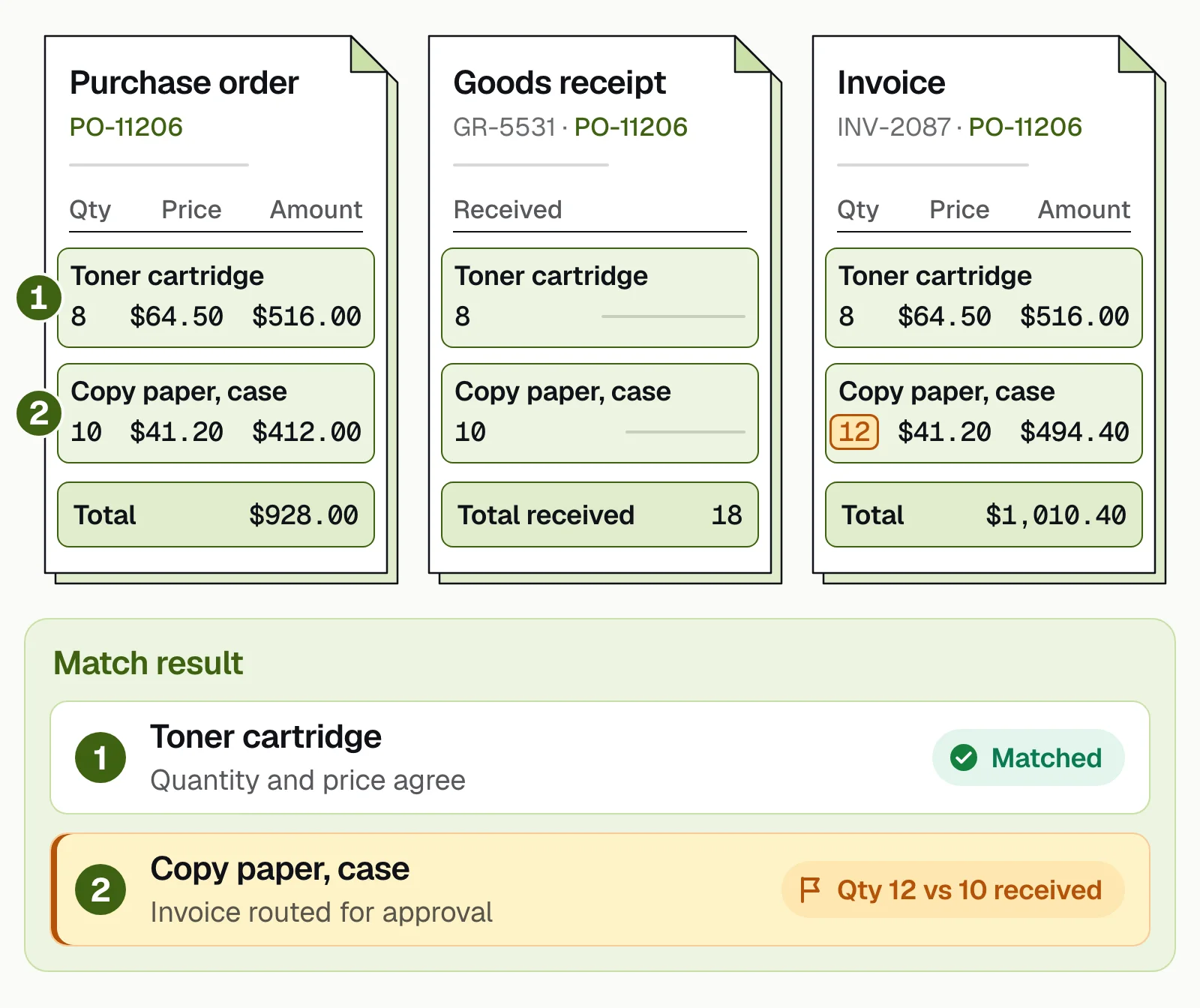
Our take. At thousands of invoices a month, you want automation you can predict. An invoice that matches within your tolerances should go through untouched. A person should see only the exceptions, with the reason and the lines that don't agree side by side. In the figure above, that's the two cases of paper billed but never received.
ERP document automation: what happens at posting#
Most tools here connect to NetSuite, SAP or Dynamics; they differ in what happens at posting. A good integration checks the data before it posts, writes status back, keeps vendor records in sync and handles each entity's chart of accounts. Docsumo sends checked data through its API and webhooks, so plan the field mapping with your ERP owner. Ask any vendor how you'd export your data if you leave.
What to test before you buy#
Run about 100 real invoices through each shortlisted tool, including your 50 hardest, and check:
- Header fieldsVendor, invoice number, dates and totals.
- Line itemsLong tables, including ones that run across pages.
- New layoutsA supplier the tool hasn't seen, with no template.
- MatchingYour tolerances, and whether 3-way matching is included or a higher tier.
- Cross-field checksLines that add up to the total, and tax that matches the rate.
- ApprovalsRouting rules your team can change without a consultant.
- ERP write-backWhat posts and what syncs back, per entity.
- Supplier channelsEmail, PDF, EDI and portal, so suppliers don't have to switch.
- SecuritySOC 2 Type 2 reports and data retention terms.
What AP automation is worth#
Ardent Partners' State of ePayables 2025, a sponsored analyst report, puts the average cost to process an invoice at $9.84. The same report puts the average processing time at 8.2 days and the exception rate at 18.4%. Best-in-Class AP teams process invoices at 79% lower cost than their peers. Try your own numbers below, and see AP metrics and benchmarks for more.
What invoice processing costs you
Put in your own numbers. The cost and exception-rate defaults are the 2025 averages across AP teams.
- Cost today, per month
- Cost with automation, per month
- Difference per month
- Difference per year
How it's worked out
- Cost today is invoices per month times the cost of one invoice.
- With automation, an invoice that still needs a person costs what it costs today, and the rest cost only the software.
- It leaves out late-payment fees and missed early-payment discounts, which usually make the gap bigger.
Source: Ardent Partners, State of ePayables 2025: AP benchmarks (sponsored analyst report, Jan 2026)
Docsumo's published results:
- 95%+of documents processed straight through, without manual review
- <5 minper document, down from 2+ hours
- 65%+lower costs at Valtatech, with 99%+ of invoices touchless
If your AP workflow works but the invoice data doesn't#
Choose by bottleneck. If invoice data holds you up, add an extraction layer such as Docsumo and keep your workflow. If approvals and payments do, pick a suite that fits your size and ERP. Test on your own invoices first, and see the AP automation guide for the rollout.
Book a demo and bring a few of your hardest invoices, or start a free trial.
Frequently asked questions#
What is accounts payable OCR software?
It's software that reads supplier invoices from PDFs, scans and email. It turns the header fields and line items into data your AP system or ERP can use. Most tools also check the data, match it to purchase orders and route it for approval.
What is the best accounts payable OCR software?
It depends on where your AP process breaks. If approvals and payments are the problem, choose an AP suite that fits your size and ERP. If invoice data is keyed by hand or comes out wrong, add an extraction platform such as Docsumo in front of it.
What is the best AP automation software for a mid-market company?
If you need the whole workflow, shortlist suites that name your ERP, such as Stampli, Medius or MineralTree's TotalAP. All three list NetSuite, Microsoft Dynamics and Sage Intacct. If the workflow already works and the problem is invoice data, add an extraction platform such as Docsumo.
Does Tipalti have OCR?
Yes. Tipalti captures invoices with OCR. Its Invoice Capture Agent extracts header and line-item data, and 2-way and 3-way PO matching are built in.
How does document automation integrate with an ERP?
Through pre-built connectors, APIs and webhooks, or file transfer. The software extracts and checks the invoice data, then posts it to the ERP. Docsumo connects through its API and webhooks (see integrations).
Sources
- Ardent Partners: State of ePayables (Part Nine), AP benchmarks and Best-in-Class performance (sponsored analyst report, Jan 22, 2026)
- Tipalti: accounts payable software
- Tipalti: invoice management (Invoice Capture Agent, OCR, PO matching)
- Tipalti: pricing
- Tipalti: integrations
- AvidXchange: AP automation
- AvidXchange: integrations
- AvidXchange: TPG and Corpay complete acquisition of AvidXchange
- Stampli: AP automation platform
- Stampli: integrations
- BILL: accounts payable
- BILL: pricing
- SAP Concur: Concur Invoice
- MineralTree, a Global Payments company
- MineralTree: TotalAP
- MineralTree: Inspyrus
- Medius: autonomous AP
- Medius: accounts payable automation
- Medius: ERP integrations
- Medius: pricing
- Coupa: AP automation
- Coupa: invoicing
- Rossum: Coupa acquires Rossum (press release, May 12, 2026)
- Rossum: home page
- Rossum: pricing
- HighRadius: accounts payable automation
- HighRadius: AP automation ERP integrations
- Yooz: product
- Yooz: line-level PO matching
- Yooz: pricing
- Hypatos: invoice processing agents
- Hypatos: pricing
- Hypatos: integrations
- Docsumo: pricing
First published . Last updated .