Document classification: how it works, methods and examples
For operations and engineering teams that receive mixed files. See how a classifier splits and labels a packet, which method fits which job, and how to test one.


Key takeaways
- Document classification gives each document a type, such as invoice, bank statement or W-2. The type decides which extraction model, queue and team it goes to.
- Classifiers decide from text, layout or both. Rules and templates suit stable forms, trained models suit high volume, and LLMs classify from a short description of each type.
- Real files often hold several documents in one PDF, so classification comes with splitting, which finds where each document starts and ends.
- Every label should carry a confidence score. Confident documents are routed by type and by your rules, and the rest go to a person.
- Measure accuracy for each document type on a month of your own files. An overall average can hide the one type a classifier keeps getting wrong.
On this page
- What is document classification?
- How document classification works, step by step
- Document classification methods and when each fits
- A simple document classifier in Python
- Document classification examples by team
- Routing documents after classification
- How accurate is document classification?
- How to test a classifier on your own documents
- Where Docsumo fits
- Which document types to name first
- Frequently asked questions
Document classification sorts each document by type, such as an invoice, a bank statement or a pay stub. Software reads the text and layout of each page to decide the type. Once it knows what a document is, it can send it to the right extraction model and team.
Below, we walk one mixed file through each step, compare the methods, and show how to test a classifier on your own files.
What is document classification?
Document classification gives each document a label from a list you set, usually its document type. A lender sorts a loan packet into bank statements, pay stubs, tax returns and IDs. An accounts payable team separates invoices from credit notes. An insurer separates ACORD applications from loss runs. Everything after that depends on the label, because an invoice model can't read a bank statement.
Many teams call the same job document categorization. When the two terms are kept apart, classification gives each document exactly one label, and categorization can give it several. Indexing comes after both. It pulls searchable values, such as dates, amounts and PO numbers, from a document once its type is known.
Routing without a mailroom
Documents from shared inboxes and upload portals reach the right model and team in seconds.Correct extraction
Each document type gets the model and validation rules built for it.Complete files
With every page labeled, the system can say what's missing, such as "two months of bank statements received, three required".Search and retention
Labeled documents are easier to find, audit, and keep or delete on schedule.
How document classification works, step by step
A classifier looks at each file on three levels. The first is the file format, such as a digital PDF, a scan that needs OCR, a photo or an email. The second is the structure. A tax form has a fixed layout, an invoice is semi-structured, and a contract is free text. The third is the document type, the label the business cares about.
- Take in the fileFiles arrive by email, upload, scanner or API. One file can hold one page or a 60-page packet.
- Clean up and readThe system straightens each scan and reads it with OCR. It keeps each word's position, so layout counts too.
- Split the fileThe classifier finds where each document starts and ends. One wrong cut can mislabel the pages after it.
- Label each documentEach piece gets one type from your list, based on its words, its layout or both.
- Score the labelEach label gets a confidence score, the model's own estimate that it's right.
- Route itConfident documents go to the extraction model and queue for their type.
- Review the restA person checks low-confidence labels and pages that fit no type. Their fixes become new training examples.
Here's what that does to a scanned loan packet. One PDF of 18 pages goes in, and six labeled pieces come out.
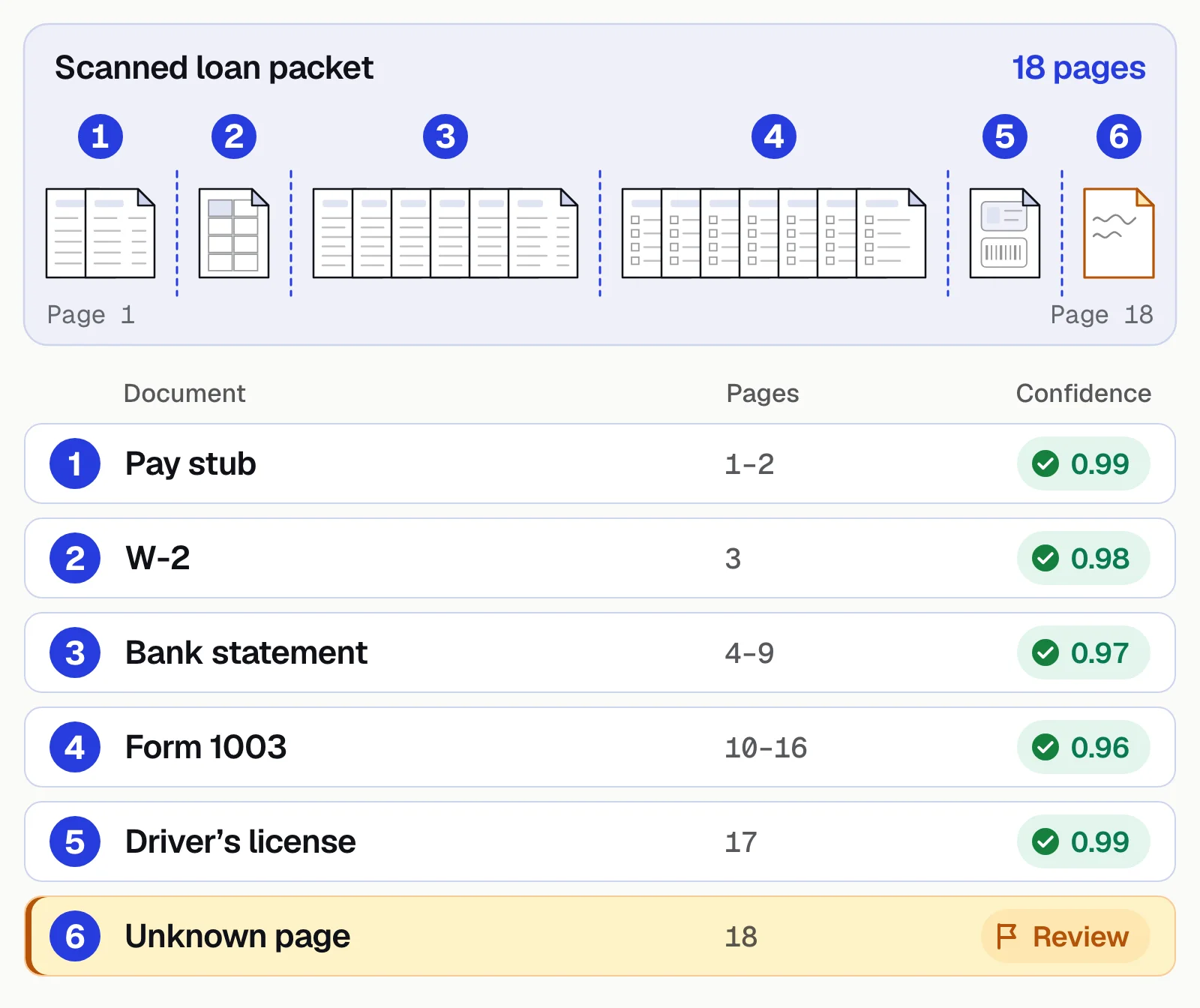
Pages 1 and 2 are a pay stub, page 3 is a W-2, and pages 4 to 9 are a bank statement. Pages 10 to 16 are a Form 1003 loan application, and page 17 is a driver's license. Each one scores between 0.96 and 0.99. Page 18 fits no known type, so it goes to review instead of being forced into the closest match. Underwriters and income verification teams start from that sorted file.
Document classification methods and when each fits
Most classifiers use one of five methods, or a mix of them. The methods differ in what they read and how much setup they need.
| Method | How it decides | When it fits | Where it breaks |
|---|---|---|---|
| Rules and keywords | Looks for set words, such as "Statement period" and "Closing balance" for a bank statement | A few stable types, or one look-alike pair a model keeps confusing | New layouts and new wording; rules pile up and conflict |
| Templates and layout matching | Compares the page with known layouts, such as where the title, boxes and tables sit | Fixed forms, such as tax forms, IDs and standard applications | Invoices, which come in thousands of layouts; any form version it hasn't seen |
| Machine learning on text | Learns which words mark each type from labeled examples, for example TF-IDF features with logistic regression | High-volume, text-heavy types with labeled samples; fast and cheap to run | Needs labeled samples for every type; mixes up types that use the same words |
| Deep learning on text and layout | Models such as LayoutLM read the words, their positions and the page image together | Look-alike documents, poor scans, and forms where position matters | Needs more labeled data and computing power; a single label is harder to explain |
| Large language models (zero-shot) | Reads the document and a short description of each type you name, then picks the best fit | Many types, new types, and varied text-heavy documents, with no training set | Costs more per page than a small trained model; may label look-alikes differently from run to run |
Words alone are often enough, because most types use phrases no other type does. Layout matters when two types share their words, such as bank and credit card statements. It also helps on poor scans, where OCR misreads words but the shape of the page still shows the type.
LLM classification is the newest route. You write a name and a one-line description for each type, and the model picks the best fit. Cloud services offer it too. Google's Document AI custom classifier, for example, supports zero-shot classification.
Most production systems combine methods. A trained or LLM classifier handles most types, rules settle known look-alikes, and a person takes the rest. Context from outside the document, such as the email subject or the upload folder, can confirm a prediction. Clustering can come first, grouping similar documents in an unsorted archive for a person to name.
Whatever the method, define types by what happens next. Two documents that go to the same extraction model and workflow can share one type. To see which vendors use which method, read document classification tools compared, our vendor list.
A simple document classifier in Python
This example trains a text classifier on OCR output with scikit-learn, small enough to see every step. It runs on Python 3.11+ with scikit-learn 1.9 (pip install scikit-learn).
from sklearn.feature_extraction.text import TfidfVectorizer
from sklearn.linear_model import LogisticRegression
from sklearn.pipeline import make_pipeline

# Text from OCR, one string per document, with its known type
train_texts = [
    "INVOICE Invoice number INV-1042 Bill to Acme Corp Due date Subtotal Tax Total due",
    "Invoice # 88731 Remit to Payment terms Net 30 Qty Unit price Amount Balance due",
    "Statement period Opening balance Deposits and credits Withdrawals Closing balance Account number",
    "Account summary Beginning balance Checks paid Electronic withdrawals Ending balance Daily balance",
    "Earnings statement Pay period Gross pay Federal income tax Social Security Medicare Net pay YTD",
    "Pay date Employee ID Regular hours Overtime Deductions 401k Net pay Year to date",
]
train_labels = ["invoice", "invoice", "bank_statement", "bank_statement", "pay_stub", "pay_stub"]

model = make_pipeline(
    TfidfVectorizer(lowercase=True, ngram_range=(1, 2)),
    LogisticRegression(max_iter=1000),
)
model.fit(train_texts, train_labels)

new_docs = [
    "Invoice date 03/02/2026 Total due $4,120.00 Remit payment to",
    "Ending balance $12,480.55 Deposits Withdrawals Statement period",
]
for text, label, probs in zip(new_docs, model.predict(new_docs), model.predict_proba(new_docs)):
    print(f"{label:<15} confidence {probs.max():.2f}  <- {text[:40]}")
Output:
invoice         confidence 0.45  <- Invoice date 03/02/2026 Total due $4,120
bank_statement  confidence 0.45  <- Ending balance $12,480.55 Deposits Withd
Both labels are right, but confidence is low because the model has only six examples. In production you'd train on dozens to hundreds of real samples per type and send anything below a threshold to a reviewer.
To classify a scanned page, put OCR in front of the model. With Tesseract installed, pytesseract does it in one line.
from PIL import Image
import pytesseract

text = pytesseract.image_to_string(Image.open("page_1.png"))
label = model.predict([text])[0]
What this leaves out is most of production, from splitting multi-document PDFs and layout features to poor scans, retraining and a review queue. That's the gap between a notebook and an intelligent document processing platform.
Document classification examples by team
The document types change from team to team, but the job stays the same.
| Team and file | Documents inside | Look-alikes to watch | What the labels set up |
|---|---|---|---|
| Lending: a loan packet | Bank statements, pay stubs, W-2s, tax returns, IDs, the application | W-2s and 1099s; bank and credit card statements | Each type goes to its own model for lending decisions, and gaps are flagged |
| Insurance: a claim packet | Loss notice, police report, repair estimate, photos, medical bills | Repair estimates and final repair invoices | The adjuster opens one sorted claim file |
| Accounts payable: the mailroom | Invoices, credit notes, vendor statements, receipts, remittance advices | Invoices and quotes; invoices and statements | Only invoices enter approval and matching |
| Healthcare: patient records | Visit notes, lab results, referrals, prior authorizations, claim forms, EOBs | EOBs and patient bills | Each page reaches the right queue, with an audit trail |
| Logistics: shipment documents | Bills of lading, commercial invoices, packing lists, customs forms | Commercial invoices and packing lists | Standard documents go straight through, and exceptions queue for review |
An insurance claim packet shows why splitting matters. One PDF can hold a loss notice, a police report, a repair estimate and photos. The adjuster needs each piece labeled, and a supplement estimate that arrives a week later should join the same claim. New business submissions pose the same problem, with ACORD forms, loss runs and schedules in one email. See insurance claims automation for the rest of the claims process.
An accounts payable mailroom is mostly invoices, but not only invoices. Vendor statements, credit notes, receipts and W-9 forms reach the same inbox. A statement filed as an invoice can be keyed and paid twice. Classification keeps only real invoices in the accounts payable approval flow.
Healthcare records are often classified page by page. A faxed referral packet or a compiled medical record can run to hundreds of pages, with many document types mixed together. We compare the tools for that job in healthcare document classification software.
Routing documents after classification
Auto-routing sends each classified document to its next step, with no one sorting by hand. The next step can be an extraction model, a work queue, a person or another system.
- Invoices
- Vendor statements
- Claim packets
- Email attachments
- 01Label the document type
- 02Extract key fields
- 03Apply your routing rules
- 04Hold uncertain documents
What decides the route
The simplest route uses the type alone, so invoices go to accounts payable. Most teams add extracted values. An invoice from a vendor that isn't in the vendor list can go to vendor review. One over a set amount can go to a senior approver.
Most routes are if-then rules, which are easy to audit. Some systems learn routes from past decisions instead, which adapts to new patterns but is harder to explain. A common mix is rules for policy, such as approval limits, with the classifier's confidence deciding what a person checks.
When a document fits nowhere
Every setup needs a queue for documents that fit no route. Unknown types, low-confidence labels and files missing a required document wait there for a person. Log each decision, because the log shows which rules misfire and which types the classifier keeps missing. That loop is the core of human-in-the-loop review.
Review the rules on a schedule too. A rule written for one vendor's old errors can outlive the problem, and an approval limit set years ago may no longer fit.
How accurate is document classification?
Accuracy is the share of documents that get the right type. As one number, it hides the type that fails. If 98 of 100 test documents are invoices, a model that calls everything an invoice is right 98 times and useless for the other 2. Rare types suffer in training too. A model trained on 10,000 invoices and 50 credit memos learns to say "invoice", so weight the classes and send rare types to review.
So measure each type on its own. Precision asks how many documents labeled "invoice" really are invoices. Recall asks how many real invoices got that label, and the F1 score combines the two. A confusion matrix shows which types get mixed up, such as W-2s read as 1099s. Score splitting separately, by counting the files where a boundary was missed or added.
A confidence score is the model's own estimate that a label is right, usually from 0 to 1. It's useful only if it's calibrated. Among labels scored near 0.8, about 8 in 10 should be correct, so check that on your own files.
A threshold turns the score into a decision. Labels above it go straight through, and labels below it go to a person. Set it per type, and higher where a wrong label costs more, such as tax forms in a loan file. After launch, watch for falling confidence and a rising share of pages marked unknown. Both are signs that your documents have changed and the model needs retraining.
How to test a classifier on your own documents
Run this test before you choose a classifier, and again before you change one.
- Use a month of real filesTake what actually arrives, including faxes, phone photos and multi-document packets.
- Write the answer key firstHave someone who knows the documents mark each document's type and page range.
- Add look-alikes and straysInclude the pairs your team mixes up, and pages that fit no type, such as cover letters.
- Score each type and each splitCount wrong labels per type, missed or extra boundaries, and pages marked unknown.
- Count what a person had to fixThe documents a reviewer moved to another type are the work you'll pay for every day.
- Rerun the same set after every changeTest again when you add a type, change a threshold or update the model.
Our take. Judge a classifier by how many documents your reviewers had to move in a month of your own files. A vendor's accuracy figure, ours included, comes from documents that aren't yours. Make sure your month includes your worst scans and closest look-alikes, since that's where most of the fixes happen.
Where Docsumo fits
Docsumo's document classification software splits and labels files as they arrive by email, upload or API. You name the document types you want, with no training set, and a new type works from the first document. AI Split takes a plain-English definition of each document type, so it can cut a loan binder or a claim packet into its documents. One upload can run up to 500 pages.
Every label has a confidence score. Documents it can't classify wait as Unclassified for a person to assign, and a reviewer can move any document to another type. Each correction teaches the classifier. It covers 250+ document types and classifies in most printed languages.
Each document then goes to the extraction model for its type, and low-confidence fields go to a person for review. Auto-classification and splitting come with the Business plan. On that plan, Docsumo also routes invoices for approval by the rules you set.
On the Enterprise plan, case management groups every document in an application. Case Routing files a document that arrives later into the open claim by its claim number. Cross-document validation, also on the Enterprise plan, checks whether the documents agree. Does the employer on the pay stub match the payroll deposits on the bank statement? See pricing for each plan.
- 99%field-level accuracy across 250+ document types
- 95%+of documents AI Approved, extracted and checked with no manual review
Which document types to name first
Start with the types that arrive most often and drive a decision, such as bank statements and pay stubs in a loan file. Run a month of real files through the classifier, then read what comes back as unknown. That list tells you which type to add next, and the test above tells you when to trust the result.
Book a demo with a mixed packet of your own documents, or start a free trial.
Frequently asked questions
What is document classification in OCR?
OCR turns a scanned page into text. Document classification then uses that text, often with the page's layout, to decide what kind of document it is. Both are steps in the same intelligent document processing pipeline.
What is the difference between document classification and categorization?
Most people use the two terms for the same job. When they're kept apart, classification gives each document exactly one label. Document categorization can give it several, such as an invoice that is also a rush order.
What is the difference between document classification and data extraction?
Classification tells you what a document is. Extraction pulls out the values it contains. Classification comes first, because the type decides which extraction model and rules apply.
Can LLMs classify documents?
Yes. A large language model can classify from a short description of each type, with no labeled samples. Test it on your own look-alike types, and keep a confidence threshold so uncertain documents go to a person.
How many samples do I need to train a document classifier?
It depends on how alike your types are. A few dozen varied examples per type is a common starting point for a trained model, and look-alike types need more. Classifiers that work from type names and descriptions need none.
Is document classification the same as security classification?
No. Security classification labels a file by sensitivity, such as public, internal, confidential or restricted, to control who can open it. Document classification sorts documents by type, so each one can be read and routed.
Sources
- scikit-learn: Classification of text documents using sparse features
- PyPI: scikit-learn
- PyPI: pytesseract
- Google Cloud: Document AI processors (Custom Classifier and Splitter)
- Google Cloud: Document AI custom classifier (zero-shot model)
- Xu et al.: LayoutLM, pre-training of text and layout for document image understanding (arXiv, 2019)
- scikit-learn: Metrics and scoring (confusion matrix, precision, recall, F1)
- scikit-learn: Probability calibration
First published . Last updated .