Multi-document handling: how to split, read and check a document packet
For operations teams whose documents arrive as packets, such as loan files, claims and debt settlement files: how one PDF becomes a checked case, and what to do when a step goes wrong.

Key takeaways
- Multi-document handling means processing a packet of mixed documents, such as a loan file sent as one PDF, as a single case: split it into documents, classify and read each one, then check the documents against each other.
- The hard part comes before extraction: finding where one document ends and the next begins, and telling look-alike documents apart.
- Consistency checks run at two levels: inside each document, where related fields must agree (cross-field checks), and across the case, where names, reference numbers and amounts that appear on more than one document must match (cross-document checks).
- Errors are silent: a missed boundary or a wrong label produces wrong data that looks fine, so confidence scores and a review step for uncertain pages matter.
On this page
- What is multi-document handling?
- Why a packet is harder than a single document
- How multi-document handling works
- Multi-document consistency checks
- Where multi-document handling matters most
- What breaks in multi-document pipelines, and how to fix it
- How Docsumo handles document packets
- The bottom line
- Frequently asked questions
Multi-document handling is processing a packet, or bundle, of mixed documents as one case. A loan file, claim or onboarding packet that arrives as a single PDF is split into its documents, each document is classified and read, and the documents are checked against each other before the data moves on. It matters because an early mistake, such as a missed boundary or a wrong document type, quietly spoils the data read from that document and every check that depends on it.
This guide covers the two ways to process a packet, why it's harder than a single file, how the pipeline works, the consistency checks to run across a case, and what breaks.
What is multi-document handling?
There are two ways to process a document packet: by hand, one document at a time, or automatically, as one case. Processing one document at a time assumes each upload is a single document of a known type, so someone has to split and label the packet first. Multi-document handling drops that assumption: the system splits and labels the packet itself, then checks the documents against each other.
By hand, one document at a time
- Someone splits the PDF and names each file
- Each document is keyed or uploaded on its own, with its type picked by hand
- The pay stub and the bank statement meet only when an underwriter opens both
- A misfiled page turns up late, if at all
Automated, one case per packet
- The system finds where each document starts and ends
- Each document is classified and read with the fields its type needs
- Names, amounts, dates and reference numbers are compared across the case
- Pages that fit no known type, and values that don't agree, go to a reviewer
Why a packet is harder than a single document
A single upload comes with its answer built in: you told the system what it is. A packet makes the system work that out first, page by page.
Boundary detection
A statement's last page may have no page number, the next document may open with a page that looks like a continuation, and scans add blank, rotated or out-of-order pages. Miss one boundary and two documents are read as one.Mixed layouts
Pay stubs from two employers, or statements from two banks, put the same numbers in different places under different labels. Each still has to yield the same fields.Look-alike documents
An explanation of benefits and a provider invoice are both tables of amounts. Each needs its own fields and checks, so a wrong label spoils everything read from it.
How multi-document handling works
Every packet goes through the same four stages, whether a processor works through them by hand or software does them.
- Loan packet PDF
- Claim file
- Email attachments
- 01Split at each boundary
- 02Classify each document
- 03Extract fields and tables
- 04Cross-check the case
Splitting looks for the signs that a new document has started: a new header, page numbers that reset ("Page 1 of 3"), a change of layout, a blank separator page. Language models add a second test: does this page still read like the one before it? Classification then labels each document with a type and a confidence score, and a page that fits no known type goes to a person instead of being forced into the nearest type. Document classification covers this step in more depth.
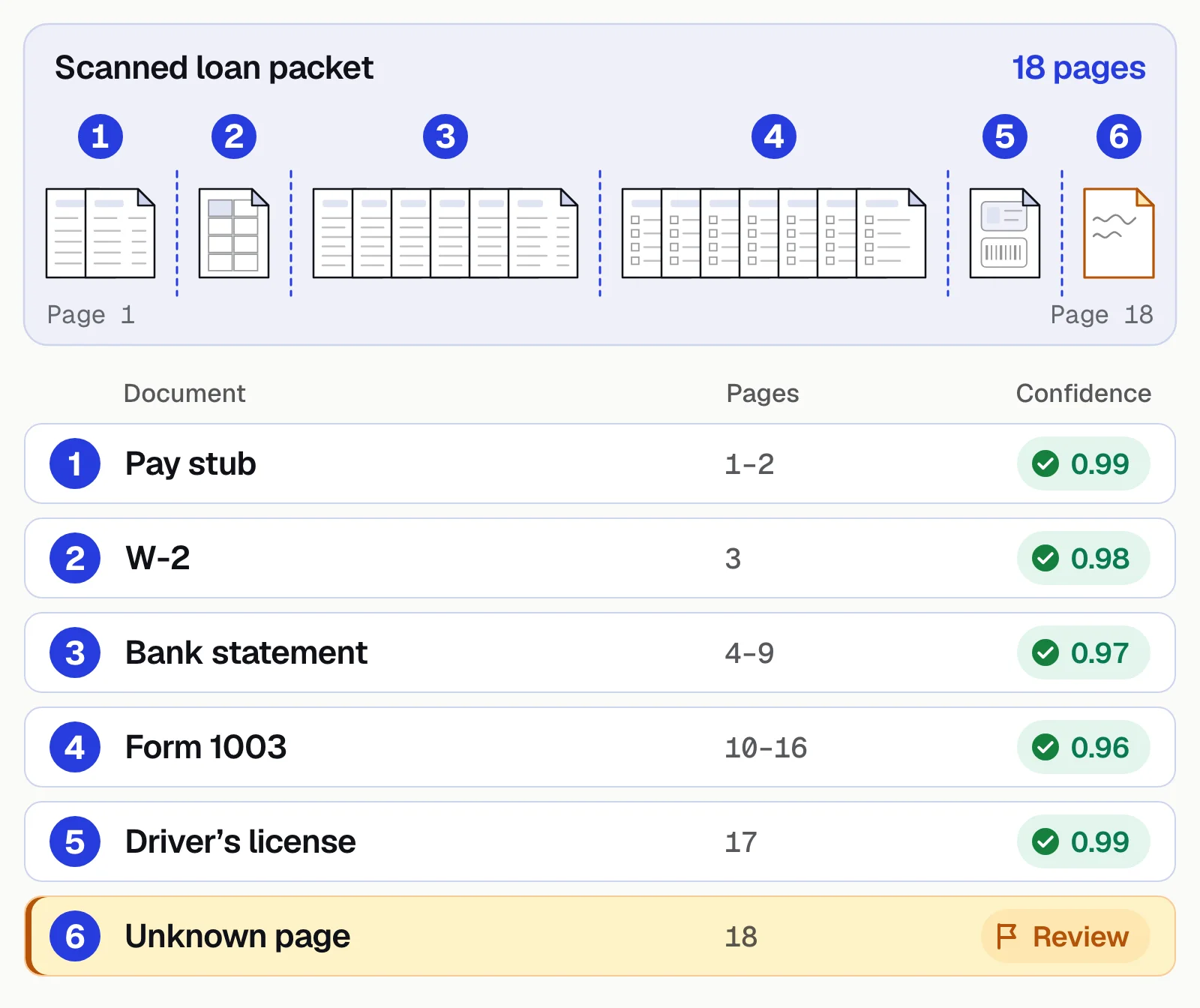
Each document is then read with the fields its type needs: year-to-date earnings from the pay stub, every transaction from the statement, the borrower's details from the application. The last stage reads the documents together, as one case, with the checks below.
Multi-document consistency checks
Extraction reads each document; consistency checks decide whether the case holds together. They run at two levels. Cross-field checks, sometimes called cross-field reasoning, test fields inside one document that depend on each other. Cross-document checks, or cross-document linking, match the same party, numbers and dates across the case.
| Check | Inside one document (cross-field) | Across the case (cross-document) |
|---|---|---|
| Parties | Every page of a statement names the same account holder | The borrower, insured or vendor is the same on every document, even when one says "Acme Inc." and another "ACME INCORPORATED" |
| Reference numbers | The account or policy number is the same on every page | The PO number on the invoice matches the purchase order, and a missing one fails the check |
| Amounts | Line items add up to the total, and each transaction moves the running balance by its amount | Quantities and prices match across the invoice, PO and receipt (2-way and 3-way matching); net pay on the stub matches the payroll deposit |
| Dates | The date of loss on a claim form falls inside the policy period it lists | For a Fannie Mae loan, the latest pay stub is dated no earlier than 30 days before the initial loan application |
| Completeness | Page numbers run without gaps, from 1 of 6 to 6 of 6 | Every document the case needs is there for every period, such as W-2s for the most recent one or two years |
Give each check a tolerance, such as a few cents of rounding on totals. When two names are close but not the same, an address or tax ID decides, or a person does. Send every failure to a reviewer with the field and the rule it broke: a mismatch is a question, not a verdict, and it can be a typo, a timing difference or a missing page.
Where multi-document handling matters most
Any process where one decision rests on several documents needs it.
Loan files
An application, pay stubs, W-2s, bank statements and an ID, often scanned as one PDF. The documents have to tell the same income story. More in mortgage document processing.Insurance claims and submissions
A claim file of forms, estimates, invoices and reports, or a new-business submission of ACORD forms, loss runs and schedules, read and checked as one file. See document automation for insurance.Debt settlement
Settlement letters arrive in each creditor's own format, and their terms have to match the settlement negotiated for the client. National Debt Relief reached 95% straight-through processing on debt settlement letters with Docsumo.Accounts payable
An invoice, its purchase order and the receiving record, matched line by line before payment. See accounts payable automation.Freight
A bill of lading, proof of delivery and carrier invoice for each load, compared before the invoice is paid. See freight invoice audit.
What breaks in multi-document pipelines, and how to fix it
Multi-document pipelines fail in predictable ways, and each failure has a fix you can build in from the start.
- A boundary is missedTwo documents are read as one. Score every split and send low-confidence boundaries to a reviewer who can see the pages on both sides of the cut.
- A document is misclassifiedA bank statement read as a pay stub returns the wrong fields. Set a confidence threshold per document type, route anything below it to review, and feed the corrections back to the model.
- Wrong values look rightCheck each value against an expected range and against the other documents before it moves on. Monthly income of $50 on a file that states $4,000 is a flag, not a fact.
- Documents arrive out of orderNever rely on position. Classify each document by its content and sort by type.
- Pages are rotated, skewed or blankStraighten pages before splitting, and don't treat every blank page as a boundary: the blank back of a two-sided scan isn't a separator sheet.
Treat the first weeks in production as calibration: log every failure by type, and adjust each threshold based on what the log shows. Human-in-the-loop systems covers how to set up the review step.
How Docsumo handles document packets
Docsumo is an intelligent document processing (IDP) platform. On the Business plan, it splits a packet into its documents and labels each one (auto-classification and splitting). Docsumo covers 250+ document types and isn't limited to them. Each document is read field by field, including handwritten text and tables that run across pages, which are joined into one table.
Fields the model is unsure about go to your reviewers: confidence thresholds are set per field, clicking a field highlights its source line, and corrections improve the model. On the Enterprise plan, case management keeps each file's documents together and cross-document validation checks them against each other, including 2-way and 3-way invoice matching. Checks of your own can be added as workflow steps, as an AI step or your own Python code. Data goes to your systems through API and webhooks or an Excel export. Docsumo doesn't make the credit, claim or payment decision; your team does.
- 99%field-level accuracy across 250+ document types
- 95%+of documents processed straight through, without manual review
- <5 minper document, down from 2+ hours
The bottom line
Much of real document work arrives in packets, not single forms. Get the split and the labels right, read each document with the fields its type needs, and check the case as a whole before anything moves on. Send what doesn't fit, or doesn't agree, to a person.
Book a demo with one of your own packets, or start a free trial.
Frequently asked questions
What does document handling mean?
Document handling is how an organization receives, sorts, processes, stores and routes documents to the people and systems that act on them. Multi-document handling is the same job for packets: several documents that arrive together and have to be split up and read as one case.
What's the difference between document splitting and document classification?
Splitting finds the physical boundaries: where one document ends and the next begins. Classification decides what each document is, such as a pay stub or a bank statement. Both have to work for multi-document processing to succeed.
What is a multi-document consistency check?
A check that compares the same facts across the documents in a case, such as the borrower's name on the pay stub, W-2 and bank statement, or the PO number and amounts on an invoice and its purchase order. It usually runs alongside cross-field checks inside each document, such as line items adding up to the total. Anything that doesn't agree goes to a person.
Is multi-document handling the same as multi-document search?
No. Multi-document search finds information across a library of documents, for example with a search index or a chatbot over your files. Multi-document handling processes an incoming packet: it splits, classifies and reads each document, then checks them against each other.
What happens if documents arrive in the wrong order?
It shouldn't matter. Document classification identifies each document by its content, not its position, and documents are sorted by type before extraction.
Can I process documents if I don't know which types to expect?
Yes, within limits. Docsumo covers 250+ document types and isn't limited to them, but you still decide which fields you need from each type. Pages that match no known type should go to review rather than being forced into the nearest type.
Sources
First published . Last updated .