What is text normalization? NLP steps and document data examples
For developers and data teams: what text normalization means in NLP and speech, how extracted document data gets normalized, and how to catch the failures that slip through.

Key takeaways
- Text normalization converts different ways of writing the same thing into one standard form, so values match and systems can use them.
- In NLP, it covers Unicode and punctuation cleanup, case folding, tokenization, and reducing words to a base form by stemming or lemmatization.
- In document processing, it turns extracted dates, amounts, phone numbers and names into one format per field, such as ISO 8601 dates (2026-04-06) and plain decimal amounts.
- Normalize first, then validate: extract, normalize, validate, look values up in your master data, then export.
- The costly failures are silent: over-normalization merges values that differ, and locale bugs swap the day and month. Test every rule on real samples.
On this page
Text normalization is the process of converting text into one standard form, so that different ways of writing the same thing match. In NLP, that means steps such as fixing Unicode and punctuation, lowercasing and reducing words to a base form before a model or search index uses the text. In document processing, it means converting extracted values such as dates, amounts and names into one format per field before they reach an ERP or database.
This guide covers the steps in NLP, how document data gets normalized, the fields where it matters most and the failures to test for.
What is text normalization?
People write the same thing in different ways. "USA" and "U.S.A.", "04/06/2026" and "6 Apr 2026", "Smith Inc." and "SMITH INC" mean the same thing, but software comparing strings sees different values. Normalization maps each variant to one canonical form. The term covers three related jobs:
NLP and search
Makes words match despite differences in case, punctuation and word endings, so a search for "process" also finds "processing" and "processed".Speech
Text-to-speech turns written forms into spoken ones, such as "$123" into "one hundred and twenty-three dollars". Speech recognition does the reverse, called inverse text normalization.Document data
Puts values extracted from invoices, forms and statements into one format per field, such as ISO 8601 dates and plain decimal amounts, so the systems downstream accept them.
Text normalization steps in NLP
Which steps you need depends on the task: search usually wants aggressive matching, while a model that reads tone may need case and punctuation kept.
| Step | Before | After |
|---|---|---|
| Unicode normalization | é typed as e plus a combining accent | é as one character |
| Case folding | Invoice, INVOICE | invoice |
| Punctuation | U.S.A. | USA |
| Tokenization | Net 30 days. | "Net", "30", "days", "." |
| Stemming | processing, processed | process |
| Lemmatization | am, are, is | be |
Stemming chops off word endings by rule, which is crude but simple. Lemmatization uses a vocabulary and grammar to return the dictionary form of a word, its lemma. To normalize text in Python, the standard library covers the first three steps; NLTK adds tokenization, stemming and lemmatization, and spaCy adds tokenization and lemmatization.
import re
import unicodedata

def normalize(text: str) -> str:
    text = unicodedata.normalize("NFKC", text)  # one form per character; "fi" becomes "fi"
    text = text.casefold()                       # case-insensitive matching
    text = re.sub(r"[^\w\s]", "", text)          # drop punctuation
    return re.sub(r"\s+", " ", text).strip()     # collapse spaces

print(normalize("  The final INVOICE, U.S.A.  "))           # the final invoice usa
print(normalize("Cafe\u0301") == normalize("Café"))       # True: e + accent matches é
How text normalization works for document data
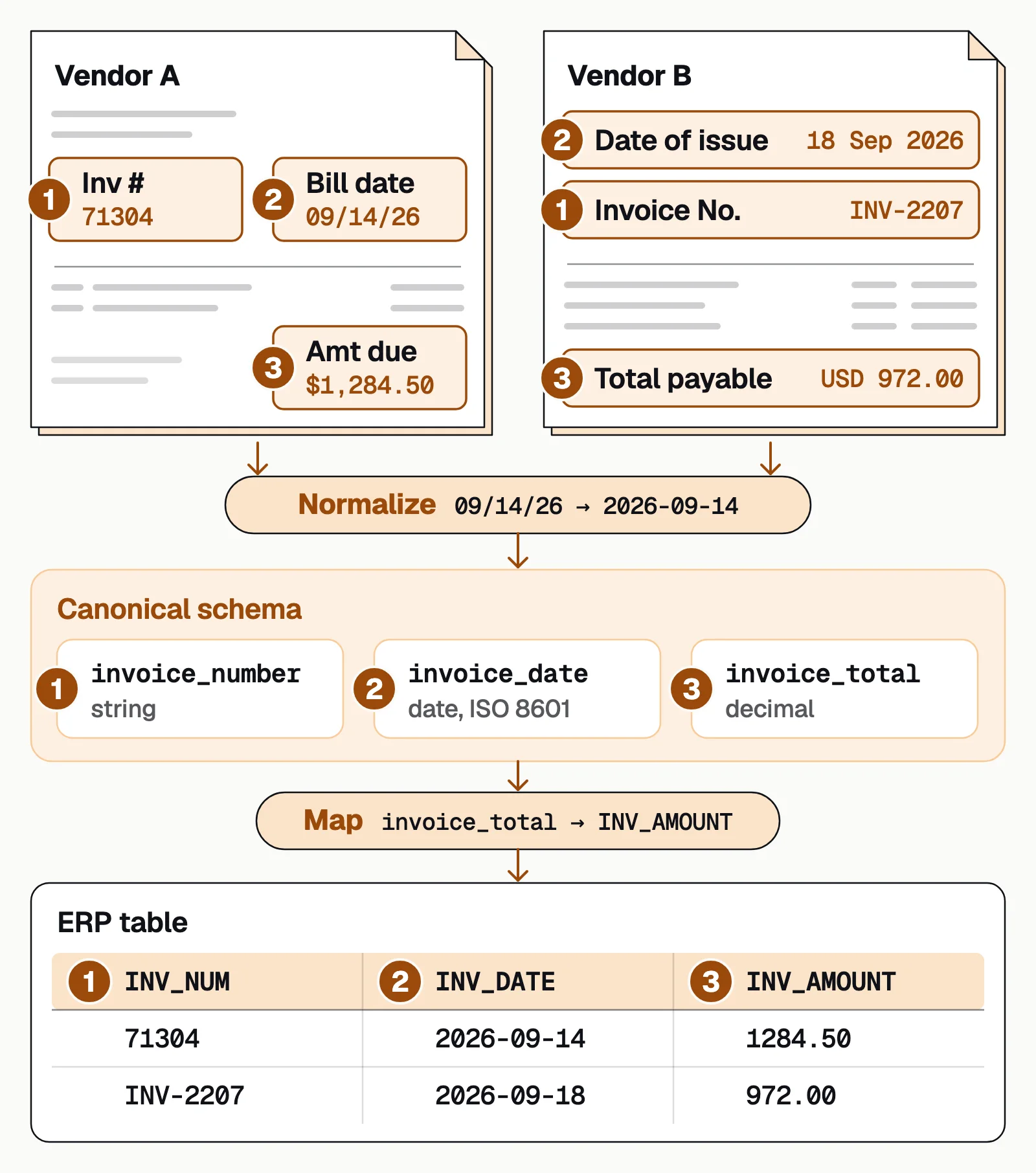
Extraction pulls values off the page as they're printed. Normalization runs next, before validation, so every value is checked in its final form: extract, normalize, validate, look up, export.
- Fix the charactersConvert text to one Unicode form, so é typed two ways matches, and replace the curly quotes, ligature characters (fi as one character instead of f and i) and non-breaking spaces that PDFs and OCR bring in.
- Standardize formatsDates become ISO 8601 (2026-04-06), amounts become plain decimals with a separate currency code (1234.56 and USD), and phone numbers become E.164 (+15551234567). Read dates by the sender's country: 04/06/2026 is April 6 in the US and June 4 in much of Europe.
- Resolve names and IDsApply case, suffix and abbreviation rules, so "Johnson Mfg Inc." and "JOHNSON MANUFACTURING" become one vendor, strip the formatting from IDs such as EINs, then look each value up in your master data.
The last step, putting each canonical value into the column your ERP or database expects, is schema mapping:
Where text normalization has the highest impact
The fields that hurt most when they're inconsistent are the ones that feed automated logic: payment terms, matching and deduplication.
| Field | Raw variants | Normalized | Where it's used |
|---|---|---|---|
| Invoice date | 04/06/2026, 6 Apr 26, April 6th | 2026-04-06 | Payment terms, AP aging |
| Invoice amount | $1,234.56, 1.234,56, 1234.56 | 1234.56, plus a currency code | General ledger posting |
| Vendor name | Smith Inc, SMITH INCORPORATED, Smith Inc. | One vendor ID from your vendor master | Deduplication, payments |
| PO number | PO-2026-001, PO 2026-001, po2026001 | PO2026001 | Invoice-to-PO matching |
| Tax ID (EIN) | 12-3456789, 12 3456789 | 123456789 | Vendor records, tax reporting |
| Phone number | +1-555-123-4567, (555) 123-4567 | +15551234567 | Customer contact, matching |
For documents from other countries, the date and number rules change with the sender; multilingual OCR shows how the same characters can mean different values.
Common normalization failures and how to catch them
Normalization fails quietly. The pipeline runs, the data looks clean, and the values are wrong.
- Over-normalizationStripping every suffix merges "Acme LLC" and "Acme Inc.", which can be two companies. Keep a list of values that must stay distinct and test it after every rule change.
- Under-normalizationA missed variant leaves "Johnson Mfg" and "Johnson Manufacturing" as two vendors. Track the count of distinct values per field; a jump usually means a new variant.
- Locale bugs04/06/2026 means April 6 in the US and June 4 in much of Europe, and 1.234 on a German invoice is 1,234 in US notation. Set date and number rules by the sender's country, and flag dates that fit both readings.
- Rule typosA regex that reads the wrong decimal separator turns $1.99 into 199 without an error. Add tests that fail on impossible values: negative amounts, future invoice dates, letters in phone numbers.
- Silent data lossRemoving every non-digit drops the + that marks a phone number's country code, and rounding drops cents. Log what came in, which rule ran and what came out, and spot-check samples.
The bottom line
Text normalization is what lets different ways of writing the same thing match: in NLP it prepares text for models and search, and in document processing it turns extracted values into one format per field. Normalize before you validate, look values up in your master data, and test every rule on real samples.
In Docsumo, reformatting rules run as a workflow step you set up, either an AI step or your own Python code. Values can be looked up in your master data, which is part of the Enterprise plan. Fields the model is unsure about go to a reviewer before the data leaves through the API and webhooks or as an Excel export.
Book a demo with a few of your own documents, or start a free trial.
Frequently asked questions
What is text normalization?
Text normalization is converting text into one standard, canonical form so that different ways of writing the same thing match. In NLP it prepares text for models and search; in document processing it puts extracted values such as dates and amounts into one format per field.
What is text normalization in NLP?
In NLP, text normalization turns raw text into a consistent form before a model or search index uses it: fixing Unicode, lowercasing, handling punctuation, splitting text into tokens and reducing words to a base form with stemming or lemmatization.
What's the difference between normalization and cleaning?
Cleaning removes noise and errors, such as OCR misreads (an O read as a 0), stray punctuation and empty values. Normalization standardizes format, turning every variant into one representation. In practice you clean first, then normalize.
Can normalization cause data loss?
Yes, if the rules are too aggressive. Stripping every non-digit from a phone number drops the + that marks its country code, lowercasing names can lose information you need for matching, and rounding amounts loses cents. Decide what each field can afford to lose, and test the rules on edge cases.
Do I normalize before validation or after?
Normalize first, then validate. Validation checks whether a canonical value is acceptable; if you validate first, you reject values that would pass once normalized. The usual order is extract, normalize, validate, look up against master data, then export.
Sources
- Manning, Raghavan and Schütze: Introduction to Information Retrieval, Normalization (equivalence classing of terms)
- Manning, Raghavan and Schütze: Introduction to Information Retrieval, Stemming and lemmatization
- NVIDIA: Text normalization and inverse text normalization with NVIDIA NeMo
- Sproat and Jaitly: RNN approaches to text normalization, a challenge (arXiv, 2016)
- Unicode Standard Annex #15: Unicode Normalization Forms (Unicode 18.0.0)
- W3C: Date and Time Formats (a profile of ISO 8601)
- ITU-T Recommendation E.164: The international public telecommunication numbering plan
First published . Last updated .