Handwriting recognition: how it works, where it fails and how accurate it is
For operations teams that still receive handwritten forms, notes and receipts: how handwriting recognition works, where it breaks, how to measure it and what a business workflow needs around it.

Key takeaways
- Handwriting recognition (HWR), also called handwritten text recognition (HTR) or handwriting OCR, is software that turns handwriting in scans, photos or pen input into machine-readable text.
- Modern systems read whole lines, not single letters: neural networks predict the most likely sequence of characters, using the letters around an unclear one as context.
- It fails in predictable places: degraded scans, touching characters, writing outside the field, mixed scripts and look-alike characters such as 1, l and I.
- Measure it by field-level accuracy, not character error rate alone: one wrong digit makes a whole date or amount wrong.
- In business workflows, handwriting recognition needs confidence routing, validation and human review around it. Docsumo reads handwritten text and sends low-confidence fields to a person.
On this page
- What is handwriting recognition?
- Handwriting recognition vs OCR and ICR
- How handwriting recognition works
- Where handwriting recognition fails
- How to measure handwriting recognition accuracy
- What makes handwriting recognition enterprise-ready
- Where handwriting recognition is used
- The bottom line
- Frequently asked questions
Handwriting recognition (HWR), also called handwritten text recognition (HTR) or handwriting OCR, is software that reads handwriting in a scan, photo or pen input and turns it into machine-readable text. Modern systems use neural networks that read a whole line at a time and score how sure they are of each result, so unclear entries can go to a person. It's how a handwritten income figure on a scanned loan application becomes a number your system can use rather than a guess.
This guide covers how handwriting recognition works, where it fails, how to measure its accuracy and what a business workflow needs around it.
What is handwriting recognition?#
Handwriting recognition comes in two modes. Offline recognition reads a static image: a scanned form, a photographed note, a fax. Online recognition captures pen strokes as someone writes on a tablet or touchscreen. Business document workflows are almost always offline, because the writing happened on paper before anyone scanned it.
| Aspect | Offline recognition | Online recognition |
|---|---|---|
| Input | Scans, photos and faxes | A stylus or finger on a touchscreen |
| What the system sees | Pixels only | Stroke order, pressure and timing |
| Difficulty | Harder: less signal | Easier: richer signal |
| Common use | Forms and document processing | Note-taking apps, signature capture |
The hard part is variation. Printed text looks the same every time; handwriting doesn't. Letter shapes differ from person to person, spacing wanders, and cursive joins blur where one character ends and the next begins.
Handwriting recognition vs OCR and ICR#
OCR reads printed text. Intelligent character recognition (ICR) reads hand-printed characters, usually one per box. Handwriting recognition reads cursive and free-flowing writing as whole words and lines, and optical mark recognition (OMR) reads checkboxes. Modern engines combine them, because one form often needs all four. Intelligent character recognition compares them in detail.
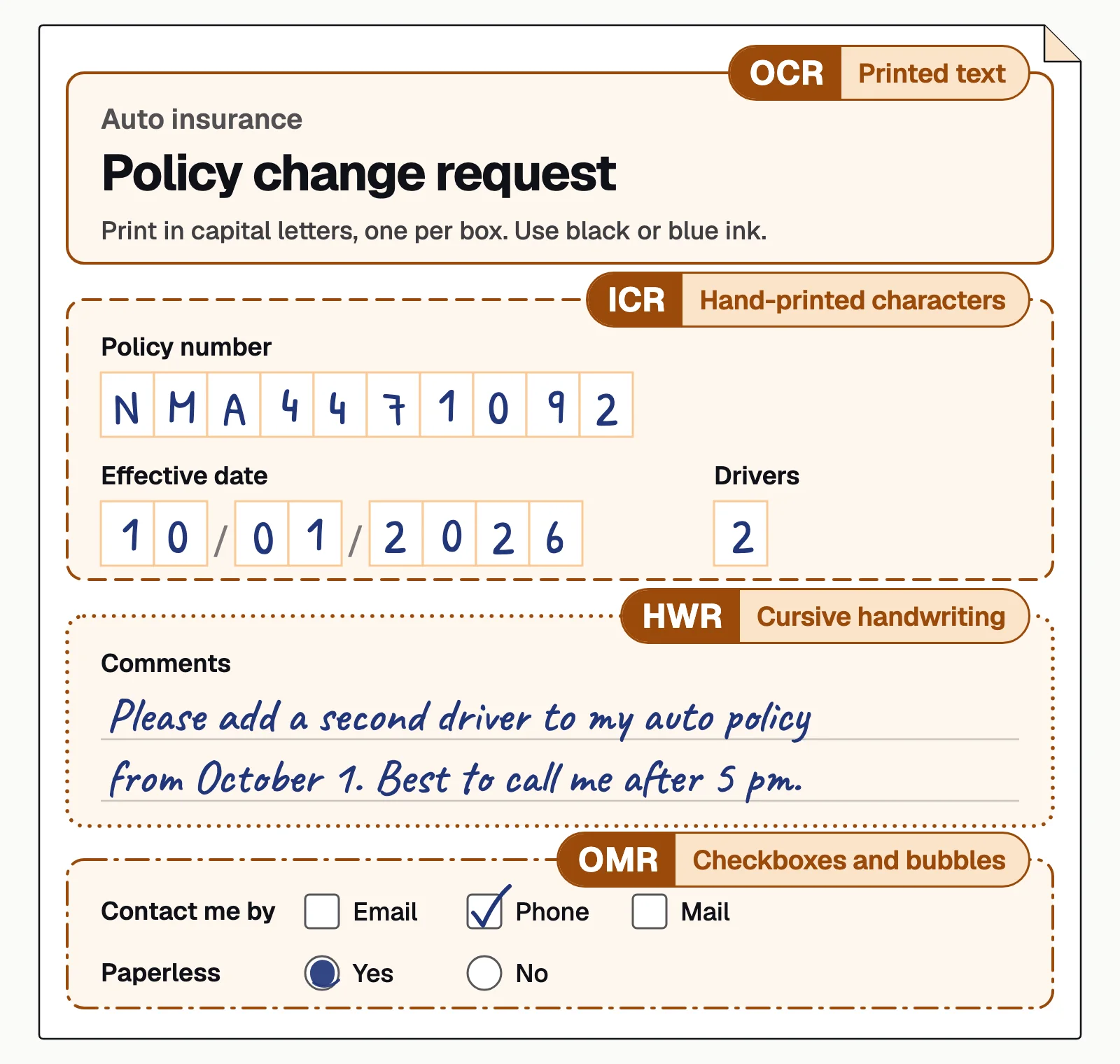
How handwriting recognition works#
A handwritten page goes through four stages before its values can be used. Each can fail, and an error in an early stage carries through to the rest.
- Scanned form
- Phone photo
- Fax
- 01Clean up the image
- 02Find lines and words
- 03Recognize sequences
- 04Score and validate
- Clean up the imageStraighten skewed pages, remove specks and shadows, and even out contrast so faint ink stands out from the background.
- Find lines and wordsLayout analysis finds where the writing is and boxes each line and word in reading order. Writing that drifts across ruled lines or into the margin breaks this step.
- Recognize sequencesA neural network reads each line image as a sequence instead of cutting it into letters, so the letters around an unclear one help decide it: the smudged letter in "handwr_ting" is almost certainly an i.
- Score and validateEach result gets a confidence score, and values are checked against formats, dictionaries and related fields. Anything below the threshold goes to a person.
Two widely cited papers show the whole-line approach: Shi et al. (2015), which trained convolutional and recurrent networks end to end to read text sequences without cutting them into characters, and TrOCR (2021), a transformer model tested on printed and handwritten text.
Where handwriting recognition fails#
Even well-trained models break in predictable places:
Degraded images
Faded ink, low-resolution scans, fax noise and heavy compression remove the detail the model reads.Touching characters
Cursive and cramped writing merge letters, so the model can't tell where one ends and the next begins.Writing outside the field
Entries that spill over field lines, wrap around printed text or run up the margin confuse layout analysis.Mixed scripts
A form that mixes scripts needs handwriting support for each one, and engines read handwriting in far fewer languages than print: Azure Document Intelligence reads printed text in 300+ languages but handwriting in 12, and Amazon Textract reads handwriting in English only.Look-alike characters
1, l and I, or 0 and O, can't be told apart without context, such as a field that only takes digits.
Handwriting reads best on forms designed for it: one box per character, room to write, and an instruction to print in capitals.
How to measure handwriting recognition accuracy#
Accuracy figures only mean something when you know what they count:
| Metric | What it counts | Use it for |
|---|---|---|
| Character error rate (CER) | Characters substituted, inserted or deleted, as a share of the correct text | Comparing engines on the same pages |
| Word error rate (WER) | The same, counted in words | Free-text notes and comments |
| Field-level accuracy | Fields that came out entirely right | Forms whose values feed a system |
For business documents, field-level accuracy is the one that matters, because one wrong digit makes a date or an amount wrong. Character rates hide this: if errors fell at random, a 5% CER would leave a 10-character field fully correct only about 60% of the time (0.95 to the power of 10). Where errors land matters too. A system with 95% character accuracy whose errors hit dates and amounts creates more rework than one with 90% whose errors fall in free-text notes.
Published figures come from the publisher's own test documents, so test on yours, including the worst ones. OCR accuracy works through CER and WER, and the best handwriting recognition software has a test plan and compares 8 tools.
What makes handwriting recognition enterprise-ready#
Recognition is one step in handwritten document processing. The controls around it decide whether errors reach your systems:
- Confidence routingFields below a confidence threshold go to a person instead of flowing on silently.
- ValidationValues are checked against formats, related fields and other documents: does the name on the application match the ID?
- Audit trailEvery extraction, review and correction is logged with who made it and when.
- API outputChecked fields reach your systems as structured data through an API and webhooks.
Docsumo reads handwritten text as well as printed text. Fields it's unsure about go to your reviewers: confidence thresholds are set per field, clicking a field highlights its source line on the page, and reviewers' corrections improve the model. Audit logging is on the Business plan, cross-document validation is on the Enterprise plan, and the data leaves through an API and webhooks. Here's field-level handwriting extraction on a property loss notice, with each handwritten entry in its own field:
| Field | Extracted value | Confidence |
|---|---|---|
| Policy number | QHM-5561204 | |
| Line of business | Homeowners (HO-3) | |
| Policy period | 2026-03-01 to 2027-03-01 |
| Field | Extracted value | Confidence |
|---|---|---|
| Insured name | Dana Whitlow | |
| Phone | (555) 010-2231 | |
| Contact note | Evenings (handwritten) |
| Field | Extracted value | Confidence |
|---|---|---|
| Date of loss | 2026-09-14 | |
| Cause of loss | Water: burst supply line | |
| Loss location | 212 Linden Ave, Fairhaven, LM | |
| Within policy period | Yes |
| Field | Extracted value | Confidence |
|---|---|---|
| Description | Burst supply line, kitchen and basement | |
| Estimated loss | 18,400.00 (handwritten) |
Where handwriting recognition is used#
Handwriting survives wherever paper forms do: loan applications and account-opening forms in lending, claim forms and loss notices in insurance, intake and consent forms in healthcare, and delivery receipts in logistics. On a proof of delivery, for example, Docsumo reads handwritten arrival and departure times and tells a signed signature box from a blank one.
The bottom line#
Handwriting recognition turns handwritten entries into text by cleaning the image, finding the lines, reading each line as a sequence and scoring the result. It's less accurate than printed-text OCR, so the confidence scores, checks and review around it matter as much as the model. Test it on your own worst documents, and measure fields, not just characters.
Book a demo with a few of your own handwritten forms, or start a free trial.
Frequently asked questions#
What is handwriting recognition?
Handwriting recognition (HWR) is software that converts handwriting in an image, or from pen input, into machine-readable text. Offline recognition reads scans and photos; online recognition reads pen strokes as they're written.
Can OCR read handwriting?
OCR built for printed text reads handwriting poorly. Handwriting OCR, meaning engines trained on handwriting, reads it, but less reliably than print, so business workflows send low-confidence handwritten fields to a person.
How accurate is handwriting recognition?
There's no single figure: it depends on the writing, the paper, the scan and the field. Measure character error rate and field-level accuracy on a sample of your own documents rather than relying on a vendor's test set.
What is the difference between handwriting recognition and ICR?
ICR (intelligent character recognition) traditionally reads hand-printed characters in boxes, one at a time. Handwriting recognition reads connected and cursive writing as whole words and lines. Modern engines do both; see intelligent character recognition.
Can handwriting recognition read cursive?
Yes. Modern systems read cursive, but less accurately than print, because joined letters blur where one character ends and the next begins. Faded ink and crowded fields make it harder still.
What is the difference between online and offline handwriting recognition?
Online recognition captures pen strokes as someone writes on a tablet, so it knows stroke order, timing and pressure. Offline recognition only sees the finished image, which makes it harder. Scanned business documents need offline recognition.
Sources
- Shi et al.: An end-to-end trainable neural network for image-based sequence recognition (arXiv:1507.05717)
- Li et al.: TrOCR, transformer-based optical character recognition with pre-trained models (arXiv:2109.10282)
- Microsoft: Azure Document Intelligence language support for Read and Layout
- AWS: Amazon Textract FAQs (language support)
First published . Last updated .