What is schema mapping? Examples, patterns, tools and validation
For operations and data teams moving extracted document data into an ERP, loan system or warehouse. It covers what a schema map is, how mapping works and how to test it before it touches production.

Key takeaways
- Schema mapping is a set of rules. Each rule says which field in one system goes to which field in another, and how the value changes on the way. Together the rules are often called a schema map.
- Schema matching finds fields that mean the same thing; schema mapping defines how to move and transform the data between them.
- For documents, map through a canonical schema: normalize every vendor's labels to one internal field, then map that field to your ERP once.
- The costly failures give no warning. A comma is read as a divider, a day and month swap places, or a name is cut short. Test every mapping for required fields, types, lengths, dates, codes and totals before production.
On this page
- What is schema mapping?
- Schema mapping vs schema matching
- How schema mapping works
- How to create a schema map for unstructured documents
- How to handle nested and hierarchical data
- How to validate schema mappings before production
- Schema mapping tools
- Which sender should you map first?
- Frequently asked questions
A schema is the list of fields a system expects. Schema mapping is a set of rules. Each rule says which field in one system goes to which field in another, and how the value changes on the way. In document processing, the rules turn a field such as vendor into the field your ERP or loan system expects, such as SUPPLIER_NAME. Each value arrives in the right type and format. Without the rules, your ERP or loan system cannot use the extracted data.
Three rules move one invoice into an ERP.
| Field | Extracted | Loaded into the ERP | Rule |
|---|---|---|---|
| Vendor | vendor: "Acme Corp" | SUPPLIER_NAME: "ACME CORP" | Rename and uppercase |
| Total | total: "$1,284.50" | INV_AMOUNT: 1284.50 | Strip the symbol and comma, store as a decimal |
| Date | date: "09/14/26" | INV_DATE: 2026-09-14 | Read as MM/DD/YY, write as ISO 8601 (YYYY-MM-DD) |
What is schema mapping?#
A schema defines what data looks like: field names, data types, which fields are required and how they relate. The fields extracted from an invoice are the source schema. The table your ERP loads is the target schema. The rules between them are often called a schema map. Some just rename a field, such as invoice_number to INV_NUM. Others change the value, such as "$1,234.56" to 1234.56, or join first_name and last_name into FULL_NAME.
The same idea moves data between databases, apps and warehouses. Documents add a twist, because the source schema changes with every sender's layout.
Schema mapping vs schema matching#
Schema matching answers "do these two fields mean the same thing?" Schema mapping goes further and defines how data moves from one to the other. Matching is an old problem. A 2001 survey by Rahm and Bernstein called it a basic problem in data integration and data warehousing. The survey also noted that people usually matched fields by hand.
| Aspect | Schema matching | Schema mapping |
|---|---|---|
| Purpose | Find fields that mean the same thing | Define how data moves and changes |
| Output | Pairs of corresponding fields | Rules a system can run |
| Automation | Often machine-learning assisted | Rules plus transformations |
| When | Discovery | Implementation |
Matching usually comes first. A matching tool might suggest that PO_NUM and purchase_order_number hold the same thing. The mapping rule then says "rename only, do not change the value."
How schema mapping works#
Follow the Acme Corp invoice from the table above through the three stages.
- Invoice fields
- Form fields
- Statement tables
- 01Normalize to a canonical schema
- 02Map and transform
- 03Validate
Extraction first reads three raw values off the scan. Acme labels its total "Amt due", so the normalize step renames that field to the standard field invoice_total. Other vendors' labels for the same value are renamed to invoice_total too.
The map comes next. The ERP can't store "$1,284.50" as text, so one rule strips the symbol and comma and writes a decimal. Another reads "09/14/26" as MM/DD/YY and writes 2026-09-14. The vendor name is a plain rename plus uppercase. These are one-to-one rules, the most common kind.
Other invoices need other patterns. A many-to-one rule joins street, city, state and ZIP code into one ADDRESS field. A one-to-many rule splits full_name into FIRST_NAME and LAST_NAME. A conditional rule sends tax_id to US_TIN when the country is "US", and to FOREIGN_TAX_ID otherwise. A rule can also change a type, such as the string "100" to the integer 100. It can standardize a value by trimming spaces or mapping a code, or calculate one, such as line_total from quantity times unit price. Validation, the last stage, is covered below.
How to create a schema map for unstructured documents#
With documents, the source schema keeps changing. One vendor's invoice says Inv #, Bill date and Amt due. Another's says Invoice No., Date of issue and Total payable. Both need to land in the same ERP table.
The reliable pattern puts a canonical schema in the middle. This is your own standard list of fields. You first convert the extraction output to that list, then map the list to the target once. A new vendor doesn't need a new ERP mapping.
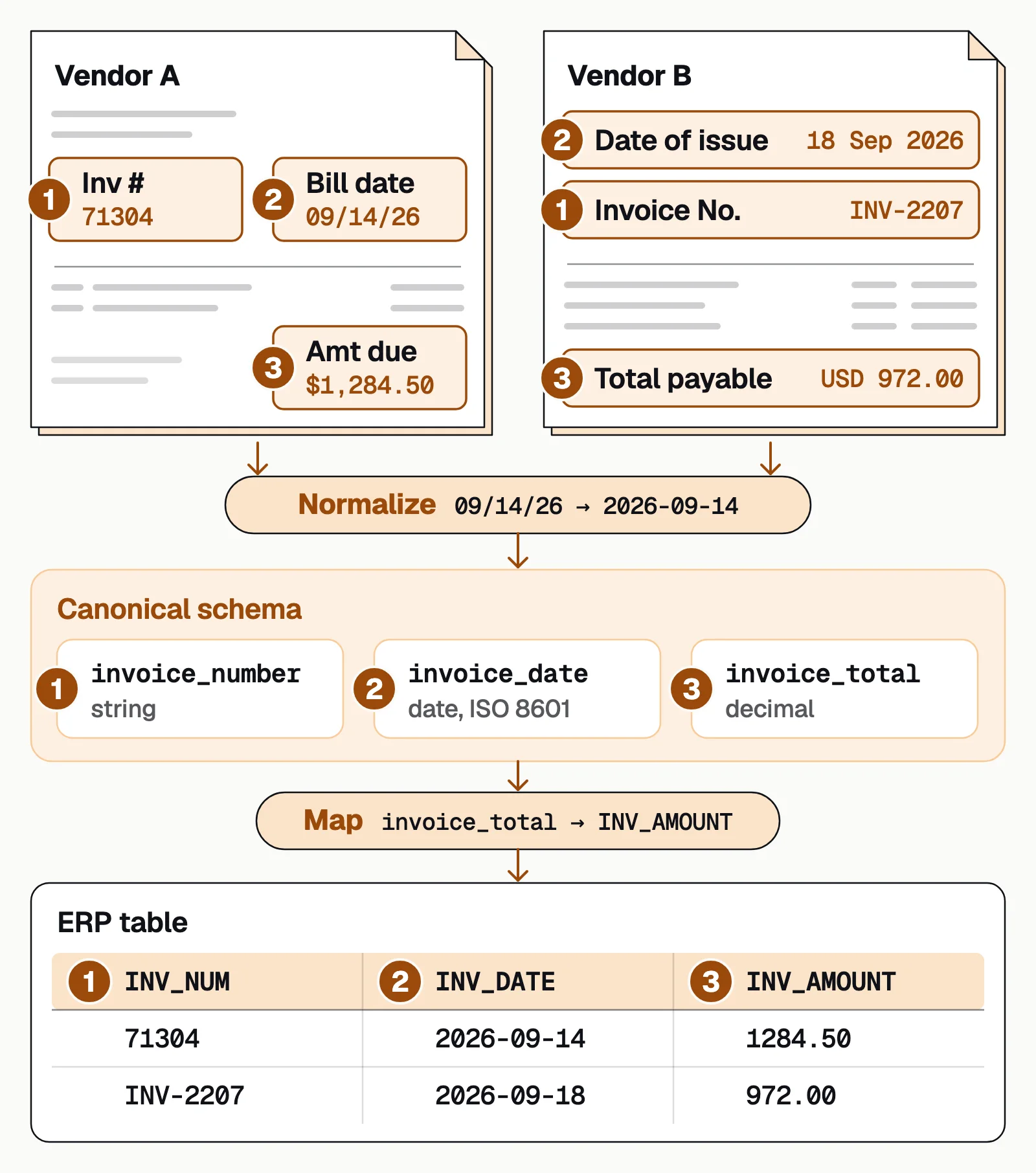
Keep the standard list to fields that every sender has, such as the invoice number and total. Treat vendor-specific fields as optional extras. More on the normalization step in text normalization.
In Docsumo's document workflows, extraction handles the layout differences and low-confidence values go to a reviewer. Master data lookup (Enterprise plan) checks values such as vendor names against your own records. A workflow step you set up, either an AI step or your own Python code, can rename, reformat or calculate fields for your target system. The data then leaves through the API and webhooks or as an Excel export.
How to handle nested and hierarchical data#
Line items on invoices, procedures on medical claims and shipment lines on bills of lading are nested. The header has one set of fields and each line has another. The target may want flat rows, with header fields repeated on each line. It may instead want header and child records linked by key.
- Give each line a fixed ID. Use invoice number plus line number, so each line stays linked to its invoice after the mapping.
- Decide flatten or preserve early. Flatten if your ERP wants flat rows. Keep the hierarchy if it accepts nested records.
- Loop over rows. Line-item counts vary, so don't assume fixed positions. Set null rules for optional columns such as a discount.
Mappings also break when a table continues on a second page and extraction returns two separate lists. Docsumo joins tables that continue across pages into one table, and maps the column headers. More in table extraction from PDFs.
How to validate schema mappings before production#
A mapping can pass testing and still be wrong. The job runs and the data loads, but values are wrong, cut short or missing. Run these checks on every mapping.
- Required fields are filledEvery target field that cannot be empty has a source field. An empty optional field must not leave the total blank.
- Types convert without loss"1,234" parsed with the comma as a delimiter becomes 1. Test every number format your senders use.
- Lengths fitA 50-character vendor name loaded into a 30-character column can be cut off without an error.
- Dates keep their meaning03/04/2026 is March 4 in the US and April 3 in much of Europe. Fix the source format per sender and write ISO 8601.
- Codes map to valid valuesUnits, currencies, GL codes and statuses land on values the target accepts.
- Totals still reconcileLine items plus tax equal the total after mapping, and line items are matched by key, not by their order on the page.
Test on a representative set, not happy-path samples. Use the longest vendor name, the invoice with 200 line items and the document with every optional field missing. Try changes in a test environment first and record which mapping version processed each document. Once live, watch null rates, parse errors and reconciliation gaps by sender. Docsumo's Business plan includes a test environment and audit logging.
Schema mapping tools#
The right tool depends on where the data starts.
Document AI platforms
Extract fields from PDFs and scans and deliver them in the shape your system expects. Docsumo, our product, is one: workflow steps you set up transform fields before they leave by API and webhooks or as an Excel export. It runs in the cloud only.Data integration and ETL tools
Visual mappers for moving data between databases and apps. FME's SchemaMapper, for example, restructures data using mappings kept in an external lookup table.Code in your pipeline
SQL or Python transformations that you write and test yourself, and keep under version control. You get the most control and carry the most maintenance.Matching and entity-resolution services
You describe what each input field holds so the service can match records. AWS Entity Resolution calls this a schema mapping.
Where we land. Don't shortlist a mapping tool by its label. Vendors call this schema mapping, data mapping, field mapping, document AI or IDP, and the names overlap. Take the same few files, including the sender that gives you the most trouble, and see what each tool puts in your target system.
Which sender should you map first?#
Start with the sender whose documents arrive most often, and map its fields end to end. Normalize each sender's labels to a canonical schema and map that schema to your target once. Then test the failure modes that don't throw errors before they reach production.
Book a demo with a few of your own documents, or start a free trial.
Frequently asked questions#
Can schema mapping be fully automated with AI?
AI can suggest likely field pairs from names and sample values, but mapping without review is risky. Research on LLM-based schema mapping found outputs that change with how the input is phrased. The safer pattern is to let AI suggest mappings and have a person approve each one before it runs in production.
How often do schema mappings need updates?
Whenever a source or target changes, such as a new vendor layout, a revised form or an API version upgrade. Monitoring null rates and parse errors by sender tells you when, better than a fixed schedule.
What's the difference between ETL mapping and document schema mapping?
ETL mapping usually starts from databases or APIs whose schemas are explicit and stable. Document schema mapping starts from fields extracted from PDFs and scans. Their labels and layouts vary by sender, so a normalization step comes before the standard mapping rules.
What is schema mapping in SAP HANA?
In SAP HANA the term is narrower. It links the authoring schema that content was built against, such as SAP_BW, to the physical schema in your own system, such as SAPBWD. Views built against one schema name then find their tables in yours.
What API can map captured document fields to our internal schema?
Most document AI APIs return extracted fields as JSON, often under the vendor's field names. The mapping to your schema then happens in the platform or in your integration code. In Docsumo, you can set up a workflow step, either an AI step or your own Python code. It renames, reformats and calculates fields before they're sent through the API and webhooks.
Sources
- Rahm and Bernstein: A survey of approaches to automatic schema matching (VLDB Journal, 2001)
- Buss et al.: Towards Scalable Schema Mapping using Large Language Models (arXiv, 2025)
- W3C: Date and Time Formats (a profile of ISO 8601)
- SAP Help Portal: Defining schema mapping
- Safe Software: SchemaMapper transformer (FME documentation)
- AWS: Creating a schema mapping (AWS Entity Resolution)
First published . Last updated .