What is intelligent document processing (IDP)?
For operations, finance and IT teams that handle a lot of documents: what IDP is, how the workflow runs, how it differs from OCR and how to choose a platform.

Key takeaways
- Intelligent document processing (IDP) is software that reads business documents, works out what each one is, pulls out the data you need and checks it before it goes into your systems.
- An IDP workflow has six stages: ingest, classify, extract, validate, review and integrate. OCR is only the first step of extraction.
- Unlike template OCR, IDP handles structured, semi-structured and unstructured documents, including layouts it hasn't seen before.
- The goal is straight-through processing: documents that pass every check flow through untouched, and people review only the exceptions.
- Judge a platform on field-level accuracy on your own documents, confidence thresholds, validation rules, the review screen, integrations and security.
On this page
- What is intelligent document processing?
- How intelligent document processing works: the IDP workflow
- The technologies behind IDP
- IDP vs OCR, RPA and automated document processing
- Benefits of intelligent document processing
- Where IDP is used
- Common challenges, and how to handle them
- When IDP pays off
- How to choose an intelligent document processing platform
- The bottom line
- Frequently asked questions
Intelligent document processing (IDP) is software that reads business documents, such as invoices, bank statements, tax forms and insurance certificates, and turns them into structured, checked data. It combines OCR with machine learning and language models to classify each document, extract the fields you need, validate them and send them to your systems, so people only handle the exceptions.
This guide covers how the workflow runs, the technology behind it, IDP vs OCR, where it's used and how to choose a platform.
What is intelligent document processing?#
Document processing is the work of turning the documents a business receives into data its systems can use: reading each one, keying the values and checking them. IDP is document process automation built on AI, so it needs no fixed template per layout and copes when every bank or vendor formats the page differently.
Structured
Fixed forms, such as IRS tax forms and ACORD certificates.Semi-structured
The same data in different layouts, such as invoices, bank statements and pay stubs.Unstructured
Free text, such as contracts and emails, where data is found by meaning.
Most business volume is semi-structured, which is where template OCR breaks. More in structured vs unstructured vs semi-structured data.
How intelligent document processing works: the IDP workflow#
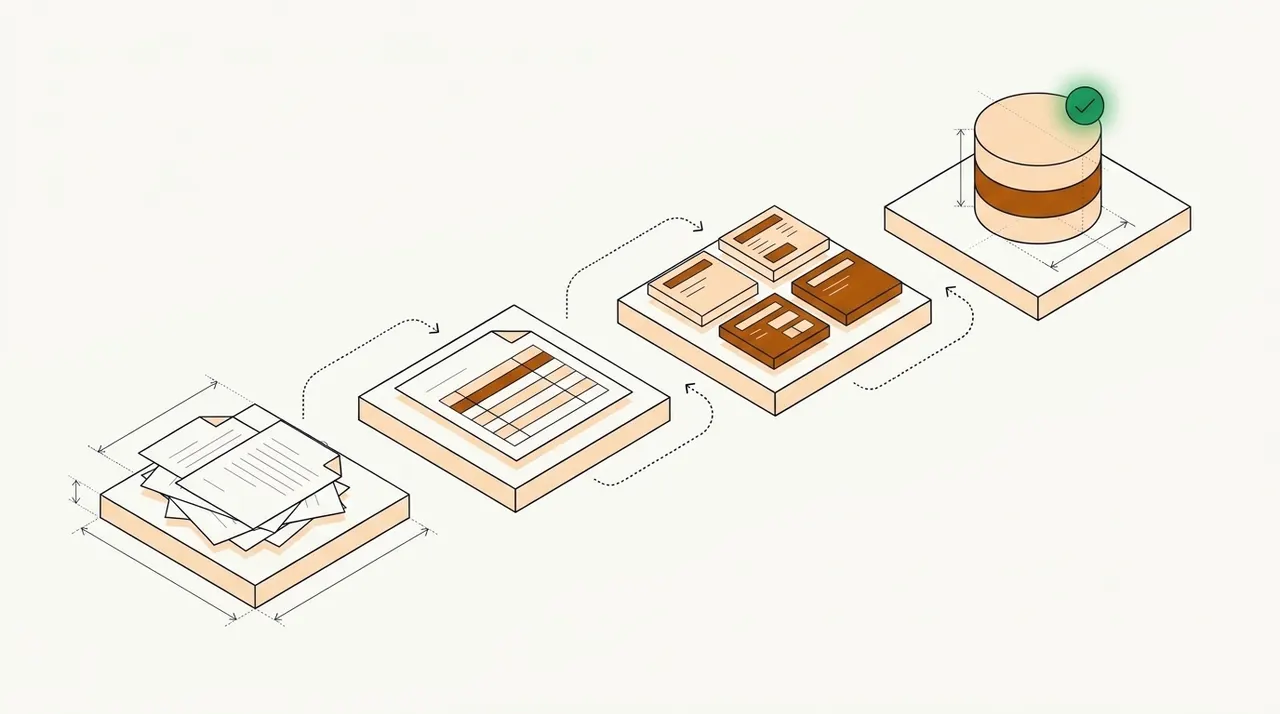
A typical IDP workflow runs six stages.
- Email inboxes
- Upload portals
- Scanners
- Cloud storage and API
- 01Ingest
- 02Classify
- 03Extract
- 04Validate
- 05Review exceptions
- IngestFiles from email, portals, scanners or an API land in one queue, with pages cleaned up.
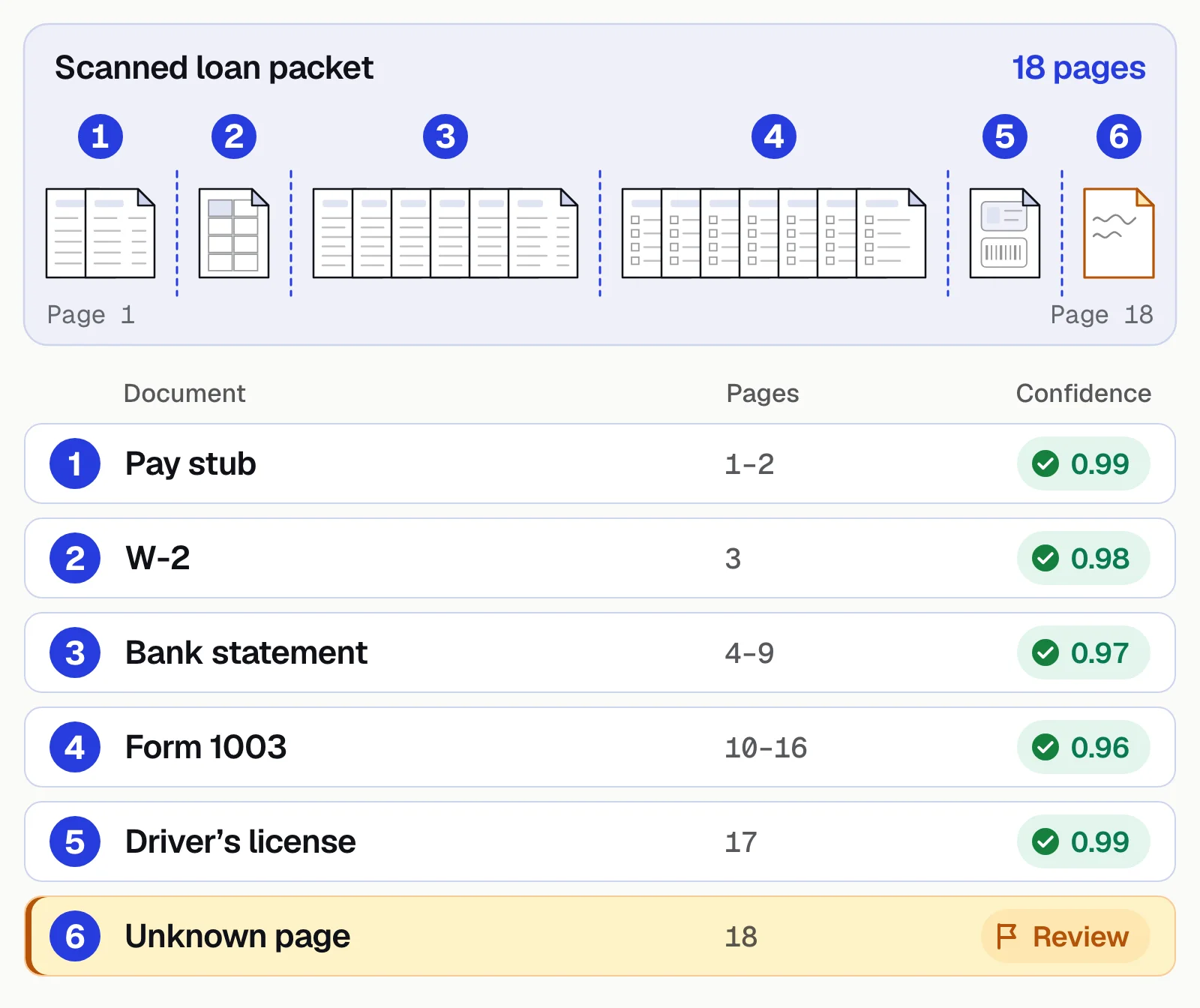
- ClassifyEach document is labeled (invoice, bank statement, W-2) and mixed packets are split. See document classification.
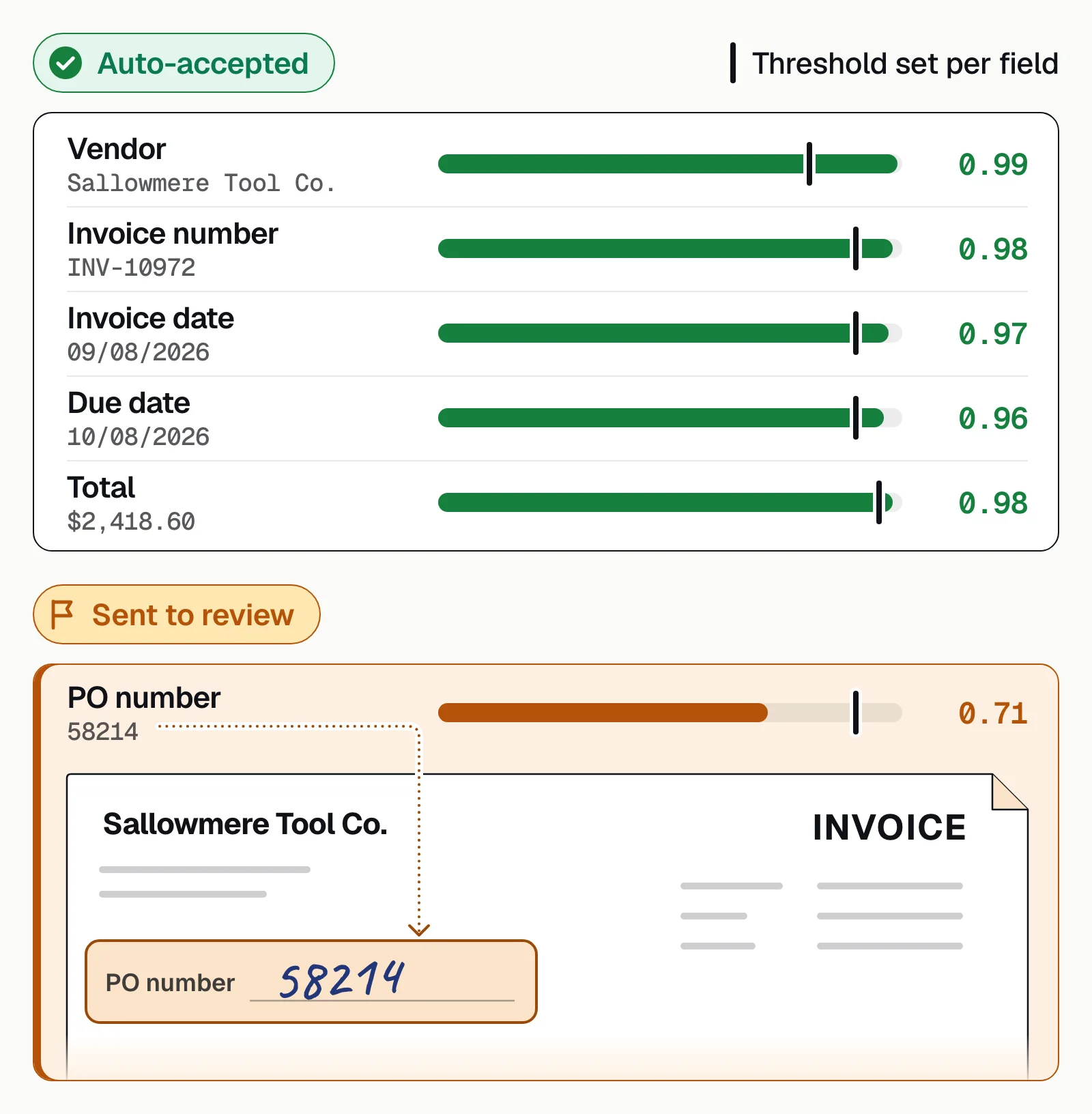
- ExtractOCR reads the text; layout and language models find the fields and tables, each with a confidence score.
- ValidateRules check formats, totals, master-data lookups and values across documents, such as pay stub income against bank deposits.
- ReviewLow-confidence values and failed checks go to a person, shown on the source page. See human-in-the-loop review.
- IntegrateClean data goes to your ERP, loan system or database through an API or webhook, sometimes after analysis such as categorizing bank transactions.
The technologies behind IDP#
OCR and ICR
Turn printed text (OCR) and handwriting (ICR) into characters.Computer vision
Finds tables, key-value pairs, checkboxes and signatures.Machine learning
Classifies documents and learns where fields sit, from examples and corrections.Language models
Read free text by meaning, such as the parties in a contract.Rules and validation
Math checks, formats, lookups and cross-document comparisons.Workflow and integration
Route documents, assign reviews and push results on.
Large language models can read unfamiliar layouts without training data, but they can also give confident, wrong answers, so production systems pair them with confidence scores, rules and human review. More in LLMs in document processing.
IDP vs OCR, RPA and automated document processing#
OCR is one step inside IDP, not an alternative to it.
OCR
- Turns an image of text into characters
- Doesn't know which value is which
- Needs a template per layout to pull out fields
- Doesn't check what it reads
Intelligent document processing
- Classifies each document and finds the fields you need
- Reads layouts it hasn't seen before
- Checks values with confidence scores and rules
- Sends only uncertain values to a person
RPA mimics clicks and keystrokes but can't read documents, so it often keys IDP's output into a system with no API. Template-based capture, the older form of automated document processing, needs a new template for every layout. More in IDP vs OCR and automated document processing.
Benefits of intelligent document processing#
Less data entry
People handle exceptions instead of retyping PDFs.Fewer errors
Validation catches transposed digits, wrong totals and mismatched names.Faster turnaround
Minutes, not days, when a loan, claim or payment is waiting.Scale without hiring
Month-end peaks are absorbed by software, not overtime.An audit trail
Every value links to its place on the page; every correction is logged.
Docsumo's published results:
- 99%field-level accuracy across 250+ document types
- 95%+of documents processed straight through, without manual review
- <5 minper document, down from 2+ hours by hand
- 96.67%less processing time at ClearOne Advantage, across 170,000 documents in 9 months
Where IDP is used#
Which team are you?
More in intelligent document processing examples.
Common challenges, and how to handle them#
Poor scans
Set confidence thresholds so bad reads go to review, not straight through.Document variety
Start with your highest-volume types and add more in phases.Format drift
Track accuracy by sender, so a layout change shows up in days.Mixed packets
If splitting misses a boundary, fields come from the wrong document. Test real combined uploads.Complex tables
Check that rows and columns survive merged cells and page breaks.
More in IDP challenges and how to solve them.
When IDP pays off#
- Volume outgrows the teamBacklogs build and customers wait.
- Errors are expensiveA keying mistake in a loan file, claim or payment means rework or a compliance finding.
- Speed wins businessFaster approvals or payments give you an edge.
- Skilled people key dataUnderwriters, analysts and AP specialists type instead of deciding.
Put in your own numbers:
Hours and budget automation frees up
What automating document data entry saves your team, and the most the software can cost before it stops paying for itself.
- Hours per month today
- Hours per month with automation
- Labor saved per month: your break-even software budget
- Labor saved per year
How it's worked out
- Hours today are documents times minutes by hand. With automation, only the documents that don't go straight through take a person's time, at the review minutes you set.
- Labor saved is the hours saved times the hourly cost. Software that costs less than that a month pays for itself on labor alone.
- It leaves out setup time and the value of faster turnaround.
Analysts put the IDP market at $3.22 billion to $10.41 billion in 2025, growing roughly 27% to 34% a year. More in IDP statistics.
How to choose an intelligent document processing platform#
- Test on your own documentsRun 50 to 200 real files, bad scans and mixed packets included, and measure field-level accuracy. At 10,000 documents a month, the gap between 95% and 99% correct is about 400 more documents to fix.
- Check confidence thresholdsSet per field, with values below them sent to review.
- Check validationRules, master-data lookups and cross-document checks.
- Look at the review screenA flagged field should open on its source line.
- Confirm integrations and securityAPI and webhooks, SOC 2 Type 2, role-based access and audit logs. See Docsumo's integrations and security.
- Compare total costPrice at your real volume, plus the review time left over. See Docsumo's pricing.
Judge the result by the straight-through processing rate, the share of documents no person touches. For vendors, see the best intelligent document processing software.
The bottom line#
IDP classifies each document, extracts the fields, checks them and sends them on, leaving people only the documents that need judgment. Test any platform on your own documents and count how many come through untouched.
Book a demo with a few of your own documents, or start a free trial.
Frequently asked questions#
What is the difference between IDP and OCR?
OCR turns an image of text into machine-readable characters. IDP uses OCR as one step, then classifies the document, finds the fields you need, validates them and sends them to your systems. See IDP vs OCR for a side-by-side comparison.
What is an IDP platform?
An IDP platform is software that runs the whole IDP workflow in one place, from intake, classification and extraction to validation, a review queue for uncertain values, and an API that sends the data on. For a comparison of platforms, see the best intelligent document processing software.
What is document processing?
Document processing is turning the documents a business receives, such as invoices, statements and forms, into data its systems can use by reading each one, capturing the values and checking them. Done by hand it's data entry; IDP automates it.
Is IDP the same as intelligent document automation or document process automation?
Mostly. Vendors use all three terms for software that reads incoming documents and moves the data on. "Document automation" on its own often means generating documents, such as contracts, from templates, which is a different job.
What documents can IDP process?
Most business documents, including invoices, bank statements, pay stubs, tax forms, insurance forms, contracts and IDs. Docsumo has pre-trained models for 250+ document types, and because LLMs structure the OCR output, it handles any other document type too; reviewer corrections improve the model over time.
How long does it take to implement IDP?
It depends on document variety and integrations. Pre-trained models for common documents can run on day one; custom documents need labeled samples and testing. You can try Docsumo free for 14 days on up to 1,000 pages.
Sources
- AWS: What is intelligent document processing?
- Microsoft Learn: What is Azure Document Intelligence in Foundry Tools?
- Precedence Research: Intelligent document processing market size (updated Jul 2026)
- Fortune Business Insights: Intelligent document processing market (updated Sep 2026)
First published . Last updated .