Key-value pair extraction: what it is, examples and how it works
For operations teams and developers: what counts as a key-value pair on a document, examples from invoices, forms, IDs and statements, how extraction works step by step, and where it goes wrong.

Key takeaways
- Key-value pair extraction pulls labeled fields off a document as pairs: the key is the label printed on the page, such as "Invoice #", and the value is the data that belongs to it, such as "NKE-9921".
- A value can be any type of data: text, a number, a date, an amount, a checked box or a whole address.
- The hard part is linking and mapping: the same field is printed as "Inv #", "Invoice No." or "Invoice #", and values sit beside, below or far from their labels.
- The key-value features of cloud OCR APIs return pairs as printed. Mapping them to your field names, normalizing formats and checking the values is left to you.
- Send values below a confidence threshold to a person, with their spot on the page highlighted, instead of reviewing every document.
On this page
Key-value pair extraction pulls labeled fields out of a document as pairs: the key is the label printed on the page, such as "Invoice #", and the value is the data that belongs to it, such as "NKE-9921". Software reads the page, links each label to the right value, even when the value sits below the label or is handwritten, and maps the pair to a field in your system.
This guide covers what counts as a key-value pair, examples from common business documents, how extraction works and what makes it hard.
What is a key-value pair?#
A key-value pair is two linked pieces of data: a key that names something and a value that holds it. Databases and JSON store data this way; the JSON standard calls them name/value pairs. On a document, the key is the printed label and the value is what's written beside it, under it or in its box. The value can be any type of data: text, a number, a date, an amount, a checked box or a whole address.
Here are the pairs at the top of an invoice, as printed and as your system should store them:
| Key as printed | Value as printed | Field | Value stored |
|---|---|---|---|
| Invoice # | NKE-9921 | invoice_number | NKE-9921 |
| Date | 08/12/2026 | invoice_date | 2026-08-12 |
| Terms | Net 30 | payment_terms | Net 30 |
| Due | 09/11/2026 | due_date | 2026-09-11 |
| PO # | 5498 (handwritten) | po_number | 5498 |
Key-value pair examples by document#
Most business documents are sets of key-value pairs around a table or two. The keys to expect:
Invoices
Invoice number, invoice date, due date, PO number, payment terms and total due. The line items are a table.Forms and applications
Name, date of birth, address and phone, plus checkboxes, whose value is their state: selected or not.IDs
Surname, given names, date of birth, document number and expiry date on a passport; short labels such as DL, DOB, EXP and CLASS on a driver's license.Bank statements
Account holder, account number, statement period, and opening and closing balances. The transactions are a table, not pairs.Certificates of insurance
Insured, insurer, policy number, effective and expiration dates, and each limit on an ACORD 25.Tax forms
The keys are box labels. On a W-2: the employer's EIN, box 1 wages and box 2 federal income tax withheld.
How key-value pair extraction works#
Whatever the tool, extraction runs through the same stages:
- PDFs
- Scans
- Phone photos
- Emailed forms
- 01Read the text
- 02Find the layout
- 03Link each key to its value
- 04Map to your fields
- 05Validate and review
Reading (OCR) turns the page image into text and positions, and its errors carry through: in our April 2025 OCR benchmark, the same language model got 84.8% of key-value pairs right from Docsumo's OCR text and fewer from the other systems' text. Layout analysis finds lines, boxes and tables, so a label pairs with the value beside or below it. Linking decides which text is a key and which is its value, checkboxes and multi-line addresses included. Mapping turns printed labels into your field names and normalizes formats. Validation checks types and totals, and sends low-confidence values to a person.
Here's the result on an invoice, grouped into tabs:
| Field | Extracted value | Read |
|---|---|---|
| Vendor name | Northeast Kitchen Equipment | |
| Invoice number | NKE-9921 | |
| Invoice date | 2026-08-12 | |
| Due date | 2026-09-11 | |
| Payment terms | Net 30 | |
| PO number | 5498 (handwritten) |
| Field | Extracted value | Read |
|---|---|---|
| Vendor address | 37 Bridge St, Westbrook, ME | |
| Bill to | Harbor Street Bakery LLC | |
| Ship to | 22 Thames St, Portland, ME | |
| Remit to | PO Box 3170, Portland, ME |
| Field | Extracted value | Read |
|---|---|---|
| Item code | WT-3072 | |
| Description | Stainless work table, 30 x 72 in | |
| Quantity | 2 | |
| Unit of measure | EA | |
| Unit price | 385.00 | |
| Amount | 770.00 |
| Field | Extracted value | Read |
|---|---|---|
| Subtotal | 23,250.00 | |
| Sales tax rate | 5.5% | |
| Sales tax | 1,278.75 | |
| Freight | 121.25 | |
| Total due | 24,650.00 |
What makes key-value extraction hard#
Reading the words is only the start. Labels vary by sender, values sit below or far from their labels, fields are left blank and labels repeat. The key-value features of cloud OCR APIs return the pairs as printed: Google's Form Parser documentation suggests custom logic to resolve varied keys, and Amazon Textract returns dates exactly as they appear on the page. The gap between raw pairs and usable data:
Raw pairs, as printed
- "Inv #", "Invoice No." and "Invoice #" come back as three different keys
- Dates as printed: 08/12/2026 on one invoice, 12 Aug 2026 on the next
- A blank field can pick up the next label's text
- "Date" could mean the invoice date or the ship date
- Amounts are text, with currency signs and commas
Fields your system can use
- All three land in one field, invoice_number
- One date format, such as 2026-08-12
- A blank field comes back empty
- Each date is named by its role: invoice_date, ship_date
- Amounts are numbers, checked against the line items and total
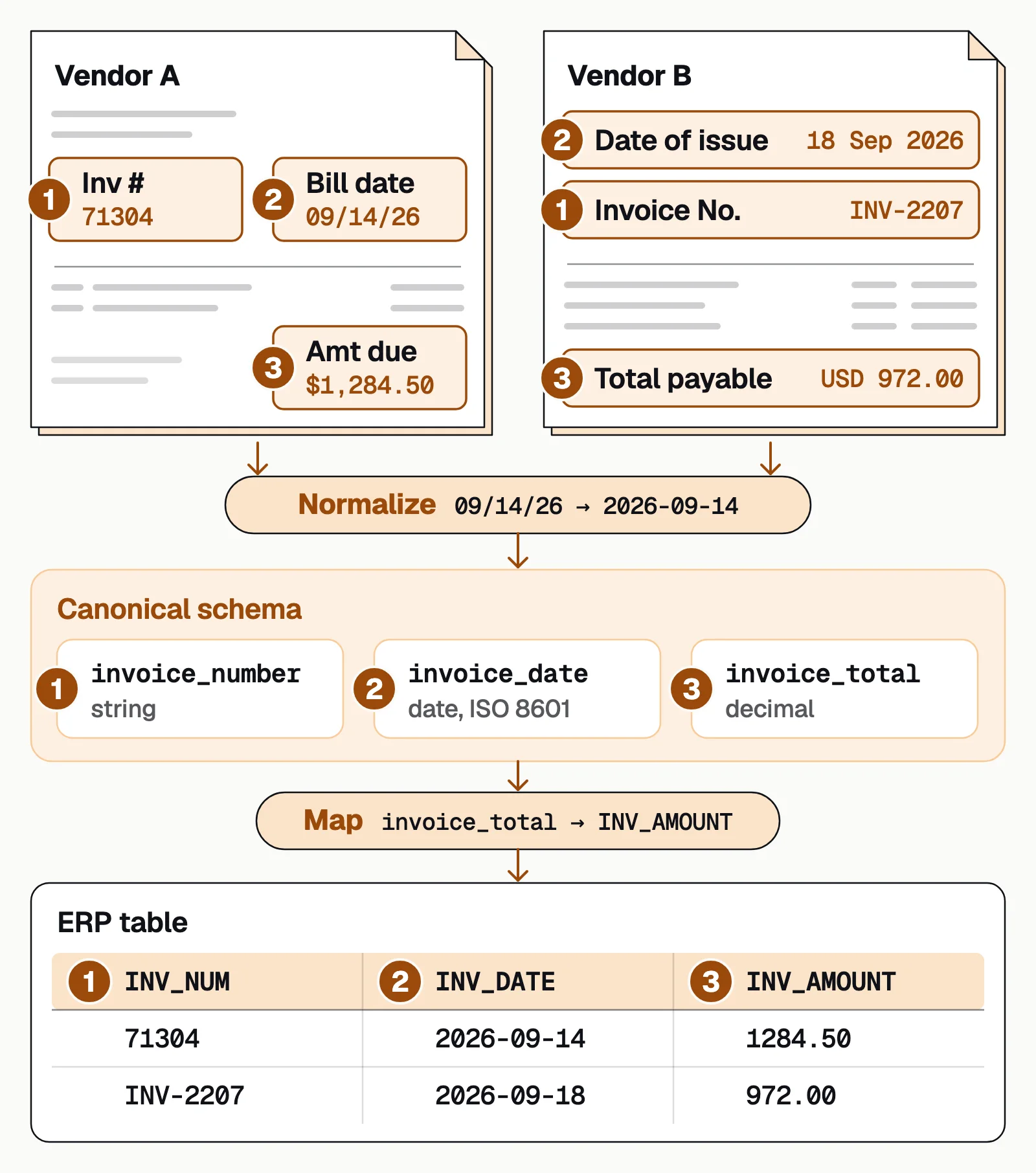
More on this step in what schema mapping is.
How to extract key-value pairs from PDFs#
There are four ways to do it, and they differ mostly in how much of the mapping and checking is left to you:
| Approach | How it finds pairs | What's left to you |
|---|---|---|
| Rules and templates | Regular expressions or fixed zones for each layout (zonal OCR) | A new template for every new layout |
| Cloud OCR APIs (forms features) | Amazon Textract (forms), Google Document AI Form Parser and Azure Document Intelligence (key-value pairs) return the pairs as printed | Mapping keys to your fields, normalizing values, checks and review |
| Your own model | A layout-aware model trained on labeled forms, or a language model given the page text and your field list | Training data or prompts, testing, and checks for confident wrong answers |
| IDP platforms | Pre-trained models return named fields, check them and send unsure values to a person | Setting up your fields, and testing on your worst documents |
Docsumo is an IDP platform, and it's our product. Its Document AI has pre-trained models for 250+ document types with 99% field-level accuracy, and because language models structure the OCR output, it isn't limited to those types. It reads printed and handwritten text, returns fields through the API and webhooks or as an Excel download, and sends each field below its confidence threshold to your reviewer, with the source line highlighted. It reads forms; it doesn't fill them out.
The bottom line#
A key-value pair is a label and its data, and business documents are full of them. Reading the text is only the first step; linking each label to its value, mapping it to your fields and checking it is where extraction succeeds or fails. Choose a tool by how much of that it leaves to you, and test it on your messiest files.
Book a demo with a few of your own documents, or start a free trial.
Frequently asked questions#
What is key-value pair extraction?
Pulling labeled fields out of a document as pairs of a key (the label, such as "Due date") and a value (the data, such as "09/11/2026"), then mapping each pair to a field in your system. It works on PDFs, scans and photos of invoices, forms, IDs and statements.
What can the value in a key-value pair be?
Any type of data. On a document, a value can be text, a number, a date, an amount, a checkbox state or a multi-line address. In JSON, a value can be a string, a number, an object, an array, true, false or null.
What is an example of a key-value pair?
On an invoice, "Invoice #: NKE-9921" is a key-value pair: "Invoice #" is the key and "NKE-9921" is the value. In JSON, the same pair is written as "invoice_number": "NKE-9921".
How do you extract key-value pairs from a PDF?
If every PDF has the same layout and a text layer, rules or a template can find each label and read the value beside it. For scans and varied layouts, use OCR with a model that finds the pairs, such as a cloud OCR API's forms feature or an IDP platform, then map the keys to your field names and check the values.
What is a key-value database?
A non-relational (NoSQL) database that stores data as a collection of key-value pairs, where each key is a unique identifier. Amazon DynamoDB is a well-known example; common uses include session data, shopping carts and caches.
How do you loop over key-value pairs in Python?
Extracted pairs usually arrive as JSON, which Python's json module loads as a dictionary. The loop "for key, value in fields.items():" then gives you each key and its value together, which is how the Python tutorial loops over a dictionary.
Sources
- AWS: Amazon Textract, form data (key-value pairs)
- Google Cloud: Document AI Form Parser
- Microsoft Learn: Document Intelligence add-on capabilities (key-value pairs)
- IETF RFC 8259: The JavaScript Object Notation (JSON) Data Interchange Format
- AWS: What is a key-value database?
- Python documentation: Looping techniques (dict.items)
- Python documentation: json
First published . Last updated .