AI invoice processing: how the software works, where it helps and how to start
For AP managers and controllers weighing AI for invoices. We cover each step, how it differs from template OCR, what to measure, e-invoicing and the rollout.

Key takeaways
- AI invoice processing uses machine learning to read invoices in any layout and extract header and line-item data. It checks the data against POs and vendor records and sends only exceptions to a person.
- Unlike template-based OCR, AI models don't need a template per vendor, so a new supplier or a changed layout doesn't break the process.
- Validation is worth more than reading the data. Totals and tax, vendor lookups, duplicate checks and PO and receipt matching catch errors before payment.
- Ardent Partners' State of ePayables 2025, a sponsored analyst report, puts the average cost to process an invoice at $9.84. The average processing time is 8.2 days, and best-in-class AP teams process invoices at 79% lower cost and 79% faster than their peers.
- E-invoicing mandates change what AI does, but you still need it. E-invoices arrive as data but still need matching and checks. Other suppliers still send PDFs.
On this page
- What is AI invoice processing?
- Manual entry vs template OCR vs AI
- How AI invoice processing works
- Where AI helps most in accounts payable
- What the numbers look like
- What to measure
- How to choose and roll out AI invoice processing software
- AI and e-invoice compliance
- Count the fixes before you count the savings
- Frequently asked questions
AI invoice processing uses machine learning to read supplier invoices in any layout. It pulls out the header and line-item data and checks it against purchase orders and vendor records. Only the exceptions go to a person. It replaces manual keying and template-based OCR, which breaks every time a vendor changes its invoice format.
Below, we cover what the AI does at each step, where it helps most, what to measure and what e-invoicing changes.
What is AI invoice processing?#
AI invoice processing automates four jobs between receiving an invoice and recording it in your accounting system. It uses software that reads images and language models that understand text.
Read
Turns PDFs, scans, photos and email attachments into text, including tables and handwriting.Understand
Finds the invoice number, due date and line items on layouts it hasn't seen before.Check
Reconciles totals and tax, looks up the vendor, catches duplicates and matches lines to POs.Route
Sends clean invoices for approval and exceptions to a reviewer.
Reading and understanding together are intelligent document processing. Adding checking and routing makes it accounts payable automation. Here's what the first two jobs produce from one invoice:
| Field | Extracted value | Read |
|---|---|---|
| Vendor name | Northeast Kitchen Equipment | |
| Invoice number | NKE-9921 | |
| Invoice date | 2026-08-12 | |
| Due date | 2026-09-11 | |
| Payment terms | Net 30 | |
| PO number | 5498 (handwritten) |
| Field | Extracted value | Read |
|---|---|---|
| Vendor address | 37 Bridge St, Westbrook, ME | |
| Bill to | Harbor Street Bakery LLC | |
| Ship to | 22 Thames St, Portland, ME | |
| Remit to | PO Box 3170, Portland, ME |
| Field | Extracted value | Read |
|---|---|---|
| Item code | WT-3072 | |
| Description | Stainless work table, 30 x 72 in | |
| Quantity | 2 | |
| Unit of measure | EA | |
| Unit price | 385.00 | |
| Amount | 770.00 |
| Field | Extracted value | Read |
|---|---|---|
| Subtotal | 23,250.00 | |
| Sales tax rate | 5.5% | |
| Sales tax | 1,278.75 | |
| Freight | 121.25 | |
| Total due | 24,650.00 |
Manual entry vs template OCR vs AI#
| Manual entry | Template OCR | AI invoice processing | |
|---|---|---|---|
| New vendor layout | No setup, but slow | Needs a new template | Handled without a template |
| Line items | Keyed by hand | Only if the template maps them | Extracted as a table |
| Scans and photos | Readable by people | Accuracy drops on skewed or poor scans | Reads scans; flags low-confidence fields |
| Validation | Depends on the reviewer | Usually none | Rules, PO matching and duplicate checks |
How AI invoice processing works#
Every invoice takes the same path, whatever channel it arrives through.
- AP inbox
- Supplier portal
- Scanned paper
- 01Classify
- 02Extract
- 03Validate
- 04Route
The software first sorts each document by type, so invoices are separated from credit memos, statements and receipts. It then reads the header fields and line items and gives each a confidence score, which shows how sure it is. Docsumo reaches 99% field-level accuracy across 250+ document types, invoices included.
Validation comes next. Totals and the vendor are checked, along with duplicates and the 2-way or 3-way match. Clean invoices go for approval. Exceptions go to a reviewer, with the field that failed the check highlighted. Approved data then goes to the ERP by API. The reviewers' corrections improve the model.
Where AI helps most in accounts payable#
Capture
Header fields and line items from any layout, with no keying.Duplicate detection
Flags an invoice that duplicates one already received.PO and receipt matching
Compares quantity, unit price and amount with the PO and goods receipt. Docsumo does this on the Enterprise plan.Approval routing
Invoices that pass the checks go for approval. Docsumo routes invoices for approval on the Business plan.A review queue that learns
Unsure fields go to a person with the source line highlighted, and corrections improve the model.Posting
Validated data goes to your ERP through an API and webhooks.
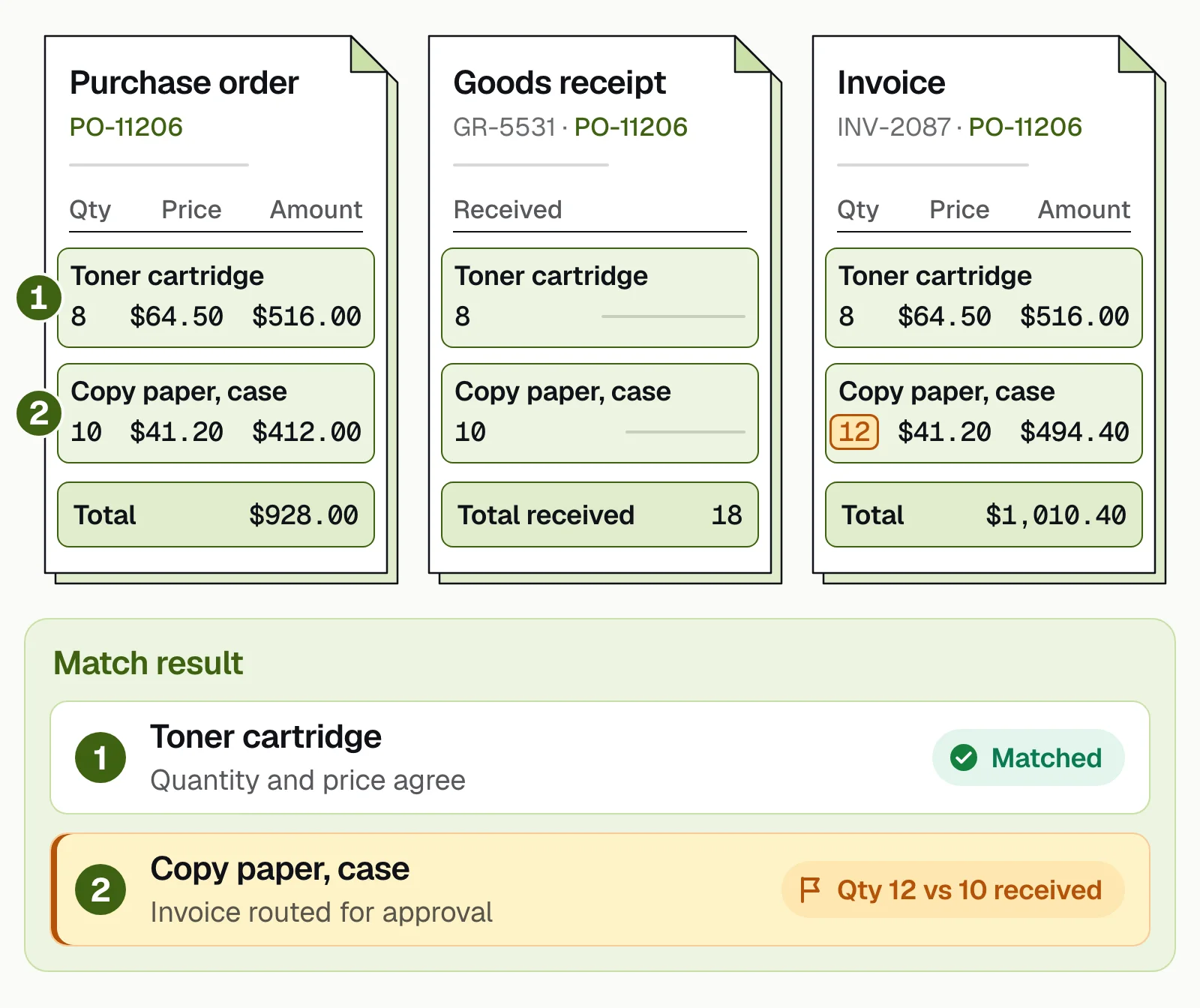
Matching stops you paying for overbilling, or for goods that were billed but not delivered. In the example below, the toner line matches. The invoice bills 12 cases of copy paper when 10 were received, so it's routed for approval.
What the numbers look like#
Ardent Partners' State of ePayables 2025, a sponsored analyst report, puts the average cost to process an invoice at $9.84. The same report puts the average processing time at 8.2 days and the average invoice exception rate at 18.4%. Best-in-class AP teams process invoices at 79% lower cost and 79% faster than their peers. Docsumo's own results are below, including at Valtatech.
- 95%+of documents processed straight through, without manual review
- <5 minper document, down from 2+ hours
- 65%+lower costs at Valtatech
- 99%+of invoices processed touchless at Valtatech
What to measure#
Take a baseline before the rollout and track the same numbers after.
- Straight-through rateInvoices posted with no human touch.
- Field-level accuracyExtracted fields that were right, on your own invoices.
- Exception rate by reasonNo PO, price variance, missing approver, low confidence.
- Cycle timeReceipt to approval, and receipt to payment.
- Cost per invoiceFully loaded AP cost divided by invoices processed.
- Duplicates caughtDuplicate and wrong payments stopped before they go out.
Where we land. Judge an AI invoice tool by what your team had to fix, not by the accuracy figure on a vendor's page. Run your own invoices through a trial, then count every field a person corrected and every invoice that needed a touch. A vendor that shows you that count on day one is easier to trust than one that quotes a headline number.
How to choose and roll out AI invoice processing software#
Test any invoice processing software on your own invoices, then roll it out one part at a time.
- Map the processList invoice sources, volumes, PO share, approval rules and your ERP.
- Build a test setPull a few hundred real invoices: top vendors, long-tail vendors and bad scans.
- Run a trialMeasure field-level accuracy on that set, line items included.
- Write the rulesStart with totals, duplicates, vendor checks and PO matching.
- Connect the ERPPull vendors and POs in, push approved invoices out, and test on a sandbox first.
- Start with one partGo live with one entity or vendor group, with a person on every exception.
- Review monthlyFix the biggest exception reason and approve more invoices automatically once the numbers stay steady.
Invoices carry bank details, so check security too. Docsumo is SOC 2 Type 2, HIPAA and GDPR compliant.
AI and e-invoice compliance#
An e-invoice carries its data in a structured format, such as XML, that the buyer's system reads directly. More countries are making e-invoicing mandatory. The EU's VAT in the Digital Age rules, in force since April 2025, let member states make e-invoicing mandatory. From July 1, 2030, the EU requires digital reporting of cross-border B2B transactions. In France, since September 1, 2026, every business in scope must be able to receive e-invoices. Large and mid-sized companies must issue them too. Smaller companies must issue them from September 1, 2027.
That changes what AI does, not whether you need it.
Read the PDFs that remain
Suppliers outside a mandate still send PDFs and scans.Check what the invoice says
A valid e-invoice can still bill the wrong quantity or repeat an earlier invoice.Keep one queue
E-invoices and PDFs get the same checks and approvals.
Your e-invoicing platform handles format and delivery. AI invoice processing checks the content.
Count the fixes before you count the savings#
AI invoice processing pays off when it does more than read the invoice. Reading any layout removes the keying. Checks and matching stop bad payments. Sending only exceptions to people lowers the cost per invoice. Test it on your own invoices and automate more once the numbers stay steady.
Book a demo with a batch of your own invoices, or start a free trial.
Frequently asked questions#
How is AI used in invoice processing?
AI reads incoming invoices and identifies fields such as vendor, invoice number, dates and line items, plus tax and totals. It checks them against purchase orders and receipts, and against vendor records. It flags duplicates and mismatches and routes clean invoices for approval and posting.
What is the difference between OCR and AI invoice processing?
OCR converts an image into text. AI invoice processing also works out which text is which field, handles layouts it hasn't seen before, validates the values and learns from corrections. Template OCR needs a template for every vendor layout.
Can AI approve invoices automatically?
Yes, within rules you set. An invoice that meets them can be approved without a person. One example is a clean 3-way match under a set amount from a known vendor. The rest go to an approver. Most teams start with human approval and widen the rules as accuracy is proven.
How accurate is AI invoice data extraction?
It depends on the model and the documents, so measure it at the field level on your own invoices during a trial. Docsumo reports 99% field-level accuracy across 250+ document types.
Does AI invoice processing work with my ERP?
Usually. AI invoice platforms push validated invoice data to ERPs and accounting systems through APIs and webhooks, and pull vendor and PO data back for matching. Docsumo connects through its API and webhooks.
Can AI help with e-invoice compliance?
Partly. Your e-invoicing platform handles the format and delivery rules. AI invoice processing checks what each invoice says, such as the PO match and the totals, and whether it repeats an earlier invoice. It also reads the invoices that still arrive as PDFs or scans.
Sources
- Ardent Partners: State of ePayables 2025, AP benchmarks and best-in-class performance (sponsored analyst report, Jan 2026)
- European Commission: VAT in the Digital Age (ViDA)
- French tax administration (DGFiP): Fiche 3, when a business must receive and issue e-invoices (updated June 2026)
First published . Last updated .