OCR for claims processing: what to extract and how to automate it
For claims operations teams at carriers, TPAs and health plans: what OCR does in claims intake, which data to pull from each claim document, and why most teams now pair OCR with AI extraction and validation.

Key takeaways
- OCR claims processing converts scanned claim documents, PDFs and photos into machine-readable text so claim data doesn't have to be keyed by hand.
- Plain OCR only produces text. To get policy numbers, dates of loss, amounts, codes and VINs into the right fields, claims teams add AI extraction and validation on top.
- Each claim type has its own documents: CMS-1500 and UB-04 forms for health claims, estimates and police reports for auto, contractor invoices for property, first reports of injury for workers' compensation.
- The main obstacles are poor scans, handwriting, varied formats, sensitive data and integration with the claims system.
- A good setup sends only low-confidence fields and failed checks to an adjuster or processor, and everything else straight to the claims system.
On this page
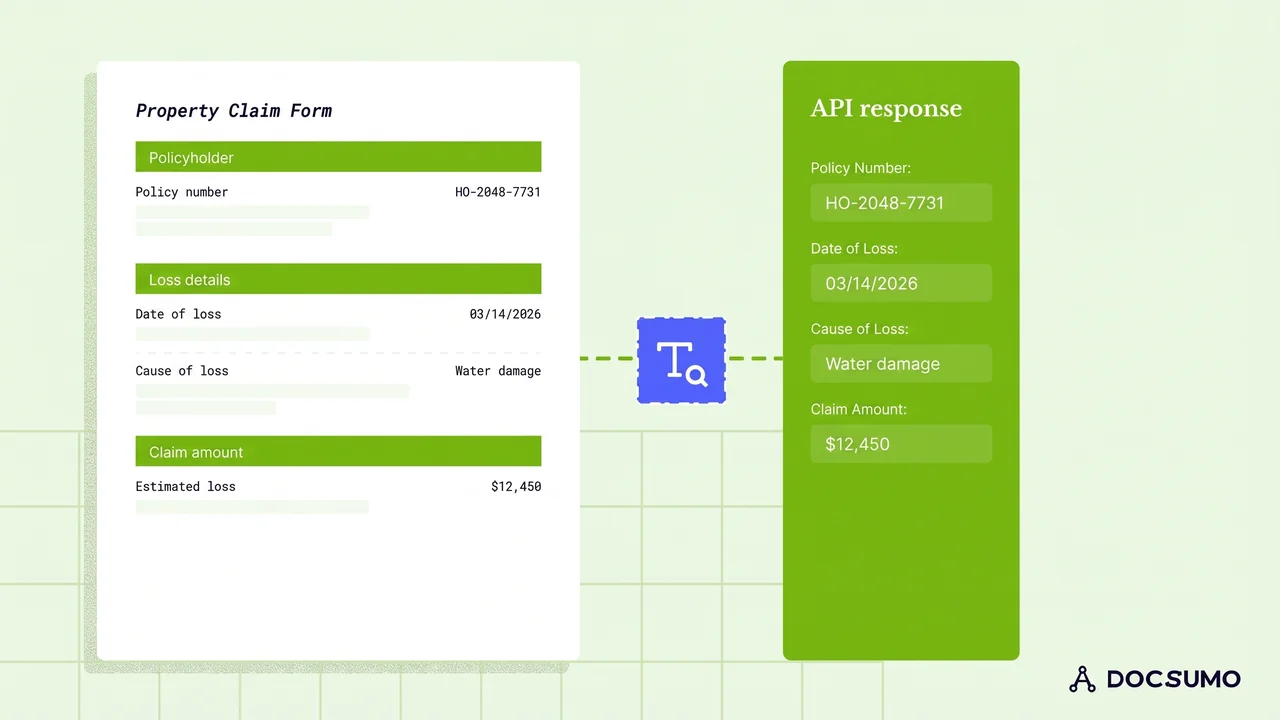
OCR claims processing is the use of optical character recognition to turn claim documents such as claim forms, medical bills, repair estimates, police reports and invoices into machine-readable text, so claim data can be captured without manual typing. On its own, OCR only produces text. Claims teams get real automation by adding AI extraction to find the right fields, validation to check them, and a review step for anything uncertain.
This guide covers the documents and data by claim type, the six steps from capture to claims system, the benefits, and the limits of plain OCR.
What OCR does in claims processing#
Claims start with documents, and many still arrive as scans, faxes, phone photos or flattened PDFs. OCR reads the characters on those pages. That makes them searchable, and it's the first step to extracting data.
What OCR doesn't do is understand. It can read "03/14/2026" but not tell whether that's the date of loss, the date of service or the date the form was signed. That's the job of AI extraction, which uses layout and context to map each value to the right field.
| Capability | Plain OCR | OCR plus AI extraction (IDP) |
|---|---|---|
| Reads printed text | Yes | Yes |
| Reads handwriting | Limited | Better, with confidence scores |
| Maps values to fields | No, or only with a fixed template | Yes, across layouts |
| Handles tables such as itemized bills | Poorly | Yes, row by row |
| Validates data | No | Rules, lookups and cross-document checks |
| Flags uncertain values | No | Yes, for human review |
Documents and data by claim type#
| Claim type | Common documents | Key data to extract |
|---|---|---|
| Health and medical | CMS-1500, UB-04, itemized bills, explanation of benefits, medical records | Patient and insured IDs, provider NPI, dates of service, diagnosis and procedure codes, charges |
| Auto | Loss notice, police report, repair estimate, invoices, photos | Policy number, date and place of loss, vehicle year, make, model and VIN, parties, estimate totals |
| Property | Loss notice, contractor estimates and invoices, proof of ownership | Policy number, property address, cause of loss, damage description, amounts |
| Liability | Loss notice, incident report, demand letter, medical bills | Claimant, date and description of incident, injuries, amounts demanded |
| Workers' compensation | First report of injury, medical bills, wage statements | Employee, employer, date and nature of injury, treatment, wages |
For health claims, the CMS-1500 is the standard professional claim form and the UB-04 is used by institutional providers. See IDP for healthcare for how these are automated.
How to extract data from claims documents, step by step#
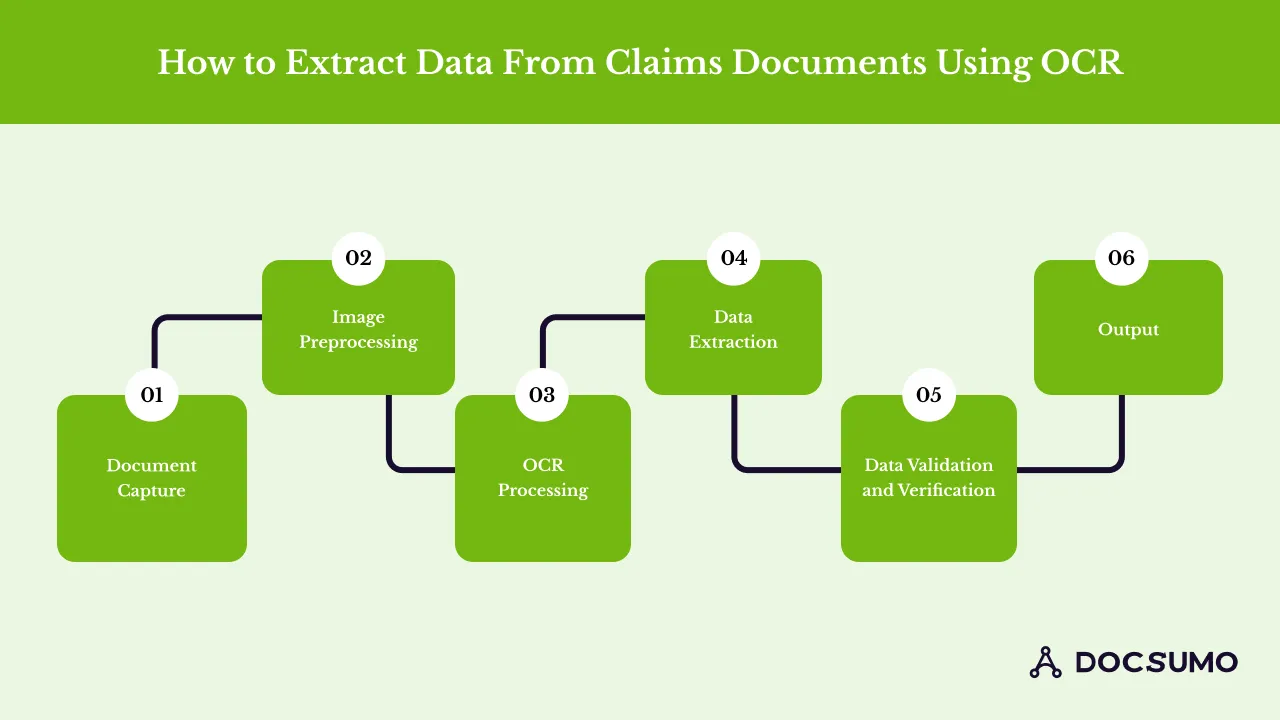
- Document capture. Collect documents from email, portals, fax, mail scanning and mobile uploads into one queue.
- Image preprocessing. Straighten, de-noise and enhance scans and photos so text is legible.
- OCR processing. Convert each page to text with positions, including handwriting where possible.
- Data extraction. Classify each document and pull its fields and tables: policy number, date of loss, codes, line items, totals.
- Validation and verification. Check the policy is in force on the date of loss, totals add up, codes are valid, and amounts agree across documents.
- Output. Send structured data to the claims system through an API or webhook, and route exceptions to a processor or adjuster.
Benefits of OCR and AI in claims processing#
- Faster intake: claims reach adjusters without waiting for data entry. Docsumo takes under 5 minutes per document, down from more than 2 hours by hand.
- Fewer errors: 99% field-level accuracy on 250+ document types, with validation catching what extraction misses.
- Lower cost: Docsumo reports saving $15 per processed document.
- Better fraud detection: comparing documents in a claim exposes inconsistencies; Docsumo reports 64% lower fraud with cross-document validation.
- Audit trail: every value links back to its source page.
- Scale: catastrophe surges don't need temporary data entry staff.
Challenges and how to handle them#
- Poor document quality. Faxes and phone photos lower accuracy. Use preprocessing and route low-confidence fields to review.
- Many formats. Every body shop, contractor and provider has its own layout. Use AI extraction that doesn't need a template per format.
- Sensitive data. Medical and personal data need controls. Require SOC 2 Type 2, HIPAA and GDPR coverage.
- Integration. Claims systems vary in how they accept data. Plan API, webhook or RPA delivery early.
- Change management. Show processors and adjusters how review works before go-live.
Choosing software for claims document processing#
Look for pre-trained models for claim documents, handwriting support, table extraction for itemized bills and estimates, configurable validation rules, a fast review screen and integration with your claims system. For a comparison of tools, see the best insurance claims automation software.
The bottom line#
OCR is the first step in automating claims, not the whole answer. Pair it with AI extraction, validation and a review step, and claim documents become claim data that flows straight to adjusters and systems, with people handling only the exceptions.
Frequently asked questions#
What is OCR in claims processing?
It's the use of optical character recognition to turn scanned or photographed claim documents into machine-readable text, so claim data can be captured and processed without manual typing.
Is OCR enough to automate claims intake?
Usually not. OCR gives you text but not which value is the date of loss or the billed amount. AI extraction, validation and a review step turn that text into claim data. See insurance automation.
Which claim forms can OCR and AI read?
Standard forms such as the CMS-1500, UB-04 and ACORD loss notices, plus unstructured documents such as repair estimates, invoices, police reports and medical records. See our guide to health insurance claim form extraction.
Can OCR read handwritten claim forms?
Modern OCR and handwriting recognition read much handwriting, but accuracy drops on poor scans and messy writing. Keep a review step for low-confidence values.
How does OCR help with claims fraud?
OCR itself doesn't detect fraud, but the data it captures makes checks possible, such as comparing amounts across invoices and estimates or spotting duplicate bills. Docsumo reports 64% lower fraud with cross-document validation.
Sources
First published . Last updated .