RPA in insurance claims processing: use cases, limits and how to add AI
For claims operations and IT leaders at carriers, MGAs, TPAs and health plans: where bots fit in the claims lifecycle, what they can't do on their own, and how to pair them with document AI.

Key takeaways
- RPA in claims processing uses software bots to repeat rule-based steps in claims systems: creating claim records, checking policy status, copying data between screens and sending standard letters.
- RPA fits structured, repetitive tasks in older systems without APIs.
- On their own, bots can't read documents: loss notices, repair estimates, medical bills and police reports need document AI to turn them into data first.
- The strongest setup pairs document AI for intake with APIs or bots for system updates, and sends exceptions to a person.
- Bots break when screens change, so use an API wherever a system has one.
On this page
RPA in claims processing is the use of software bots, known as robotic process automation, to repeat the rule-based steps of handling an insurance claim: creating the claim record, checking policy status, copying data between systems and sending standard letters. It suits older claims systems without APIs. On their own, bots can't read the documents a claim arrives with, so RPA works best with document AI in front of it.
What RPA does in claims#
A bot repeats what a person does on screen: log in, open a record, type a value, click a button.
Bots alone
- Start after someone keys the loss notice
- Read fixed fields on known screens
- Stop at a scanned estimate or medical bill
- Pass on whatever data they're given
Document AI in front of bots
- Start when the documents arrive
- Read loss notices, estimates and bills in varied layouts
- Check values against the policy and each other
- Send only uncertain fields to a person
RPA use cases across the claims lifecycle#
| Claim stage | What a bot can do | What it needs first |
|---|---|---|
| First notice of loss (FNOL) | Create the claim record | Loss notice data |
| Coverage verification | Check policy status, dates and limits | Policy number, date of loss |
| Assignment | Route the claim to an adjuster queue | Routing rules |
| Investigation support | Pull prior claims, order reports, file documents | Classified documents |
| Settlement and payment | Enter approved payments | Adjuster approval |
| Subrogation | Open recovery tasks when a third party is at fault | Liability details |
| Reporting | Compile status and aging reports | Consistent claim data |
Most rows need data from a document first, such as this loss notice:
| Field | Extracted value | Confidence |
|---|---|---|
| Policy number | QHM-5561204 | |
| Line of business | Homeowners (HO-3) | |
| Policy period | 2026-03-01 to 2027-03-01 |
| Field | Extracted value | Confidence |
|---|---|---|
| Insured name | Dana Whitlow | |
| Phone | (555) 010-2231 | |
| Contact note | Evenings (handwritten) |
| Field | Extracted value | Confidence |
|---|---|---|
| Date of loss | 2026-09-14 | |
| Cause of loss | Water: burst supply line | |
| Loss location | 212 Linden Ave, Fairhaven, LM | |
| Within policy period | Yes |
| Field | Extracted value | Confidence |
|---|---|---|
| Description | Burst supply line, kitchen and basement | |
| Estimated loss | 18,400.00 (handwritten) |
Benefits of RPA in claims processing#
- Faster hand-offs. Bots work around the clock, so claims don't sit in queues between steps.
- No system replacement. Bots use the screens staff already use.
- The same steps every time. Every claim gets the required letters and checks, with a log.
Where RPA falls short#
It can't read documents
ACORD loss notices, police reports, estimates and medical bills often arrive as scans; on its own, a bot reads only fixed fields on a screen.It breaks when screens change
An upgrade or a moved field stops the bot until someone fixes the script.It can't handle exceptions
A missing policy number or a date of loss outside the policy period needs a person.
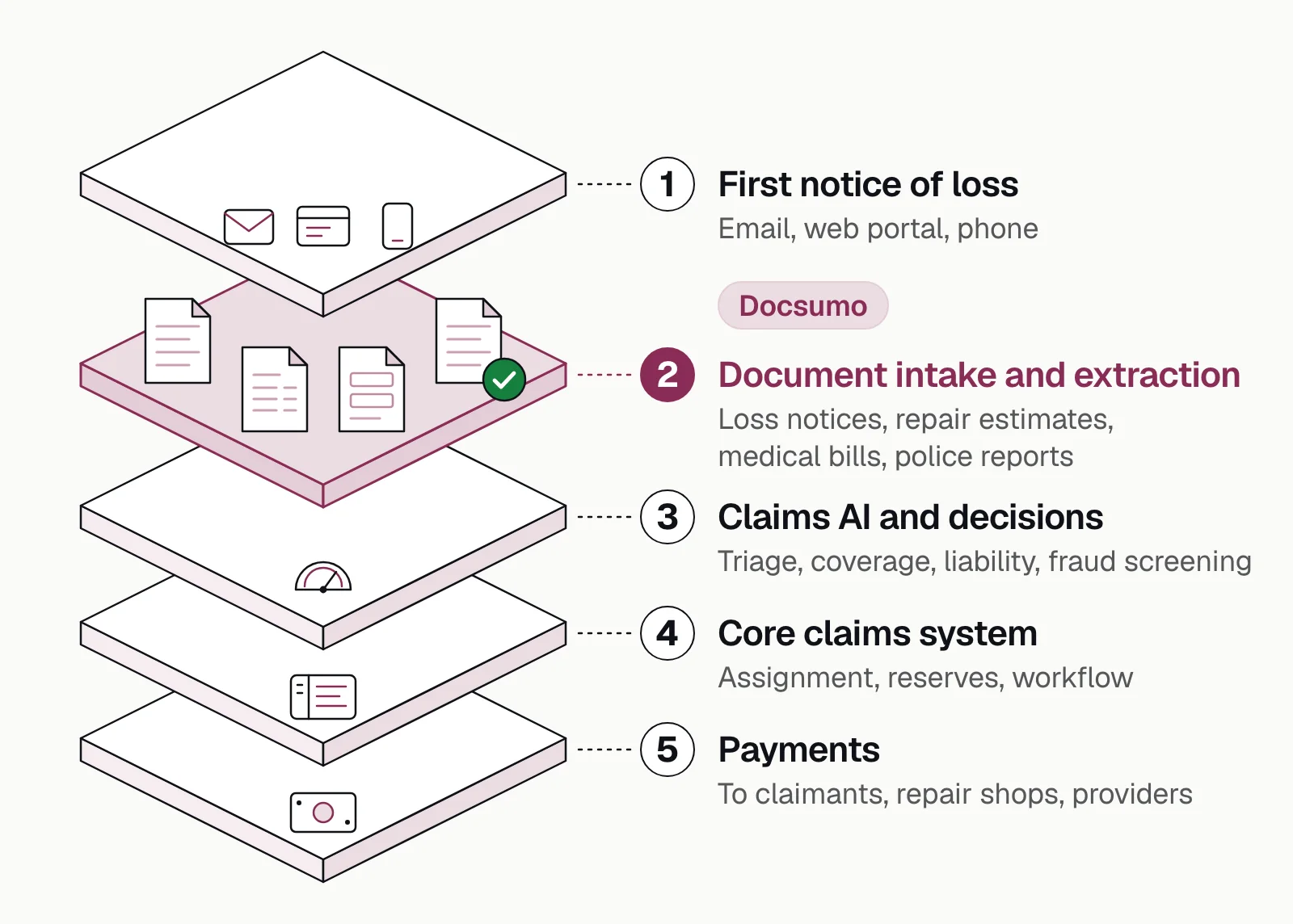
Document AI closes the first gap. In the claims stack below it's layer 2, and bots or APIs carry its data on to the core claims system.
How to combine RPA with document AI#
- Loss notices
- Estimates and invoices
- Medical bills
- Police reports
- 01Classify and split
- 02Extract
- 03Validate
- 04Update by API or bot
- CollectEmail, portal and scanned documents land in one queue.
- Classify and splitSeparate the loss notice, estimates, bills and reports.
- Extract and validateRead the policy number, date of loss and amounts, and check them against the policy.
- Route exceptionsUncertain fields go to a reviewer.
- Update systemsBy API or webhook where one exists, by bot where it doesn't.
- MeasureTrack straight-through rate, cycle time and exception reasons.
Docsumo is an intelligent document processing (IDP) platform. In this setup it's the reading step, not the bot: it reaches 99% field-level accuracy on 250+ document types, sends fields it's unsure about to a reviewer and delivers the data by API and webhooks. It reads handwritten text, too.
RPA in healthcare claims processing#
Providers' billing teams use bots to check patients' eligibility in payer portals, post payments and generate appeals for denied claims. Payers' bots can key claims into the claims system, but paper CMS-1500 (professional) and UB-04 (institutional) claim forms, itemized bills and medical records have to become data first, which is the document AI step. See health insurance claim form extraction and document AI for healthcare.
The bottom line#
RPA does one job in claims well: operating systems that have no API. Put document AI in front of it, use APIs where you can, and keep adjusters on the decisions. See how claims automation works and claims automation software compared.
Book a demo with a few of your own claim files, or start a free trial.
Frequently asked questions#
What is RPA in claims processing?
It's the use of software bots (robotic process automation) for the repetitive, rule-based steps of handling a claim, such as keying claim data into a claims system, checking policy dates, updating claim status and sending acknowledgment letters.
What is RPA in insurance?
It's the use of software bots for rule-based work in policy, billing and claims systems, such as updating policy records, processing endorsements and renewals, and entering claim data.
Can RPA read claim documents?
Not on its own. A bot works on screens and structured data, so scanned forms, medical bills and adjuster reports need OCR or intelligent document processing to extract the data first.
What's the difference between RPA and intelligent document processing in claims?
Intelligent document processing reads documents: it classifies them, extracts fields and checks them. RPA moves the resulting data through systems, so the two are often used together. See document automation for insurance.
Which claims tasks should be automated first?
High-volume, rule-based steps that start with a document, such as FNOL intake, claim registration, coverage checks and simple payments. Leave judgment calls, such as liability and complex settlements, with adjusters.
Sources
- ACORD: Forms index (ACORD 1 to 4 loss notices)
- ACORD: Forms library
- CMS: Professional paper claim form (CMS-1500)
- CMS: Institutional paper claim form (CMS-1450 / UB-04)
- TechTarget RevCycleIntelligence: How robotic process automation optimizes revenue cycle management (February 2024)
First published . Last updated .