Insurance document automation for claims: the 8 best data extraction tools in 2026
For claims operations teams at carriers, MGAs and TPAs. Eight tools that turn claim documents into data, and what each one reads and costs. You'll also see how the data reaches Guidewire, Duck Creek or your own claims system.

Key takeaways
- Insurance document automation reads claim documents such as loss notices, ACORD forms, repair estimates and CMS-1500 bills. It hands checked data to the claims system. The adjuster still makes the decisions.
- Eight tools are worth a shortlist for claims data extraction in 2026: Docsumo, Hyperscience, ABBYY Vantage, Affinda, Indico Data, Bevaya (formerly Roots Automation), Sensible and Amazon Textract.
- Only three name a core claims system on their own sites. Hyperscience, Indico Data and Bevaya list Guidewire and Duck Creek, while the rest, Docsumo included, hand data over through an API and webhooks.
- Three publish prices: Bevaya from $4,000 per AI agent a month, Sensible from $449 a month (both billed annually) and Amazon Textract per page. Docsumo offers a free 14-day trial for up to 1,000 pages.
- Pilot on your own claim files, because faxed estimates, handwritten loss notices and long medical bills are where tools differ.
On this page
- Where document automation sits in a claim
- Claims data extraction: what to pull from each document
- How claim documents become claim data
- The 8 best claims data extraction tools
- Claims data extraction tools compared
- Where the data lands: core claims systems
- How to choose claims data extraction software
- What to test in a pilot
- If claim files still wait for someone to key them
- Frequently asked questions
Insurance document automation software reads claim documents and turns them into checked data for the claims system. Claim documents include loss notices, ACORD forms, repair estimates and CMS-1500 medical bills. For claims data extraction, the tools worth a shortlist in 2026 include Docsumo, Hyperscience, ABBYY Vantage and Affinda. Indico Data, Bevaya, Sensible and Amazon Textract are on the shortlist too. All eight tools work in front of a core claims system such as Guidewire ClaimCenter or Duck Creek Claims. The core system runs the claim from intake to closure.
Vendor details below come from each vendor's own website, checked in September 2026. Links are in the sources at the end.
What are you fixing?
Where document automation sits in a claim
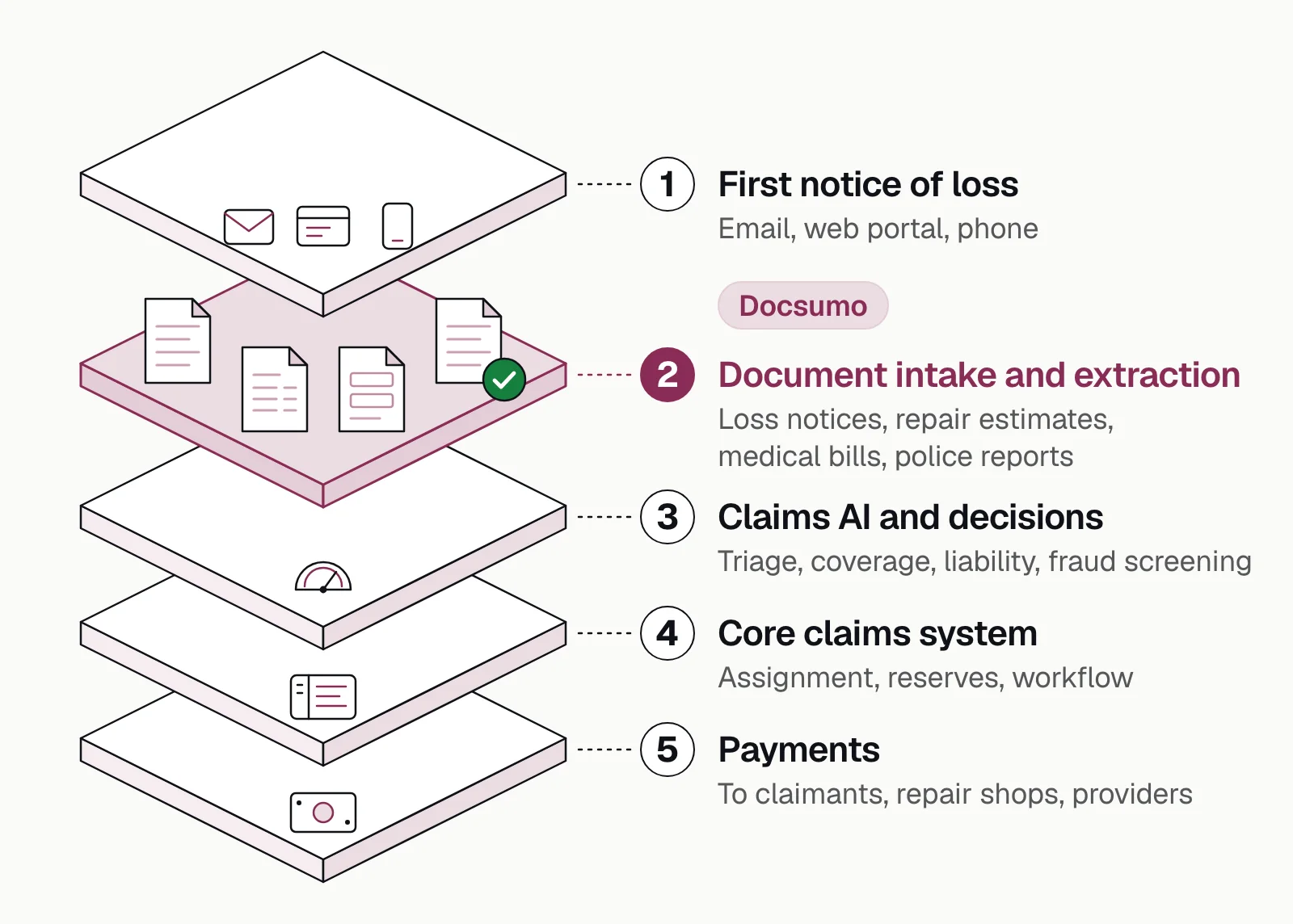
Claims software comes in three kinds. Core claims systems run the claim itself, from assignment to payment. Claims AI tools help handlers with decisions such as triage and coverage. Insurance document automation sits in front of both and turns what the claimant, the shop and the provider send into data. This post ranks that third kind, the tools that read claim documents, and then shows where the core systems fit.
Claims data extraction: what to pull from each document
Every claim document has a handful of fields the claims system needs and one or two checks worth running before anyone opens the file. These are the ones claims teams ask for most.
| Document | Fields to extract | Check before it reaches the claims system |
|---|---|---|
| Loss notice (ACORD 1, 2 or 3, or your FNOL form) | Policy number, insured, date, time and location of loss, cause, description, estimated loss | The date of loss falls inside the policy period |
| Police report | Report number, date and location, parties, vehicles and plates, narrative | Date and location match the loss notice |
| Repair estimate | Shop, parts and labor lines, labor hours and rates, tax, total | The lines add up to the total |
| Adjuster report | Claim number, inspection date, coverage notes, reserve recommendation, narrative sections | Claim number and dates match the file |
| CMS-1500 | Insured's ID (box 1a), patient (box 2), diagnosis codes (box 21), service lines with CPT or HCPCS codes, units and charges (box 24), total charge (box 28) | Line charges add up to the total, and the member ID matches the card |
| UB-04 | Type of bill, statement period, revenue codes, HCPCS codes, units, charges, principal diagnosis | Lines add up to total charges, and service dates fall inside the statement period |
| EOB | Payer, claim number, billed, allowed and paid amounts, patient responsibility, adjustment reason codes | Billed, allowed, paid and patient amounts reconcile line by line |
| Demand letter | Claimant, attorney, amount demanded, injuries, treatment dates, response deadline | The deadline is captured and routed to the handler |
Here's a property loss notice being read, with the handwritten parts included.
| Field | Extracted value | Confidence |
|---|---|---|
| Policy number | QHM-5561204 | |
| Line of business | Homeowners (HO-3) | |
| Policy period | 2026-03-01 to 2027-03-01 |
| Field | Extracted value | Confidence |
|---|---|---|
| Insured name | Dana Whitlow | |
| Phone | (555) 010-2231 | |
| Contact note | Evenings (handwritten) |
| Field | Extracted value | Confidence |
|---|---|---|
| Date of loss | 2026-09-14 | |
| Cause of loss | Water: burst supply line | |
| Loss location | 212 Linden Ave, Fairhaven, LM | |
| Within policy period | Yes |
| Field | Extracted value | Confidence |
|---|---|---|
| Description | Burst supply line, kitchen and basement | |
| Estimated loss | 18,400.00 (handwritten) |
The medical bills have more boxes and more ways to go wrong. Our guide to health insurance claim form extraction walks through them field by field.
How claim documents become claim data
- Loss notices
- Repair estimates
- Medical bills
- Police reports
- 01Classify and split
- 02Extract
- 03Validate
- 04Route exceptions
Take an auto claim that arrives as one email. A single PDF holds an ACORD 2 loss notice, a police report, two body-shop estimates and a set of photos. The first job is splitting that PDF into its documents and labeling each one, because an estimate and a police report need different fields. We compare 14 document classification tools for this step.
Then each document is read. The estimate lines are added up against their totals, and the date on the police report is compared with the date of loss. The file reaches the claims system as data. A person sees only what failed, such as a total that doesn't add up or two dates that disagree.
That hand-off is where most teams lose time today, so it's the part the tools below are built for. Our walkthrough of claims automation covers the rest of the claim, and there's more on OCR for claims intake.
The 8 best claims data extraction tools
Docsumo is our product, so we've put it first and said plainly what it doesn't do. The others are grouped by what they're built for.
Document automation platforms
1. Docsumo
Document automationOur product- Reads
- Any claim document type, handwritten text included; covers 250+ document types
- Claims systems
- API and webhooks into your claims system or data warehouse
- Deployment
- Cloud only; SOC 2 Type 2, ISO 27001, HIPAA and GDPR, with SSO and role-based access (security)
- Pricing
- A free 14-day trial for up to 1,000 pages; Business and Enterprise plans are quoted. Classification and splitting start on Business; cross-document validation and case management are on Enterprise
- 99%field-level accuracy across 250+ document types
- 95%+of documents processed straight through, without manual review
- 99%accuracy on insurance compliance documents at Arbor
- 3,000+hours saved a month at Arbor
2. Hyperscience
Document automation- Reads
- Claim forms, medical records, damage and inspection reports, invoices; pre-built models for ACORD forms, EOBs and health insurance cards; handwriting, faxes and phone photos
- Claims systems
- Guidewire, Duck Creek and Vertafore AMS360, as named on its insurance pages; API-first
- Deployment
- SaaS, on-premises, private tenant or air-gapped; FedRAMP High authorized
- Pricing
- Not published; volume-based
- Watch for
- The insurance customers it names are large, such as QBE and Canada Life, so ask how it prices a smaller rollout
3. ABBYY Vantage
Document automation- Reads
- FNOL documents, ACORD 2 auto loss notices, auto accident reports and vehicle titles as pre-trained skills; handwriting, barcodes and checkboxes
- Claims systems
- None named; its FAQ says it connects to claims management, RPA and BPM tools; REST API
- Deployment
- ABBYY Cloud (US, Europe or Australia), or on-premises and private cloud on Azure
- Pricing
- Not published
- Watch for
- The claims page doesn't describe how people review extracted fields
4. Affinda
Document automation- Reads
- Claim forms, ACORD forms, invoices, receipts, medical reports, repair estimates, loss adjuster reports, and CMS-1500 and UB-04 health claims
- Claims systems
- None named; REST API, webhooks and client libraries, plus Salesforce and Dynamics 365
- Deployment
- Multi-tenant or single-tenant SaaS, your own VPC, or self-hosted; on-premises is a paid add-on
- Pricing
- Per-page credits with no dollar prices published; a 2-week trial with 200 credits
- Watch for
- HIPAA support is a paid add-on, and exceptions route on failed validation rules rather than on confidence scores
Insurance intake and AI agents
5. Indico Data
Insurance intake- Reads
- FNOL and loss notices from emails, PDFs, ACORD forms, photos and call summaries. Its older claims page adds loss runs, statements of values, spreadsheets and handwriting
- Claims systems
- Guidewire, Duck Creek and Salesforce, plus Snowflake, SQL and RPA tools; REST and GraphQL APIs
- Deployment
- Single-tenant on AWS, or hosted by the customer
- Pricing
- Not published; custom, based on submissions a year and users
- Watch for
- Medical bills and repair estimates aren't named on its pages, and its focus is commercial and specialty insurance
6. Bevaya (formerly Roots Automation)
Insurance AI agents- Reads
- ACORD, FROI, CMS-1500 and UB-04 forms, demand letters, photos and handwritten reports; medical bills with CPT, ICD-10 and HCPCS codes, and EOBs
- Claims systems
- Guidewire ClaimCenter (a Guidewire-validated indexing accelerator), InsuranceSuite, Duck Creek and Salesforce; HTTP API
- Deployment
- SaaS only, hosted mainly on Azure in US data centers
- Pricing
- From $4,000 per AI agent a month, billed annually, with usage counted in credits (setting up one FNOL uses 60)
- Watch for
- Each claims task, such as FNOL, medical bills or legal demands, is its own agent and is priced per agent
Developer APIs
7. Sensible
Developer API- Reads
- Pre-built configurations for CMS-1500 and UB-04. ACORD claims forms, state first reports of injury, workers' comp and auto injury forms configured on request; EOBs and loss runs
- Claims systems
- None named; REST API, Python and Node SDKs, webhooks and Zapier
- Deployment
- SaaS on AWS, with custom data residency on Enterprise
- Pricing
- Growth $449 and Scale $1,349 a month, billed annually; Enterprise quoted; 14-day trial
- Watch for
- Only the CMS-1500 and UB-04 configurations are pre-built, and the HIPAA BAA comes with the Enterprise plan
8. Amazon Textract
Developer API- Reads
- Text, forms and tables; invoices and receipts through AnalyzeExpense; handwriting in English only
- Claims systems
- None; you build the hand-off
- Deployment
- AWS cloud
- Pricing
- $1.50 per 1,000 pages for text and $50 per 1,000 for forms (published, US West); a 3-month free tier for new AWS customers
- Watch for
- Classification of mixed packets, review screens and routing are yours to build, and AWS's A2I human review service is closed to new customers
Claims data extraction tools compared
Facts as published on each vendor's site in September 2026.
| Tool | Claim documents | Claims systems | Deployment | Pricing |
|---|---|---|---|---|
| Document automation platforms4 tools | ||||
| DocsumoOur productCarriers and MGAs, mid-sized to enterprise | API, webhooks | Cloud | Free trial; quoted plans | |
| HyperscienceOn-premises or FedRAMP High | Guidewire, Duck Creek, AMS360 | SaaS, on-premises, air-gapped | Not published | |
| ABBYY VantageInsurers already on ABBYY | Not named | Cloud, on-premises | Not published | |
| AffindaMany document types in one tool | Not named; API | SaaS, VPC, self-hosted | Per-page credits; trial | |
| Insurance intake and AI agents2 tools | ||||
| Indico DataCommercial and specialty carriers | Guidewire, Duck Creek, Salesforce | Single-tenant AWS, self-hosted | Not published | |
| BevayaCarriers and TPAs on Guidewire | Guidewire ClaimCenter, Duck Creek, Salesforce | SaaS | From $4,000 per agent a month | |
| Developer APIs2 tools | ||||
| SensibleEngineering teams | Not named; API | SaaS on AWS | From $449 a month | |
| Amazon TextractEngineering teams on AWS | Build your own | AWS | Per page | |
Where the data lands: core claims systems
Guidewire ClaimCenter and Duck Creek Claims don't read claim documents. They're where the extracted data ends up, and they're what most searches for claims automation software turn up, so here's how they fit.
Guidewire ClaimCenter
Core claims system- Takes in
- Digital intake tied to policy search; APIs and Guidewire Marketplace integrations
- Deployment
- Guidewire Cloud
- Pricing
- Not published
Duck Creek Claims
Core claims system- Takes in
- 2,600+ APIs across the platform
- Deployment
- SaaS (Duck Creek OnDemand)
- Pricing
- Not published
Hyperscience, Indico Data and Bevaya name connectors for these systems on their own sites. Docsumo and the other tools send JSON through an API or webhooks, and your team or integrator maps it to the claims system's intake. Ask each vendor which fields it maps without custom work and who maintains the mapping when the claims system changes.
How to choose claims data extraction software
Start with the claim documents you receive most, by line of business, and rule out any tool whose own site doesn't name them. A workers' comp team living on FROIs and medical bills needs a different shortlist from a property team drowning in contractor estimates.
Then decide who owns the integration. Named Guidewire or Duck Creek connectors save integration work if you run those systems, which is the case for Hyperscience, Indico Data and Bevaya. An API-first tool asks more of your engineers but fits any claims system, older ones included. Medical data adds one more question, which is who stores it, where, and whether the vendor signs a BAA before you send a single bill.
Our take. Judge claims intake by the whole file, not by how well a tool reads one page. A perfectly read loss notice doesn't help much if the estimate, the police report and the policy disagree. So the checks between documents decide how many files reach an adjuster clean. On Docsumo those cross-document checks are part of the Enterprise plan.
What to test in a pilot
Clean samples make every tool look good. Pilot on a couple of hundred real claim files, score classification and extraction separately, and include the documents your team struggles with.
- Itemized medical billsCMS-1500 and UB-04 forms from many providers, with codes and modifiers on every line.
- Faxed repair estimatesDegraded images where every line item and total still has to be read right.
- Adjuster reportsA structured header over narrative sections that hold much of the detail.
- Explanations of benefitsPayer-specific layouts, with remark codes for each adjustment.
- Edge casesDuplicate submissions, missing fields and totals that don't match their lines.
- The review queueWhat a reviewer sees, and whether corrections improve the model.
If claim files still wait for someone to key them
Shortlist by the job. For FNOL intake wired into Guidewire or Duck Creek, look at Indico Data or Bevaya. For capture on your own servers, Hyperscience or ABBYY Vantage. For CMS-1500 and UB-04 bills through an API, Sensible, and for many claim document types in one general tool, Affinda. For a pipeline your engineers own on AWS, Amazon Textract.
If you want claim packets read and checked in front of the claims system you already run, that's where Docsumo fits. Your own team clears the exceptions. The same approach reads underwriting submissions too, from ACORD 125 applications to loss runs.
Book a demo and bring a few of your own claim files, or start a free trial.
Frequently asked questions
What software do insurance companies use to process claims?
Most use three kinds together. A core claims system such as Guidewire ClaimCenter or Duck Creek Claims runs the claim. Insurance document automation such as Docsumo, Hyperscience or Indico Data turns claim documents into data. Claims AI helps with decisions such as triage and coverage. The document layer feeds the other two.
How do you automate insurance claims processing?
Start where claims wait, which for most teams is intake. Documents arrive by email or portal, get classified and split, and have their fields extracted and checked. Only the exceptions reach a person before the data goes to the claims system. Adjusters keep the coverage, liability and settlement decisions.
Is a general document AI tool or an insurance-specific platform better for claims?
Insurance-specific platforms such as Indico Data and Bevaya come with claims workflows and named Guidewire or Duck Creek connectors. General platforms such as Docsumo, Affinda and ABBYY Vantage read claim documents alongside the rest of your paperwork and connect through an API. If your engineers already own the claims-system integration, the connectors matter less than how each tool reads your documents. So test both kinds on real files.
Which claim documents can extraction software read?
Loss notices and FNOL forms, ACORD loss notices, police reports, repair estimates, adjuster reports, demand letters, CMS-1500 and UB-04 medical bills, and EOBs. Coverage differs by tool, so check that each one names the documents you receive most, and test the handwritten and faxed ones. Our guide to health insurance claim form extraction covers the medical bills box by box.
Will claims extraction software work with Guidewire, Duck Creek or an older claims system?
Hyperscience, Indico Data and Bevaya name Guidewire and Duck Creek connectors on their own sites. Docsumo and the other tools send extracted data as JSON through an API or webhooks. Your team or integrator maps it to the claims system's intake. An older system without an intake API usually takes the data through the integration layer you already run.
What is the best API for document extraction and splitting in insurance?
It depends on who builds the workflow. Amazon Textract and Sensible are APIs your engineers build around, and both publish prices. Docsumo, our product, returns extracted fields through an API and webhooks. It splits and classifies mixed claim packets on its Business plan. It sends low-confidence fields to a reviewer.
Is insurance document automation the same as document management or delivery software?
No. Document management software stores and organizes files, and document delivery software creates and sends outgoing documents such as policies and notices. Insurance document automation reads incoming documents, such as loss notices, applications and bills, and turns them into data.
Sources
- Hyperscience: insurance claims processing
- Hyperscience: insurance solutions
- Hyperscience: Hypercell platform
- ABBYY: claims processing
- ABBYY: Vantage
- Affinda: claims processing
- Affinda: health insurance claim extraction
- Affinda: platform
- Affinda: pricing
- Indico Data: FNOL
- Indico Data: insurance claims
- Indico Data: architecture
- Bevaya: launch and rebrand from Roots Automation (May 28, 2026)
- Bevaya: claims automation
- Bevaya: FNOL and FROI claims setup agent
- Bevaya: integrations
- Bevaya: pricing
- Bevaya: security
- Sensible: claims forms
- Sensible: pricing
- Sensible: security overview
- AWS: Amazon Textract pricing
- AWS: Amazon Textract features
- AWS: Amazon A2I human review loops (no longer open to new customers)
- Guidewire: ClaimCenter
- Guidewire: agreement to acquire ProNavigator (press release, October 28, 2025)
- Duck Creek: claims management software
- Duck Creek: Vista Equity Partners completes acquisition of Duck Creek
First published . Last updated .