Image segmentation: types, techniques, tools and document uses
For developers, data scientists and technical buyers: what image segmentation is, how the types and techniques differ, the tools and models to know in 2026, and how segmentation helps read documents.

Key takeaways
- Image segmentation divides an image into regions by assigning a label to every pixel, so software knows exactly which pixels belong to which object or area.
- There are three main task types: semantic segmentation (a class per pixel), instance segmentation (each object separately) and panoptic segmentation (both at once).
- Techniques range from classic thresholding, edge, region and clustering methods to deep learning models such as U-Net, Mask R-CNN and promptable models like Meta's Segment Anything (SAM 3, November 2025).
- Quality is measured with Intersection over Union (IoU) and the Dice coefficient, which compare predicted and true masks.
- In document processing, segmentation separates text blocks, tables, signatures, stamps and photos on a page, so each region is read with the right method.
On this page
Image segmentation is the process of dividing an image into regions by assigning a label to every pixel. Instead of saying "there's a car somewhere in this box," segmentation marks exactly which pixels are the car, which are the road and which are the sky. It's used in medical imaging, self-driving cars, satellite analysis, retail and document processing, where it separates the text, tables and signatures on a page before they're read.
This guide covers the types of segmentation, the classic and deep learning techniques, the tools and models to know, how to measure quality, and how segmentation is used to read documents.
What is image segmentation?#
A computer sees an image as a grid of pixel values. Segmentation groups those pixels into regions that mean something: an organ, a vehicle, a building, a paragraph. The output is a mask, an image the same size as the original where each pixel carries a label.
Segmentation sits between two other computer vision tasks:
- Image classification gives one label for the whole image ("this is an invoice").
- Object detection draws a bounding box around each object.
- Segmentation labels every pixel, capturing exact shapes and boundaries.
Types of image segmentation#
| Type | What it labels | Example |
|---|---|---|
| Semantic segmentation | A class for every pixel; objects of the same class are merged | All "road" pixels, all "car" pixels |
| Instance segmentation | Each individual object separately, with its own mask | Car 1, car 2, car 3 |
| Panoptic segmentation | Both: every pixel gets a class, and countable objects get an instance ID | Road and sky as regions, each car and person as its own object |
Panoptic segmentation was formalized in a 2019 paper by Kirillov and colleagues to unify the other two.
Image segmentation techniques#
Classic techniques
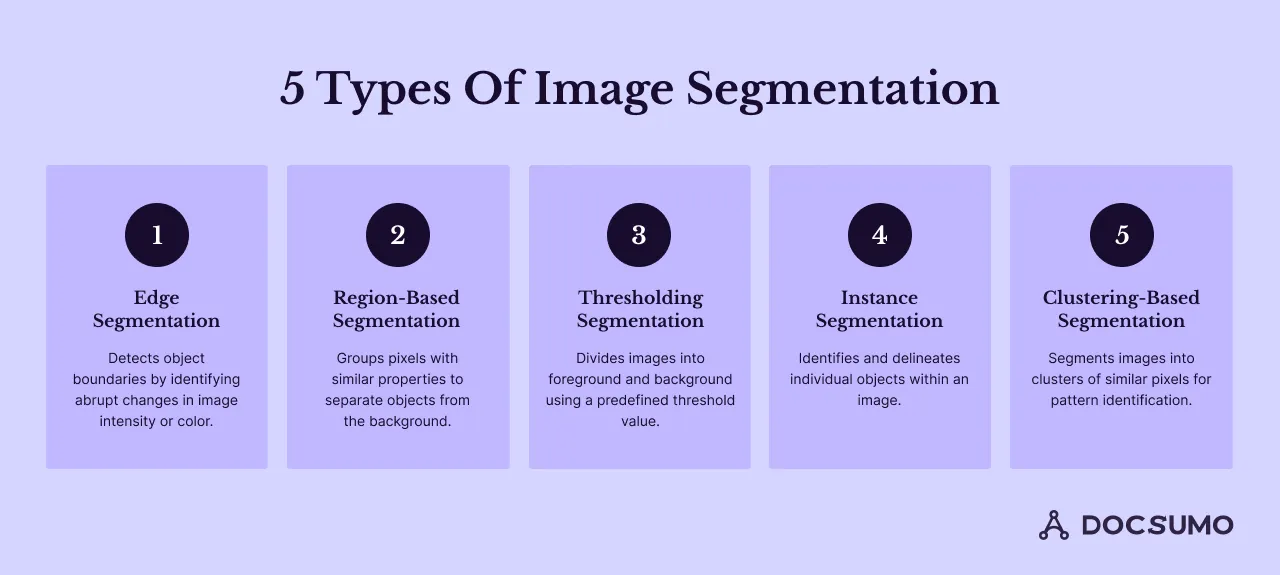
- Thresholding. Every pixel above a brightness value is foreground, the rest background. Simple and fast, and still the standard first step for separating dark text from a light page. Otsu's method picks the threshold automatically.
- Edge-based. Detects sharp changes in intensity (for example with the Canny detector) and treats them as object boundaries.
- Region-based. Grows regions from seed pixels by adding neighbors that look similar, or splits and merges regions. The watershed algorithm is a common example.
- Clustering. Groups pixels by color or texture with algorithms such as k-means, without labeled training data.
Here's thresholding on a scanned page with OpenCV, the usual first step before OCR:
import cv2

img = cv2.imread("scanned_page.png", cv2.IMREAD_GRAYSCALE)
img = cv2.GaussianBlur(img, (5, 5), 0)

# Otsu picks the threshold; THRESH_BINARY_INV makes text white on black
_, mask = cv2.threshold(img, 0, 255, cv2.THRESH_BINARY_INV + cv2.THRESH_OTSU)

# Merge characters into text blocks, then find each block's outline
kernel = cv2.getStructuringElement(cv2.MORPH_RECT, (25, 5))
blocks = cv2.dilate(mask, kernel, iterations=2)
contours, _ = cv2.findContours(blocks, cv2.RETR_EXTERNAL, cv2.CHAIN_APPROX_SIMPLE)
print(f"{len(contours)} text regions found")
Deep learning techniques
Most production segmentation now uses neural networks trained on labeled masks:
- U-Net (2015) is an encoder-decoder network with skip connections, designed for biomedical images and still widely used when training data is limited.
- Mask R-CNN (2017) extends an object detector to predict a mask for each detected object, making it a standard choice for instance segmentation.
- Transformer-based models handle semantic, instance and panoptic segmentation in one architecture.
- Promptable foundation models. Meta's Segment Anything family segments objects from a prompt, such as a click, a box or, since SAM 3 in November 2025, a short text phrase or example image, without training on your specific objects.
Tools and libraries#
- OpenCV: open-source computer vision library with thresholding, edge detection, contours and watershed, for Python, C++ and Java.
- scikit-image: Python library with classic segmentation algorithms.
- PyTorch and TensorFlow: deep learning frameworks for training U-Net, Mask R-CNN and transformer models.
- MATLAB Image Processing Toolbox: interactive segmentation tools, common in research.
- Annotation tools such as VGG Image Annotator and Labelbox, for drawing the masks you train on. See image classification.
How to measure segmentation quality#
- Intersection over Union (IoU): the overlap between predicted and true mask divided by their combined area. 1.0 is a perfect match.
- Dice coefficient: twice the overlap divided by the total size of both masks; common in medical imaging.
- Pixel accuracy: share of pixels labeled correctly. Easy to read, but misleading when one class dominates, such as a page that's mostly white background.
- Mean IoU across classes and, for panoptic tasks, panoptic quality (PQ).
Where image segmentation is used#
- Medical imaging: outlining organs and tumors in CT and MRI scans for diagnosis and treatment planning.
- Autonomous driving: separating road, lanes, vehicles and pedestrians.
- Satellite and aerial imagery: mapping land use, crops, flooding and buildings.
- Retail: isolating products for catalogs and visual search.
- Manufacturing: finding defects on parts and surfaces.
- Document processing: splitting pages into text, tables, figures, signatures and stamps.
Image segmentation in document processing#
Documents look simple, but a single page can mix typed text, handwriting, tables, logos, stamps, checkboxes and signatures. Reading it well starts with segmentation:
- Separate foreground from background so faint or noisy scans can be read.
- Find layout regions: headers, paragraphs, key-value blocks, tables, figures. This sets the reading order for multi-column pages.
- Segment tables into cells so each value lands in the right row and column, even across pages.
- Isolate special regions: signatures to check for presence, stamps and handwriting to route to the right model.
Document AI platforms do this automatically as part of extraction. Docsumo, for example, uses layout-aware models to read fields and multi-page tables from documents such as bank statements and invoices, and reports 99% field-level accuracy on 250+ document types. See Docsumo Document AI and our guide to table extraction from complex PDFs.
Challenges in image segmentation#
- Labeled data. Pixel-level masks are slow to draw. Pre-trained and promptable models reduce how many you need.
- Boundaries and small objects. Thin structures, overlaps and tiny objects are the hardest to get right.
- Domain shift. A model trained on clean images struggles with blur, glare or new layouts.
- Compute. Deep models need GPUs to train, and sometimes to run at speed.
- Evaluation. Pick metrics that reflect the task: IoU on table cells matters more than overall pixel accuracy on a mostly blank page.
The bottom line#
Image segmentation labels every pixel so software can tell where one thing ends and another begins. Classic methods like thresholding still do useful work, especially on documents, while deep learning and promptable models handle complex scenes. For documents, segmentation is what lets a system read tables, signatures and multi-column layouts correctly. To see that on your own files, book a demo.
Frequently asked questions#
What is image segmentation in simple terms?
It's labeling every pixel in an image so the image is split into meaningful regions, such as road, car and pedestrian in a street scene, or text, table and signature on a document page.
What is the difference between image segmentation and object detection?
Object detection draws a box around each object. Segmentation marks the exact pixels that belong to it, so it captures shape and boundaries precisely. Instance segmentation does both.
What are the types of image segmentation?
By task, semantic, instance and panoptic segmentation. By technique, thresholding, edge-based, region-based, clustering and deep learning methods.
How is image segmentation used in OCR and document processing?
It separates the page into regions before recognition, such as text blocks, tables, checkboxes, signatures and stamps, and separates text from background noise. That improves reading order and lets tables be extracted cell by cell. See layout detection.
What is the Segment Anything Model?
A family of promptable segmentation models from Meta. SAM 3, released in November 2025, can find and segment objects from short text prompts, visual prompts or example images, in images and video.