Agentic document extraction: what it is and how it changes document workflows
For operations and engineering teams evaluating AI for document-heavy work: what "agentic" extraction actually means, how it compares with OCR and general-purpose LLMs, and how to put it into a production workflow.

Key takeaways
- Agentic document extraction uses AI that plans and checks its own work: it breaks a document into parts, picks the right method for each, extracts the data and verifies it, instead of running a single OCR pass or prompt.
- Its main advantages over OCR are layout awareness (tables, checkboxes and sections keep their structure) and visual grounding, where every value links back to its location on the page.
- Compared with prompting a general-purpose LLM, it returns structured, schema-shaped data with sources, which makes review and audit possible.
- Extraction alone isn't a workflow. Production use still needs validation rules, cross-document checks, exception routing and integrations.
- The term was popularized by LandingAI's Agentic Document Extraction API in 2025; many IDP platforms now apply similar agent-style steps inside larger document workflows.
On this page
Agentic document extraction is a way of pulling data from documents in which AI works in steps, like an agent: it analyzes the layout, splits the document into parts such as text blocks, tables, checkboxes and charts, extracts each with the right method, and checks the result before returning structured data linked to its source on the page. It handles complex layouts better than OCR, and it's more reliable and auditable than asking a general-purpose LLM to read a PDF.
This article explains how it works, how it compares with OCR and LLM prompting, five ways it changes document workflows, and what to check before you rely on it.
What is agentic document extraction?#
Traditional OCR reads a page once, left to right, and returns text. Template-based capture adds rules that say where a field sits on a known layout. Both break when the layout changes.
Agentic extraction treats a document as a visual structure. The term was popularized in 2025 by LandingAI's Agentic Document Extraction API, which describes planning, extracting and verifying through multimodal reasoning. The same idea now shows up across document AI platforms. An agentic system typically:
- Analyzes the layout to find text, tables, forms, checkboxes, charts and signatures.
- Chooses a method per part, for example table reconstruction for a multi-page statement and checkbox detection for a form.
- Extracts against a schema, so the output has the fields your system expects.
- Grounds every value to a page and position, so a reviewer can see where it came from.
- Verifies its output, re-checking values that fail a rule or conflict with each other.
Agentic extraction vs OCR vs a general-purpose LLM#
| Feature | Agentic extraction | OCR | General-purpose LLM |
|---|---|---|---|
| Output | Structured fields and tables against a schema | Raw text, sometimes with positions | Free text or loosely structured JSON |
| Layout and tables | Preserves structure and relationships | Loses most structure | Varies; often struggles with long or multi-page tables |
| Source tracking | Each value linked to its location on the page | Character positions only | Usually can't point to the exact source |
| Handling uncertainty | Confidence and verification steps | None | Can be confidently wrong |
| Best for | Production extraction with review and audit | Digitizing text for search | Ad hoc questions about a document |
5 ways agentic extraction changes document workflows#
1. Classification without templates
Incoming files are recognized by content rather than a fixed layout, so a new bank's statement or a new carrier's form doesn't need a template before it can be processed. Multi-document packets can be split automatically.
2. Reliable table extraction
Tables are where OCR fails most: rows that wrap, headers that repeat on each page, merged cells. Agentic systems reconstruct tables as tables and keep column relationships, which matters for bank statements, invoices with many line items and loss runs.
3. Answers you can verify
Because every value links to its place on the page, a reviewer can check a flagged field in seconds, and an auditor can see where a number came from. That's the difference between an AI answer and evidence.
4. Validation built into extraction
Rules can run as data is extracted: line items must add up to the total, a date must fall within a policy period, an account number must match across documents. Cross-document validation catches both errors and fraud; Docsumo reports 64% lower fraud with cross-document validation.
5. Straight into downstream systems
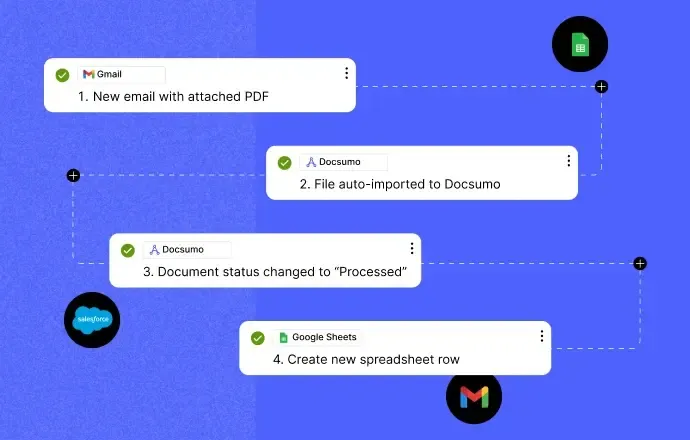
Documents can arrive by email, upload or API and leave as structured data through APIs and webhooks, as in the header image: an email attachment is imported, processed and written to a spreadsheet with no manual step. Exceptions go to a person; everything else moves on.
Where it's used#
| Industry | Typical documents | Example workflow |
|---|---|---|
| Lending | Bank statements, pay slips, tax returns, financial statements | Income verification and financial spreading |
| Insurance | ACORD forms, loss runs, certificates of insurance, claims documents | Submission intake and COI tracking |
| Accounts payable | Invoices, purchase orders, receipts | Invoice capture and matching |
| Commercial real estate | Rent rolls, operating statements, leases | Underwriting and asset management |
| Healthcare | Claim forms, intake forms, eligibility documents | Intake and billing |
What to check before adopting it#
- Accuracy on your documents, especially scans, handwriting and long tables.
- Confidence and review: how uncertain values are flagged and how fast a reviewer can fix them.
- Validation: whether you can add your own rules and cross-document checks.
- Grounding: whether every value links to its source for audit.
- Security: certifications such as SOC 2 Type 2, HIPAA and GDPR, and data retention controls.
- Cost and speed at your real volume, including reprocessing.
Docsumo applies these ideas inside a full document workflow: pre-trained models for 250+ document types at 99% field-level accuracy, auto-classification and splitting, validation and master data lookups, a review queue for exceptions, and case management and automated workflows on the Enterprise plan. For more on the agentic side, see what agentic document processing is.
The bottom line#
Agentic document extraction is a real step up from OCR and from pasting documents into a chatbot: it keeps structure, shows its sources and checks its own work. It is still one part of a workflow. Pair it with validation, exception review and integrations, and measure it on your own documents before you trust it with decisions.
Frequently asked questions#
How is agentic document extraction different from OCR?
OCR converts an image of text into characters. Agentic extraction also understands layout and meaning, keeps tables and form elements structured, and checks its own results, so it returns usable data rather than raw text.
How is it different from asking ChatGPT or another LLM to read a document?
A general-purpose LLM returns free text and can't reliably show where each answer came from. Agentic extraction returns structured fields against a schema and links each value to its location on the page, which people can review and systems can trust.
Can agentic document extraction handle handwriting and scans?
Modern systems handle handwriting, skewed scans and complex layouts much better than template OCR, but accuracy still varies by document. Test on your own files and keep a review step for low-confidence values.
Does agentic document extraction still need human review?
Yes, for values the system is unsure about and for decisions that need judgment. The goal is to review only exceptions. Docsumo reports 95%+ straight-through processing with a review step for the rest.
How does it integrate with existing systems?
Through APIs, webhooks, email ingestion and connectors that deliver structured data to ERPs, CRMs, loan origination and policy systems. See Docsumo integrations.
Sources
First published . Last updated .