Automated document processing software: how to automate document processing end to end
For operations, finance and IT leaders moving document work off manual queues: what automated document processing covers, how it compares with manual work, how it works step by step, and how to choose a platform.

Key takeaways
- Automated document processing is the end-to-end handling of documents by software: intake, classification, extraction, validation, review of exceptions and delivery to business systems.
- It goes further than OCR or extraction alone. A platform also checks documents against rules and against each other, and routes each file to its next step.
- Manual document processing is slow, error-prone and hard to audit. Automation leaves people the exceptions, not the typing.
- The payoff shows up in straight-through rate, time per document and cost per document. Docsumo reports 95%+ straight-through processing and $15 saved per processed document.
- Choose a platform by testing accuracy on your documents, cross-document validation, the review screen, integrations and security.
On this page
- What is automated document processing?
- Manual vs automated document processing
- Four ways to process documents, compared
- How automated document processing works
- What a platform needs
- Benefits of automated document processing
- How to choose an automated document processing platform
- The bottom line
- Frequently asked questions
Automated document processing software takes documents in, works out what each one is, extracts the data, checks it, sends exceptions to a person and delivers clean data to the systems that use it. To automate document processing at volume, most platforms now use intelligent document processing (IDP): AI models that read varied layouts, wrapped in validation, review and workflow.
This guide covers what it includes, how it compares with manual work and other approaches, how it works and how to choose a platform.
What is automated document processing?#
Most document work follows one pattern: a document arrives, someone works out what it is, types the key values into a system, checks them and passes the file on. Automated document processing, also called document processing automation, does each step in software and sends only the exceptions to people.
It's broader than OCR, which turns images of text into text, and data extraction, which pulls out fields and tables but doesn't check them or move the file on. See automated data extraction.
Manual vs automated document processing#
Manual document processing is slow, error-prone and hard to secure, audit or scale.
Manual document processing
- Someone opens each file and retypes the values
- Typos and missed fields surface downstream
- Sensitive files pass through many hands
- Approvals wait in queues
- Audits mean digging through folders
Automated document processing
- Software reads, checks and routes every file
- Rules catch errors before data reaches your systems
- Fewer people touch each file, and every action is logged
- Clean files go straight to the next step
- Every value links back to its source for audits
To reduce manual document handling, start with your highest-volume document and let people handle only what the software flags.
Four ways to process documents, compared#
Most teams use a mix. Pick by your documents:
Which approach fits your documents?
| Approach | How it works | Strengths | Weaknesses | Best for |
|---|---|---|---|---|
| Manual processing | People read documents and type the data in | Flexible; handles anything | Slow, costly, error-prone; doesn't scale | Very low volumes or rare documents |
| Template-based OCR | OCR reads text; a template says where each field sits | Accurate on a fixed layout; inexpensive | Breaks when layouts change | One or two standard forms |
| RPA | Bots copy data between applications | Works with systems that have no API | Can't read documents; brittle when screens change | Moving data that's already extracted |
| Intelligent document processing (IDP) | OCR plus AI classifies, extracts, validates and flags exceptions | Varied layouts, tables and handwriting; review built in | More to evaluate; needs a review step | Varied, high-volume documents |
For a deeper introduction, see what intelligent document processing is.
How automated document processing works#
- Upload
- API
- 01Classify and split
- 02Extract
- 03Validate
- 04Review exceptions
- IntakeDocuments arrive by email, upload or API and are grouped into a case, such as one loan or claim.
- PreprocessingPages are deskewed, rotated and cleaned, and scans go through OCR.
- Classification and splittingEach page is labeled by type, and mixed uploads are split into separate documents.
- ExtractionModels capture fields and tables, with a confidence score on every value.
- ValidationRules check each field, fields against each other and documents against each other: totals add up, dates are valid, names match.
- ReviewUncertain or failing values go to a person, next to their source on the page.
- DeliveryClean data goes to your ERP, loan origination system or policy system through an API and webhooks.
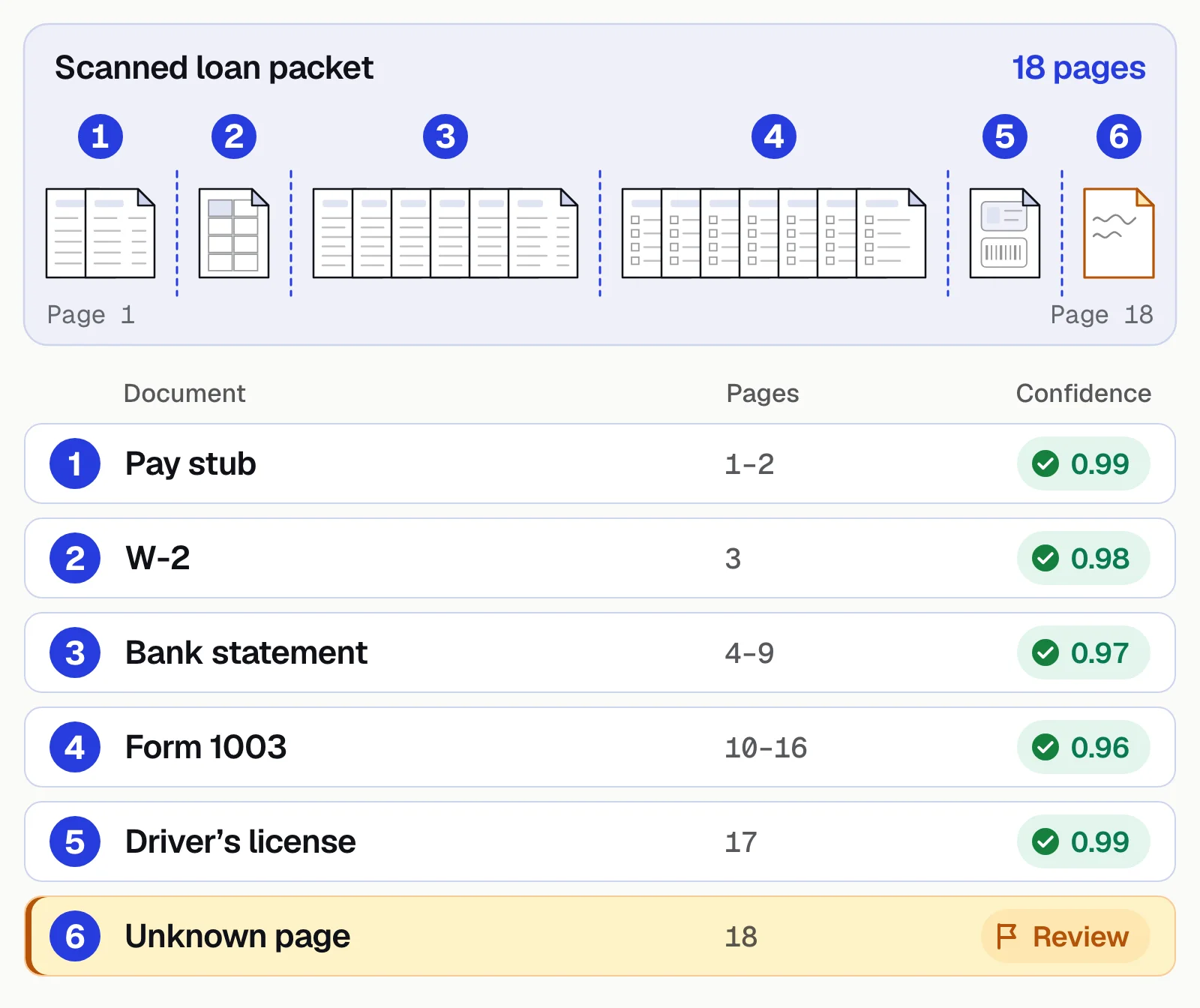
Splitting a mixed packet
An 18-page loan packet becomes a pay stub, W-2, bank statement, Form 1003 and driver's license, each with a confidence score. A page that fits no known type goes to review.
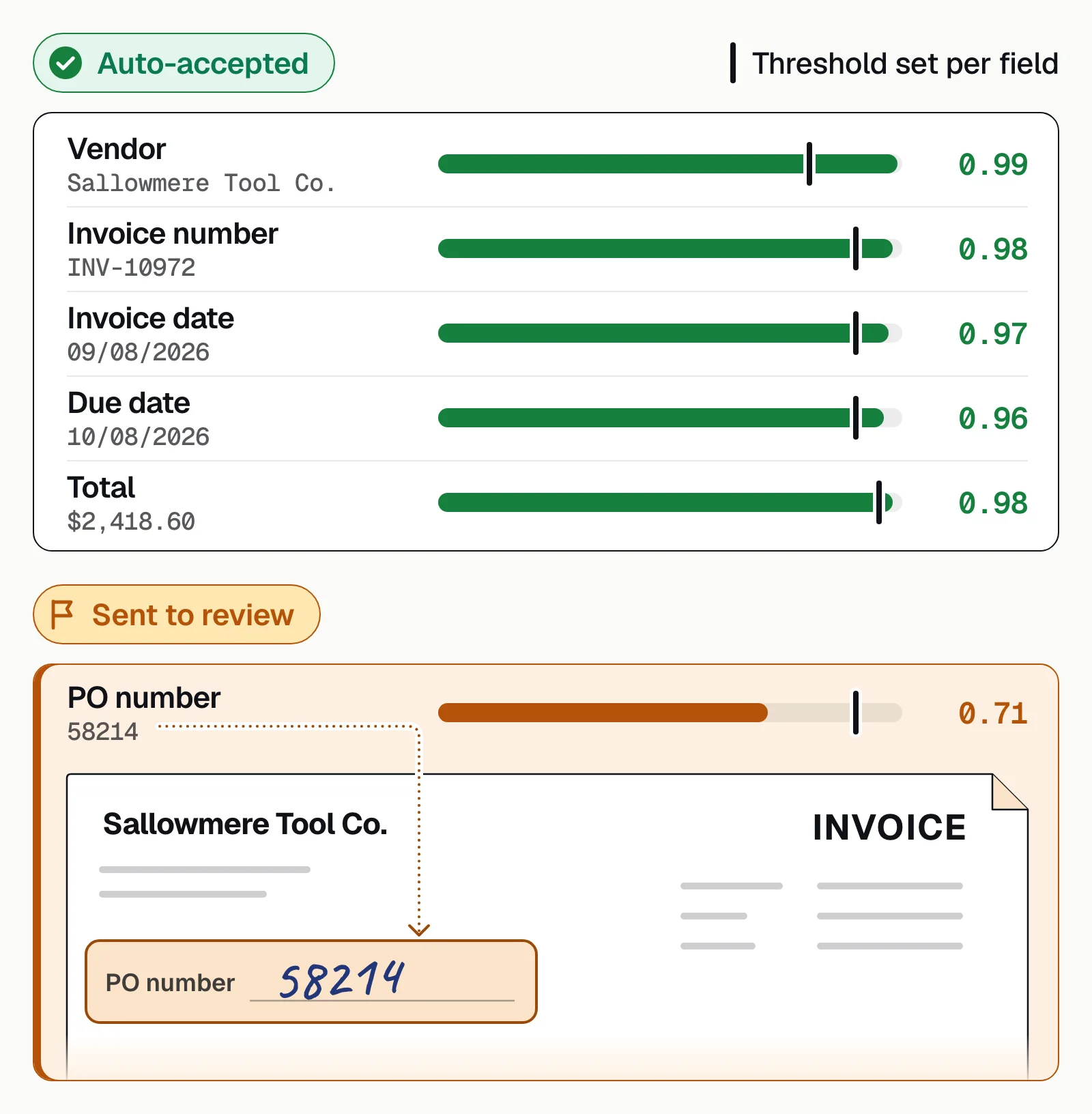
Sending only the unsure fields to a person
Values above their field's threshold go straight through; a value below it goes to review. In Docsumo, thresholds are set per field, clicking a flagged field highlights its source line on the document, and reviewers' corrections improve the model.
What a platform needs#
Pre-trained models
Read common documents on day one, with no labeling.Custom models
Learn the document types only you process.Classification and splitting
Label pages and separate mixed uploads.Validation rules
Check values within a document and across the file.Case management
Keep a borrower's or claimant's documents together, so decisions are made on the whole file.Review screen
Show each flagged value next to its source on the page.Workflow and integrations
Route each case and deliver data by API and webhooks.Security and audit trail
Access control, encryption, certifications and a log of every action.
Build or buy? You can assemble these from an OCR API, your own models and a rules engine, but your team then maintains intake, validation, review and delivery too. A practical split: buy the reading layers and own the business rules.
Docsumo covers these in one platform: Document AI reads and extracts, case management runs cross-document validation, and document workflows route the results. Auto-classification and splitting come with the Business plan; case management, cross-document validation and automated workflows with Enterprise.
Benefits of automated document processing#
The payoff shows up in time, accuracy, straight-through rate and cost per document. Docsumo's figures:
- <5 minper document, down from 2+ hours by hand
- 99%field-level accuracy across 250+ document types
- 95%+of documents processed straight through, without manual review
- $15saved per processed document
How to choose an automated document processing platform#
- Accuracy on your own documentsScore field-level accuracy and straight-through rate on a few hundred real files, bad scans included.
- Cross-document validationIt should compare documents in the same file, not just check each one alone.
- The review screenTry it with the people who'll use it daily.
- Custom document typesAsk how you'd add one that no one else processes.
- IntegrationAn API and webhooks into your systems. See integrations.
- SecuritySOC 2 Type 2, HIPAA and GDPR where your data needs them. See Docsumo security.
- PricingPer page, per document or subscription. Docsumo's free trial covers 14 days and up to 1,000 pages (pricing).
The bottom line#
Automated document processing takes documents from inbox to decision, with people handling only the exceptions. The value comes from the whole chain, not extraction alone, so judge platforms on validation, review and integration as well as accuracy.
Book a demo with a few of your own documents, or start a free trial.
Frequently asked questions#
What is automated document processing?
It's the use of software, usually AI-based, to handle documents from arrival to decision without manual data entry. The software reads each document, extracts the data, checks it, and sends it to the right system or person.
How do you automate document processing?
Route documents into one queue, let software classify, extract and validate them, send only the exceptions to a person, and deliver the data to your systems through an API. Start with one high-volume document type and compare accuracy and straight-through rate with your manual baseline.
Is document automation the same as automated document processing?
The terms overlap. Document automation often means generating documents, such as contracts and letters, from templates, though some vendors use it for handling incoming documents too. Automated document processing, or document processing automation, handles the documents you receive: reading them, checking the data and routing it. Many businesses need both.
What are the challenges of manual document processing?
The main disadvantages: it's slow, error-prone and hard to scale. Every document is read and typed by hand, mistakes surface downstream, sensitive files pass through many hands, approvals wait in queues, and audits mean digging through folders.
What is the difference between OCR, RPA and IDP?
OCR converts images of text into text. RPA automates clicks and keystrokes in applications but can't read documents. IDP uses OCR plus AI models to classify documents, extract fields and tables, validate them and route exceptions, and often supplies the data an RPA bot enters. See IDP vs OCR.
How long does it take to implement automated document processing?
With pre-trained models for common documents, a pilot can start during a free trial. Full rollout depends on custom document types, the validation rules you need and your integrations.