What is schema mapping? Examples, patterns, tools and validation
For operations and data teams moving extracted document data into an ERP, loan system or warehouse: what a schema map is, how mapping works and how to test it before it touches production.

Key takeaways
- Schema mapping is the set of rules that says which field in one system goes to which field in another, and how each value is transformed on the way. Together the rules are often called a schema map.
- Schema matching finds fields that mean the same thing; schema mapping defines how to move and transform the data between them.
- For documents, map through a canonical schema: normalize every vendor's labels to one internal field, then map that field to your ERP once.
- The costly failures are silent: a comma read as a delimiter, a day and month swapped, a name cut short. Test every mapping for required fields, types, lengths, dates, codes and totals before production.
On this page
Schema mapping is the set of rules that says which field in one system goes to which field in another, and how each value is transformed on the way. In document processing, it turns the fields extracted from an invoice or form, such as vendor, into the fields your ERP or loan system expects, such as SUPPLIER_NAME, in the right type and format. Without it, extracted data sits unused because the target system doesn't recognize it.
Three rules move one invoice into an ERP:
| Field | Extracted | Loaded into the ERP | Rule |
|---|---|---|---|
| Vendor | vendor: "Acme Corp" | SUPPLIER_NAME: "ACME CORP" | Rename and uppercase |
| Total | total: "$1,284.50" | INV_AMOUNT: 1284.50 | Strip the symbol and comma, store as a decimal |
| Date | date: "09/14/26" | INV_DATE: 2026-09-14 | Read as MM/DD/YY, write as ISO 8601 (YYYY-MM-DD) |
What is schema mapping?#
A schema defines what data looks like: field names, data types, which fields are required and how they relate. The fields extracted from an invoice are the source schema; the table your ERP loads is the target schema. The rules between them are often called a schema map. Some just rename a field (invoice_number to INV_NUM); others change the value, such as "$1,234.56" to 1234.56, or join first_name and last_name into FULL_NAME.
The same idea moves data between databases, apps and warehouses. Documents add a twist: the source schema changes with every sender's layout.
Schema mapping vs schema matching#
Schema matching answers "do these two fields mean the same thing?" Schema mapping goes further and defines how data moves from one to the other. Matching is a long-studied problem: a 2001 survey by Rahm and Bernstein called it a basic problem in data integration and data warehousing, and noted it was usually done by hand.
| Aspect | Schema matching | Schema mapping |
|---|---|---|
| Purpose | Find fields that mean the same thing | Define how data moves and changes |
| Output | Pairs of corresponding fields | Rules a system can run |
| Automation | Often machine-learning assisted | Rules plus transformations |
| When | Discovery | Implementation |
Matching usually comes first. A matcher might suggest that PO_NUM and purchase_order_number are the same concept; the mapping rule then says "rename, no transformation."
How schema mapping works#
For document data, fields pass through three stages before they reach the target system.
- Invoice fields
- Form fields
- Statement tables
- 01Normalize to a canonical schema
- 02Map and transform
- 03Validate
Each rule can rename a field, change its type (the string "100" to the integer 100), convert a format (dates, currencies), standardize a value (trim spaces, uppercase, map codes) or calculate one (line_total from quantity times unit price). Rules come in four patterns:
One-to-one
invoice_dategoes toINV_DATE, reformatted on the way.Many-to-one
Street, city, state and ZIP code are joined into oneADDRESSfield.One-to-many
full_nameis split intoFIRST_NAMEandLAST_NAME.Conditional
If the country is "US",tax_idgoes toUS_TIN; otherwise it goes toFOREIGN_TAX_ID.
How to create a schema map for unstructured documents#
With documents, the source schema keeps changing. One vendor's invoice says Inv #, Bill date and Amt due; another's says Invoice No., Date of issue and Total payable. Both need to land in the same ERP table.
The reliable pattern puts a canonical schema in the middle: extraction output is normalized to one internal format first, then mapped to the target once. Extract, normalize, map: document variety stays out of your integration logic, and a new vendor doesn't need a new ERP mapping.
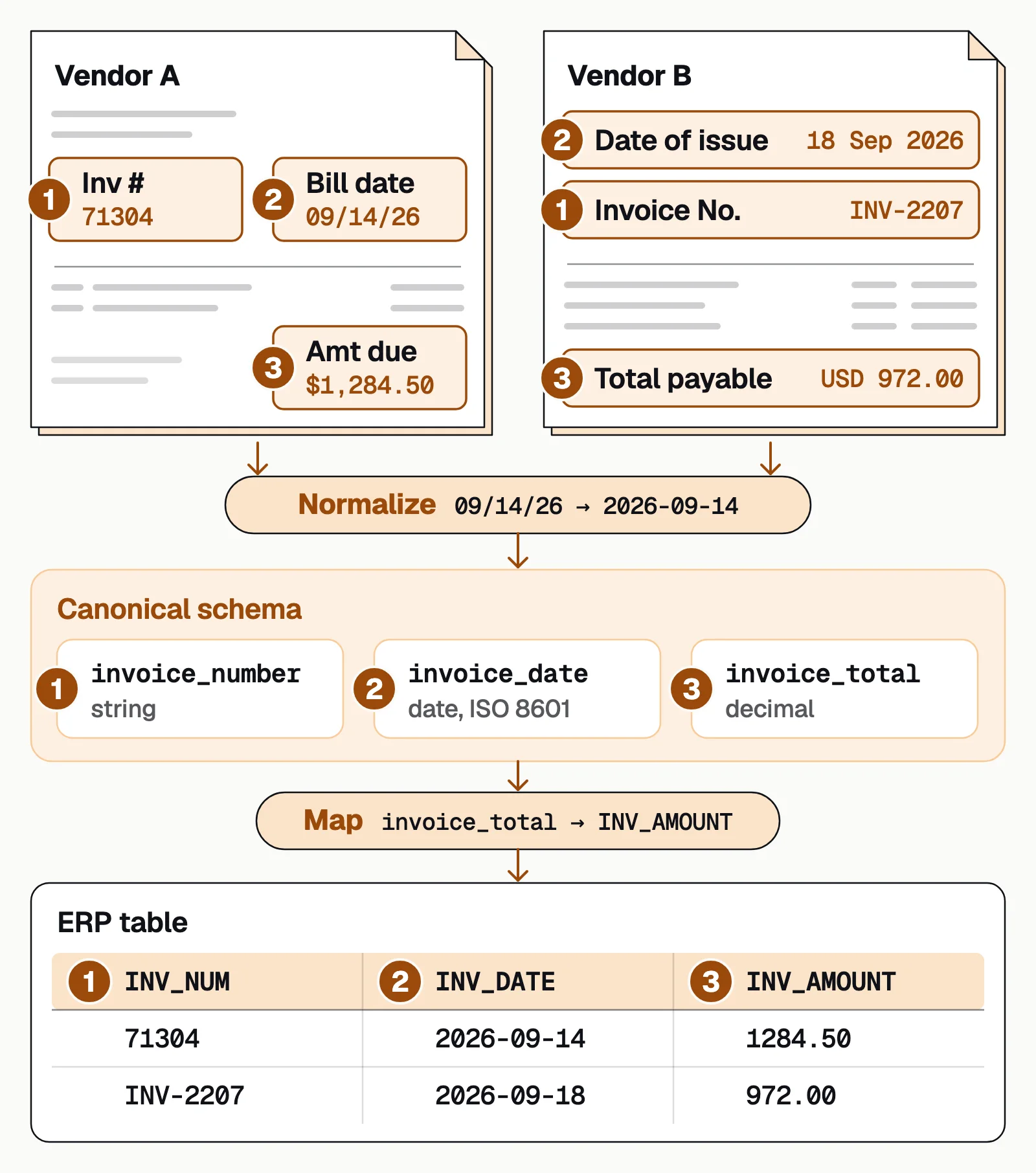
Keep the canonical schema to fields that are stable across senders (number, date, total) and treat vendor-specific fields as optional extras. More on the normalization step in text normalization.
In Docsumo's document workflows, extraction handles the layout differences and low-confidence values go to a reviewer. Master data lookup (Enterprise plan) checks values such as vendor names against your own records. A workflow step you set up, an AI step or your own Python code, can rename, reformat or calculate fields for your target system. The data then leaves through the API and webhooks or as an Excel export.
How to handle nested and hierarchical data#
Line items on invoices, procedures on medical claims and shipment lines on bills of lading are nested: the header has one set of fields, each line another. The target may want flat rows (header fields repeated on each line) or header and child records linked by key.
- Generate stable keys: invoice number plus line number, so relationships survive the transformation.
- Decide flatten vs preserve early: flatten if your ERP wants flat rows; keep the hierarchy if it accepts nested records.
- Loop over rows: line-item counts vary, so don't assume fixed positions, and set null rules for optional columns such as a discount.
Mappings also break when a table runs across pages and extraction returns two arrays. Docsumo joins tables that run across pages into one table, with headers mapped. More in table extraction from PDFs.
How to validate schema mappings before production#
A mapping that "works" in testing can fail silently: the job runs and data lands, but values are wrong, cut short or missing. Run these checks on every mapping:
- Required fields are filledEvery non-nullable target field has a source, and an empty optional field can't cascade into a null total.
- Types convert without loss"1,234" parsed with the comma as a delimiter becomes 1. Test every number format your senders use.
- Lengths fitA 50-character vendor name loaded into a 30-character column can be cut off without an error.
- Dates keep their meaning03/04/2026 is March 4 in the US and April 3 in much of Europe. Fix the source format per sender and write ISO 8601.
- Codes map to valid valuesUnits, currencies, GL codes and statuses land on values the target accepts.
- Totals still reconcileLine items plus tax equal the total after mapping, and line items are matched by key, not by their order on the page.
Test on a representative set, not happy-path samples: the longest vendor name, the invoice with 200 line items, the document with every optional field missing. Try changes in a test environment first, record which mapping version processed each document, and once live, watch null rates, parse errors and reconciliation gaps by sender. Docsumo's Business plan includes a test environment and audit logging.
Schema mapping tools#
The right tool depends on where the data starts.
Document AI platforms
Extract fields from PDFs and scans and deliver them in the shape your system expects. Docsumo, our product, is one: workflow steps you set up transform fields before they leave by API and webhooks or as an Excel export. It runs in the cloud only.Data integration and ETL tools
Visual mappers for moving data between databases and apps. FME's SchemaMapper, for example, restructures data using mappings kept in an external lookup table.Code in your pipeline
SQL or Python transformations you write, version and test yourself: the most control, and the most maintenance.Matching and entity-resolution services
You describe what each input field holds so the service can match records. AWS Entity Resolution calls this a schema mapping.
The bottom line#
Schema mapping is what turns extracted data into data your systems accept. For documents, normalize every sender's labels to a canonical schema, map that schema to your target once, and test the failure modes that don't throw errors before they reach production.
Book a demo with a few of your own documents, or start a free trial.
Frequently asked questions#
Can schema mapping be fully automated with AI?
AI can suggest likely field pairs from names and sample values, but mapping without review is risky: research on LLM-based schema mapping found outputs that change with how the input is phrased. The safer pattern is to let AI suggest mappings and have a person approve each one before it runs in production.
How often do schema mappings need updates?
Whenever a source or target changes, such as a new vendor layout, a revised form or an API version upgrade. Monitoring null rates and parse errors by sender tells you when, better than a fixed schedule.
What's the difference between ETL mapping and document schema mapping?
ETL mapping usually starts from databases or APIs whose schemas are explicit and stable. Document schema mapping starts from fields extracted from PDFs and scans, whose labels and layouts vary by sender, so it needs a normalization step before the standard mapping rules.
What is schema mapping in SAP HANA?
In SAP HANA the term is narrower: it maps the authoring schema that content was built against, such as SAP_BW, to the physical schema in your own system, such as SAPBWD, so views built against one schema name find their tables in yours.
What API can map captured document fields to our internal schema?
Most document AI APIs return extracted fields as JSON, often under the vendor's field names, so the mapping to your schema happens in the platform or in your integration code. In Docsumo, a workflow step you set up (an AI step or your own Python code) can rename, reformat and calculate fields before they're sent through the API and webhooks.
Sources
- Rahm and Bernstein: A survey of approaches to automatic schema matching (VLDB Journal, 2001)
- Buss et al.: Towards Scalable Schema Mapping using Large Language Models (arXiv, 2025)
- W3C: Date and Time Formats (a profile of ISO 8601)
- SAP Help Portal: Defining schema mapping
- Safe Software: SchemaMapper transformer (FME documentation)
- AWS: Creating a schema mapping (AWS Entity Resolution)
First published . Last updated .