What is data extraction? Definition, types, methods and examples
For operations, finance and data teams: what data extraction means, how it differs from ETL and scraping, the main methods from manual entry to AI, and how to extract data from business documents.

Key takeaways
- Data extraction is retrieving specific data from a source, such as a database, an application, a website or a document, so it can be stored, moved or analyzed somewhere else.
- It's the E in ETL: extraction pulls the data, transformation cleans and reshapes it, and loading puts it in a warehouse or business system.
- Sources are structured (databases, APIs), semi-structured (invoices, bank statements, emails) or unstructured (contracts, letters, scans), and each needs a different method.
- The main methods are manual entry, templates and rules, OCR, and AI-based intelligent document processing; AI handles varied layouts that rules can't.
- For documents, extraction only pays off with validation: checks that totals add up and values match other documents catch errors before they reach your systems.
On this page
Data extraction is retrieving specific data from a source, such as a database, an app, a website or a document, and putting it into a structured form that can be stored, moved or analyzed. It's the first step in most data workflows: before you can report on data or act on it, you have to get it out of wherever it lives.
What is data extraction?#
Extraction is selective, pulling the fields you need (an invoice number and total, not the whole file), and structured, so each value lands in a named field that software can use.
It's also the E in ETL: data is extracted from sources, transformed (cleaned and reshaped), then loaded into a warehouse or business system. ELT loads the raw data before transforming it. Either way, extraction errors carry through to everything downstream.
Types of data sources#
Where the data lives decides how you extract it.
Structured
Databases, spreadsheets and APIs, pulled with queries and ETL tools: in full each time, or only what changed since the last run.Semi-structured
Invoices, bank statements, pay stubs and forms, with the same fields in a different place on each. Read with OCR plus AI models.Unstructured
Contracts, letters, clinical notes and scans. Read with OCR plus language models.
More in our guide to structured, unstructured and semi-structured data.
Data extraction methods#
| Method | How it works | Works well for | Falls down on |
|---|---|---|---|
| Manual entry | People type each value | Small volumes, one-off tasks | Speed, cost and typing errors |
| Templates and rules | Fixed zones or regex patterns per layout | A few stable layouts | Every new layout |
| OCR | Turns images and scans into text | Making documents searchable | Knowing which text is which field |
| Intelligent document processing (IDP) | OCR plus AI models classify, extract and validate | Many layouts at high volume | Needs a pilot on your own documents |
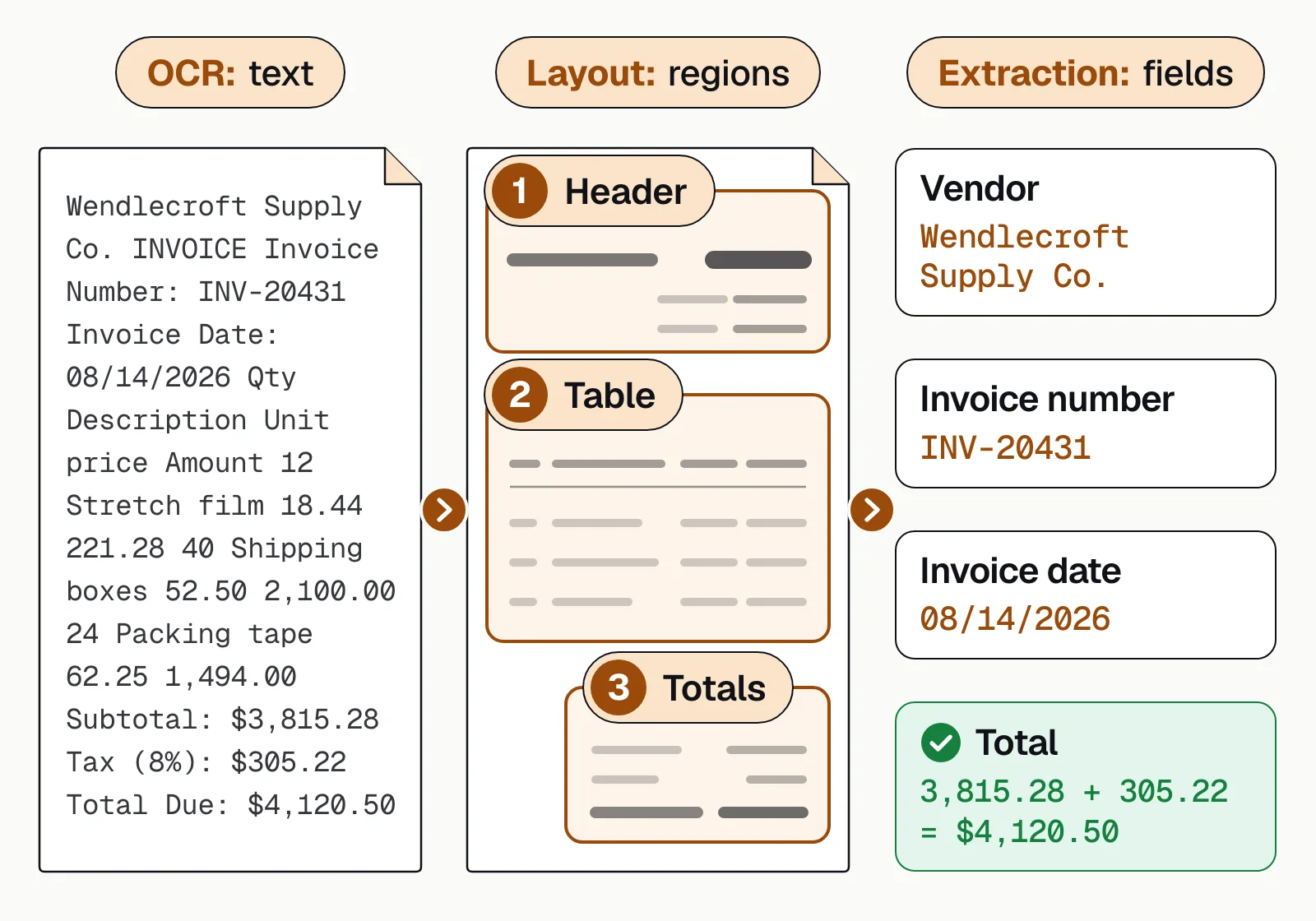
Here's the difference between OCR and extraction on one invoice:
Manual vs automated data extraction#
Manual extraction makes sense for small volumes. As volume grows, automation turns typing into checking.
Manual: typing
- People key every value from every document
- Typing errors slip through unnoticed
- Work backs up at month-end and tax season
Automated: checking
- Software reads each document and fills the fields
- Totals and formats are checked automatically
- People review only the values the software is unsure of
On Docsumo, that looks like this:
- 99%field-level accuracy across 250+ document types
- 95%+of documents processed straight through, without manual review
- <5 minper document, down from 2+ hours
How to extract data from documents#
Six steps take a document from arrival to your systems. Here's step 3 on a business bank statement:
| Field | Extracted value | Confidence |
|---|---|---|
| Account holder | Harbor Street Bakery LLC | |
| Address | 118 Harbor St, Portland, ME | |
| Bank name | First Midwest Bank | |
| Account number | •••• 4821 | |
| Account type | Business checking | |
| Statement period | 2026-07-01 → 2026-07-31 |
| Field | Extracted value | Confidence |
|---|---|---|
| Opening balance | 42,180.55 | |
| Total deposits | 88,412.10 | |
| Total withdrawals | 91,686.44 | |
| Closing balance | 38,906.21 | |
| Transaction count | 142 |
| Field | Extracted value | Confidence |
|---|---|---|
| Date | 2026-07-14 | |
| Description | ACH DEPOSIT STRIPE PAYOUT | |
| Amount | +3,284.10 | |
| Debit / credit | Credit | |
| Running balance | 51,902.44 | |
| Category | Card processor payout |
- CollectRoute email, uploads, scans and API submissions into one queue.
- Classify and splitIdentify each document and split combined PDFs, such as a loan packet.
- ExtractCapture every field and table row with a model trained on that document type, such as bank statements or invoices.
- ValidateCheck totals and formats, and compare documents: does pay stub income match statement deposits?
- Review exceptionsSend only low-confidence values to a person, with the source highlighted.
- ExportPush the data to your systems by API or webhook, or as Excel, CSV or JSON.
Data extraction examples by industry#
Five common examples:
Lending
Bank statements, pay stubs, tax returns and IDs for income verification and underwriting.Accounts payable
Invoice headers, line items and PO numbers for invoice matching and approval.Insurance
ACORD forms, loss runs and certificates of insurance for underwriting and compliance.Commercial real estate
Rent rolls and operating statements for property underwriting.Logistics
Bills of lading, delivery notes and customs documents for billing and freight audit.
Common data extraction challenges#
Each has a fix you can test before you buy.
- Varied layoutsEvery bank and vendor formats documents differently. Use models that find fields from context, not templates.
- Poor scansSkewed pages, faxes and photos cause misreads. Flag low-confidence values for a person.
- Tables across pagesLine items that span pages come apart. Check they come out as one table.
- Handwriting and checkboxesNot every OCR engine reads handwriting or checkbox marks. Test tools on your own handwritten samples.
- Silent errorsA misread digit still looks valid. Check totals and compare values across documents.
- SecurityFinancial and health documents carry personal data. Choose a vendor with SOC 2 Type 2, HIPAA and GDPR coverage.
The bottom line#
Data extraction gets the data you need out of its source and into a structured form. Databases and APIs are the easy part; documents are where teams still type by hand, and where AI extraction with review saves the most time. Compare methods in data extraction techniques or read about automated data extraction.
Book a demo with a few of your own documents, or start a free trial.
Frequently asked questions#
What is data extraction in simple terms?
Data extraction means taking the specific information you need out of wherever it lives, such as a PDF, a database or a web page, and putting it in a structured form you can use, like a spreadsheet row or a JSON record.
What is an example of data extraction?
A lender pulling the account holder, statement period, balances and every transaction from a borrower's bank statement into its underwriting system is data extraction. So is an AP team capturing the vendor, invoice number, line items and total from each invoice.
What is the difference between data extraction and data mining?
Extraction retrieves data from a source. Mining analyzes data that's already collected to find patterns. Extraction usually comes first. See data extraction techniques.
Is data extraction the same as web scraping?
Web scraping is one kind of data extraction, specific to websites. Data extraction also covers databases, applications, files and documents.
What tools are used for data extraction?
ETL and ELT tools for databases and applications, scraping tools for websites, OCR for scanned text, and intelligent document processing for pulling fields and tables out of business documents.