RPA vs AI for document data extraction: what each does and how they work together
For operations and automation teams deciding how to get data off documents and into their systems: what each technology does, the setup that fits each kind of document, and the checks that stop a bot from keying a misread value.

Key takeaways
- RPA (robotic process automation) uses software bots to repeat rule-based steps in other applications, such as copying a value into a screen. AI document extraction reads the document itself and returns named fields.
- RPA alone can only reliably read documents whose layout never changes. When layouts vary, bots need an AI extraction step to turn each page into fields first.
- OCR is a third thing: it turns a page image into text. Reading an I as a 1 is an OCR error, which confidence scores and validation can catch and a bot simply passes on.
- The risk in RPA document processing is the silent failure: a bot keys a misread value without questioning it. Put validation and a review step between extraction and the bot.
- In practice the two work together: AI to read, rules to check, and a bot or an API to deliver. Use the API wherever the target system has one.
On this page
RPA vs AI for document processing comes down to two different jobs: AI reads the document, finding and naming the fields even when every sender's layout differs, and RPA bots move the data, keying it into systems that have no API. The two work together, with a validation step in between so a misread value is caught before it's keyed in.
This guide covers what each one does, where OCR fits, the setup for each kind of document, and the checks that stop bad data from reaching your systems.
Should you use RPA or AI for document data extraction?#
It depends on how much your documents vary:
What are your documents like?
What RPA, OCR and AI each do#
Three technologies get lumped together here, and each does one job:
RPA
Software bots that repeat rule-based steps in other applications: open a screen, copy a value, click Save. GSA's Digital.gov describes it as low- to no-code software that automates repetitive, rules-based tasks.OCR
Turns a page image into text. It reads characters, not meaning, so reading an I as a 1 is an OCR error, whatever runs after it.AI extraction
Models that find and name the fields on a page, such as the invoice total or the statement period, on layouts they haven't seen, with a confidence score for each value.
RPA vs AI: the differences#
Side by side, for document work:
| Criteria | RPA | AI document extraction |
|---|---|---|
| Works on | Application screens and structured data: fields, files, spreadsheets | Documents: scans, PDFs, photos and emails, in any layout |
| How it decides | Rules a person scripted | Patterns learned from examples, with a confidence score per value |
| When things change | A redesigned screen or a new layout breaks the bot until someone updates it | New layouts are read without a new template; unsure values go to review |
| Setup | Record or script each step, application by application | Pre-trained models for common documents, plus examples for new types |
| How errors show up | The bot stops, or keys a wrong value without noticing | A confidence score for each value, so doubtful ones can go to a person |
| Best for | Moving data into systems with no API | Turning documents into checked data |
When an application's screens change, a bot's selectors stop matching and someone has to repair or recapture them, as Microsoft's Power Automate documentation describes. A new document layout does the same to a template.
How RPA and AI work together in document processing#
In a working setup, AI reads, rules check, and a bot or an API delivers:
- Emailed PDFs
- Scans
- Portal uploads
- 01Classify
- 02Extract with AI
- 03Validate
- 04Review low-confidence fields
Where the target system has an API, use it instead of a bot: an API call doesn't break when a screen is redesigned. Keep bots for systems that only have screens. For finance examples, see RPA in finance and accounting.
Checks that stop silent failures#
The step that's easiest to skip is validation. A bot doesn't question its input: if OCR reads an 8 as a B or extraction misreads a total, the bot keys the wrong value and nothing fails. Confidence scores catch only some of these errors:
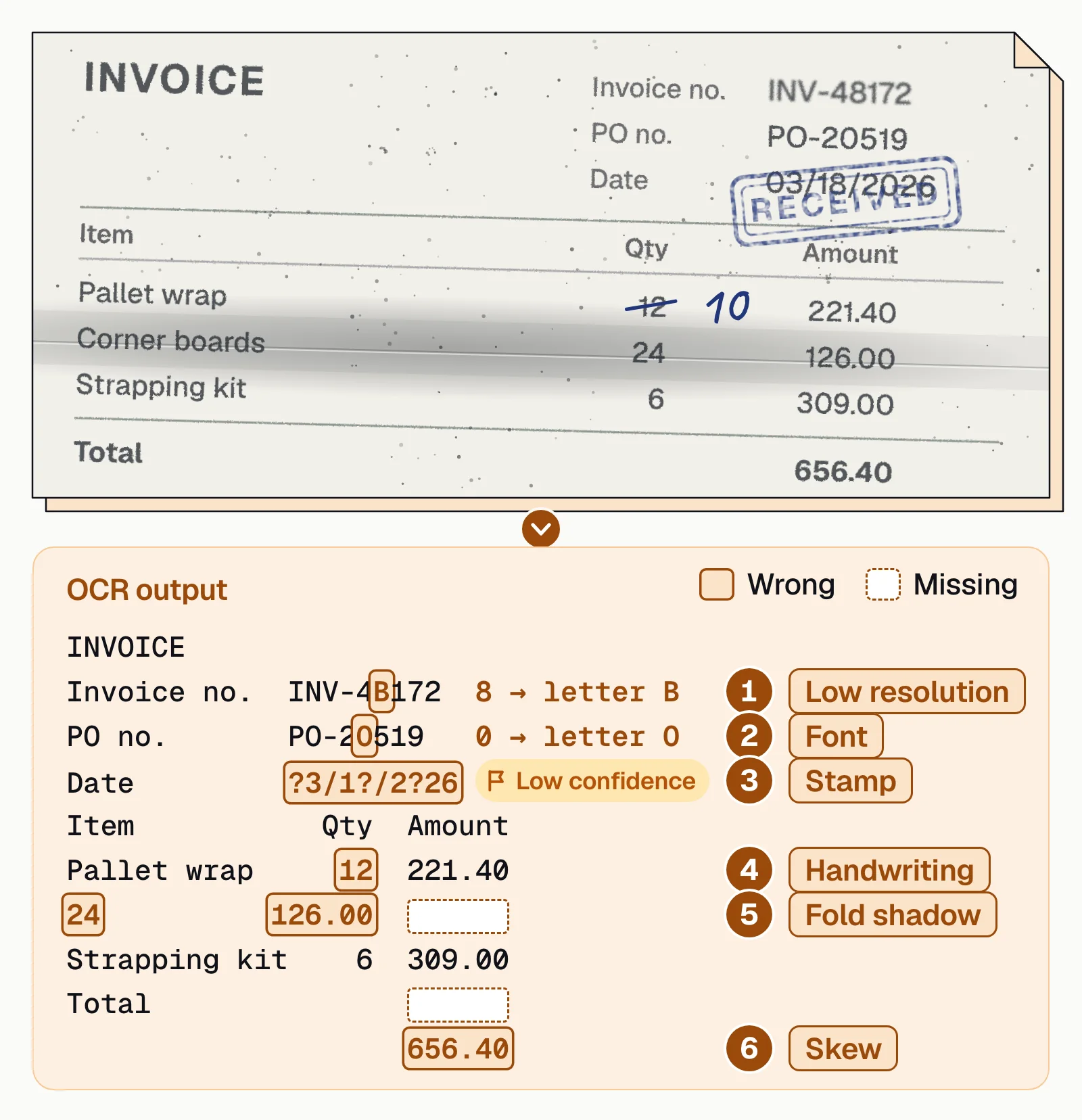
These checks stop that kind of silent failure:
- Totals add upLine items sum to the invoice total; debits and credits reconcile to the statement balance.
- Confidence travels with the dataThe bot receives each field's confidence score and routes low scores to a person instead of keying them.
- Formats are rightDates are dates, amounts are numbers, and IDs match their pattern.
- Records existThe vendor, account or policy is already in the target system before the bot writes to it.
- Exceptions have an ownerFailed checks land in a queue someone works, so they're neither keyed nor dropped.
- Layout changes get noticedA jump in exceptions from one sender often means its layout changed.
OCR tools for RPA: three kinds#
The document step can come from three kinds of tools:
IDP platforms
Intelligent document processing platforms such as Docsumo (our product), ABBYY Vantage and Hyperscience read documents in varied layouts and hand the data to any bot or system through an API.RPA platforms' own document tools
UiPath IXP, Automation Anywhere Document Automation and the AI document processing in Microsoft Power Automate read documents inside the same platform as the bots.Cloud OCR APIs
Amazon Textract, Azure Document Intelligence and Google Document AI return text, tables and fields as JSON. You build the checks and the review step.
Where Docsumo fits#
Docsumo is an intelligent document processing platform for the reading and checking half of the job. Its Document AI reads documents in any layout, with pre-trained models for 250+ document types, and Document Workflows run the checks you set up; fields it's unsure about go to your team, who click a value to see its source line on the page. Documents arrive by email, upload or API, and the data leaves through the API and webhooks to your systems or to a bot. Docsumo isn't RPA: it doesn't click through other applications' screens.
- 99%field-level accuracy across 250+ document types
- 95%+of documents processed straight through, without manual review
The bottom line#
RPA and AI aren't rivals in document work. AI reads the document and scores what it found, validation decides what a person should see, and a bot or an API puts the checked data where it belongs. Fixed forms can live with simple OCR and a bot; anything that varies needs AI extraction and checks in front of the bot.
Book a demo with a few of your own documents, or start a free trial.
Frequently asked questions#
What is the difference between RPA and AI?
RPA follows rules someone wrote: it clicks, types and copies exactly as scripted. AI learns patterns from examples, so it can read a layout it hasn't seen and work out which number is the invoice total. In document work, AI reads the data and RPA moves it.
Is AI replacing RPA?
Not for moving data. AI takes over the fragile part, reading documents, but bots still fill the gap where a system has no API. RPA vendors have built AI document reading into their own platforms: UiPath sells IXP, and Automation Anywhere retired IQ Bot Cloud in March 2026 and now sells Document Automation.
How do OCR and RPA work together?
OCR turns a scanned page into text a bot can use, but it returns characters, not fields. On documents whose layout varies, an AI extraction step names the values and a validation step checks them before a bot or an API writes them into the target system.
Can RPA extract data from PDFs?
A bot can read a native PDF's text layer, or fixed zones on a form whose layout never changes. Scans need OCR first, and documents that change layout from sender to sender need AI extraction; otherwise the bot reads the wrong spot without knowing it.
Which OCR tools work with RPA?
Three kinds. IDP platforms such as Docsumo (our product) read and check the documents and hand the data to any bot through an API. The RPA platforms' own document tools, such as UiPath IXP and Automation Anywhere Document Automation, work inside those platforms. Cloud OCR APIs such as Amazon Textract, Azure Document Intelligence and Google Document AI return JSON for you to check.
Sources
- Digital.gov (GSA): Understanding robotic process automation
- Microsoft Learn: Fix Failed to get UI element errors in Power Automate for desktop
- UiPath: IXP and Document Understanding
- Automation Anywhere: Document Automation
- Automation Anywhere: IQ Bot sunset (March 2026)
- Microsoft: Power Automate
- ABBYY: Vantage
- Hyperscience: Hypercell platform
- AWS: Amazon Textract features
- Microsoft: Azure Document Intelligence overview
- Google Cloud: Document AI overview
First published . Last updated .