RPA in finance and accounting: use cases, limits and where AI fits
For controllers, finance operations and shared services leaders: which finance tasks suit robotic process automation, which don't, how to pair bots with document AI, and the controls auditors will ask about.


Key takeaways
- Robotic process automation (RPA) uses software bots to repeat rule-based steps a person does in applications: logging in, copying data, running reports, posting entries.
- RPA fits finance work that is high-volume, rule-based and built on structured data, such as bank reconciliations, journal postings, report distribution and data transfers between systems.
- Bots break when inputs vary. Invoices, statements and other documents need document AI to turn them into structured data before a bot can use them.
- The strongest setups combine document AI for reading, RPA or APIs for moving data, and people for exceptions.
- Bots touching financial systems need controls: named bot identities, least-privilege access, change management and logs auditors can review.
On this page
RPA in finance and accounting is the use of software bots to repeat the rule-based steps people do in finance systems: downloading bank files, matching transactions, posting journal entries, moving data between applications and sending reports. It works best on high-volume tasks with structured inputs and stable screens, and struggles with documents such as invoices and bank statements, which is where document AI comes in.
This guide covers the finance use cases that suit RPA, where bots break, how RPA and document AI split the work in accounts payable, and the controls auditors expect.
What RPA does in finance#
An RPA bot mimics a user: it logs in, clicks, reads screens and fields, copies and pastes, and follows rules. It doesn't understand content; it follows the steps it was given. That makes it fast and consistent for predictable work and brittle when inputs or screens change.
RPA use cases in finance and accounting#
| Process | What the bot does | Fit for RPA |
|---|---|---|
| Accounts payable | Enters invoice data into the ERP, updates payment status | Only after invoices are turned into structured data |
| Accounts receivable | Creates and sends invoices, posts cash receipts, sends reminders | Good; PDF remittance advice needs document AI first |
| Bank reconciliation | Downloads bank files, matches transactions to the ledger, lists unmatched items | Good, when bank data arrives as structured files |
| Journal entries | Posts recurring and standard entries from templates | Good |
| Intercompany | Creates matching entries in both entities, flags differences | Good |
| Month-end close | Runs checks, collects outputs, updates trackers | Good for the mechanical steps |
| Reporting and forecasting | Loads actuals into planning tools, runs and emails reports | Good |
| Vendor master updates | Enters approved changes into the ERP | Good, with strong approval controls |
Accounts receivable is often the quickest win after AP: a bot that sends every invoice on time and applies every payment keeps days sales outstanding (DSO) down. Payroll, tax and expense work fit only in part: bots can validate timesheets, gather tax data or build expense reports from receipts that document AI has read, but a person still approves the run, the filing or the reimbursement.
Where RPA breaks: documents#
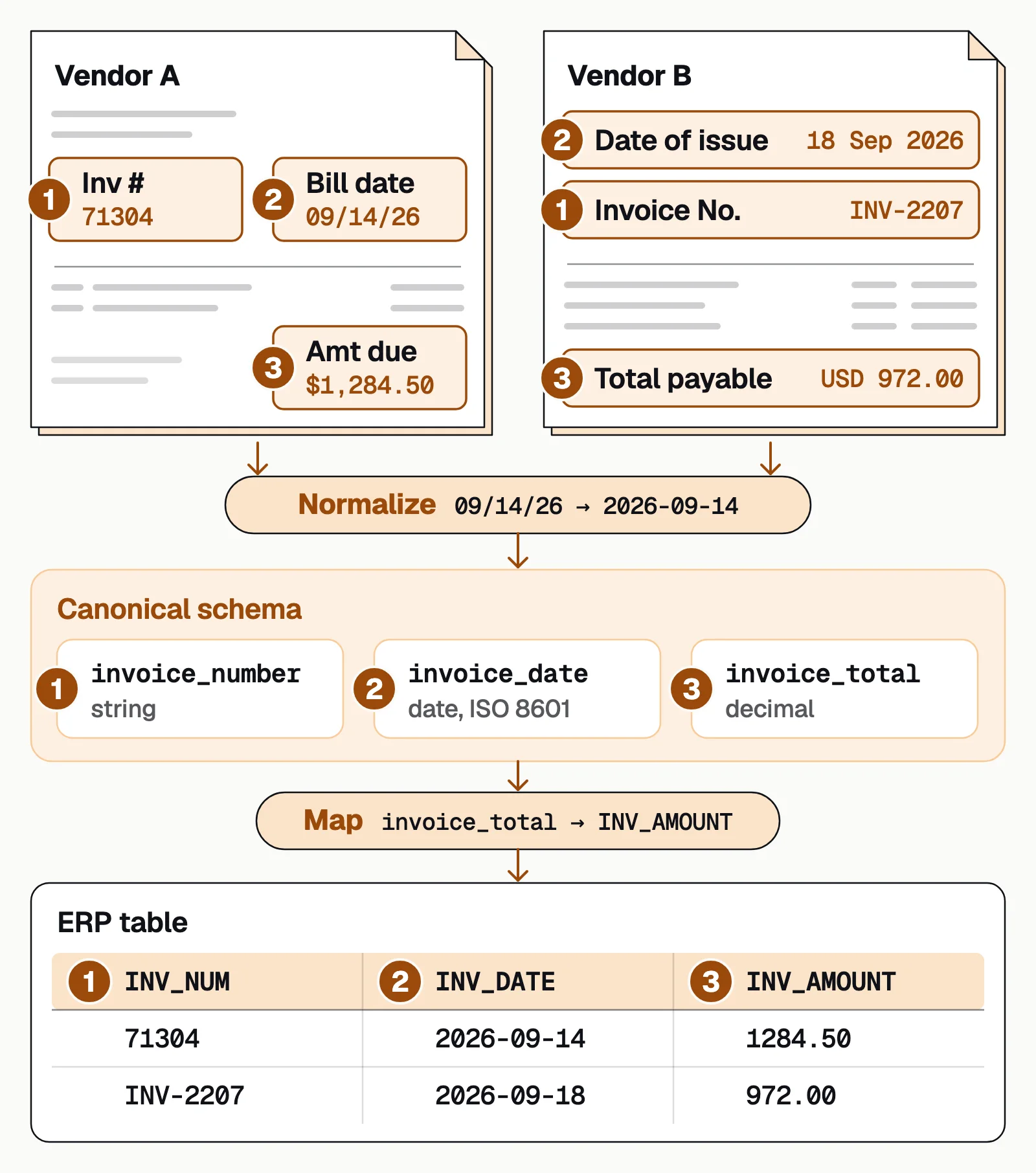
Much of finance runs on documents: supplier invoices, bank statements, remittances, receipts, tax forms. They arrive as PDFs, scans and photos in thousands of layouts. A bot can open a PDF, but it can't reliably find the total on a layout it hasn't seen, read a line-item table that runs across pages, or tell a credit memo from an invoice. Teams that paired RPA with template OCR ended up with a template per vendor, breakage whenever a layout changed, and exceptions back on people.
RPA in accounts payable: pair bots with document AI#
In accounts payable, the split that works is simple: document AI reads, APIs or bots move the data, and people handle exceptions. Capture, validation and matching happen before anything touches the ERP, which is how AP teams raise their touchless rate.
- Emailed invoices
- Supplier portals
- Scanned mail
- 01Document AI reads and checks
- 02API or bot moves the data
- 03People handle exceptions
Docsumo is the reading step. It reads invoices, bank statements and other documents with 99% field-level accuracy across 250+ document types, sends low-confidence fields to a reviewer with the source line highlighted, and delivers the data through API and webhooks. Where the ERP has no API, an RPA bot can enter the validated data. See accounts payable automation.
For scale, Ardent Partners' State of ePayables 2025, a sponsored analyst report, puts the average cost to process an invoice at $9.84. Best-in-class AP teams process invoices at 79% lower cost than their peers.
How to pick processes for RPA#
Score each candidate on five things, start with one or two processes, and measure hours saved and error rates before adding more.
Volume
Enough repetitions to repay the build.Rules
Clear, stable decisions with few judgment calls.Inputs
Structured data, or documents already read by document AI.Stability
Screens and systems that rarely change.Risk
Errors that are easy to spot and reverse.
Controls for bots in finance#
Auditors treat bots like users with system access, so they'll ask for the same controls.
- Named bot identitiesEach bot has its own login, never a shared human one.
- Least-privilege accessA bot that creates vendors shouldn't also release payments.
- Vaulted credentialsStored in a vault and rotated on a schedule.
- Change managementBot scripts are tested and approved before they change.
- LogsEvery bot action is recorded and kept for audit. See audit trails.
- MonitoringFailures raise an alert, so a broken bot doesn't silently stop posting.
Vendors that handle financial documents should hold security certifications; Docsumo's are on its security page.
The bottom line#
RPA is good at moving structured data between finance systems on a schedule and poor at reading documents. Pair it with document AI for invoices, statements and other paperwork, use APIs wherever they exist, keep people on exceptions and put the same controls around bots that you put around people. For more on the difference, read RPA vs AI for document data extraction.
Book a demo with a few of your own invoices, or start a free trial.
Frequently asked questions#
What is RPA in finance?
RPA in finance is the use of software bots to perform repetitive, rule-based tasks in finance and accounting systems, such as downloading bank files, matching transactions, posting entries and preparing reports.
How is RPA used in accounts payable?
In accounts payable, bots enter invoice data into the ERP, update payment status and move files between systems. They need structured data, so invoices are first read and checked by document AI, and people handle the exceptions. See accounts payable automation.
How is RPA used in accounts receivable?
Bots create and send customer invoices, post cash receipts against open invoices, send payment reminders and update the ledger. Remittance advice that arrives as PDFs or email is read by document AI first, so the bot can apply each payment to the right invoice.
What finance processes can RPA automate?
Bank and account reconciliations, journal entry postings, intercompany transactions, vendor master updates, invoice posting from structured data, accounts receivable, treasury and forecasting data loads, payroll checks, report generation and distribution, and data transfers between systems without integrations.
What is the difference between RPA and intelligent document processing?
RPA follows fixed steps in applications. Intelligent document processing reads documents like invoices and bank statements and extracts structured data. RPA needs clean inputs; IDP provides them. See RPA vs AI for document data extraction.
Should I use RPA or an API integration?
Use an API when one exists. It's more stable and secure. RPA is useful for legacy systems without APIs or as a bridge until an integration is built.
Is RPA secure for financial data?
It can be, with controls: each bot has its own credentials and least-privilege access, credentials are vaulted, changes go through change management, and every bot action is logged.
Sources
First published . Last updated .