Document process automation: how to automate document processing end to end
For operations and finance teams that still type document data into their systems. Walk one pay stub through every step, then see how to test a tool on your own files.

Key takeaways
- Document process automation uses software to handle the documents a business receives. It's also called automated document processing. People check only what the software can't confirm.
- It goes further than OCR or extraction alone. A platform also checks documents against rules and against each other, and routes each file to its next step.
- Document automation usually means creating documents, such as contracts, from templates. Reading and checking the documents you receive is a different job.
- Measure the results by straight-through rate, the share of documents processed with no manual review, and by time and cost per document. Docsumo reports 95%+ straight-through processing and $15 saved per processed document.
- Judge a tool by the fields your team had to fix on a few hundred of your own files. A vendor's published number can't tell you that.
On this page
- What is document process automation?
- Manual vs automated document processing
- Four ways to process documents, compared
- How automated document processing works
- What a platform needs
- Benefits of automated document processing
- How to choose an automated document processing platform
- Start where your team does the most typing
- Frequently asked questions
Document process automation is software that reads each document, checks the data and sends the data to your systems. People see only the files the software can't confirm. Automated document processing is another name for the same thing.
What is document process automation?#
Most document work follows one pattern. A document arrives, and someone works out what it is. They type the key values into a system, check them and pass the file on. Document process automation does each step in software and sends only the exceptions to people. You'll also see it called document processing automation.
It's broader than OCR, which turns images of text into text. It's also broader than data extraction, which pulls out fields and tables but doesn't check them or move the file on. See automated data extraction.
Document automation is a different job. It usually means creating documents, such as contracts and letters, from templates. This post is about the documents you receive. When those documents vary in layout and arrive in volume, the software that reads them is usually intelligent document processing (IDP).
Manual vs automated document processing#
Manual document processing is slow and error-prone. It's also hard to secure, audit or scale.
Manual document processing
- Someone opens each file and retypes the values
- Typos and missed fields are found later, by the teams and systems that use the data
- Sensitive files pass through many hands
- Approvals wait in queues
- Audits mean digging through folders
Automated document processing
- Software reads and checks every file, then routes it
- Rules catch errors before data reaches your systems
- Fewer people touch each file, and every action is logged
- Clean files go straight to the next step
- Every value links back to its source for audits
To reduce manual document handling, start with your highest-volume document and let people handle only what the software flags.
Four ways to process documents, compared#
Most teams use a mix, so pick by the documents you handle.
Which approach fits your documents?
| Approach | How it works | Strengths | Weaknesses | Best for |
|---|---|---|---|---|
| Manual processing | People read documents and type the data in | Flexible; handles anything | Slow, costly, error-prone; doesn't scale | Very low volumes or rare documents |
| Template-based OCR | OCR reads text; a template says where each field sits | Accurate on a fixed layout; inexpensive | Breaks when layouts change | One or two standard forms |
| RPA | Bots copy data between applications | Works with systems that have no API | Can't read documents; brittle when screens change | Moving data that's already extracted |
| Intelligent document processing (IDP) | OCR plus AI classifies, extracts, validates and flags exceptions | Varied layouts, tables and handwriting; review built in | More to evaluate; needs a review step | Varied, high-volume documents |
For a deeper introduction, see what intelligent document processing is.
How automated document processing works#
- Upload
- API
- 01Classify and split
- 02Extract
- 03Validate
- 04Review exceptions
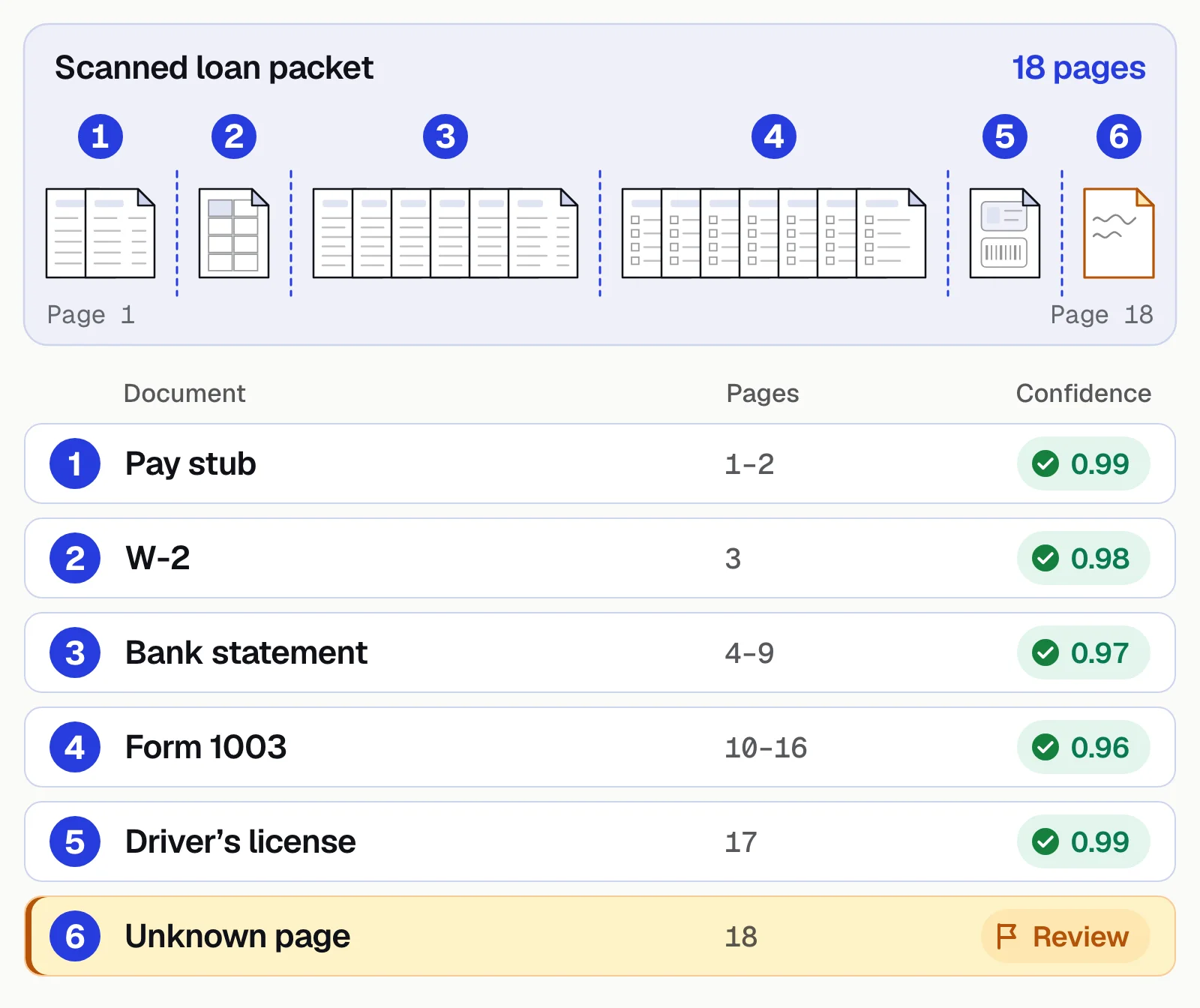
Take a pay stub that arrives by email with a loan application. If it's a scan, the software straightens and cleans it, then reads the text. The software finds where the stub starts and ends, and splits it from the W-2 and bank statement in the same email. Then it puts the three documents in one case, which holds all of the borrower's documents. That way they're checked together with the loan application.
Extraction turns the stub into named fields. Each value gets a confidence score, which shows how sure the software is that it read the value correctly.
| Field | Extracted value | Confidence |
|---|---|---|
| Employer | Northfield Freight LLC | |
| Employer EIN | ••-•••3082 | |
| Employee | Aisha K. Warren | |
| Employee ID | 20417 | |
| Period start | 2026-08-17 | |
| Period end | 2026-08-30 | |
| Pay date | 2026-09-04 | |
| Pay frequency | Biweekly |
| Field | Extracted value | Confidence |
|---|---|---|
| Regular hours | 80.00 | |
| Regular rate | 30.00 | |
| Regular pay | 2,400.00 | |
| Overtime hours | 4.00 | |
| Overtime rate | 45.00 | |
| Overtime pay | 180.00 | |
| Gross pay | 2,580.00 |
| Field | Extracted value | Confidence |
|---|---|---|
| Federal income tax | 227.98 | |
| Social Security | 159.96 | |
| Medicare | 37.41 | |
| State income tax | 122.14 | |
| Roth 401(k) | 129.00 | |
| Total deductions | 676.49 | |
| Net pay | 1,903.51 |
| Field | Extracted value | Confidence |
|---|---|---|
| YTD regular hours | 1,440.00 | |
| YTD gross pay | 44,910.00 | |
| YTD federal income tax | 3,927.46 | |
| YTD Social Security | 2,784.42 | |
| YTD Medicare | 651.20 | |
| YTD total deductions | 11,731.39 | |
| YTD net pay | 33,178.61 |
Next, a check you set up as a step in the workflow tests the stub's own math. Here, 80 regular hours at $30.00 and 4 overtime hours at $45.00 make $2,580.00 gross. Deductions of $676.49 leave $1,903.51, the net pay printed on the stub. Then cross-document validation compares the stub with the W-2 and the bank statement in the case. The W-2 shows the same employer, and the bank statement shows a payroll deposit of $1,903.51 on September 4. Both checks pass.
The income on the loan application doesn't match. The stub's $2,580.00 gross pay comes every two weeks, which makes 26 paychecks a year. Divided across 12 months, that's $5,590.00 a month. The applicant stated $6,200.00 a month, so the stub shows about 10% less. The gap may have a simple reason, such as a second job or a bonus this stub doesn't show. So the case goes to a person with both numbers side by side. Stubs that pass every check go straight to the loan system through an API and webhooks.
You can see the same stub and checks on Docsumo's pay stub page. Docsumo can read any document type, pay stubs included, without a pre-built model. In Docsumo, cross-document validation, such as the three checks above, is on the Enterprise plan.
Splitting a mixed packet
An 18-page loan packet becomes a pay stub, W-2, bank statement, Form 1003 and driver's license, each with a confidence score. A page that fits no known type goes to review. In Docsumo, you give AI Split a plain-English definition of each document type. Documents Docsumo can't classify wait as Unclassified until a person assigns each one a document type.
Sending only the unsure fields to a person
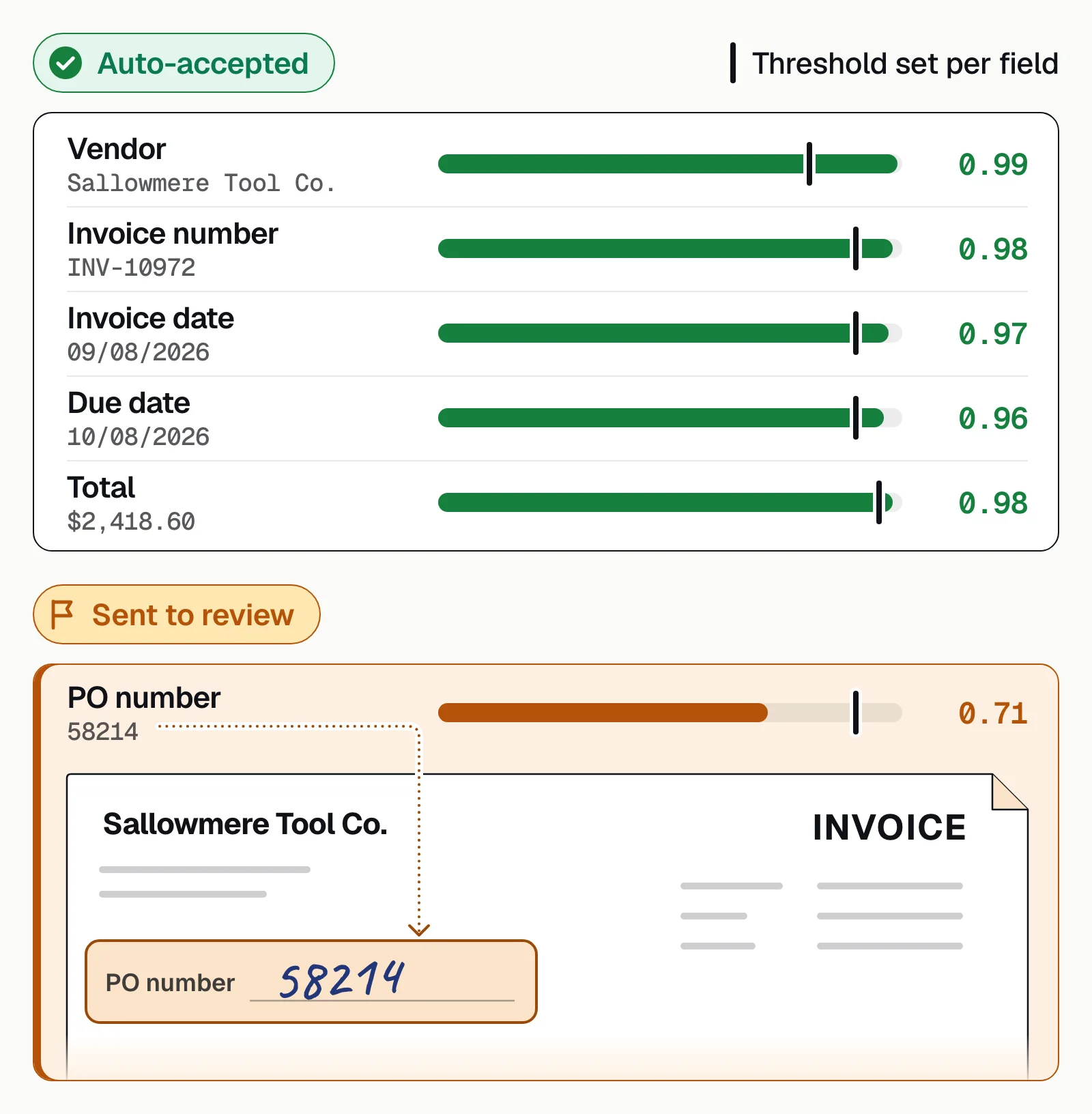
Each field has a threshold, the lowest confidence score the software accepts for that field. Values above the threshold go straight through, and a value below the threshold goes to review. In Docsumo, you set the threshold for each field. Clicking a flagged field highlights its source line on the document, and reviewers' corrections improve the model.
What a platform needs#
Pre-trained models
Read common documents on day one, with no labeling.Custom models
Learn the document types only you process.Classification and splitting
Label pages and separate mixed uploads.Validation rules
Check values within a document and across the file.Case management
Keep a borrower's or claimant's documents together, so decisions are made on the whole file.Review screen
Show each flagged value next to its source on the page.Workflow and integrations
Route each case and deliver data by API and webhooks.Security and audit trail
Access control, encryption, certifications and a log of every action.
Build or buy? You can build these eight parts yourself from an OCR API, your own models and a rules engine. Your team then maintains intake, validation, review and delivery too. A practical split is to buy the software that reads documents, and to write and maintain your business rules yourself.
Docsumo covers these in one platform. Document AI reads and extracts, case management runs cross-document validation, and document workflows route the results. You can add your own workflow steps too, such as one that summarizes medical records or suggests GL codes for invoices. Auto-classification and splitting are on the Business plan. Case management, cross-document validation and automated workflows are on the Enterprise plan.
Benefits of automated document processing#
Track the results by time per document, accuracy, straight-through rate and cost. Here are Docsumo's figures for each.
- <5 minper document, down from 2+ hours by hand
- 99%field-level accuracy across 250+ document types
- 95%+of documents processed straight through, without manual review
- $15saved per processed document
How to choose an automated document processing platform#
Score each platform on the same set of your own files. These are the checks that tell them apart.
- Accuracy on your own documentsRun a few hundred real files, bad scans included. Count the fields a person had to fix and the files that went straight through.
- Cross-document validationIt should compare documents in the same file, not just check each one alone.
- The review screenTry it with the people who'll use it daily.
- Custom document typesAsk how you'd add one that no one else processes.
- IntegrationAn API and webhooks into your systems. See integrations.
- SecuritySOC 2 Type 2, HIPAA and GDPR where your data needs them. See Docsumo security.
- PricingPer page, per document or subscription. Docsumo's free trial covers 14 days and up to 1,000 pages (pricing).
Our take. The best document process automation tool is the one your team has to correct least on your own documents. A vendor's published accuracy figure, including Docsumo's, comes from files that aren't yours. Run the same files through every tool on your list. Then you can compare fairly how many fields your team had to fix with each one.
Start where your team does the most typing#
Pick one document that arrives often and that a decision depends on. Pay stubs in a loan file and invoices that need approval are two examples. Get that one running end to end, then add the next. You can run a first pilot on your own documents during Docsumo's free trial.
Book a demo with a few of your own documents, or start a free trial.
Frequently asked questions#
What is document process automation?
It's software that handles the documents a business receives, from arrival to the system that needs the data. The software reads each document, extracts the data and checks it. A person reviews only what the software can't confirm. You'll also see it called automated document processing or document processing automation.
How do you automate document processing?
Route documents into one queue, and let AI-based software classify, extract and validate them. Send only the exceptions to a person, and deliver the data to your systems through an API. Start with one document type you receive in large numbers. Compare its accuracy and straight-through rate with the same numbers for your manual work today.
Which document process automation tool is best?
The one that needs the fewest corrections on your own documents. Test each tool on the same few hundred real files, bad scans included, and count the fields a person had to fix. For a list of tools to test, see the best intelligent document processing software.
Is document automation the same as automated document processing?
The terms overlap. Document automation usually means creating documents, such as contracts and letters, from templates. Some vendors use it for incoming documents too. Automated document processing, or document process automation, handles the documents you receive. Many businesses need both kinds of software, one to create documents and one to read the documents that come in.
What is the difference between OCR, RPA and IDP?
OCR converts images of text into text. RPA automates clicks and keystrokes in applications but can't read documents. IDP uses OCR plus AI models to classify documents, extract fields and tables, validate them and route exceptions. It often supplies the data an RPA bot enters. See IDP vs OCR.
How long does it take to implement automated document processing?
With pre-trained models for common documents, a pilot can start during a free trial. Full rollout depends on custom document types, the validation rules you need and your integrations.
Sources
First published . Last updated .