Financial statement spreading: what it is, how it works and how to automate it
For credit analysts, commercial lenders and credit unions. Learn what spreading is, follow a worked example with the ratios lenders calculate, and see the common mistakes and how automation cuts spreading time.


Key takeaways
- Financial statement spreading moves a borrower's balance sheet, income statement and tax returns into a lender's standard template. Every borrower is then analyzed the same way.
- Spreading is mostly mapping. Every borrower labels lines differently, and the analyst decides which template row each line belongs in.
- The spread feeds the credit ratios. They include the current ratio, debt to EBITDA or debt to worth, debt service coverage, working capital turns and margins.
- Common mistakes are putting current and long-term items in the wrong group, missing one-off items and mixing dollars and thousands. Another is not checking the spread against the source totals.
- Automation extracts and maps the lines, checks the math, and leaves analysts to review exceptions and apply credit judgment.
On this page
Financial statement spreading means a lender puts a borrower's numbers into its own standard template. Lenders also call it financial spreading. The numbers come from the borrower's statements and tax returns, line by line and period by period. Every borrower is then analyzed the same way. Credit analysts use the spread to calculate ratios, track trends, assign risk ratings and test covenants. Most of the work is mapping, which means deciding where each differently named line belongs in the template.
What is financial statement spreading?
Borrowers send financials in whatever form their accountant produces. That can be audited statements, reviewed or compiled statements, company-prepared statements from QuickBooks, or tax returns. No two look alike. A spread puts them all into one layout with three parts.
Rows
Follow the lender's chart of accounts, such as cash, inventory, payables, long-term debt, net worth, revenue, operating expenses and net income.Columns
One for each period, usually three fiscal years plus the latest interim period.Calculated rows
Ratios and cash flow measures, worked out from the rows above.
Once spread, a borrower can be compared with its own history, with peers and with the lender's policy thresholds.
How spreading works, step by step
Every spread moves from a pile of differently formatted documents to one template and a set of ratios.
- Financial statements
- Business tax returns
- Guarantor returns
- T12s and rent rolls
- 01Extract lines
- 02Map to template
- 03Adjust
- 04Reconcile
- 05Calculate ratios
The numbers are entered or extracted line by line for each period, with the units noted. A statement may be in dollars or in thousands. Next comes mapping, which means assigning each line to a template row. "Net sales", "Revenue" and "Fees earned" all go to revenue, while "Due to shareholder" may belong in subordinated debt.
The analyst then adjusts some items the way the lender treats them. Typical adjustments cover one-off gains or losses, owner pay and amounts that related parties owe. The lender also takes intangibles out of net worth to get tangible net worth. The spread is then reconciled to the source, since total assets, total liabilities and net income should match the statements. Only after that are the ratios and cash flow measures calculated and compared with policy and prior years.
A worked spreading example
The example is a distribution company's fiscal 2025 statements. We start with the income statement, where each label the borrower's accountant used goes into one row of the lender's template. The template then calculates EBITDA, which stands for earnings before interest, taxes, depreciation and amortization.
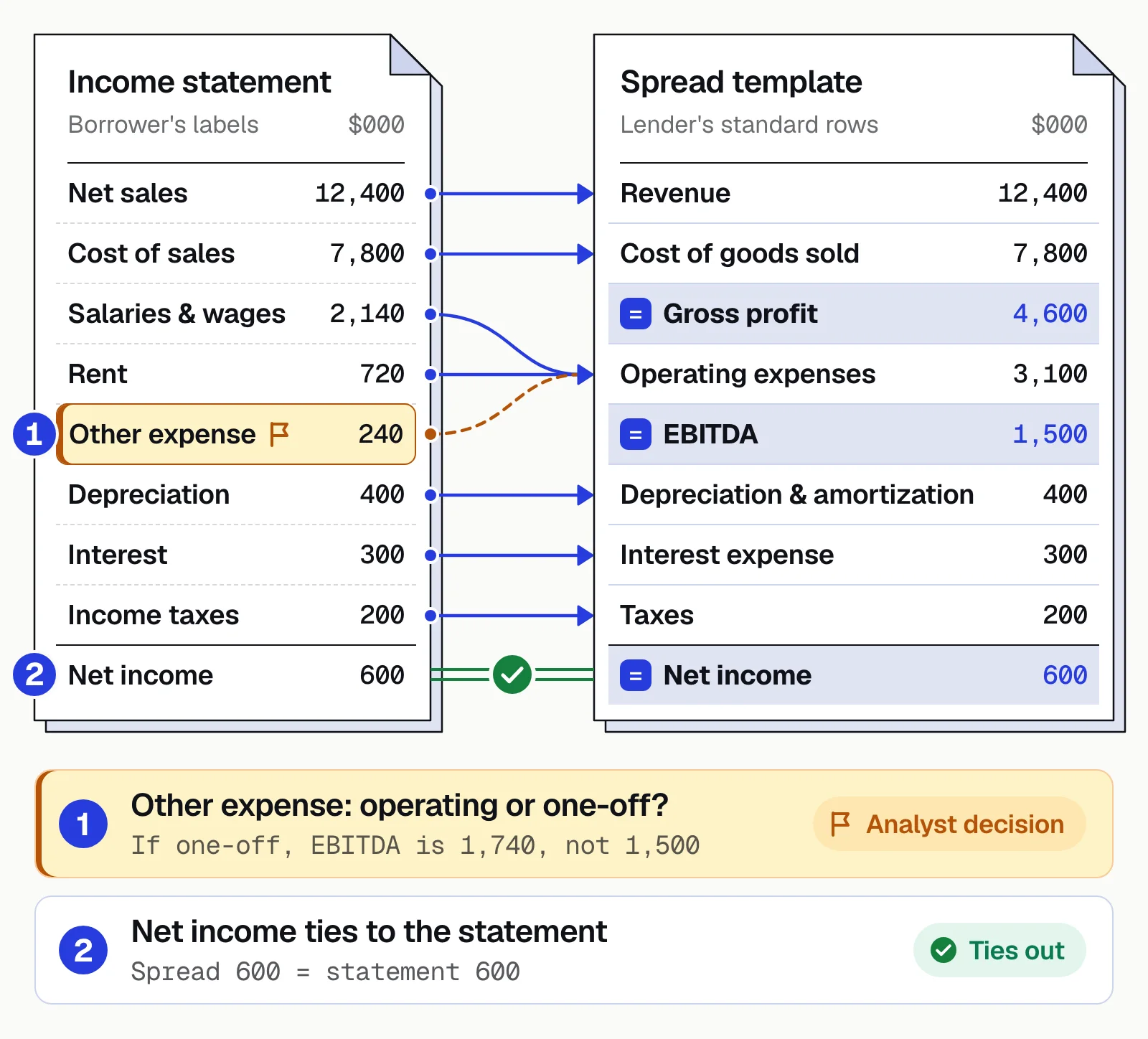
The full spread adds the balance sheet lines the ratios need.
| Template row | Borrower's label | FY2025 |
|---|---|---|
| Revenue | Net sales | $12,400,000 |
| Cost of goods sold | Cost of sales | $7,800,000 |
| Gross profit | (calculated) | $4,600,000 |
| Operating expenses (ex. D&A) | Salaries & wages, rent, other expense | $3,100,000 |
| EBITDA | (calculated) | $1,500,000 |
| Depreciation and amortization | Depreciation | $400,000 |
| Interest expense | Interest | $300,000 |
| Taxes | Income taxes | $200,000 |
| Net income | Net income | $600,000 |
| Current assets | Total current assets | $3,200,000 |
| Current liabilities | Total current liabilities | $2,000,000 |
| Total funded debt | Line of credit + term loan | $4,500,000 |
The key ratios follow, using annual debt service of $1,000,000 ($700,000 principal plus $300,000 interest).
| Ratio | Formula | Result |
|---|---|---|
| Gross margin | Gross profit ÷ revenue | 37.1% |
| Current ratio | Current assets ÷ current liabilities | 1.60x |
| Debt to EBITDA | Funded debt ÷ EBITDA | 3.0x |
| Debt service coverage (simple) | EBITDA ÷ annual debt service | 1.50x |
One mapping decision changes the answer. Treat the $240,000 of other expense as a one-off, and EBITDA rises to $1,740,000. Debt to EBITDA then falls to 2.6x and coverage rises to 1.74x.
Lenders refine these with their own definitions. Some deduct unfunded capital expenditures, taxes and distributions from EBITDA before calculating coverage. Others run a global cash flow that combines the business and its guarantors.
What the spread is used for
Credit analysis
Trends in sales, margins, debt and liquidity over several years.Risk rating
Ratios feed the lender's rating model.Covenant testing
Maximum debt to EBITDA, minimum coverage or minimum net worth, tested each period.Peer comparison
The borrower against industry benchmarks.Portfolio monitoring
Annual reviews and early warnings.
Checks to run on every spread
Most spreading errors come from the same few mistakes. Check for each before the spread goes to credit.
- Current vs long-term is rightThe current portion of long-term debt sits in current liabilities. Leaving it in long-term debt overstates the current ratio.
- Units matchStatements "in thousands" aren't spread as dollars, or the reverse.
- One-off items are removedA gain on sale of equipment left in operating income inflates EBITDA.
- Related-party items are flaggedLoans to owners aren't treated as ordinary receivables.
- Interim periods are annualizedYear-to-date figures aren't compared with full years as they stand.
- The spread ties to the sourceTotal assets, total liabilities and net income match the statements. Typing and mapping errors stay hidden if the spread is not reconciled to the source.
- Net worth rolls forwardLast year's net worth plus net income, less distributions, plus any new capital, equals this year's. A gap points to a missed adjustment or a restatement.
What we'd do. Run the checks above as rules on every spread. The analyst should see only the checks that fail. Each failed check comes with the reason and the source line behind it, such as a statement total that didn't tie. Numbers that pass every check don't need to be retyped or counted again, so the analyst's time goes to the credit questions. The same inputs then get the same treatment every time, which is what makes the automation predictable.
How to automate financial spreading
Manual spreading means retyping PDFs and making the same mapping decisions over and over. Automation handles both and leaves analysts the judgment.
Manual spreading
- Analysts retype every line from PDFs and scans
- Each analyst maps labels a little differently
- Math errors surface late, if at all
- A multi-year spread can take hours per borrower
Automated spreading
- The software extracts lines and periods, with each number's units and plus or minus sign
- A mapping table sends the same label to the same row every time
- The software automatically checks that the balance sheet, its subtotals and the source totals agree
- Analysts review exceptions and apply credit judgment
- <5 minper document, down from 2+ hours
- 99%field-level accuracy across 250+ document types
- 95%+of documents processed straight through, without manual review
Docsumo, our product, automates the reading and checking. It extracts financial statements and tax returns line by line, scans included. It sends values it's unsure about to an analyst, with the source line highlighted. You set up the steps that map labels to your template and add up the totals in the workflow. On the Enterprise plan, cross-document validation checks the statements against the returns. Data goes to Excel or, through the API and webhooks, to the system that holds your spread. It isn't a spreading module, so your template, adjustments, ratios and credit decision stay where they are. More on financial spreading and, for real estate loans, CRE underwriting.
What stays with the analyst once spreading is automated
The analyst keeps the decisions that need credit judgment, such as whether the other expense in the example was a one-off. Software can read the lines, map the labels and add up the totals. The goal is a spread that reconciles to the source, with mapping and adjustments that an analyst can defend. See how automated spreading fits into the lending workflow, or read about automated underwriting software.
Book a demo with a few of your own borrower financials, or start a free trial.
Frequently asked questions
What does spreading mean in banking?
Spreading is the process of entering a borrower's financial statements into the bank's standard spreadsheet or credit system, line by line and period by period. Analysts can then calculate ratios and compare years and borrowers.
Why do banks spread financial statements?
A standard layout lets analysts compare one borrower with another and run ratio and trend analysis. The spread also supplies the numbers for risk ratings and covenant tests, which check the borrower against the limits in the loan agreement. The same layout gives credit review and examiners a consistent record.
What documents are spread?
Lenders spread balance sheets, income statements and cash flow statements. They also spread business tax returns (Forms 1120, 1120-S and 1065) and personal tax returns for guarantors. For real estate loans, they add T12 operating statements and rent rolls.
How do you check that a spread ties out?
Compare the spread with the source for every period. Total assets should equal total liabilities plus net worth, and net income should match the income statement. This year's net worth should equal last year's plus net income, less distributions, plus any new capital. A gap means a typing error, a mapping error or a missed adjustment.
How long does financial spreading take?
By hand, one borrower's multi-year spread can take hours, depending on the number of statements and their quality. Automation cuts most of that time because the software extracts the lines and people only review them. Docsumo reports under 5 minutes per document, down from more than 2 hours.
What is financial statement spreading software?
Software that reads a borrower's statements and tax returns, so analysts don't retype them into the spread. Document AI tools such as Docsumo, our product, read the statements and tax returns and send the data to Excel. Through an API, they can also send the data to the tool that holds your spread. Credit platforms such as nCino keep everything in one system. In nCino, Automated Spreading reads the documents with OCR and sends the data to nCino Spreads, which holds the templates and ratios.