OCR form processing: a step-by-step guide to OCR for forms
For operations teams that still key data off loan applications, tax forms and insurance forms. See how OCR reads a form, where templates break and what to look for.


Key takeaways
- OCR form processing reads filled-in forms and turns every field into structured data. Loan applications, tax forms and ACORD certificates are common examples.
- One form can need four readers. OCR reads printed text, ICR hand-printed characters, handwriting recognition cursive notes and OMR checkboxes.
- Template OCR reads each field from a fixed spot and breaks when a layout, edition or scan shifts. AI form processing finds each field by its label and context.
- Standard forms still vary. IRS rules let employers drop unused boxes and move fields on the W-2 copies employees receive, so position alone isn't enough.
- Handwriting and poor scans are where errors happen, so every value needs a confidence score, validation rules and human review of the uncertain ones.
On this page
- Structured vs semi-structured forms
- The four kinds of content on a form
- How OCR form processing works
- Form processing use cases
- Template OCR vs AI form processing
- What to look for in OCR form processing software
- How to automate form processing with Docsumo
- When a form is one document in a larger file
- Frequently asked questions
OCR form processing reads filled-in forms and turns each field into data. OCR, short for optical character recognition, is the part that reads the text. Forms such as loan applications, tax forms and insurance certificates are typical. Plain OCR only turns the page into text. Form processing goes further. It matches each value to the right field and reads handwriting and checkboxes. Then it checks the values and sends them to your other systems.
The sections below sort forms by layout, follow one form through the software, and end with what to ask a vendor.
Structured vs semi-structured forms#
How a document is laid out decides how hard it is to read automatically.
Structured forms
Every copy has the same fields in the same place, like Form 1003, Form W-2 and ACORD 25. Templates can read them, as long as the layout and the scan stay put.Semi-structured forms
The same information in a different layout from every sender, like invoices, bank statements and pay stubs. Fields have to be found by their labels, not their position.Unstructured documents
Free text with no fields, like letters and contracts. Values come out of sentences, which takes language models rather than templates.
Even a standard form varies. Employers send Copy A of Form W-2 to the Social Security Administration (SSA). It is printed in red dropout ink, which scanners ignore. A substitute copy must match the layout exactly, because SSA scanners read the form automatically. Borrowers give lenders the copies that employees receive. These copies can leave out unused boxes. They can also move the name and address boxes or use a vertical layout. IRS rules allow all of this.
The four kinds of content on a form#
A single form can mix four kinds of content, and each has its own reader. OCR reads the printed text. Intelligent character recognition (ICR) reads hand-printed characters in boxes. Handwriting recognition (HWR) handles cursive notes. Optical mark recognition (OMR) decides which checkboxes and bubbles are marked. Form processing software uses all four readers on the same page.
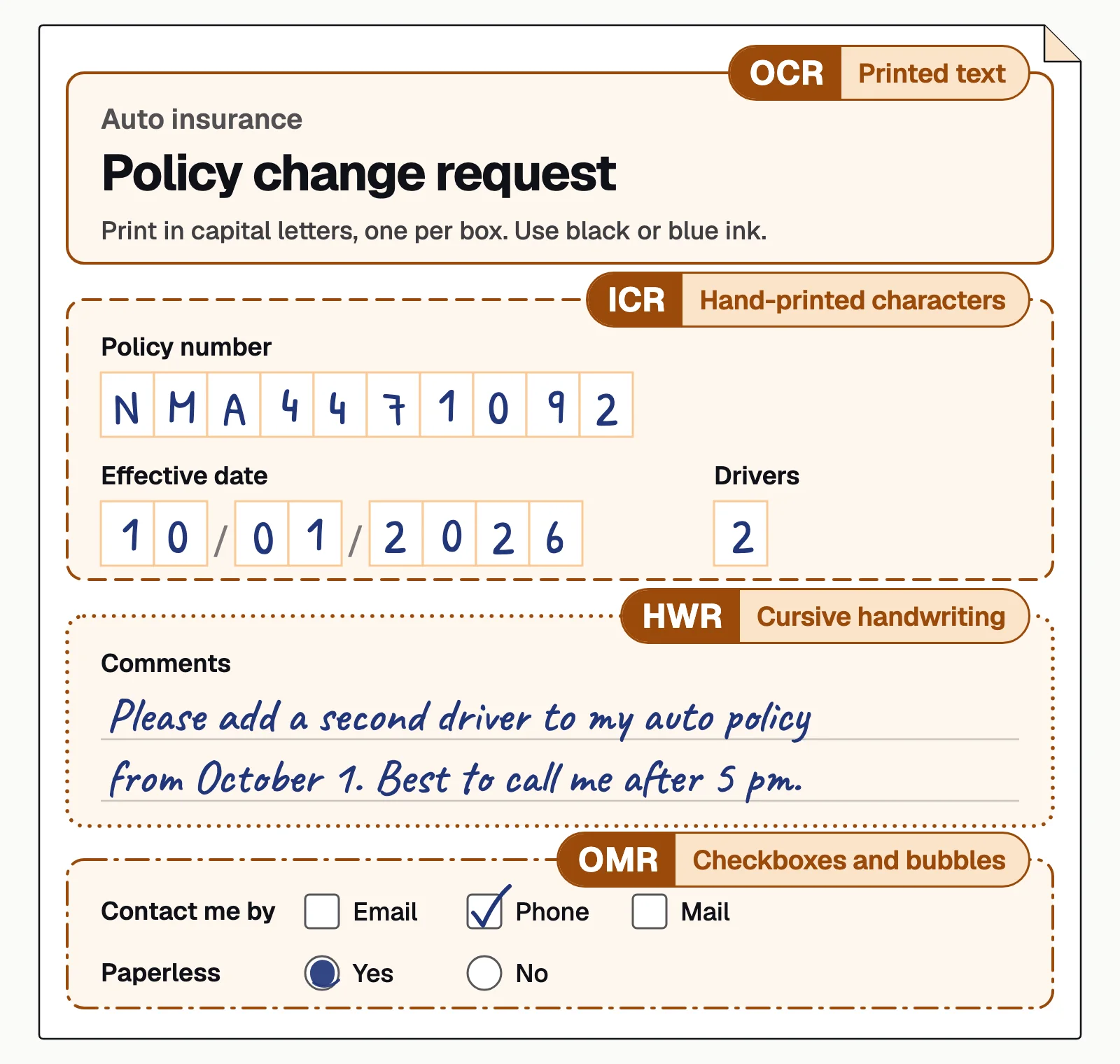
Good form design helps: one box per character, a request for capital letters, and boxes in a dropout color. Handwriting still reads less reliably than print, so values the engine isn't sure about should go to a person. Our guide to intelligent character recognition covers the handwritten part in depth.
How OCR form processing works#
Most form processing systems run the same stages. Systems differ in how well each stage handles a form that looks different from the ones it was set up with.
- Scans and faxes
- PDFs
- Phone photos
- 01Classify the form
- 02Read text and marks
- 03Map values to fields
- 04Validate
- 05Review exceptions
Follow one borrower's packet through the system. It arrives by email as one PDF with a W-2 and page 3 of a Form 1003. One page is a skewed phone photo. The system straightens and cleans each image first. Then the system finds the form type on each page and splits the packet into separate forms.
Next, each page goes to the reader it needs. OCR reads the printed text, ICR the hand-printed entries, handwriting recognition the notes and OMR the checkboxes. Each value is then tied to a field such as borrower name. On a fixed form, the system can find a value by where it sits on the page. On forms that vary, it uses the field name next to the value and the text around it. Template OCR starts to fail at this step.
Validation comes last. Dates must be real dates, tax IDs must have the right format, totals must add up and required fields can't be blank. A value below the confidence threshold goes to a person. The rest go to your system through an API, or as JSON, CSV or Excel files.
Form processing use cases#
These forms come up every day in lending, tax and insurance work, in onboarding and in healthcare. Form-like documents such as pay stubs belong here too.
Mortgage applications
Form 1003, the Uniform Residential Loan Application, and Form 1008, the Uniform Underwriting and Transmittal Summary, read alongside the income documents in the loan file.IRS tax forms
W-2s, 1040s and 1099s often arrive in one mixed packet. Form 4506-C is the borrower's signed consent for a lender to get IRS transcripts.ACORD insurance forms
Standard forms from ACORD, the insurance industry's standards body. ACORD 25 is the certificate of liability insurance. ACORD 125 is the commercial insurance application, and 126 is the commercial general liability section.Pay stubs
Gross pay, deductions, net pay and year-to-date totals, in a different layout for each payroll provider. See pay stub extraction.Onboarding and KYC forms
Account opening forms, vendor forms and W-9s, where the name, address and tax ID have to match other records.Healthcare and benefits forms
Patient intake forms, often partly handwritten, plus claim forms and explanation of benefits (EOB) statements. See healthcare.
Template OCR vs AI form processing#
Traditional form OCR, often called zonal or template OCR, reads each field from a fixed spot on the page. It works well on one clean, fixed layout and needs a new template for every other. AI form processing finds each field by its label and context, so one setup covers many layouts.
Template OCR
- A template drawn for every layout and edition
- A skewed scan or a new edition moves fields out of their zones
- Reads characters without knowing what they mean
- A misread value passes through unless someone spots it
AI form processing
- One setup covers many layouts and editions
- Fields are found by label and context, wherever they sit
- Values are checked against formats, rules and each other
- Values the engine isn't sure about go to a person first
What to look for in OCR form processing software#
Most form recognition software reads a clean printed form well. The differences show on handwriting, unfamiliar layouts and the values the engine isn't sure about.
- Handwriting and checkboxesReads hand-printed entries, cursive notes and ticked boxes in the same pass as printed text.
- New layouts without new templatesCopes with new form editions, substitute forms and skewed scans.
- Classification and splittingRecognizes each form in a mixed packet and splits it before extraction.
- A confidence score on every fieldLets you set per field how sure the engine must be before a value skips review.
- Validation rulesChecks formats, required fields and totals, and flags every value that fails.
- Review and outputShows reviewers each flagged value next to its place on the page, and sends approved data to your systems by API or webhook.
Test any tool on a sample of your own forms, including the worst scans and the messiest handwriting, before you commit.
How to automate form processing with Docsumo#
Docsumo, our product, is an intelligent document processing platform for this kind of work. It reads printed and handwritten text on any form. On the Business plan it sorts and splits mixed packets. It extracts fields and tables, and joins tables that run across pages into one. Fields it isn't sure about go to your own reviewers. You set the confidence threshold per field, clicking a field highlights its source line on the page, and corrections improve the model.
Checked data goes to your systems through the API and webhooks. Docsumo runs in the cloud only, and it isn't a desktop tool for editing PDFs or making searchable files. See the platform for the full workflow.
- 99%field-level accuracy across 250+ document types
- 95%+of documents processed straight through, without manual review
- <5 minper document, down from 2+ hours
When a form is one document in a larger file#
We'd test form OCR on a full packet, not one clean form. A W-2 can be read perfectly and still disagree with the 1003 in the same file. Checks that compare documents catch that, and they matter more than one error-free page. Cross-document validation is on the Docsumo Enterprise plan.
OCR form processing turns a filled-in form into data your systems can use, with little or no manual data entry. Templates can read structured forms until a new edition comes out or the scan quality changes. Semi-structured documents and handwriting need software that finds each field from its label and the text around it, and flags values it is unsure about. Choose a tool by how it handles your worst forms, and have people review only the values it flags.
Book a demo with a few of your own forms, or start a free trial.
Frequently asked questions#
What is OCR form processing?
OCR form processing, also called automated forms processing, uses optical character recognition to read filled-in forms and turn each field into structured data. It replaces manual data entry. The software reads every field and checks it, then sends the data on. A person reviews only the values it isn't sure about.
Can OCR read handwritten forms?
Yes, within limits. Hand-printed capitals in separate boxes read well; cursive, crowded or faint writing reads less reliably, so those values should go to a person to check. Docsumo reads handwritten text and sends any field it isn't sure about to a reviewer.
Can OCR read checkboxes on a form?
Character recognition alone can't, because a checkbox has no characters to read. Optical mark recognition (OMR) decides whether each box or bubble is marked. Look for form processing software that runs OCR and OMR in the same pass.
How accurate is OCR on forms?
It depends on the form, the scan and the handwriting, so measure it on a sample of your own forms, including the worst ones. Docsumo reaches 99% field-level accuracy across 250+ document types, and any field it isn't sure about goes to review.
What is the difference between OCR and intelligent document processing?
OCR turns an image of text into characters. Intelligent document processing (IDP) starts with OCR, then classifies the document, extracts named fields and tables, validates them and routes exceptions to a person. See our guide to IDP vs OCR.
Is there free OCR software for forms?
Tesseract is a free, open-source OCR engine. It returns text rather than form fields, so you build the field mapping and the checks, and do the review, yourself. Docsumo has a free 14-day trial for up to 1,000 pages.
Sources
- IRS: Publication 1141, General Rules and Specifications for Substitute Forms W-2 and W-3 (Rev. Proc. 2026-27)
- IRS: Income Verification Express Service for participants (Form 4506-C)
- Fannie Mae Selling Guide B1-1-01: Contents of the Application Package (Forms 1003 and 1008)
- ACORD: About ACORD
- ACORD: Forms Index (ACORD 25, 125 and 126)
- Tesseract OCR on GitHub
First published . Last updated .