OCR vs MICR: the differences, and where each fits in check processing
For banking, treasury and payments operations teams: how OCR and MICR differ, why checks still carry a MICR line, and how the two work together when checks are scanned, deposited remotely or processed as images.

Key takeaways
- OCR (optical character recognition) reads printed or handwritten text from an image of any document. MICR (magnetic ink character recognition) reads the special line of magnetic-ink characters printed along the bottom of a check.
- In the US, the MICR line uses the E-13B font: 10 digits and 4 special symbols, carrying the routing number, account number, check number and, after deposit, the amount.
- MICR is standardized by ANSI X9.100-160, which fixes the placement, font and magnetic signal of the characters so reader-sorters can process checks at high speed.
- Most checks today are cleared as images under Check 21, and image-based capture often reads the MICR line optically, so OCR and MICR work together rather than compete.
- The rest of the check (payee, amount written out, date, memo) and any remittance documents need OCR and document AI, not MICR.
On this page
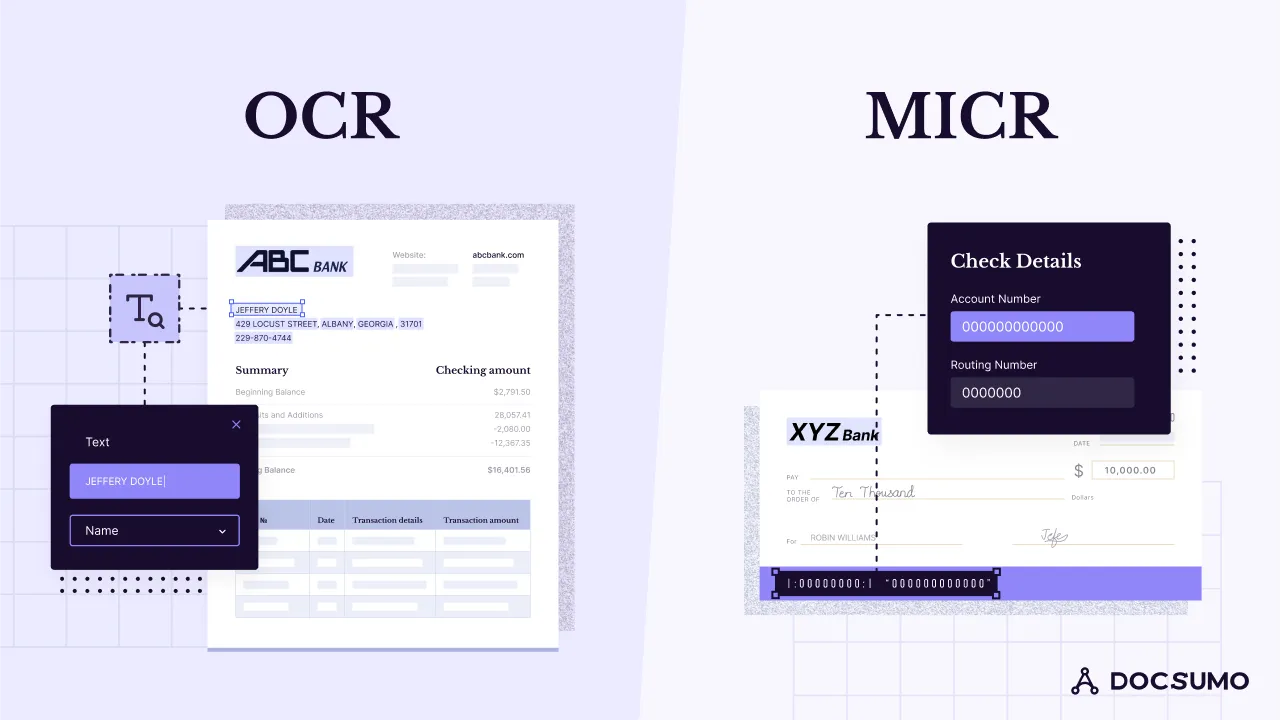
OCR (optical character recognition) reads printed or handwritten text from an image of any document by recognizing the shapes of characters. MICR (magnetic ink character recognition) reads one specific thing: the line of magnetic-ink characters printed along the bottom of a check, which carries the routing number, account number and check number. OCR is general purpose; MICR is a banking standard built for fast, reliable check handling, and in modern check processing the two work together.
Below: how each works, a side-by-side comparison, the devices that read MICR, and how the two combine in image-based check processing.
What is OCR?
OCR converts images of text, such as scans, photos and image-only PDFs, into machine-readable text. Modern engines use neural networks that read whole lines, many fonts and languages, and often handwriting, on almost any document: bank statements, invoices, forms, IDs and checks.
OCR on its own returns text. To pull specific fields, such as the amount on a check or the payee's name, it's combined with document AI that knows where those fields are and what they mean. For more, see what OCR is and IDP vs OCR.
What is MICR?
MICR is the technology banks use to read the code line at the bottom of checks. The characters are printed in magnetic ink, so a reader can detect each character's magnetic signal as well as its shape. That makes the line hard to misread, even with stamps, signatures or marks over it.
US checks use the E-13B font, which has 10 digits and 4 special symbols (transit, on-us, amount and dash). From left to right, the MICR line typically holds four fields:
Routing number
9 digits between two transit symbols, identifying the paying bank.Account number
The customer's account at that bank, followed by the on-us symbol.Check number
The serial number of the check.Amount
Added by the bank of first deposit when the check is processed.
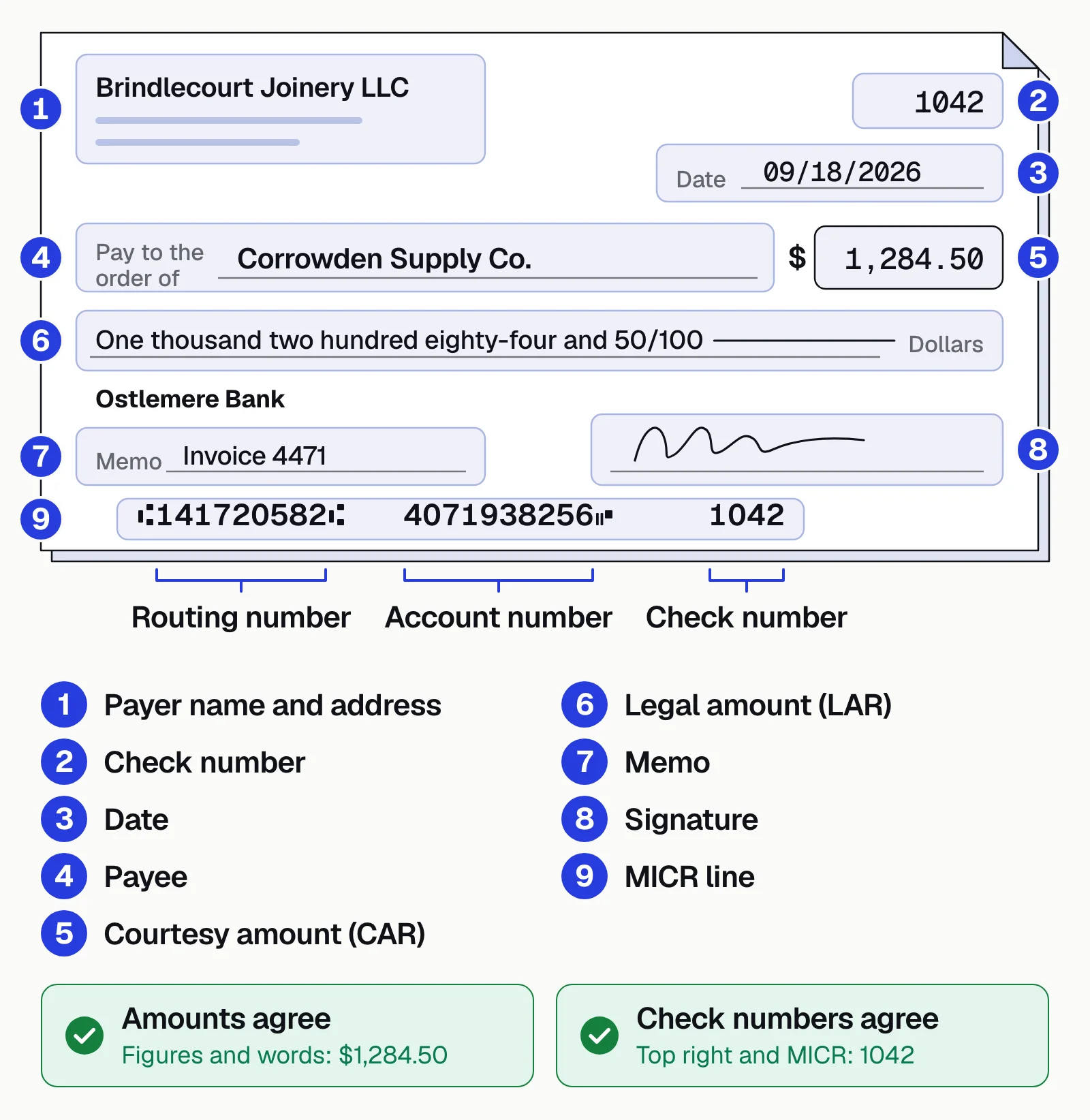
The placement, font, dimensions and magnetic signal level are specified in the ANSI X9.100-160 family of standards. Many countries in Europe and Latin America use a different MICR font, CMC-7.
MICR devices: readers, reader-sorters and scanners
A MICR device is an input device that reads the magnetic-ink line and passes it to a computer as data. Reader-sorters read and sort thousands of checks for clearing; check scanners at branches, lockboxes and businesses read the MICR line and capture the check image; MICR printers use magnetic toner to print the line on new checks.
OCR vs MICR: key differences
| Aspect | OCR | MICR |
|---|---|---|
| How it reads | Optically, from character shapes in an image | Magnetically (and often optically), from magnetic-ink characters |
| What it reads | Any text, in many fonts and languages, including handwriting | A fixed character set: E-13B (10 digits, 4 symbols) in the US |
| Where it's used | Every industry and document type | Checks and a few other bank-processed documents |
| Input requirements | A reasonably clear image | Characters printed in magnetic ink to a standard format |
| Accuracy | Varies with image quality, layout and handwriting | Very high on properly printed lines, because the format is fixed |
| Equipment | Any scanner, camera or phone, plus software | Magnetic reader-sorters, or check scanners that read the line |
| Output | Text, which document AI can turn into fields | A short code line: routing, account, serial, amount |
OCR trades MICR's reliability on one fixed line for the ability to read everything else on the check and the documents that come with it.
Where OCR and MICR are used
OCR reads documents across the business: bank statements, pay stubs and tax returns in lending; invoice fields and line items in accounts payable; ACORD forms, claims and certificates in insurance; intake forms and claims in healthcare; and everything on a check that isn't in the MICR line.
MICR has a narrower job, all of it around the check itself.
Check clearing
Reader-sorters use the MICR line to route each check to the paying bank and post it to the right account.Encoding
The bank of first deposit adds the amount to the MICR line.Check printing
Banks and businesses printing their own checks must meet the MICR standard so checks can be processed.Integrity checks
A missing or faulty magnetic signal, or a MICR line that doesn't match the bank's records, is a warning sign.
How OCR and MICR work together today
Check processing has moved from paper to images. The Check Clearing for the 21st Century Act (Check 21), in effect since October 2004, made a properly prepared substitute check, a paper reproduction of the image, the legal equivalent of the original. That paved the way for banks to clear checks electronically as images.
Once a check is an image, both technologies play a part. Branch and lockbox scanners often read the MICR line magnetically and optically at once, and compare the two reads. Remote deposit capture and mobile deposit read the MICR line optically from the photo, since there's no magnetic reader. OCR and document AI read the rest: payee, date, the courtesy amount (in numbers) and legal amount (in words), memo, endorsement and any remittance advice or invoice that came with the check.
- Branch scanners
- Lockbox scanners
- Mobile deposit photos
- Remittance advice
- 01Read the MICR line
- 02Read payee and amounts
- 03Match the remittance
- 04Route mismatches to review
Checks are in decline but far from gone. The Federal Reserve's 2025 payments study, published in July 2026, found check payments kept falling by both number and value, and the Kansas City Fed reports that checks' share of the number of business-to-business payments fell from 32% in 2015 to 13% in 2024. The remaining volume still needs processing.
Checks to run on every scanned check
- The two amounts agreeThe courtesy amount in numbers matches the legal amount in words.
- The MICR reads agreeWhere both are available, the magnetic and optical reads of the code line match.
- The account is knownThe routing and account numbers match the bank's or your customer records.
- It's endorsed and datedThe endorsement is present and the date is valid and not stale.
- The remittance ties outThe check amount matches the invoices it pays, so it posts to the right open items.
How to automate check processing
Most teams already have the MICR side covered by their scanners or remote deposit capture. The manual work is in the rest: keying payees and amounts, matching remittance advice to open invoices, and chasing mismatches.
Manual check processing
- Staff key payees, amounts and invoice numbers from images
- Remittance advice is matched to open items by hand
- Mismatches surface late, after posting
- Every check gets the same manual attention
Automated check processing
- Payees, amounts and dates are read from the image automatically
- Remittance invoice numbers are matched to open items
- Mismatches are flagged before posting
- Only exceptions reach a reviewer
Docsumo reads checks and the remittance documents that come with them. Fields it's unsure about go to a reviewer, and checking a check against its remittance is a cross-document check on the Enterprise plan. It doesn't replace the MICR reader in your scanners. See check processing, IDP for financial services or our guide to OCR for checks.
- 99%field-level accuracy across 250+ document types
- 95%+of documents processed straight through, without manual review
The bottom line
MICR is a narrow, reliable standard for the code line on checks. OCR is the general technology for reading everything else. In modern image-based check processing, they're used together: MICR identifies the check, and OCR with document AI reads what's written on it and what came with it.
Book a demo with a sample of your own checks and remittances, or start a free trial.
Frequently asked questions
What is the main difference between OCR and MICR?
OCR recognizes characters from their shapes in an image and works on any document. MICR recognizes characters printed in magnetic ink, using their magnetic signal as well as their shape, and is used almost only for the code line on checks.
Is MICR still used?
Yes. US checks still carry a MICR line in E-13B, and banks rely on it to route and post checks. Check volumes are falling, but the line remains the standard way to identify a check's bank, account and serial number.
Can OCR read a MICR line?
Yes. The E-13B font is designed to be machine readable, and scanners and mobile deposit apps commonly read the MICR line optically from the image. Dedicated magnetic readers are still used where the extra check on the magnetic signal matters.
Is a MICR reader an input device?
Yes. A MICR reader, reader-sorter or check scanner is an input device: it reads the magnetic-ink characters on a check and sends them to a computer as data, the way a keyboard or barcode scanner does.
What information is in the MICR line?
The bank's 9-digit routing number, the customer's account number and the check serial number. The bank of first deposit usually encodes the amount on the right side after the check is deposited.
How do businesses automate check processing?
Scanners or remote deposit capture read the MICR line, and OCR or document AI reads the payee, amounts, dates and any remittance advice. See check processing.
Sources
- ANSI X9.100-160-1-2021: Magnetic Ink Printing (MICR), Part 1
- Federal Reserve: Check Clearing for the 21st Century Act
- Federal Reserve: initial findings from the 2025 triennial payments study (July 2026)
- Federal Reserve Bank of Kansas City: B2B payments, a gradual shift from checks (September 2026)
First published . Last updated .