Check OCR: how bank check scanning and data extraction work
For banks, lenders, lockbox and AR teams that still receive paper checks: the fields check OCR reads, how MICR, courtesy and legal amount recognition fit together, and what to look for in check OCR software.

Key takeaways
- Check OCR reads a check image and extracts the MICR line (routing, account and check numbers), the amounts in figures and in words, the payee, date and memo, and detects whether the check is signed.
- Three parts of a check need their own recognition method: MICR for the bank data, courtesy amount recognition (CAR) for the amount in figures and legal amount recognition (LAR) for the amount in words. When the two amounts differ, the words prevail and the check should go to a person.
- Checks are declining but still big: US check payments fell to 9.2 billion worth $24.45 trillion in 2024, from 11.0 billion in 2021 (Federal Reserve Payments Study).
- For AR, lockbox and loan servicing teams, the payoff comes from reading the remittance with the check, so each payment is matched to open invoices or loan accounts and only exceptions reach a person.
On this page
Check OCR is optical character recognition applied to check images: it reads the MICR line (routing, account and check numbers), the amounts in figures and in words, the payee, date and memo, and detects whether the check is signed. Banks, lockbox operators, lenders and accounts receivable teams use it to deposit and post checks without keying them. Good check OCR compares the two amounts and sends anything that doesn't match to a person.
This guide shows each field on a check, how check OCR works from scanner to posting, where it struggles and what to look for in check OCR software.
What check OCR extracts#
The numbers on the check below mark the fields check OCR reads on the front.
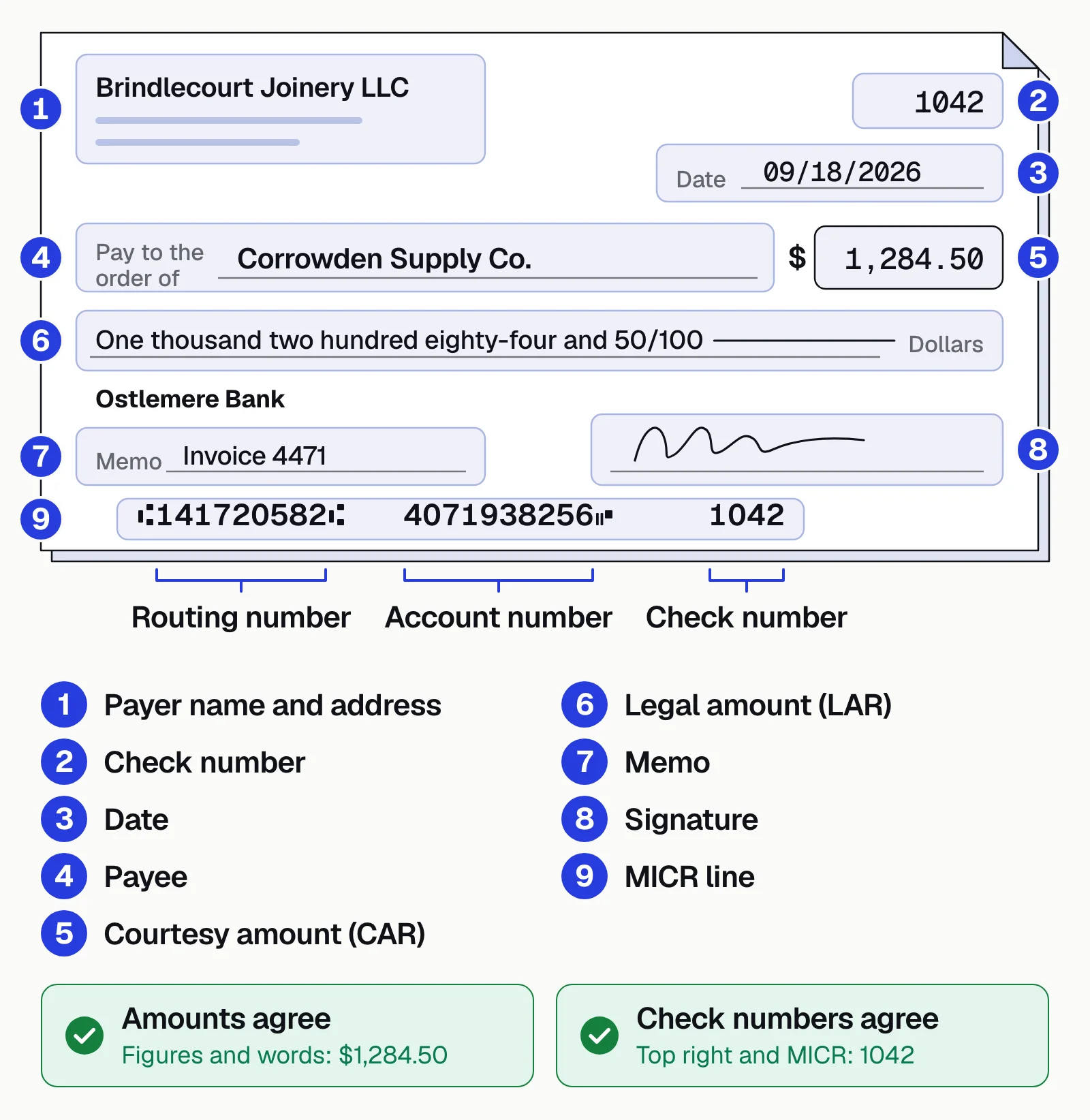
Three of the fields need their own recognition method; general OCR reads the rest. More on the MICR line in OCR vs MICR.
MICR line
The E-13B characters along the bottom: the 9-digit routing number, the account number and the check number, read magnetically or optically.Courtesy amount (CAR)
The amount in figures in the box, handwritten or printed.Legal amount (LAR)
The amount in words, converted to a number and compared with the courtesy amount. When they differ, the words prevail.
How check OCR works: from scanner to posting#
Each check goes through eight steps, from capture to posting. Most problems show up at step 2 (a poor image) or step 7 (fields that don't agree).
- CaptureFront and back images from a branch or lockbox check scanner, a mobile deposit app, image files or email.
- Test image qualitySkew is corrected; folded corners, torn edges, blur, glare and a missing back are flagged.
- Classify each imageCheck front, check back, remittance, envelope or letter, so each is read the right way.
- Read the MICR lineThe E-13B characters, with the routing number tested against its ninth digit, a check digit.
- Read both amountsCAR reads the figures in the box; LAR reads the words and converts them to a number.
- Extract the restPayee, date, payer, memo, endorsement and signature presence, plus invoice or loan numbers from the remittance.
- ValidateFigures against words, payee against your entity names, date against stale-date and post-dating rules, check number against items already deposited, total against the remittance.
- Review and postFailing or low-confidence items go to a person with the image; clean ones post to your ERP, AR or loan servicing system.
Where check OCR struggles#
Most misreads and missed alterations come from these, so plan your review queue around them.
Handwriting
Especially the amount in words and the payee line.Phone photos
Shadows, angles, glare and busy backgrounds.Security backgrounds
Patterns printed behind the text.Stamps and endorsements
Marks that overlap fields.Many layouts
Personal, business and voucher checks in many designs, some with a stub attached.Altered checks
Washed payees or amounts need image forensics, not just OCR.
Reading the remittance with the check#
For AR and lockbox teams, reading the check is half the job; the other half is knowing what it pays for. The check gives the amount, payer and check number; the remittance stub, letter or invoice copy gives the invoice or loan numbers, amounts, deductions and short-pay reasons.
- Check front and back
- Remittance stub
- Invoice copy
- Envelope
- 01Classify each image
- 02Read check and remittance
- 03Validate amounts
- 04Match to open items
Each payment is then matched to open invoices or loan accounts, and short pays, overpayments and unknown payers go to a person.
Manual vs automated check processing#
Checks aren't going away soon. The Federal Reserve Payments Study puts US check payments at 9.2 billion, worth $24.45 trillion, in 2024, down from 11.0 billion in 2021. In a 2026 survey by the Association for Financial Professionals (AFP), 72% of organizations that use checks plan to keep using them.
Manual
- Staff key amounts, payers and invoice numbers from each image
- Words and figures are compared only when someone looks
- Remittances are matched to open invoices by hand
- Short pays and unknown payers are found late
Automated
- Check and remittance fields are read from every image
- Both amounts are compared on every check
- Payments are matched to open invoices or loan accounts
- Only mismatches, short pays and unknown payers reach a person
Docsumo, our product, is an intelligent document processing (IDP) platform. For check processing, it reads checks and remittances, printed or handwritten. Fields it's unsure about go to a reviewer, each linked to its spot on the image, and reviewers' corrections improve the model. Tying a check to its remittance uses cross-document validation, on the Enterprise plan. A rule such as figures against words is a step you set up in the workflow. Data goes to your ERP, AR or loan servicing system through API and webhooks. It isn't a check scanner or a deposit system: the deposit stays with your bank.
- 99%field-level accuracy across 250+ document types
- 95%+of documents processed straight through, without manual review
How to choose check OCR software#
Test any tool on a sample of your own checks, including the worst ones, and look for:
- Reads your worst checksHandwritten amounts, phone photos, voucher checks with stubs, remittances in any layout.
- Validates, not just readsFigures against words, payee, date and duplicate check numbers on every check.
- Reads the remittanceInvoice or loan numbers and amounts, so payments can be matched.
- Shows its workLow-confidence fields go to a reviewer, highlighted on the image.
- Fits your systemsAPI and webhooks into your ERP, AR or loan servicing system, plus exports.
- Passes security reviewA SOC 2 Type 2 report, access by role, an audit log, and a plain answer on whether your checks train shared models.
The bottom line#
Check OCR reads the MICR line, both amounts and the other fields from a check image. It's reliable when every check is validated, and it pays off when the remittance is read too: payments post automatically and only exceptions reach a person. For loan payments and the rest of the borrower file, see IDP for lending.
Book a demo with a few of your own checks and remittances, or start a free trial: upload check images and download the results to Excel.
Frequently asked questions#
What is check OCR?
Check OCR (cheque OCR outside the US) is optical character recognition applied to check images. It reads the MICR line, the amounts in figures and in words, the payee, date and memo, and detects whether the check is signed. A check scanner, check reader or phone camera captures the image, and the OCR software turns it into data for deposit and posting.
What is the difference between OCR and MICR?
MICR (magnetic ink character recognition) reads the E-13B characters printed along the bottom of a check, which hold the routing, account and check numbers. OCR reads the rest of the check, including handwriting. Image-based systems read the MICR line optically as well. See OCR vs MICR.
Can OCR read handwritten checks?
Yes, though handwriting is read less reliably than print. That's why check OCR compares the handwritten amount in words with the amount in figures, and sends mismatches and low-confidence fields to a reviewer. More in intelligent character recognition.
What are CAR and LAR on a check?
Courtesy amount recognition (CAR) reads the amount in figures in the box. Legal amount recognition (LAR) reads the amount written in words. If they disagree, the words prevail under UCC 3-114, and the check should go to a reviewer.
How do you validate data extracted from a check?
Test the routing number against its check digit, the figures against the words, the payee against your legal entity names, the date against post-dating and the six-month stale-date rule, and the check number against items already deposited. Then tie the amount to the remittance, and send failures and low-confidence fields to a person.
What is check image analysis?
Check image analysis examines a check image rather than just reading it. It tests image quality (skew, blur, folded corners, a missing back) and whether the fields agree, such as the amount in words and in figures. In bank fraud tools, it also compares each check with the account's earlier checks (check stock, layout, signature) to spot counterfeits, which check OCR alone doesn't do.
Sources
- Federal Reserve: National payment volumes, top-line data (CY 2015–24)
- AFP: 2026 Payments Fraud and Control Survey (press release, April 14, 2026)
- Uniform Commercial Code § 3-114: Contradictory terms of instrument (Cornell LII)
- Uniform Commercial Code § 4-404: Bank not obliged to pay check more than six months old (Cornell LII)
- American Bankers Association: Routing Number Policy & Procedures (updated Jan 28, 2022)
First published . Last updated .