Introducing SumoOCR: OCR built for business documents
For teams that read bank statements, invoices and forms at volume. How we built our own OCR model, how it compares with Google Cloud Vision, and where Google still wins.

Key takeaways
- SumoOCR is Docsumo's own OCR model. It reads every page, digital PDFs included, and returns each word with its box on the page.
- On scanned bank statements, SumoOCR read 96.1% of transaction rows exactly right. Google Cloud Vision read 91.8%.
- Retraining cut misread characters about five times compared with the open-source PaddleOCR model it started from.
- SumoOCR reads over 16 times as many pages per dollar as Google Cloud Vision at its list price.
- Google still does better on other scripts, badly damaged scans and handwriting, so it stays as our fallback for those pages.
On this page
SumoOCR is Docsumo's own OCR model, built for the pages our customers send, such as bank statements, invoices, tax forms and scans. It reads business documents more accurately than Google Cloud Vision, at a small fraction of the cost.
Why we built SumoOCR
OCR is the first step in everything Docsumo's document AI does. If a digit is misread there, no model further down the line can put it back.
We run OCR on every document, even digital PDFs that already carry text. That built-in text often misses logos, headers and footers, scanned pages tucked inside a digital file, and words that are part of an image. Those gaps cause a lot of extraction errors.
Most OCR is built to read anything, from street signs to book pages. Business documents are hard in their own way. They are dense tables of dates and amounts in small print, often faxed or photocopied, with names that carry accents. One wrong digit in an amount is enough to break a bank statement.
So we built an OCR model for exactly these pages. We run it in our own cloud, and customers can also run it in their own private cloud.
Every value points back to the page
SumoOCR doesn't just return text. It returns every word with its exact box on the page, and Docsumo keeps that link through extraction. Every value we extract, whether an amount, a date or an account number, can be traced to the words it came from.
| Field | Extracted value | Confidence |
|---|---|---|
| Account holder | Harbor Street Bakery LLC | |
| Address | 118 Harbor St, Portland, ME | |
| Bank name | First Midwest Bank | |
| Account number | •••• 4821 | |
| Account type | Business checking | |
| Statement period | 2026-07-01 → 2026-07-31 |
| Field | Extracted value | Confidence |
|---|---|---|
| Opening balance | 42,180.55 | |
| Total deposits | 88,412.10 | |
| Total withdrawals | 91,686.44 | |
| Closing balance | 38,906.21 | |
| Transaction count | 142 |
| Field | Extracted value | Confidence |
|---|---|---|
| Date | 2026-07-14 | |
| Description | ACH DEPOSIT STRIPE PAYOUT | |
| Amount | +3,284.10 | |
| Debit / credit | Credit | |
| Running balance | 51,902.44 | |
| Category | Card processor payout |
That makes the data easy to trust. A reviewer can check any value against the original page instead of hunting for it. An auditor can see where every number came from.
This matters most once an LLM does the extracting. A language model can return a value that looks right but isn't on the page. Because every word has a box, each value the model returns is matched back to its words, and a value with no source on the page stands out.
We cover how this link works across a whole extraction pipeline in Everyone is number one. Let's uncomplicate document extraction.
More of every bank statement read right
We ran SumoOCR and Google Cloud Vision on the same scanned and digital bank statements, from many different banks. A transaction row only counts if the whole row is read exactly right. One wrong digit anywhere in it means the statement won't add up.
| Measure | SumoOCR | Google Cloud Vision | PaddleOCR |
|---|---|---|---|
| Amounts read exactly, scanned | 99.1% | 96.6% | 96.8% |
| Dates read exactly, scanned | 98.9% | 98.9% | 98.6% |
| Words found, digital | 99.9% | 98.3% | 98.7% |
Most of SumoOCR's lead on amounts comes from reading the commas and spaces inside numbers exactly. Ignore those, and the two are level on amounts, at 99.2% against 98.9%. Dates are a tie. On a smaller set of general forms and pages, the two were close as well, with 99.0 for SumoOCR and 98.4 for Google.
How we built it
We didn't start from scratch. PaddleOCR is a strong open-source OCR model, and we kept the part of it that finds the lines of text on a page. We retrained the part that reads each line on 2.3 million text lines from private and public data. That includes 357,523 lines from public documents such as IRS forms, the Federal Register and EU law.
Two of the changes we made stand out.
- It reads the Latin alphabet only, the one used for English and most European languages. It can't drop a stray Chinese character into an English invoice.
- It reads each line close to its real size, so small print isn't stretched out of shape.
After retraining, SumoOCR misreads about five times fewer characters than the model it started from. That is fewer than 2 in 1,000, down from almost 1 in 100.
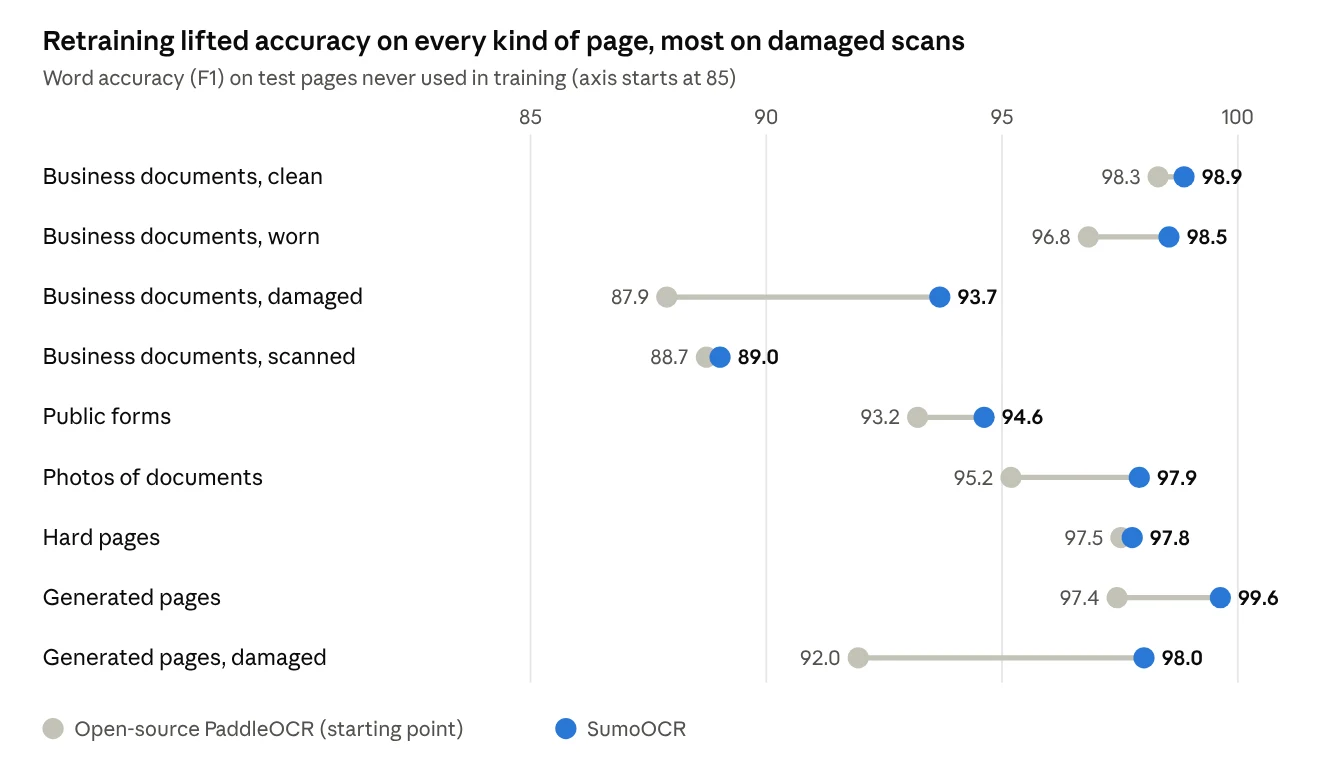
The biggest gains are on the hardest pages, such as heavily damaged scans and photos of documents. Accented letters, as in names like José or Müller, improved the most, from 87.1 to 98.7.
Fast, and a fraction of the cost
SumoOCR is built for volume. One NVIDIA L4 GPU reads about 6 pages a second. On CPUs, each instance needs just 1 vCPU and 2 GB of memory, and we add instances as the load grows.
Google's API still answers a single page faster, in about 0.4 seconds. SumoOCR takes about 0.6 seconds on a GPU and about 3 seconds on a CPU. When thousands of pages arrive at once, the cost of each page matters more than a fraction of a second. That is where SumoOCR pulls far ahead.
Where Google still wins
SumoOCR isn't better everywhere. Google stays in our pipeline as the fallback for these cases.
- Other alphabets. SumoOCR reads Latin script only. On a Hindi invoice, Google read 99% of the words and SumoOCR read none, so documents in other scripts go to Google.
- Badly damaged scans. On our hardest real pages, such as a faded payroll form or a phone photo of an insurance certificate, Google reads more words.
- Handwriting. Google is slightly better on handwriting today. We're adding more handwriting to our training data to close the gap.
Our take. We think the OCR layer deserves as much care as the model that reads its output. An OCR model that sees every word and its place on the page gives any LLM a better start. It also gives people a way to check the answer.
How we tested
- Training data. 2.3 million text lines from private and public data (357,523 of them public), with every test page kept out of training.
- Against the open-source model. Test pages never used in training. Most are business documents such as bank and brokerage statements, invoices, tax forms, insurance certificates, bills of lading, checks and utility bills. The rest are public forms, photos of documents and generated pages.
- Against Google on bank statements. Scanned and digital statements from many different banks.
- Against Google on general pages. A set of public and generated pages.
- Speed and cost. A load test in our cloud. Google's price is its public list price.
Accuracy scores are word F1. They count the words read exactly right, and penalize both missed words and extra ones.
Run SumoOCR on your hardest pages
Got pages that trip up OCR, like faded scans, dense statements or tiny print? Sign up for Docsumo and try SumoOCR on your own documents. You'll see every word it reads, and exactly where each one sits on the page. For a high-volume setup or a private-cloud install, book a demo.
Frequently asked questions
What is SumoOCR?
SumoOCR is the OCR model Docsumo built for business documents such as bank statements, invoices and tax forms. It reads every word on a page and returns its position, so each extracted value can be traced back to the page.
Is SumoOCR more accurate than Google Cloud Vision?
On business documents in Latin script, it was in our tests. On scanned bank statements it read 96.1% of transaction rows exactly right, against 91.8% for Google. Google is still better on other scripts, badly damaged scans and handwriting.
Can I run SumoOCR in my own cloud?
Yes. We run it in our own cloud, and customers can also run it in their own private cloud. Book a demo to talk through the setup.
Which languages does SumoOCR read?
It reads the Latin alphabet, which covers English and most European languages. Documents in other scripts, such as Hindi, go to Google Cloud Vision.
How was SumoOCR trained?
We started from the open-source PaddleOCR model and retrained the part that reads each line. It learned from 2.3 million text lines from private and public data, and no test page was used in training.
First published .