Document classification: how it works, methods and examples
For operations and engineering teams that receive mixed documents: how automated document classification works, which method fits which job, a working Python example, and how to run it in production.


Key takeaways
- Document classification assigns each document to a type, such as invoice, bank statement or W-2, so it can be routed to the right extraction model and workflow.
- Classifiers use text (from OCR), visual layout, or both. Combining them works best for business documents that look alike but say different things.
- The main methods are rules, supervised machine learning, deep learning and LLMs. Supervised models trained on your own samples remain the most predictable in production.
- Real packets mix many documents in one PDF, so classification usually comes with splitting, finding where one document ends and the next begins.
- Every prediction should carry a confidence score. Low-confidence documents go to a person instead of the wrong workflow.
On this page
- What is document classification?
- How automated document classification works
- Methods of document classification
- A simple document classifier in Python
- Challenges in document classification
- Best practices for production
- Document classification use cases
- Document classification software: where Docsumo fits
- Where classification ends and the real check begins
- Frequently asked questions
Document classification is the automatic sorting of documents into types, such as invoice, bank statement, pay stub or insurance certificate, based on their text and layout. It's the first decision in any document automation pipeline. Once the system knows what a document is, it can send it to the right extraction model, rules and team.
What is document classification?#
Document classification assigns each document to a predefined category, usually a document type. A lender sorts an application packet into bank statements, pay stubs, tax returns and IDs; an accounts payable team separates invoices from credit notes; an insurer separates ACORD applications from loss runs. Everything downstream depends on that label. An invoice model can't read a bank statement.
Classification and document categorization are often used interchangeably; when they differ, classification gives one label per document and categorization allows several. Indexing comes after both, pulling searchable values such as dates, amounts and PO numbers from a document once its type is known.
Routing without a mailroom
Documents from shared inboxes and upload portals reach the right model and team in seconds.Correct extraction
Each document type gets the model and validation rules built for it.Complete files
With every page labeled, the system can say what's missing, such as "two months of bank statements received, three required".Search and retention
Labeled documents are easier to find, audit, and keep or delete on schedule.
How automated document classification works#
Classification works at three levels. There's the file format (a digital PDF, a scan that needs OCR, an image, an email), the structure (a fixed form, a semi-structured layout such as an invoice, or free text), and the document type, the label the business cares about. A typical pipeline takes a mixed file in and sends labeled documents out.
- Email attachments
- Portal uploads
- Scanned packets
- API
- 01Clean up the image
- 02Read the page with OCR
- 03Build text and layout features
- 04Predict type and confidence
- 05Split at document boundaries
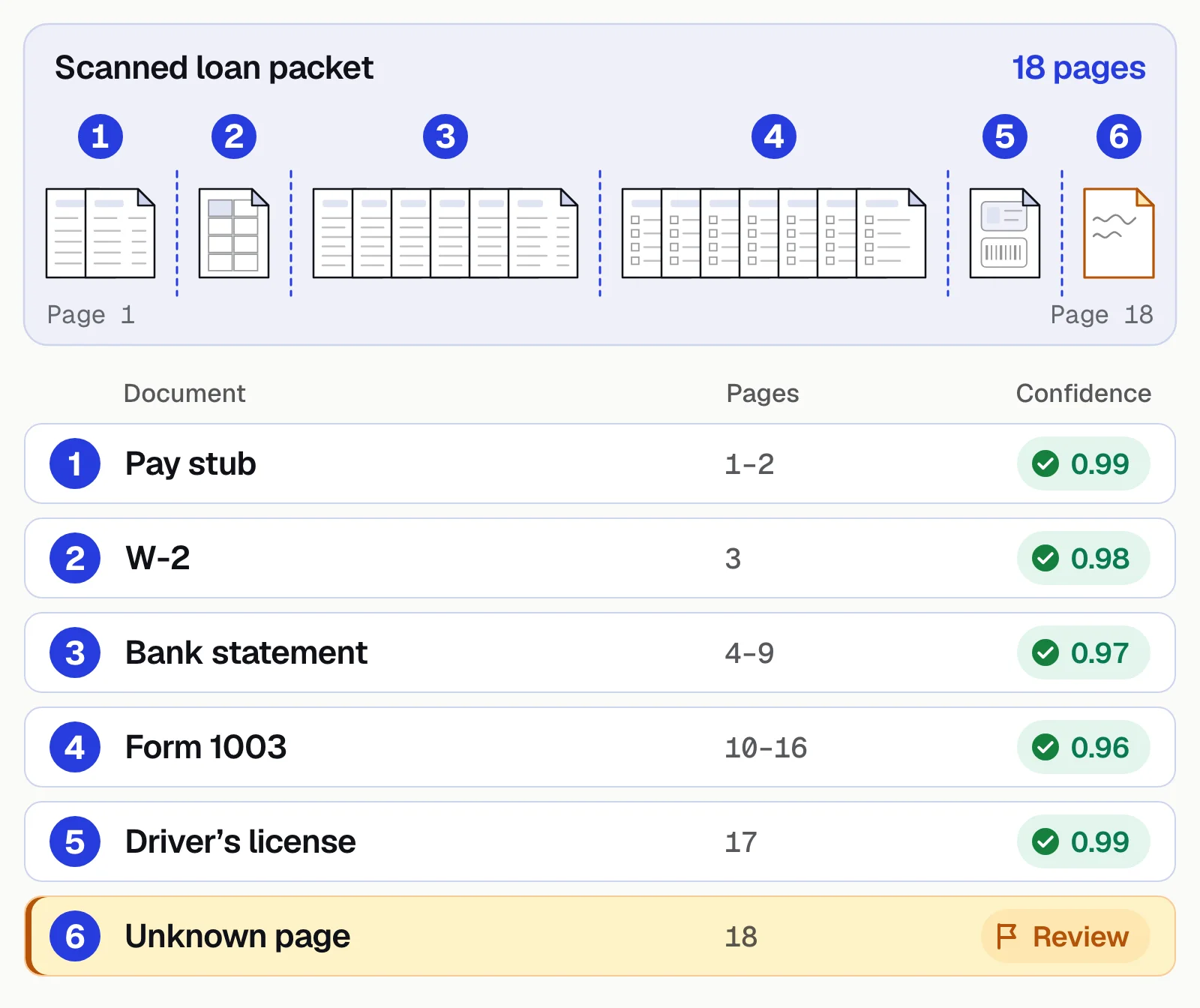
Here's what that does to a real packet. One scanned PDF goes in, and separate, labeled documents come out, each with a confidence score.
Methods of document classification#
| Method | How it works | Strengths | Weaknesses |
|---|---|---|---|
| Rules and keywords | If the page contains "Statement period" and "Closing balance", call it a bank statement | Simple, transparent, no training data | Breaks on new layouts and wording; hard to maintain at scale |
| Supervised machine learning | A model (for example TF-IDF with logistic regression) learns from labeled examples | Fast, cheap, predictable, gives confidence scores | Needs labeled samples for each type |
| Deep learning (text and layout) | Models that read text, position and image together | Best accuracy on look-alike documents and scans | Needs more data and compute |
| Large language models | The model reads the text and a description of each type, then picks one | No training data; handles varied, text-heavy documents | Higher cost per page; needs confidence checks and testing for consistency |
| Unsupervised clustering | Groups similar documents without labels | Useful for discovering what's in an unknown archive | Clusters still need a person to name them |
Production systems usually combine them. A trained classifier handles high-volume types, rules cover a few edge cases, and an LLM or a person takes the rest. Context from outside the document, such as the email subject or the upload folder, can confirm the prediction.
A simple document classifier in Python#
This example trains a text classifier on OCR output with scikit-learn, small enough to see every step. It runs on Python 3.11+ with scikit-learn 1.9 (pip install scikit-learn).
from sklearn.feature_extraction.text import TfidfVectorizer
from sklearn.linear_model import LogisticRegression
from sklearn.pipeline import make_pipeline

# Text from OCR, one string per document, with its known type
train_texts = [
    "INVOICE Invoice number INV-1042 Bill to Acme Corp Due date Subtotal Tax Total due",
    "Invoice # 88731 Remit to Payment terms Net 30 Qty Unit price Amount Balance due",
    "Statement period Opening balance Deposits and credits Withdrawals Closing balance Account number",
    "Account summary Beginning balance Checks paid Electronic withdrawals Ending balance Daily balance",
    "Earnings statement Pay period Gross pay Federal income tax Social Security Medicare Net pay YTD",
    "Pay date Employee ID Regular hours Overtime Deductions 401k Net pay Year to date",
]
train_labels = ["invoice", "invoice", "bank_statement", "bank_statement", "pay_stub", "pay_stub"]

model = make_pipeline(
    TfidfVectorizer(lowercase=True, ngram_range=(1, 2)),
    LogisticRegression(max_iter=1000),
)
model.fit(train_texts, train_labels)

new_docs = [
    "Invoice date 03/02/2026 Total due $4,120.00 Remit payment to",
    "Ending balance $12,480.55 Deposits Withdrawals Statement period",
]
for text, label, probs in zip(new_docs, model.predict(new_docs), model.predict_proba(new_docs)):
    print(f"{label:<15} confidence {probs.max():.2f}  <- {text[:40]}")
Output:
invoice         confidence 0.45  <- Invoice date 03/02/2026 Total due $4,120
bank_statement  confidence 0.45  <- Ending balance $12,480.55 Deposits Withd
Both labels are right, but confidence is low because the model has only six examples. In production you'd train on dozens to hundreds of real samples per type and send anything below a threshold to a reviewer.
To classify a scanned page, put OCR in front of the model. With Tesseract installed, pytesseract does it in one line.
from PIL import Image
import pytesseract

text = pytesseract.image_to_string(Image.open("page_1.png"))
label = model.predict([text])[0]
What this leaves out is most of production, from splitting multi-document PDFs and layout features to poor scans, retraining and a review queue. That's the gap between a notebook and an intelligent document processing platform.
Challenges in document classification#
Look-alike types
Bank vs credit card statements, invoices vs quotes, W-2s vs 1099s. Layout features and a few targeted rules help.Mixed packets
A loan application can be one 60-page PDF. If the split is wrong, every label after it is wrong.Poor image quality
Faxes, phone photos and skewed scans degrade OCR text. Preprocess and use visual features too.New layouts
A new bank or vendor shows up every week. Add low-confidence examples to the training data.Imbalanced data
10,000 invoices and 50 credit memos teach a model to say "invoice". Weight classes and route rare types to review.Model drift
Templates and form versions change. Watch confidence and the "unknown" rate, and retrain when they slip.
Best practices for production#
- Define types by what happens nextIf two documents go to the same model and workflow, they can share a class.
- Set confidence thresholds per typeBe stricter where a wrong label is costly, routing the confident band automatically, reviewing the middle band, and marking the rest unknown for triage.
- Keep a person in the loopReviewer corrections are your best training data. See human-in-the-loop review.
- Measure per classOverall accuracy hides weak types; track precision and recall for each.
- Check completenessCompare the classified set with what the process requires and flag what's missing.
Document classification use cases#
| Industry | Documents classified | Why it matters |
|---|---|---|
| Lending | Bank statements, pay stubs, tax returns, IDs, financial statements | Each type goes to its own model for lending decisions, and gaps are flagged |
| Mortgage | Loan packets with dozens of document types | Underwriters and income verification start with an organized file |
| Accounts payable | Invoices, credit notes, statements, receipts | Only invoices enter the approval and matching flow |
| Insurance | ACORD forms, loss runs, schedules, certificates of insurance | Submissions are triaged and read by the right model |
| Healthcare | Claim forms, eligibility documents, medical records | Patient documents reach the right queue with an audit trail |
| Logistics | Bills of lading, commercial invoices, packing lists, customs forms | Standard documents go straight through; exceptions queue for review |
Document classification software: where Docsumo fits#
Docsumo classifies and splits documents as they arrive by email, upload or API, then sends each one to its extraction model. Pre-trained models cover 250+ document types, and it handles other types as well. Low-confidence fields go to a person for review, and reviewer corrections improve the model. Auto-classification and splitting come with the Business plan; case management, which groups every document in an application, is on the Enterprise plan. See pricing.
What we'd do. Getting the label right on every document is necessary, but it isn't the whole job. Once a loan packet is split into its pieces, the more useful question is whether those pieces agree. Does the employer on the pay stub match the payroll deposits on the bank statement? That's a check across the whole case rather than any one page, and it's what Docsumo's case management and cross-document validation, on the Enterprise plan, are for.
- 99%field-level accuracy across 250+ document types
- 95%+of documents processed straight through, without manual review
Where classification ends and the real check begins#
Document classification decides what every document is before anything else happens to it. Start with the types that drive the most volume, combine text and layout, attach a confidence score to every prediction, and send the uncertain ones to a person.
Book a demo with a mixed packet of your own documents, or start a free trial.
Frequently asked questions#
What is document classification in OCR?
OCR turns a scanned page into text; document classification then uses that text, often with the page's visual layout, to decide what kind of document it is. The two are usually steps in the same intelligent document processing pipeline.
What is the difference between document classification and data extraction?
Classification answers "what is this document?" Extraction answers "what values does it contain?" Classification comes first, because it decides which extraction model and rules to apply.
How many samples do I need to train a document classifier?
It depends on how similar your types are. A few dozen varied examples per type is a common starting point for supervised models; types that look alike need more. Pre-trained classifiers for common financial documents need none.
Can LLMs classify documents?
Yes. Large language models can classify with no training by reading a description of each type. They work well for varied, text-heavy documents, but cost more per page and need confidence checks, so many teams use them alongside trained classifiers.
What is the difference between classification and document splitting?
Splitting finds the boundaries between documents inside one file, such as a 40-page loan packet. Classification then labels each piece. Most production systems do both in one step.
What should document classification software do?
Classify and split mixed files as they arrive, attach a confidence score to every label, send uncertain documents to a person, and pass each document to the right extraction model. Check that it handles scans and your look-alike types, not just clean samples.
What is the difference between document classification and categorization?
The terms are often used interchangeably. When they're distinguished, classification gives each document exactly one label, while categorization can give it several, such as an invoice that is also a rush order.