Data Extraction from PDF to Excel: A Step-by-Step Tutorial
Learn how to streamline data extraction from PDF to Excel with this comprehensive tutorial, covering essential tools, techniques, and best practices for professionals.


On this page
- Importance of data extraction from PDF to Excel
- 7 common challenges of data extraction from PDF to Excel
- Preparing your PDF files for data extraction
- Step-by-step guide to data extraction from PDF to Excel
- Best practices for managing extracted data from PDF to Excel
- Conclusion: Maximizing productivity through streamlined PDF to Excel data conversions
Tables that look clean and organized in a PDF often become a tangled mess when copied into Excel. And the manual retyping required is a huge time-sink, leaving little room for the analysis and reporting that drives critical decisions.
This comprehensive guide explores the pressing need for efficient data extraction and examines how it unlocks opportunities for deeper analysis, smarter decision-making, and streamlined workflows.
Importance of data extraction from PDF to Excel#
Converting data from PDF to Excel offers efficient access to valuable business information, enabling enhanced analysis and decision-making. This time-efficient process provides a quicker alternative to manual extraction and unlocking hidden insights for strategic planning and optimization.
The efficient and accurate data extraction is vital for maintaining data integrity, ensuring downstream ETL (Extract, Transform, Load) stages can effectively utilize the data.
PDF to Excel data extraction is crucial across professional settings, enhancing data analysis, reporting, and decision-making. An efficient workflow saves time for professionals in finance, healthcare, and legal sectors, boosting overall productivity.
Excel's structured format ensures precision in data handling, which is particularly beneficial for finance, research, and analytics. Data extraction organizes information in manufacturing and supply chains, providing decision-makers with valuable insights for strategic planning.
Accurate extraction ensures regulatory compliance and seamless reporting in sectors like healthcare and finance. Legal contexts benefit from PDF extraction, transforming unstructured legal documents into organized data for efficient retrieval and analysis.
Convert PDF to Excel Free Using Our Free Tool
7 common challenges of data extraction from PDF to Excel#
Data extraction from PDF to Excel poses several challenges that organizations and teams commonly encounter.
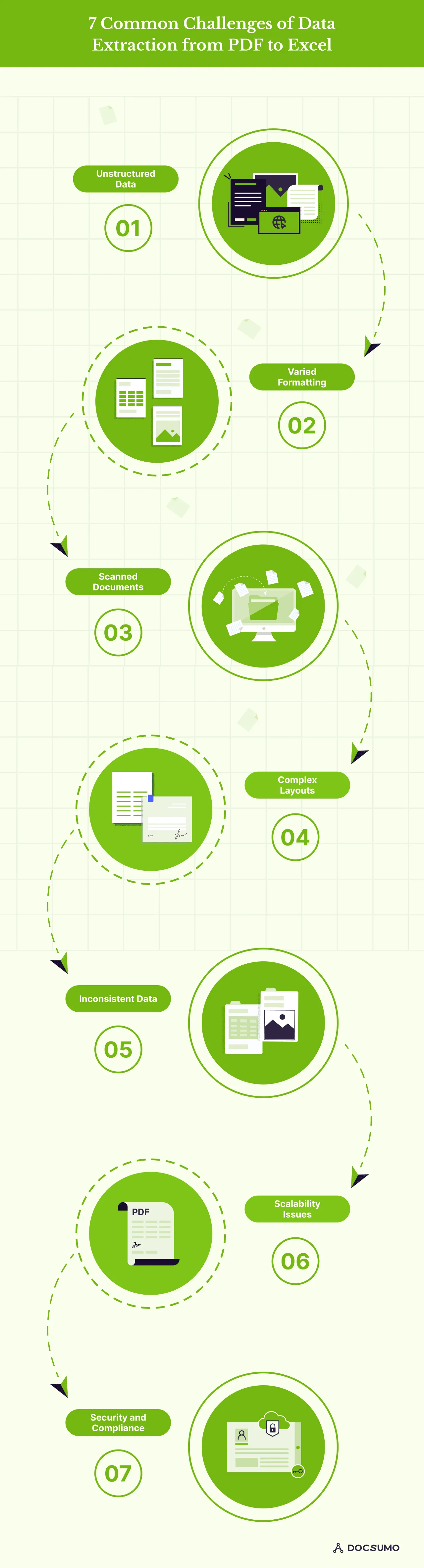
Gaining insight into the challenges is vital for selecting the optimal conversion approach and pinpointing the most suitable tools and techniques for processing data in Excel post-conversion. Here are some common data extraction challenges from PDFs:
1. Unstructured data
PDF documents are often designed for human readability rather than machine processing. Hence, unstructured data is difficult to extract and organize into a structured format like Excel.
2. Varied formatting
PDFs can have a wide range of formatting styles, layouts, and structures, making it challenging to develop a one-size-fits-all solution for data extraction. This can lead to inconsistencies and errors in the extracted data.
3. Scanned documents
Many PDF files are created by scanning physical documents, resulting in image-based content rather than editable text. Extracting data from these scanned PDFs requires advanced optical character recognition (OCR) capabilities, which can be prone to errors.
4. Complex layouts
Some PDF documents have complex multi-column layouts, tables, and other design elements that need to be clarified for traditional data extraction methods. Accurately identifying and extracting data from these intricate formats is a significant challenge.
5. Inconsistent data
PDFs often need consistent data regarding units, formatting, and naming conventions. Reconciling these variations and ensuring data integrity is crucial for practical data analysis and reporting.
6. Scalability issues
As the volume of PDF files and the complexity of the data within them increases, manual or basic extraction methods quickly become inefficient and unsustainable. Scaling the data extraction process is a common hurdle for organizations.
7. Security and compliance
Many businesses operate in highly regulated industries where data privacy and security are paramount. Extracting sensitive information from PDFs while complying with industry standards and regulations can be daunting.
Preparing your PDF files for data extraction#
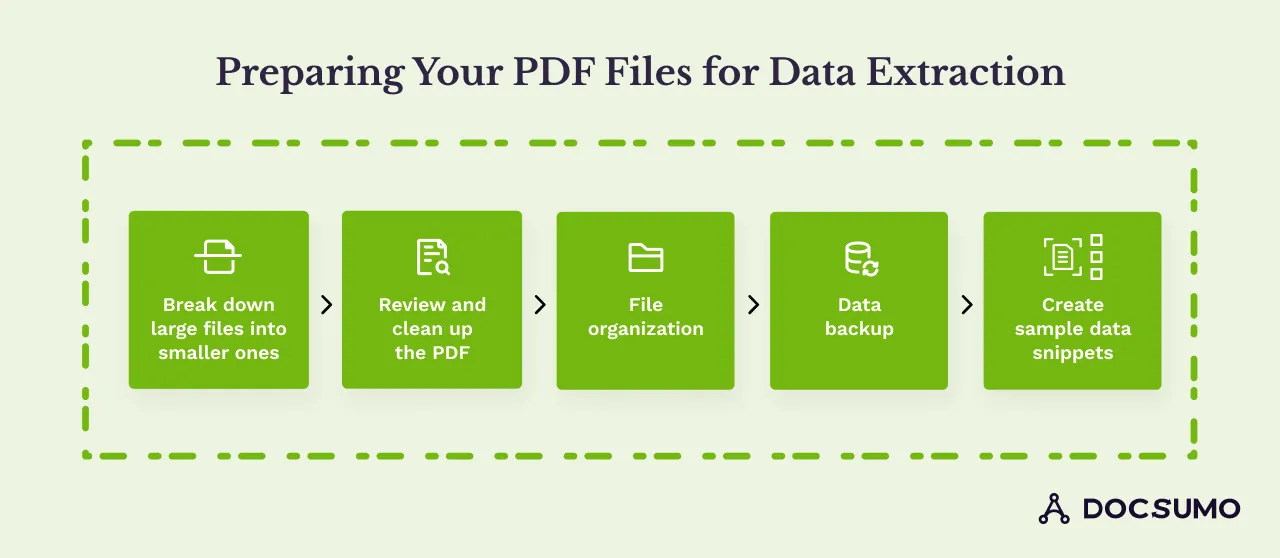
Preparing PDFs for data extraction can minimize the challenges and increase the accuracy of the extracted data. Here are some tips for optimizing PDFs for data extraction:
- Break down large files into smaller ones: When dealing with documents not created digitally, it can be easier to extract data from them by breaking them down into smaller ones as they reduce errors that can occur when working with large, complex files.
- Review and clean up the PDF: Streamline your PDF by removing redundant images, tables, or content. Simplifying the document aids in smoother data extraction, eliminating irrelevant charts to focus on essential data points.
- File organization: Organize files systematically and categorize PDFs based on relevant criteria to facilitate quick access and ensure accuracy, minimizing errors during extraction.
- Data backup: Implement regular backups to mitigate risks by ensuring that original data remains intact, reducing potential loss or corruption during extraction. Backups preserve data integrity, facilitating accurate and reliable data extraction without concerns of irreversible changes or loss.
- Create sample data snippets: To explain the required data effectively, create small sample snippets. This helps understand the data needed for extraction and facilitates communication between stakeholders
Step-by-step guide to data extraction from PDF to Excel#
Take a look at some step-by-step to set up a data extraction from PDF to Excel, including:
a. Choose the right extraction tool

Many tools exist, but consider one with intelligent OCR (Optical Character Recognition) like Docsumo. This technology automatically captures data from your PDFs.
b. Train them from your samples
Upload a sample PDF and highlight the specific data points you want to extract. This "training" helps Docsumo improve accuracy for future data extractions from similar PDFs.
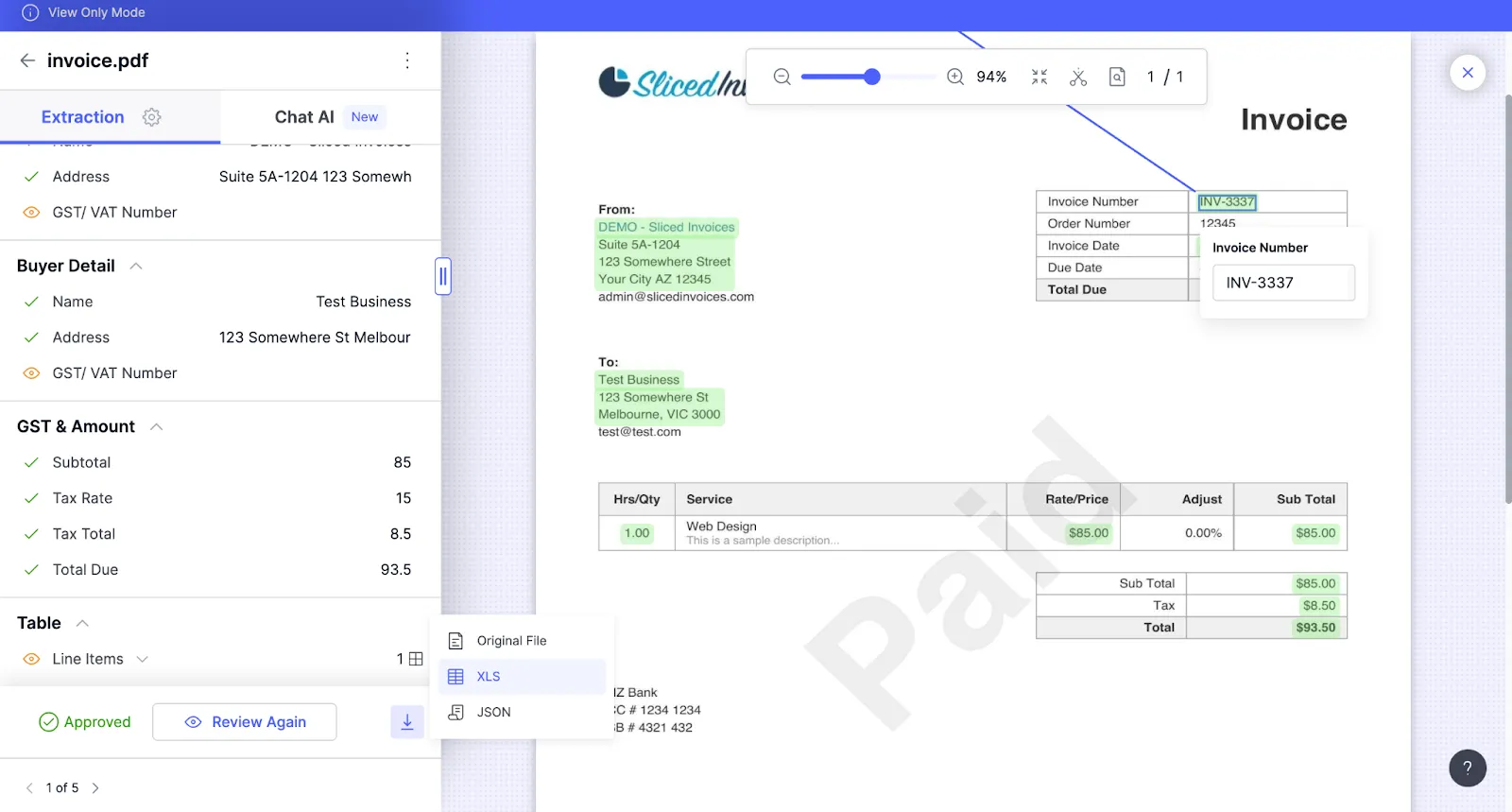
c. Customize extraction settings
Use Docsumo's advanced automated data extraction settings to fine-tune the extraction process. Specify data formats, apply filters, and configure other settings to ensure accurate and consistent data extraction.
d. Reviewing and approving the extracted data
After the extraction process, Docsumo presents the extracted data in a structured format. Review the data and make any necessary corrections before approving it to various formats like CSV, Excel, JSON, and more.
e. Automating data extraction for large document sets
Docsumo offers automation capabilities for large document sets to streamline data extraction. Set up automated workflows that trigger data extraction based on specific events or schedules.
f. Integration to workflow
Integrate Docsumo with popular tools and platforms like Zapier, Microsoft Power Automate, and more, enabling efficient data processing and analysis within your existing workflows.
Best practices for managing extracted data from PDF to Excel#
After the data is extracted from PDFs to Excel using Docsumo, there are several important steps and considerations to ensure data integrity, security, and effective utilization of the extracted data.
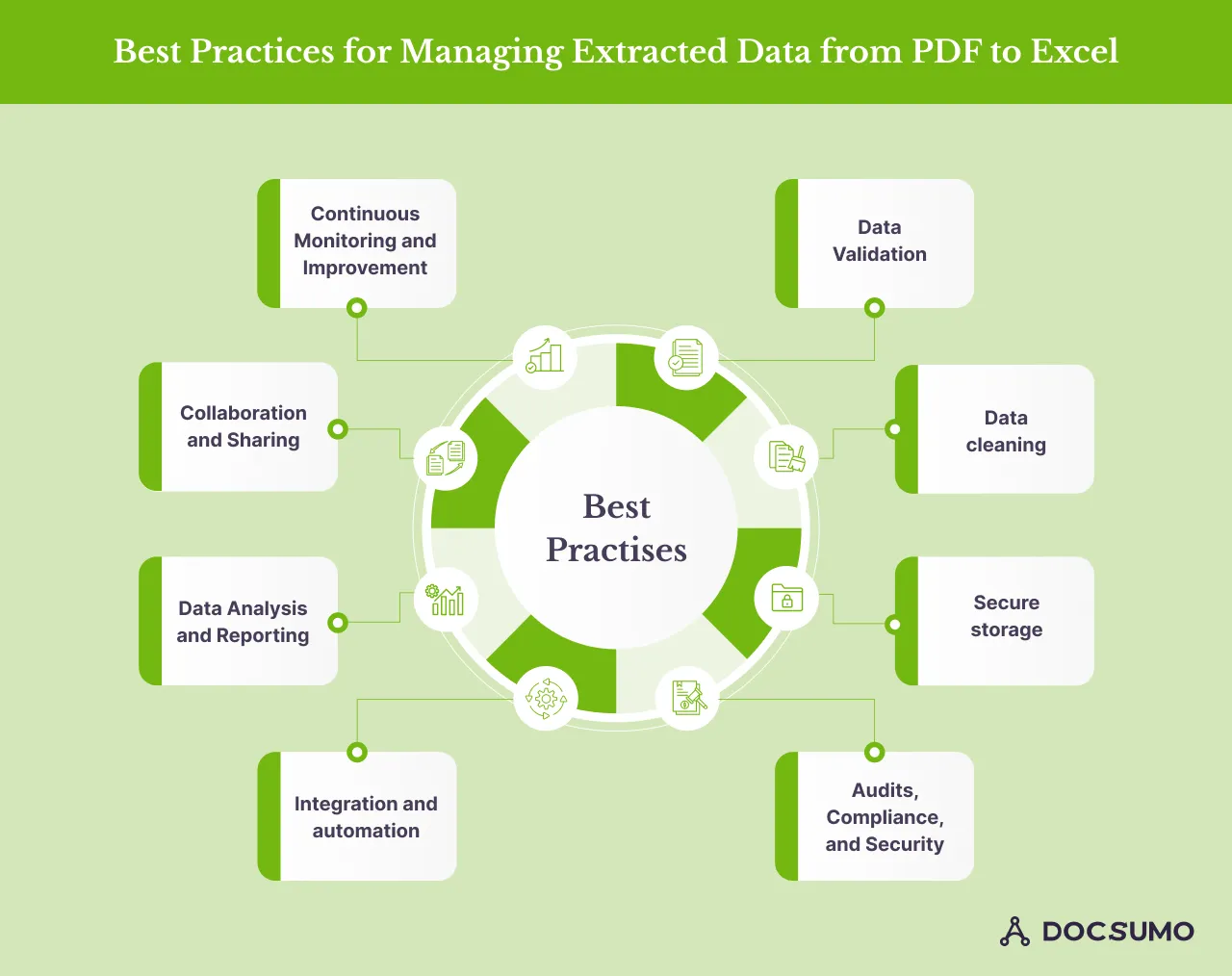
Here are the best practices for managing extracted data from PDF to Excel:
- Data validation: Implement validation rules and checks within Excel or in downstream systems to ensure the accuracy and completeness of the extracted data. Also, you can cross-check a sample of the extracted data against the source PDFs to identify and resolve any discrepancies or errors.
- Data cleaning: Remove unwanted characters, formatting inconsistencies, or special characters from the extracted data. Standardize data formats (e.g., dates, currency, numerical values) for consistency and easier analysis. Using Excel's find and replace, text manipulation functions, and data cleaning tools to streamline the cleaning process.
- Secure storage: Store the extracted data securely, adhering to industry standards and regulations. Implement access controls and encryption measures to protect sensitive or confidential data. Regularly back up the extracted data and maintain version control. Consider exporting the extracted data to a secure database or cloud solution instead of relying solely on Excel files.
- Audits, compliance, and security: Ensure compliance with relevant data privacy and security regulations (e.g., GDPR, HIPAA, PCI-DSS). Maintain audit trails and logs for data extraction, transformation, and storage activities. Implement robust access controls and user management practices.
- Integration and automation: Integrate the extracted data with other systems and workflows (e.g., CRM, ERP, BI tools) for seamless data flow and analysis. Automate data transformation and loading processes using tools like Power Query, VBA, or Python scripts.
- Data Analysis and reporting: Utilize Excel's powerful data analysis and visualization capabilities (e.g., pivot tables, charts, dashboards) to gain insights from the extracted data. Develop custom reports, dashboards, or scorecards tailored to specific business requirements. Implement data modeling and calculation techniques to derive meaningful metrics and key performance indicators (KPIs).
- Collaboration and sharing: Enable secure sharing and collaboration on the extracted data within your team or organization. Implement version control and change tracking mechanisms to maintain data integrity. Leverage cloud-based collaboration tools or shared drives for easy access and real-time updates.
- Continuous monitoring and improvement: Regularly review and refine the data extraction, transformation, and analysis processes. Monitor data quality and address any issues promptly. Optimize and refine your workflows and procedures based on user feedback and evolving business needs.
Conclusion: Maximizing productivity through streamlined PDF to Excel data conversions#
Data extraction from PDF files is critical for businesses dealing with large amounts of data. However, it can be challenging due to the nature of the unstructured data, formatting variations, and the presence of scanned documents.
By leveraging the right tools and strategies, organizations can streamline their data workflows, unlock valuable insights, and drive decision-making like never before.
In this article, we have discussed the importance of data extraction from PDF to Excel and the common challenges of data extraction from PDF to Excel. Preparing PDFs for data extraction is a step-by-step guide to extract data from PDF to Excel.
Seamlessly integrating data from PDFs into Excel spreadsheets empowers users to analyze, visualize, and act on information with incredible speed and accuracy. Automating the manual data entry saves time, reduces errors, and allows teams to focus on more strategic initiatives.
Docsumo helps extract data by identifying and pulling data from unstructured documents, reporting 99% field-level accuracy on 250+ document types.
Intelligent data extraction can train the models to adapt and capture valuable data from tables in your documents.
If you want an intelligent way to process documents, signup for a free 14-day trial.
First published .