OCR data extraction: how it works, methods and accuracy checks
For operations and finance teams replacing manual data entry. See what OCR reads, what extraction adds on top and how to get checked data out of scans, photos and PDFs.

Key takeaways
- OCR data extraction reads the text on a scan, photo or PDF with OCR. It then turns specific values into named fields and tables that a system can use.
- OCR alone returns characters, not meaning, so it can't tell which number is the invoice total. Layout analysis and field extraction add that.
- The main extraction methods are zonal templates, keywords and regular expressions, table extraction and AI models. Templates stop working when a layout changes. AI models need a review step, where a person checks the values the model isn't sure about.
- Measure field-level accuracy, the share of extracted values that are right, not character accuracy. Check every document to confirm that the totals add up, the required fields are filled in and the formats are valid.
- A digital PDF already has a text layer. That means you can select its text, so it can skip OCR. Scans and phone photos can't skip OCR.
On this page
- What is OCR data extraction?
- How OCR data extraction works
- OCR data extraction methods
- What documents can OCR extract data from?
- How to extract data from scanned documents and images
- Manual data entry vs OCR data extraction
- How accurate is OCR data extraction?
- Which extracted values can skip review?
- Frequently asked questions
OCR data extraction reads the text on a scan, photo or PDF and turns it into named fields and tables. The first step is OCR, short for optical character recognition, which reads the characters on the page. Extraction then pulls out values such as an invoice number, a closing balance or a policy date. Extraction also identifies what each value is, checks the value and sends it to the system that uses it.
What is OCR data extraction?#
OCR data extraction, also called OCR extraction or OCR data capture, has two jobs. OCR turns an image of a page into text, but the text has no labels. OCR doesn't know that "4,120.50" is the invoice total, or that a column of numbers belongs to a table. Extraction adds that knowledge. Document layout analysis finds the parts of the page, such as the header, the table and the totals. It puts them in the order a person would read them. Field extraction then names each value and checks it.
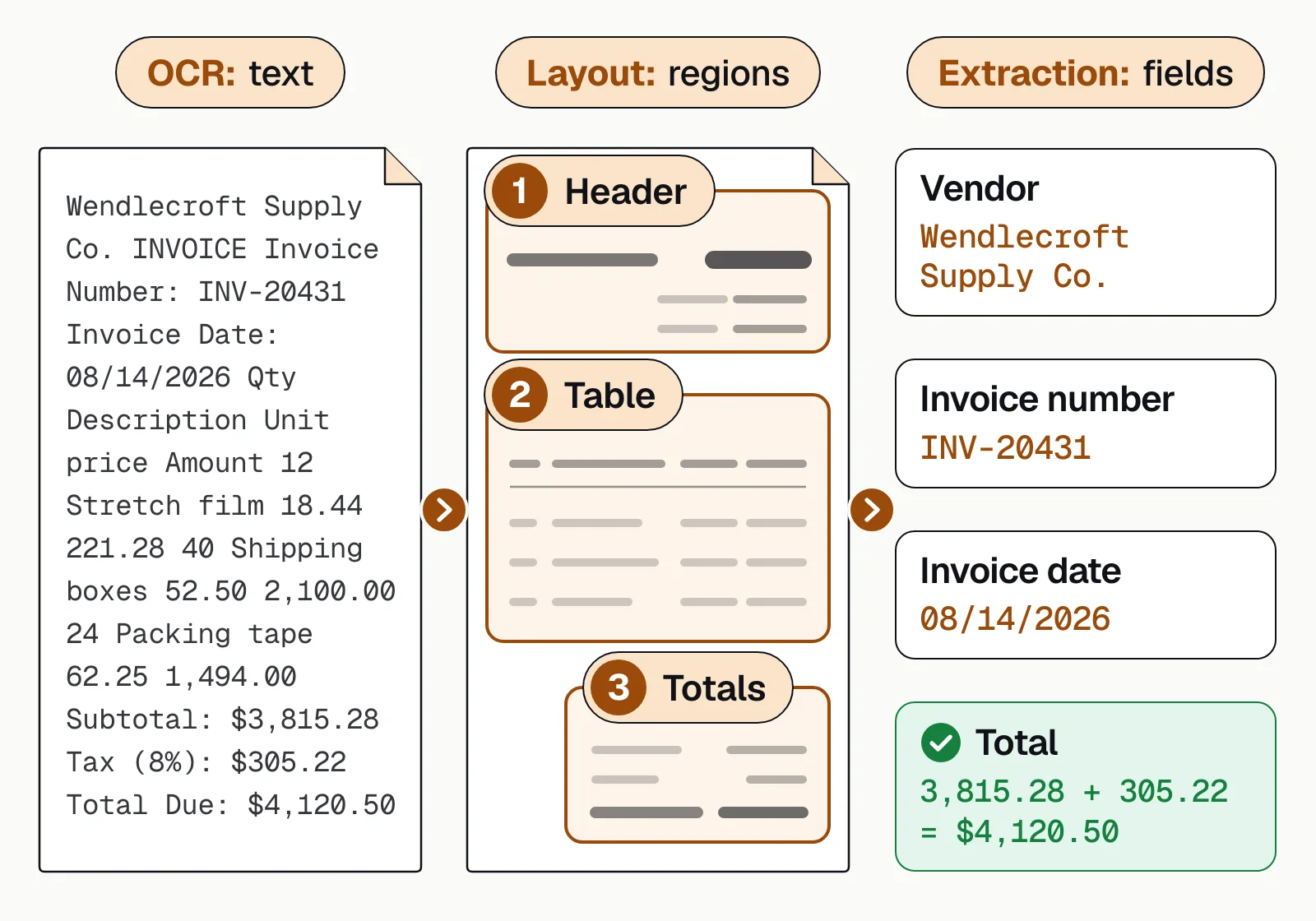
The output is structured data, such as JSON, a spreadsheet row or a record in your system, not a searchable file. A digital PDF already carries a text layer, so it can skip OCR. Scans, faxes and phone photos can't.
How OCR data extraction works#
An OCR document processing workflow takes a page image through these stages until it becomes a record in your system.
- Scans
- Phone photos
- PDFs
- 01Read text with OCR
- 02Map the layout
- 03Extract fields and tables
- 04Validate
- 05Review exceptions
Poor scans are straightened and cleaned up first, because OCR errors pass on to every later step. A misread digit becomes a wrong amount in the extracted data. Extraction returns each field and table row, usually with a confidence score, which shows how sure the software is about that value. Validation checks the values against rules. Only values that fail a check, or that score below the confidence threshold you set, go to a person. Here is the extraction stage on a business bank statement.
| Field | Extracted value | Confidence |
|---|---|---|
| Account holder | Harbor Street Bakery LLC | |
| Address | 118 Harbor St, Portland, ME | |
| Bank name | First Midwest Bank | |
| Account number | •••• 4821 | |
| Account type | Business checking | |
| Statement period | 2026-07-01 → 2026-07-31 |
| Field | Extracted value | Confidence |
|---|---|---|
| Opening balance | 42,180.55 | |
| Total deposits | 88,412.10 | |
| Total withdrawals | 91,686.44 | |
| Closing balance | 38,906.21 | |
| Transaction count | 142 |
| Field | Extracted value | Confidence |
|---|---|---|
| Date | 2026-07-14 | |
| Description | ACH DEPOSIT STRIPE PAYOUT | |
| Amount | +3,284.10 | |
| Debit / credit | Credit | |
| Running balance | 51,902.44 | |
| Category | Card processor payout |
OCR data extraction methods#
OCR-based extraction tools use four methods, often in combination. What separates them is how each copes with a layout it hasn't seen before.
Zonal or template OCR
Reads fixed boxes on a known layout. Fast and cheap for one form version; breaks when a vendor moves a field or a scan shifts. See zonal OCR.Keywords and regular expressions
Finds a label such as "Invoice No." and the value after it, using a fixed text pattern called a regular expression. Works across layouts, but fails on unusual labels, values that wrap onto a second line and other numbers that fit the same pattern.Table extraction
Rebuilds rows and columns from the position of each word. Needed for line items and transactions; breaks on merged cells, missing ruling lines and tables that run across pages.AI field extraction
A model trained on the document type finds each field from the text around it and its position on the page, with a confidence score. Handles new layouts, but needs a review step for low-confidence values.
Handwriting and checkboxes need their own readers. Intelligent character recognition (ICR) reads hand-printed text, and optical mark recognition (OMR) reads marks. Free, open-source tools such as Tesseract return the text and where each word sits on the page. The output comes in formats such as plain text, hOCR or TSV. If you build your own system on one of these tools, it must still extract fields, check values and send doubtful ones to a reviewer.
What documents can OCR extract data from?#
Any document with text on it. The payoff is biggest on documents that arrive in volume and in many layouts.
Invoices and receipts
Vendor, invoice number, dates, line items, tax and total. See invoice extraction.Bank statements
Account details, balances and every transaction, across banks and formats. See bank statement extraction.Pay stubs
Employer, pay period, gross and net pay, for the period and year to date. See pay stub extraction.Tax forms
W-2s, 1099s and returns, box by box, with mixed packets sorted by form. See IRS tax form extraction.ACORD forms
Insurers, policy numbers, limits and dates from certificates and applications. See ACORD form processing.IDs
Name, date of birth, document number and expiry from passports and driver's licenses. See passport OCR and driver's license OCR.
How to extract data from scanned documents and images#
For a few documents a month, copying values by hand is fine. At hundreds or thousands, set up a pipeline. Take one paper invoice that someone photographed and sent by email.
The attachment goes into the same queue as uploads and scanner output, and the original image stays with the record. The software finds no text layer, so the photo goes to OCR. A digital PDF would skip that step. If a page were cut off or unreadable, someone would re-request it. Classification then labels the file as an invoice, so it reaches the invoice model. A combined PDF, such as a loan packet, would be split first so that each page reaches the right model.
OCR returns the text with no labels, and layout analysis finds the header, the line items and the totals. Extraction names the vendor, the invoice number and the dates, and it rebuilds the table row by row. If the table continues across pages, extraction joins the pages into one table. Validation then adds the line items and the tax and compares the sum with the 4,120.50 printed as the total. It also checks dates, formats and required fields, and where the file holds other documents, it compares values across them.
If everything agrees, the data goes to the accounting system through an API. If a blurred digit makes the sum and the total disagree, the field the software was unsure of goes to a person. That person checks it against the original image, and the other fields need no review.
Manual data entry vs OCR data extraction#
Accounts payable shows the difference clearly, because invoices arrive in every format.
Manual data entry
- Invoices arrive by mail and email and wait in a pile
- Someone sorts them and keys in the invoice details by hand
- Mistakes surface later, as rework or a wrong payment
- Payments slip when the backlog grows
OCR data extraction
- Scans and PDFs are read as they arrive
- Fields and line items are extracted and checked against rules
- Only unclear fields go to a person for review
- Clean data posts to the accounting system through an API
Docsumo is an intelligent document processing (IDP) platform. It reads printed and handwritten text in scans, PDFs and phone photos. It extracts named fields and multi-page tables, checks them and sends only the fields it isn't sure about to a person. Docsumo reports these results.
- 99%field-level accuracy across 250+ document types
- 95%+of documents processed straight through, without manual review
- <5 minper document, down from 2+ hours
How accurate is OCR data extraction?#
Accuracy is measured at two levels. Character accuracy counts the letters and digits OCR reads correctly. Field-level accuracy counts the extracted values that are right. It is the one that matters to your systems, because one wrong digit spoils a whole amount. Character accuracy drops with poor scans (low resolution, skew, glare) and with handwriting. Field-level accuracy also drops with layouts the tool hasn't seen. OCR accuracy covers how to measure both.
We'd rather count corrections than quote a percentage. Put a batch of your own documents through the tool, poor scans included, and count the fields a reviewer had to fix. That count reflects your layouts and your worst files, so we'd trust it over any headline accuracy figure, ours included.
Whatever tool you use, run these checks before extracted data posts.
- Totals reconcileLine items plus tax equal the total; opening balance plus deposits minus withdrawals equals the closing balance.
- Required fields are presentEvery document has the fields your process needs, such as an invoice number and a due date.
- Formats are validDates are real dates, amounts are numbers and IDs match their expected pattern.
- Values match your recordsVendor names, account numbers and PO numbers exist in your master data.
- Documents agreeThe same name, amount or date matches across the documents in one file.
- Uncertain fields get a personSet a confidence threshold per field and route anything below it to review.
Which extracted values can skip review?#
The validation step decides. A value that passes your checks and scores above the confidence threshold can go into your system without a person reviewing it. Everything else goes to a reviewer. OCR turns a page into text, and extraction turns that text into fields and tables you can use. So start with the documents that arrive in volume, measure accuracy at the field level, and send only the exceptions to review.
Book a demo with a few of your own documents, or start a free trial.
Frequently asked questions#
What does "OCR extracted" mean?
It means the text was read from an image of the page by optical character recognition. It wasn't typed in or copied from a digital file. OCR-extracted text can contain misreads from poor scans or handwriting, so values that matter should be validated before they're used.
Is OCR the same as data extraction?
No. OCR turns an image of text into characters. Data extraction finds specific values in that text, such as an invoice total or an account number, and puts them into named fields. Intelligent document processing adds classification, validation and review on top. See IDP vs OCR.
Can OCR extract data from handwritten documents?
Standard OCR is built for printed text, so handwriting needs handwriting recognition (ICR) or a model trained on it. Docsumo reads handwritten text and sends any field it isn't sure about to a person for review. More in what is handwriting recognition.
Can OCR extract tables from a PDF or image?
OCR reads a table as lines of text, so table extraction has to rebuild the rows and columns. Tables that continue across pages, such as bank statement transactions, also have to be joined into one table. Docsumo joins these tables and matches each page's headers to the same columns. See table extraction from PDFs and images.
How do I extract data from a scanned PDF or image?
First check whether the PDF has a text layer. If you can select the text, read it directly. If it's a scan or a photo, run OCR, then extract the fields you need and validate them. At volume, use a tool that returns named fields through an API. See how to extract data from a PDF.
What should an OCR data extraction tool do?
It should read any scan, photo or PDF, including handwriting. It should return named fields and whole tables, with a confidence score for each value. It should also check values against your rules and send uncertain fields to a review queue. Last, it should deliver the data by API or as a file your systems accept.