ACORD 125 processing: the commercial insurance application, field by field
For carriers, MGAs, wholesalers and agencies that receive commercial submissions. You'll see what's on an ACORD 125, which fields drive clearance and underwriting, and how to process it without rekeying.

Key takeaways
- The ACORD 125 is the core form in a commercial submission. Its full name is the Commercial Insurance Application, Applicant Information Section, and it describes the business applying and the coverage it wants.
- Line-of-business sections attach to the ACORD 125. They include the ACORD 126 for general liability, 127 for business auto, 131 for umbrella and 140 for property. You check every other form against the 125.
- The fields that matter most are the named insured, FEIN, entity type and NAICS or SIC code. Also key are the lines of business requested, effective dates, premises, nature of business, prior carriers and loss history.
- An ACORD 125 is an application, not proof of insurance. Evidence of coverage comes on certificates such as the ACORD 25.
- Automated intake speeds up clearance and triage. It reads the applicant and the lines requested, checks appetite and duplicates, and routes the submission to the right underwriter.
On this page
ACORD 125 processing means reading the commercial insurance form a broker sends and turning it into data a system can use. That data shows who the applicant is, where it operates, what it does and which lines of coverage it wants. It also holds the applicant's insurance and loss history. Carriers, MGAs and wholesalers automate it because every submission starts with this form. Clearance and triage can't begin until its data is in the system.
What is an ACORD 125 form?
ACORD 125 is the standard Commercial Insurance Application, Applicant Information Section, published by ACORD. A broker or agent completes it on behalf of a business and sends it to one or more carriers to request quotes.
It is the core form of a commercial submission. Each line of coverage has its own section, and that section attaches to the ACORD 125. Some applicant details appear only on the ACORD 125, so you always read the line sections together with it.
ACORD 126, general liability
The coverage basis and limits, plus the schedule of hazards a carrier uses to set the price. See our ACORD 126 guide.ACORD 127, business auto
The drivers and vehicles a carrier needs to quote commercial auto, and the business operations those drivers and vehicles serve. See our ACORD 127 guide.ACORD 131, umbrella or excess
The umbrella or excess coverage requested and the schedule of underlying policies it sits above. See our ACORD 131 guide.ACORD 140, property
Each building and its contents, with the COPE data a carrier uses to price commercial property. COPE stands for construction, occupancy, protection and exposure. See our ACORD 140 guide.
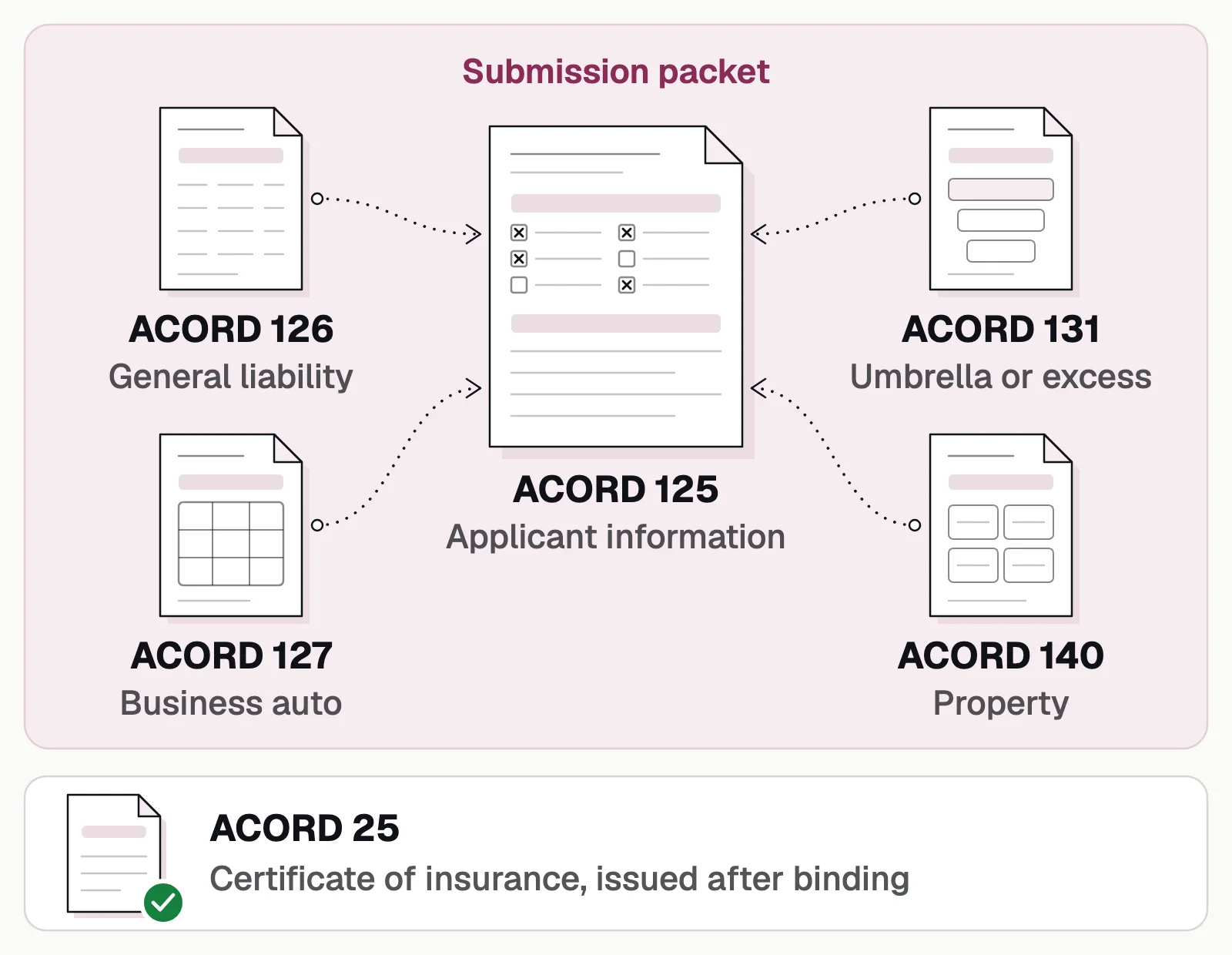
The ACORD 125 is an application and is not evidence of coverage. That comes on a certificate such as the ACORD 25.
How a commercial submission moves
A submission arrives as a packet. Intake splits the packet and reads it. Intake then runs the clearance and appetite checks and compares the form with its line sections. Only then does an underwriter see the submission.
- Broker email
- Portal uploads
- Wholesaler platforms
- 01Classify and split the packet
- 02Extract the ACORD 125
- 03Clearance and appetite
- 04Validate against line sections
The sections of an ACORD 125, and what to extract
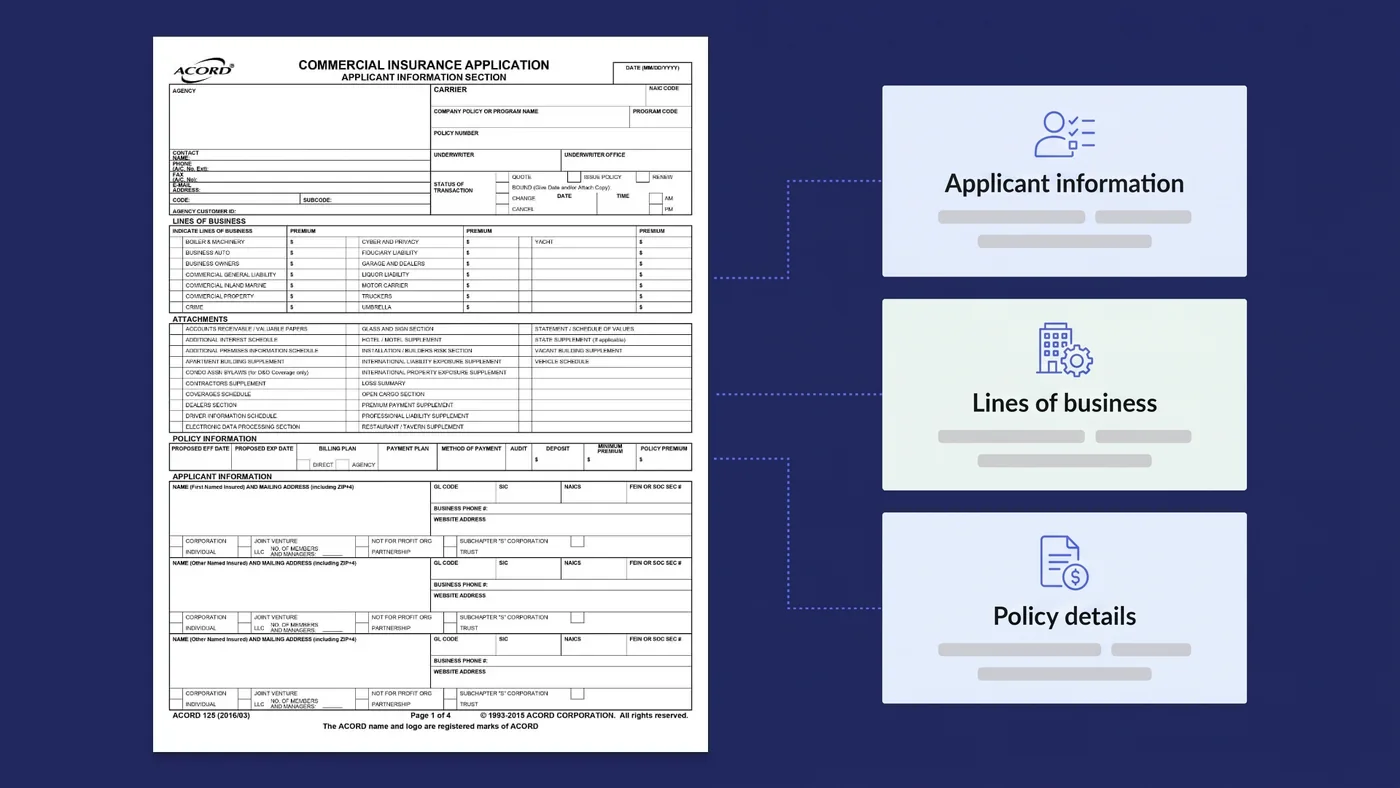
On the 2016/03 edition in the header image, page 1 has the sections from agency to applicant. The later pages have the rest. ACORD's forms index, revised September 2026, lists 2025/03 as the current edition. Brokers still send older editions, and agency systems generate their own versions. So the software that reads the form shouldn't expect each field to be in the same place on the page.
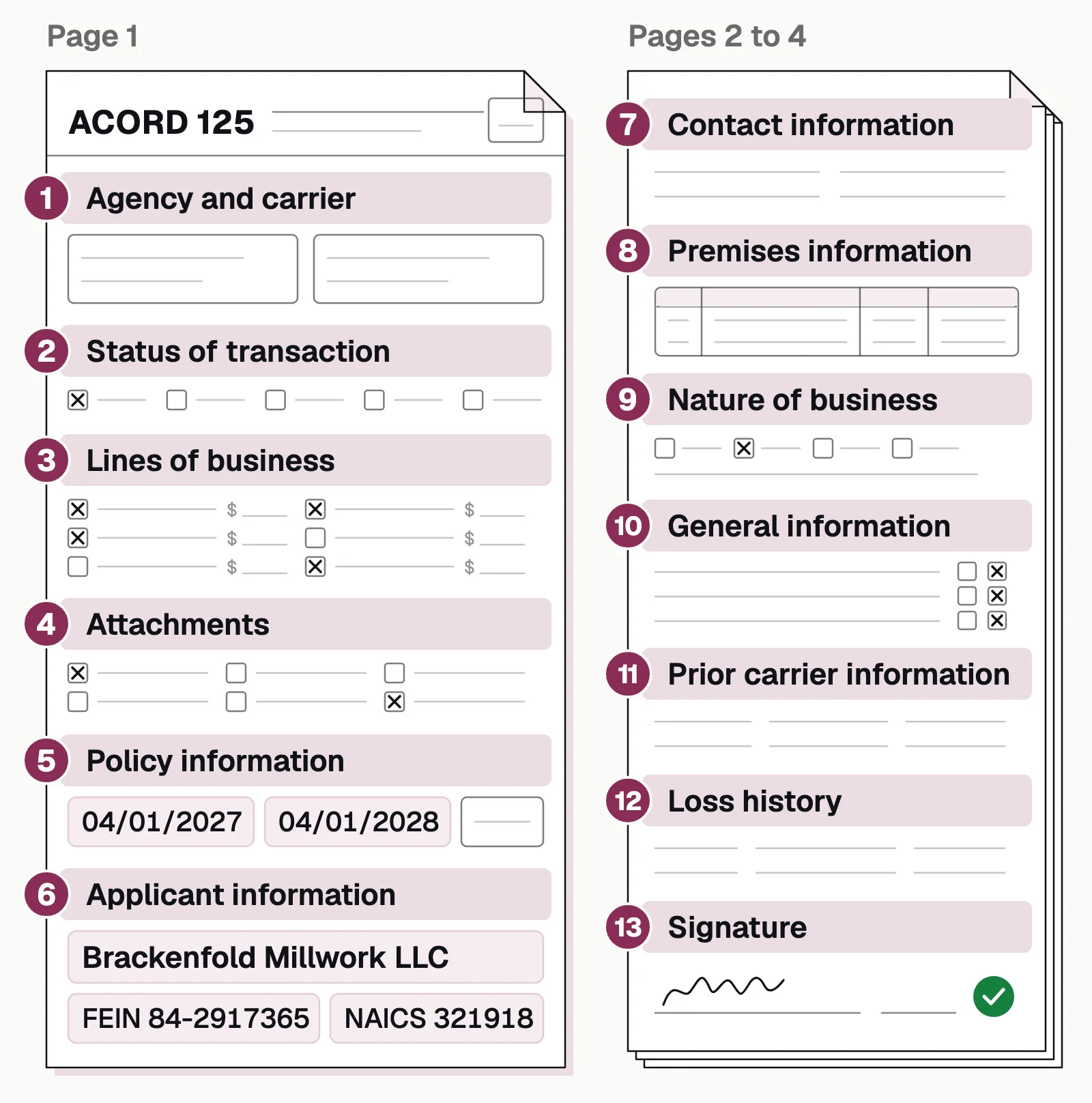
The table lists the fields worth extracting in each section and what each is used for.
| Section | Fields to extract | Used for |
|---|---|---|
| Agency and carrier | Agency, producer code, carrier, NAIC code, underwriter | Routing and producer attribution |
| Status of transaction | Quote, bound, issue policy, change, cancel or renew | What the broker is asking for |
| Lines of business | Each line requested and its premium | Which line sections to expect; appetite |
| Attachments | Schedules and supplements marked as included | Completeness |
| Policy information | Proposed effective and expiration dates, billing and payment plan | Setting up the quote |
| Applicant information | Named insureds, mailing address, FEIN, SIC, NAICS, entity type | Clearance and classification |
| Contact information | Accounting and inspection contacts | Follow-up and inspections |
| Premises information | Locations, owner or tenant, employees, annual revenues, area | Exposure |
| Nature of business | Business type, date started, primary operations | Appetite |
| General information | Yes/no answers and their explanations | Referral triggers |
| Prior carrier information | Prior carriers by line, policy numbers, premiums, dates | Insurance history |
| Loss history | Date, line, amount paid and reserved, status; or no losses | Pricing and appetite |
| Signature | Applicant and producer signatures and dates | Completeness |
The viewer below opens on the ACORD 125. It shows the fields read from one application, and the checks that follow.
Commercial applications
Evidence of property insurance
ACORD 125: Commercial insurance application
Agents and brokers send it to carriers and MGAs, with the line sections.✓ 3 passedThe first section of a commercial submission: the applicant, its premises and the lines it wants quoted.
What Docsumo reads
- Applicant
- Keystone HVAC LLC
- FEIN
- ••-•••6120
- NAICS
- 238220
- Proposed term
- 2026-07-01 → 2027-07-01
- Sections attached
- GL, property, auto, umbrella
- Full-time employees
- 46
- Annual revenues
- 8,450,000
- Premises 1
- 2150 Liberty Ave, Pittsburgh, PA 15222
Checked against
- SubmissionEvery section ticked is attached✓ 4 of 4 in
- Every sectionApplicant, FEIN and proposed term✓ Same on all
- Your rulesNAICS code against the classes you write✓ Accepted
The rules each form is checked against are yours to set.
The checks to run on every ACORD 125
Each check below runs as soon as the form is read, and says what to do when it fails.
- ClearanceThe named insured and FEIN aren't already in the system from another broker. If they are, send to clearance for a decision.
- AppetiteThe NAICS or SIC code, the operations and the lines requested fit your appetite. If not, decline early or refer.
- CompletenessEvery line of business that the broker selects has its section attached. Every attachment that the broker marks as included is in the packet. If not, ask the broker for the missing forms.
- DatesThe proposed effective date is in the future and far enough out to quote. If not, prioritize or flag.
- ConsistencyThe revenue, employee count and locations agree with the line sections and supplements. If not, flag for review.
- Loss historyLosses listed match loss runs, and "no losses" is backed by loss runs. If not, request loss runs.
- General informationEvery "yes" has an explanation. If not, request the explanation.
- SignatureApplicant signature and date are present. If not, return for signature.
Our take. Treat this list as a starting point. Appetite, clearance rules and referral triggers differ from one carrier or MGA to the next. Your intake workflow should follow how your own underwriters work. We'd rather see a tool fit your stages and checks than ask your team to change its process to suit the tool.
Why ACORD 125 intake is slow by hand
It arrives inside a packet
A submission email can include the ACORD 125, several line sections, loss runs, schedules, financials and supplementals in one PDF or many.Many formats
Fillable PDFs, flattened PDFs, scans and agency-system printouts all look slightly different.The same fields repeat
One form can list up to three named insureds, several contacts and many premises rows. The tool must keep each entry's details together.Speed matters
Brokers often send the same risk to several carriers, and the first credible quote has an advantage. Days spent keying a submission can cost the account.
How to automate ACORD 125 processing
- Collect submissions in one queueBring in broker email, portal uploads and wholesaler platforms.
- Classify and split the packetSeparate the ACORD 125, line sections, loss runs and other documents.
- Extract every sectionDocsumo's ACORD 125 model extracts agency, carrier, policy, applicant, contact and premises information and the sections that attach to the form. Docsumo reaches 99% field-level accuracy across 250+ document types.
- Run clearance and appetite checksCompare against your policy system and underwriting guidelines.
- Validate across the submissionCompare the ACORD 125 with the ACORD 126, ACORD 127, ACORD 131 and loss runs.
- Send each submission to the right personSend submissions that pass every check to the right underwriter. Send only the exceptions to underwriting assistants. They work in a case view that keeps the whole submission in one place.
- Push dataSend it to your policy admin or rating system through an API or webhook.
Insurance teams already use Docsumo. Vertikal RMS uses Docsumo for ACORD capture, to verify certificates of insurance. Arbor uses Docsumo on insurance compliance documents.
- 99%accuracy on insurance compliance documents at Arbor
- 3,000+hours a month saved at Arbor
For the full flow, see commercial insurance underwriting and ACORD form extraction.
Read the 125 first, then check the rest against it
The ACORD 125 comes first in almost every commercial submission, and every other form is checked against it. Read it accurately and run the clearance and appetite checks at once. Then validate it against the line sections, so the submission reaches an underwriter while the broker is still waiting on quotes.
Book a demo with a few of your own submissions, or start a free trial.
Frequently asked questions
What is an ACORD 125 form used for?
It's the standard application a broker or agent submits to a carrier to request a quote for commercial insurance. It describes the applicant, its locations and operations, the lines of coverage requested, prior insurance and past losses.
What forms are attached to the ACORD 125?
Each coverage requested has its own line-of-business section. These include the ACORD 126 for general liability, ACORD 127 for business auto, ACORD 131 for umbrella or excess and ACORD 140 for property. Schedules and supplements that are marked as included in the attachments section come with the forms.
Is an ACORD 125 proof of insurance?
No. It's an application for coverage. Proof of liability coverage is usually an ACORD 25 certificate of insurance. Evidence of property coverage comes on forms such as the ACORD 27 or 28.
Where can I get a fillable ACORD 125 PDF?
From ACORD's forms library. ACORD publishes its forms as printable PDFs, electronic fillable forms and eForms, and you need a subscription to an eligible forms program to download them. The current edition is ACORD 125 (2025/03).
Which ACORD 125 fields cause the most delays?
Named insured, FEIN, lines of business and loss history cause the most follow-up questions to the broker. Clearance checks, appetite checks and pricing all start from these fields.
Can ACORD 125 data be extracted automatically?
Yes. Docsumo's ACORD 125 model extracts agency, carrier, policy, applicant, contact and premises information, and the sections that attach to the form. See ACORD form extraction.
Sources
- ACORD Forms Index (rev. 9/8/2026)
- ACORD: Forms library
- Docsumo help center: ACORD 125 fields
- First Connect: ACORD 125 guide
First published . Last updated .