Purchase order automation: the workflow, the software and how to start
For procurement, AP and finance operations teams: how an automated purchase order system runs, where document AI fits, the controls to build in and the software to consider.

Key takeaways
- Purchase order automation uses software to run the steps from purchase request to payment: requisition, approval, PO creation, dispatch, receiving, invoice matching and payment.
- The biggest payoff is at the end of the chain: matching supplier invoices to POs and receipts automatically, so matched invoices can be approved without a person.
- Document AI handles the paper and PDFs in the loop: supplier invoices, order confirmations, delivery notes and, for suppliers, incoming customer POs.
- Build in controls: approval limits, a clean vendor master, match tolerances, duplicate checks and separation of duties.
- Purchase order automation software comes in three kinds: procurement platforms such as Coupa and Procurify, ERP purchasing modules such as Sage Intacct, and document AI such as Docsumo. Many teams use two.
On this page
Purchase order automation is the use of software to run the purchase-to-pay steps that used to live in email and spreadsheets: requesting, approving and creating purchase orders, sending them to suppliers, recording what was received, and matching supplier invoices to POs and receipts before payment. It puts spending under control before it happens and lets matched invoices go to payment without a person.
This guide covers the automated workflow, the data and controls it depends on, a rollout plan and four purchase order automation tools.
The automated purchase order workflow#
An automated purchase order system runs six steps, each triggered by the one before.
- Employee requests
- Catalogs
- Budgets
- 01Approve
- 02Issue the PO
- 03Receive
- 04Match the invoice
- RequestAn employee picks the item, supplier and budget code; the system fills in prices and checks the budget.
- ApproveSmall, in-budget requests move fast; large or unusual ones go up the chain.
- Issue the POThe request becomes a numbered PO, sent by email, supplier portal or EDI.
- ReceiveThe receiver logs what arrived, including partial or damaged deliveries.
- Match the invoiceThe supplier invoice is matched to the PO (2-way) and the receipt (3-way).
- Pay and closeApproved invoices are paid on terms, and the PO closes once it's fully received and invoiced.
Invoice capture and 3-way matching#
Automate this step first: capture and matching are where most of the manual work and payment errors sit, and automated PO-to-invoice matching turns them into exception handling. Ardent Partners' State of ePayables 2025, a sponsored analyst report, puts the average cost to process an invoice at $9.84. Best-in-class AP teams process invoices at 79% lower cost than their peers. Approvals come next, then requisitions and PO creation.
Below, the toner line matches, but the invoice bills 12 cases of copy paper when 10 were received, so the invoice is routed for approval. Test partial shipments, unit-of-measure mismatches and split lines too: basic matching can miss them.
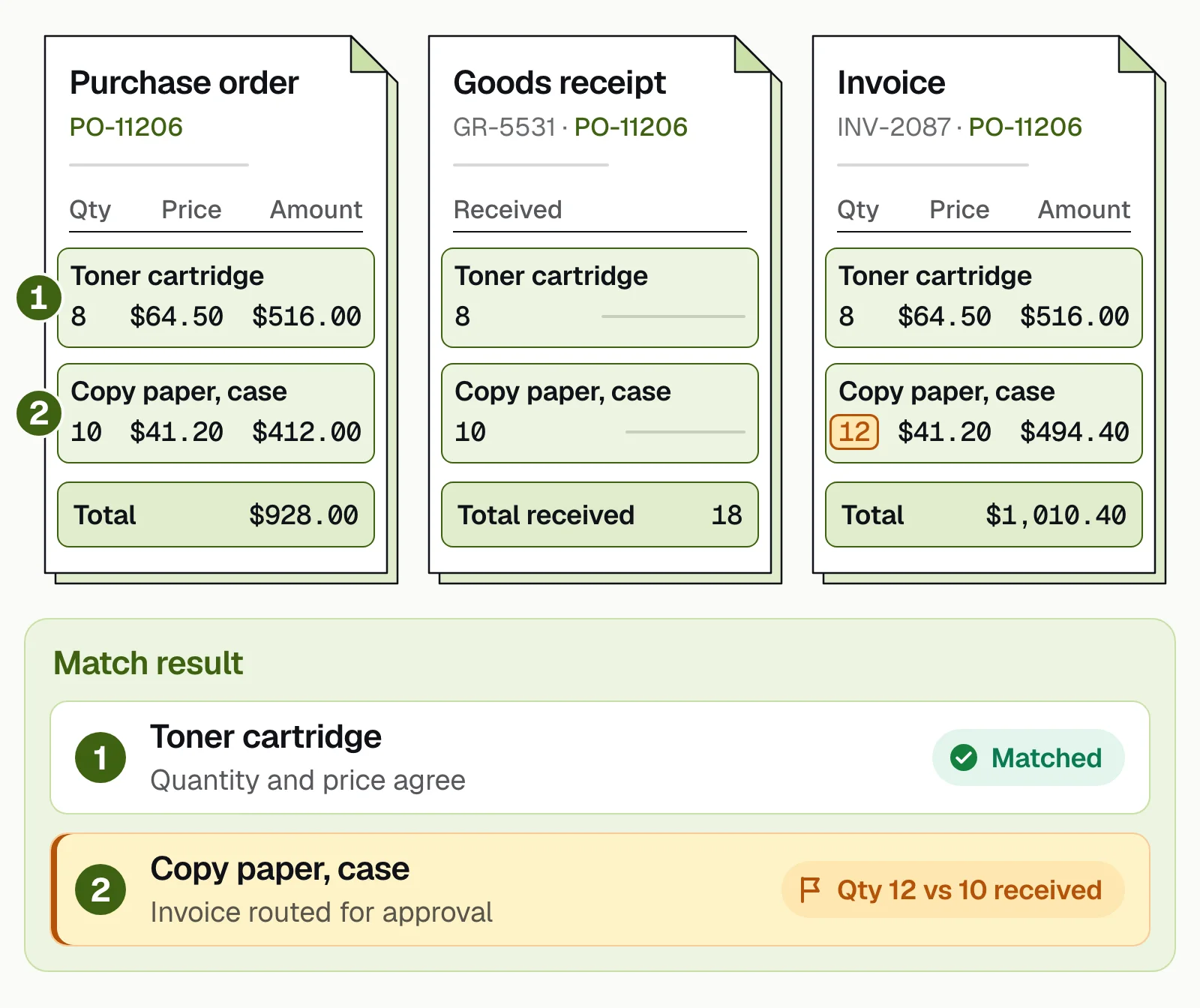
Docsumo reads invoices, order confirmations and delivery notes, and 3-way matching is on its Enterprise plan. The demo shows how it works:
Data to capture from purchase-to-pay documents#
Four documents carry the data a match needs, and the purchase order is the reference the others are checked against.
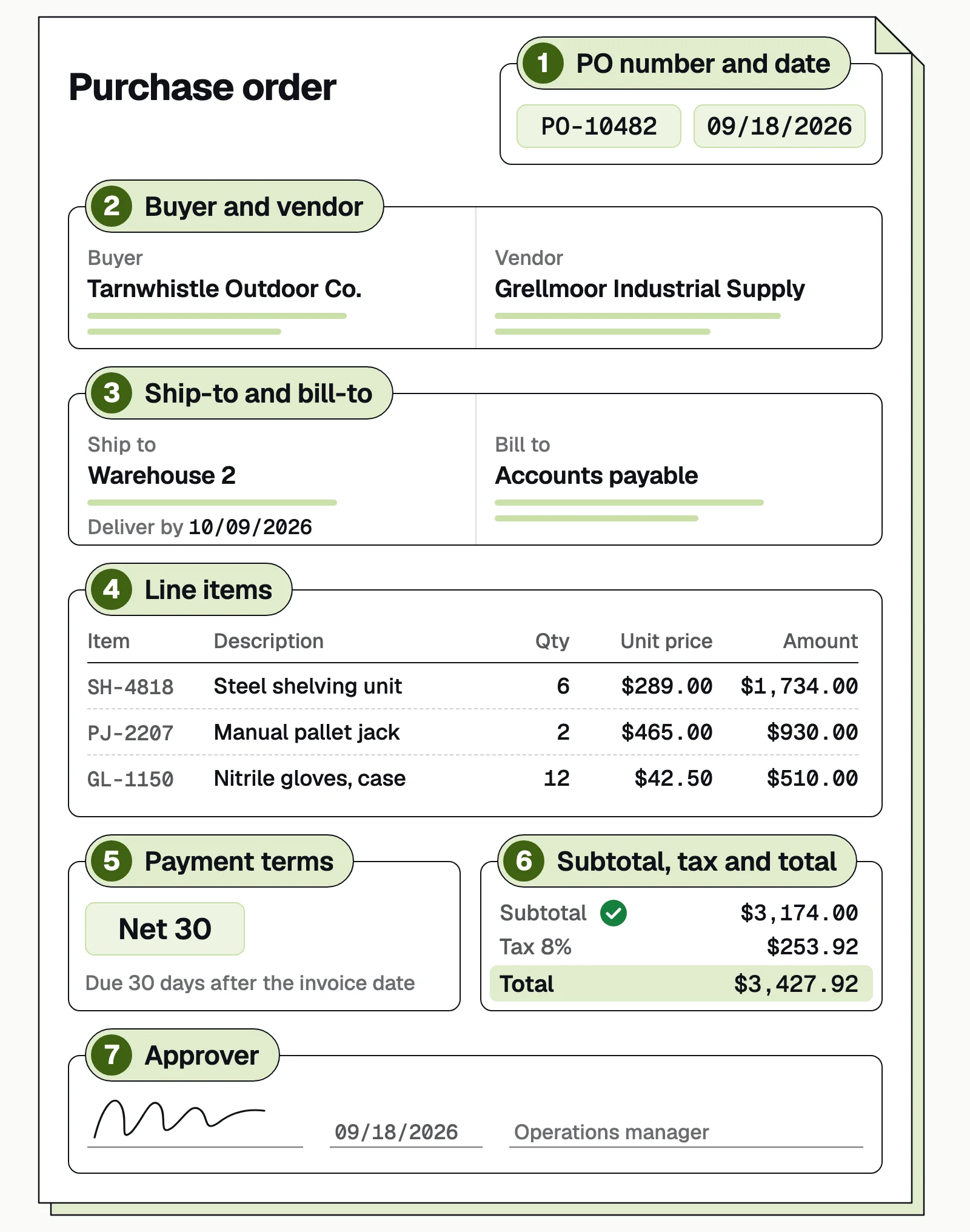
| Document | Key fields |
|---|---|
| Purchase order | PO number and date, buyer and vendor, ship-to and bill-to, line items, payment terms, subtotal, tax and total, approver |
| Order confirmation | PO number, confirmed quantities, prices and dates |
| Delivery note or packing slip | PO number, items and quantities shipped, ship date |
| Supplier invoice | Invoice number and date, PO number, line items, tax, freight, total, remit-to |
For suppliers, the same extraction works the other way around: customer POs that arrive by email become sales orders without retyping. See purchase order automation for order entry.
Controls to build in#
Automate the decisions that follow a rule, and send the ones that need judgment to a person with the context attached.
- Approval limitsBy role, amount and category, with a named approver above each limit.
- A clean vendor masterNo duplicate suppliers, and every new vendor or bank change confirmed by phone before payment.
- Match tolerancesMatches within tolerance can be approved automatically; bigger variances go to a person. Start tight.
- Missing receiptsThe receiver gets a reminder; if it's still missing, AP decides.
- Duplicate checksA repeated PO or invoice number is flagged for AP to confirm.
- Separation of dutiesDifferent people create vendors, approve purchases and release payments, and every step is logged.
Common failure points and how to avoid them#
Messy vendor data
One supplier set up twice, as "ACME CORP" and "Acme Inc.", breaks matching. Deduplicate before go-live.Late ERP integration
If data can't post, the team goes back to keying. Test posting with real data early.Scope creep
"Our top 10 vendors" grows into custom rules. Write the scope down and do standard cases first.A black box
People who don't know why an exception reached them stop trusting it. Train by role and name a power user.
A phased rollout plan#
- Assess (month 1)Baseline volumes, exception rate and approval lag, and run a proof of concept on 50 to 100 real documents from high-volume vendors.
- Pilot (month 2)Run those vendors in parallel with the manual process, clean the vendor master, finish the ERP link and tune tolerances.
- Roll out (month 3)Switch the pilot group over, then add vendors in tranches while watching exceptions.
Timelines stretch with more vendors, an older ERP or a purchasing process that has to change first.
How to choose purchase order automation software#
Purchase order automation software comes in three kinds, and many teams use two: a procurement platform or ERP module to run the purchase order workflow, and document AI to read what suppliers send back. Vendor details come from each vendor's own website, checked in September 2026. Docsumo is our product, so we've put it first and said plainly what it doesn't do.
1. Docsumo
Document AIOur product- Reads
- Any document type, including invoices, POs, order confirmations and delivery notes; covers 250+ document types
- Output
- Fields and line items through an API and webhooks
- Pricing
- A free 14-day trial for up to 1,000 pages; Business and Enterprise plans are quoted
2. Coupa
Procurement platform- Reads
- Plain-language purchase requests; invoices in any format through its supplier portal, email or EDI
- Output
- Wraps around existing ERPs with 250+ connectors; its AP page names SAP, Oracle, NetSuite, Microsoft Dynamics, QuickBooks and Xero
- Pricing
- Not published
3. Procurify
Procurement platform- Reads
- Purchase requests, and supplier invoices, which its AI extracts and codes
- Output
- Integrations with NetSuite, QuickBooks, Sage Intacct and Microsoft Dynamics 365 Business Central, plus punchout catalogs such as Amazon Business
- Pricing
- Not published; every customer starts with Purchasing and adds AP, expense and card products as needed
4. Sage Intacct
ERP purchasing module- Reads
- Vendor bills and invoices, uploaded or emailed; Sage says its AI identifies the vendor, amount, dates and line items
- Output
- Built into the Sage Intacct general ledger, with approvals and payments by check, ACH or virtual card
- Pricing
- Not published in the US; quoted by module
Whichever you shortlist, ask how it matches invoices (header only, or line by line with tolerances), how accurate it is on your own supplier invoices, how it connects to your ERP and what implementation adds to the subscription.
The bottom line#
Purchase order automation controls spending before it happens and makes paying for it close to automatic. Start with invoice capture and matching, then approvals and requisitions, with controls from day one, and use document AI for what suppliers still send as PDFs.
Book a demo with a batch of your own POs and invoices, or start a free trial.
Frequently asked questions#
What is purchase order automation?
It's the use of software to create, approve, send and track purchase orders, and to match them with receipts and supplier invoices, replacing email, spreadsheets and paper forms. An automated purchase order system runs those steps on rules, so people only handle the exceptions.
What is the best purchase order automation software?
It depends on where the work is. Procurement platforms such as Coupa and Procurify run requests, approvals and POs; ERP modules such as Sage Intacct keep purchasing inside your accounting system; and document AI such as Docsumo reads and checks the invoices, confirmations and delivery notes that suppliers send as PDFs.
What is 3-way matching in PO automation?
It's comparing the supplier invoice with the purchase order and the goods receipt, line by line, before paying. Quantities and prices must agree within set tolerances. Docsumo does 2-way and 3-way matching on the Enterprise plan; see 2-way vs 3-way matching.
Can OCR read purchase orders?
Yes. Document AI reads PO PDFs, scans and email attachments and extracts the PO number, buyer, vendor, dates, ship-to address and line items; Docsumo also reads handwritten text. Suppliers use it to turn customer POs into sales orders; buyers use it for POs and related documents that arrive outside the ERP.
Can PO automation integrate with our existing ERP?
Usually, through an API, webhooks or file transfer. Legacy or heavily customized ERPs can need extra work, so test posting early. Docsumo connects through its API and webhooks.
Do small businesses need PO automation?
Once several people can commit spending, or invoices regularly arrive without a clear approver, a simple PO and approval workflow pays off. Smaller teams often start with the purchasing module of their accounting software.
Sources
- Ardent Partners: State of ePayables 2025, AP benchmarks and best-in-class performance (sponsored analyst report, Jan 2026)
- Coupa: Intake and orchestration (purchase order management)
- Coupa: AP automation
- Coupa: Coupa acquires Rossum (newsroom)
- Procurify: home page
- Procurify: pricing
- Sage: Sage Intacct purchase order software
- Sage: Sage Intacct accounts payable
- Sage: Sage Intacct pricing
First published . Last updated .