The purchase order process: steps, PO types and best practices
For procurement, AP and operations teams: what goes on a purchase order, each step from request to payment, how to create a PO, how PO invoices are matched, the four PO types and the practices that keep it all under control.

Key takeaways
- A purchase order (PO) is the document a buyer sends a supplier to order goods or services, listing items, quantities, prices, delivery and payment terms.
- The purchase order process runs: requisition, approval, PO creation, supplier acknowledgment, delivery and receipt, invoice matching, payment and PO close.
- PO invoice processing checks the supplier's invoice against the PO (a 2-way match) and the goods receipt (a 3-way match), so you pay only for what was ordered and received.
- The four common PO types are standard, planned, blanket and contract purchase orders.
- The process slows down at approvals and invoice matching, so those are the two steps to automate first.
On this page
- What is a purchase order?
- The purchase order process, step by step
- How to create a purchase order
- PO invoice processing: matching the invoice to the PO
- Types of purchase orders
- Why companies use purchase orders
- Best practices for the PO process
- Automating the purchase order process
- The bottom line
- Frequently asked questions
The purchase order process is the set of steps a business follows to buy goods or services: an employee requests the purchase, it's approved, a purchase order (PO) goes to the supplier, the goods arrive, and the supplier's invoice is matched to the PO and receipt before it's paid. POs give finance control over spending before it happens, and they make paying invoices faster and safer.
This guide covers what goes on a PO, each step, how to create a PO, PO invoice processing, the four PO types and best practices.
What is a purchase order?#
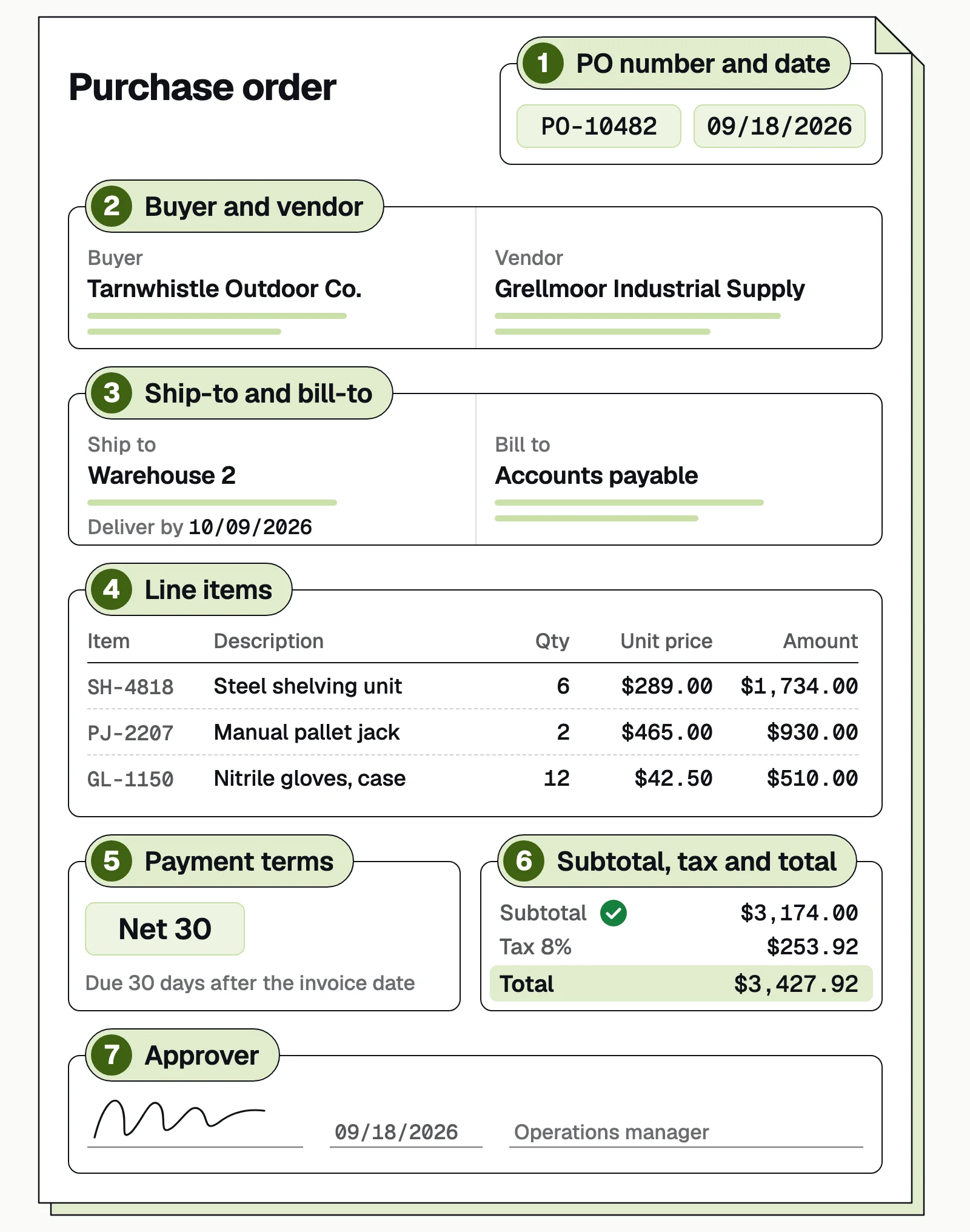
A purchase order is a document a buyer issues to a supplier to order goods or services. Once the supplier accepts it, it records the agreed terms, so both sides work from the same reference. Each PO carries a unique number and date, the buyer and supplier, ship-to and bill-to addresses, line items (item, quantity, unit price, amount), the delivery date, payment terms, totals and the approver.
The purchase order process, step by step#
- Purchase requisition
- 01Approval
- 02PO sent and acknowledged
- 03Goods received
- 04Invoice matched
- 05Payment
| Step | Who | What happens |
|---|---|---|
| Requester | Requests the item, quantity, price, supplier and budget code |
| Budget owner, finance | Approves or rejects against budget and policy |
| Purchasing | Turns the requisition into a numbered PO |
| Purchasing, supplier | Sends the PO; the supplier confirms it |
| Receiving | Records what arrived, including shortages |
| Accounts payable | Matches the invoice to the PO and receipt |
| Accounts payable, treasury | Pays approved invoices on terms |
| Purchasing, AP | Closes the PO once fully received and invoiced |
How to create a purchase order#
Purchasing turns an approved requisition into a PO:
- Start from the approved requisitionCopy its items, quantities and budget code.
- Confirm supplier and priceUse the quoted or contract price, and a supplier that's set up in your vendor master.
- Add delivery and payment termsShip-to address, delivery date and terms such as net 30.
- Number and approve itA unique PO number, which the supplier quotes on its invoice, plus any approval your policy requires.
- Send itBy email, supplier portal or EDI, and file the supplier's confirmation.
PO invoice processing: matching the invoice to the PO#
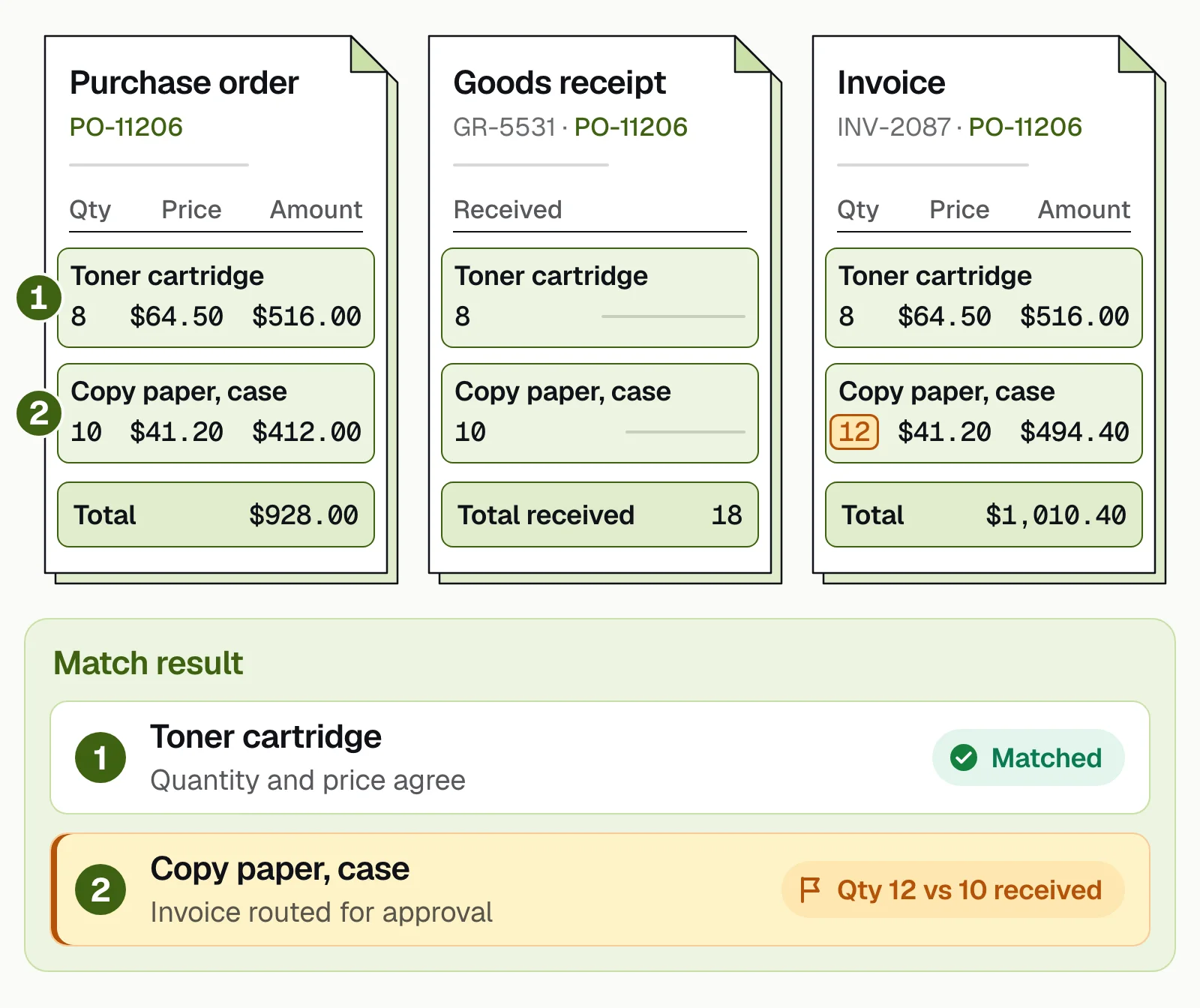
PO invoice processing is how AP handles an invoice that quotes a PO number: capture it, match it, clear any differences, approve and pay. A 2-way match compares the invoice with the PO; a 3-way match adds the goods receipt, so you pay only for what arrived. Differences within tolerance pass; larger ones go to a person.
Below, the toner line matches, but the invoice bills 12 cases of copy paper when 10 were received, so it's routed for approval.
Invoices with no PO, such as utilities and subscriptions, skip matching and go to a budget owner for approval. More in 2-way vs 3-way matching.
Types of purchase orders#
Standard PO
Items, quantities, prices, dates and terms all known up front. For one-time purchases.Planned PO
Items, quantities and prices known; delivery dates set later. For regular supplies.Blanket PO
Supplier and prices agreed; quantities drawn down over time. For recurring purchases such as maintenance supplies.Contract PO
General terms agreed; orders issued separately against it. For long-term suppliers.
Why companies use purchase orders#
Buying without POs
- Spending shows up only when the invoice arrives
- Prices and dates are agreed by phone or email
- Someone has to confirm every invoice was ordered
- The audit trail is pieced together from inboxes
Buying with POs
- Purchases are approved before money is committed
- Items, prices and dates are agreed in writing
- Matched invoices need little review, and invoices with no PO stand out
- Each purchase links a request, approval, receipt and payment
Best practices for the PO process#
- Write a purchasing policywith PO thresholds, approval limits and exceptions.
- Use blanket or contract POsfor recurring suppliers, to cut paperwork.
- Keep the vendor master cleanwith verified bank details and no duplicate suppliers.
- Record receipts promptlyor 3-way matches fail for the wrong reason.
- Set match tolerancesfor price and quantity, and review them quarterly.
- Ask suppliers to quote the PO numberon every invoice.
- Close POs when they're completeso old commitments don't linger.
- Automate approvals and matchingwhere most delays and errors happen.
Automating the purchase order process#
Purchase order management software handles requisitions and creates POs; document AI reads what suppliers send back (invoices, order confirmations, delivery notes) and checks it against the PO.
Docsumo handles the document side. It reads POs and invoices, line items included, and reaches 99% field-level accuracy across 250+ document types. It flags duplicate invoices, routes invoices for approval on the Business plan and, on the Enterprise plan, matches each invoice line to the PO and receipt. Data goes to your ERP through API and webhooks. It doesn't create POs or pay suppliers. See accounts payable automation and the full purchase order automation workflow.
Exceptions are where AP cost piles up: Ardent Partners' State of ePayables 2025 puts the average invoice exception rate at 18.4% and the average cost to process an invoice at $9.84.
The bottom line#
The purchase order process turns a request into an approved commitment, a delivery and a payment, with a paper trail at every step. Keep it simple with a clear policy, clean vendor data and prompt receiving, and automate approvals and invoice matching so POs speed up payment instead of slowing it down.
Book a demo with a few of your own purchase orders and invoices, or start a free trial.
Frequently asked questions#
What is a purchase order?
A purchase order is a document a buyer issues to a supplier to order goods or services. It states what is being bought, how many, at what price, when and where to deliver, and the payment terms. Once the supplier accepts it, it records the agreed terms.
What is a PO invoice?
A supplier invoice that quotes the buyer's purchase order number, so AP can match it to the PO and the goods receipt before paying. An invoice with no PO behind it, such as a utility bill, is a non-PO invoice and goes to a budget owner for approval instead.
What is the difference between a purchase order and an invoice?
The buyer issues the purchase order before the purchase to order goods. The supplier issues the invoice after delivery to request payment. In AP, the invoice is matched against the PO.
What is a purchase requisition?
An internal request from an employee or department to buy something. Once approved, it becomes a purchase order sent to the supplier.
What are the four types of purchase orders?
Standard (one-time purchase with all details known), planned (quantities and prices known, delivery dates scheduled later), blanket (a supplier and price agreement with quantities and dates open, drawn down over time) and contract (general terms agreed, with separate POs issued against it).
When is a PO not needed?
Many companies skip POs for small purchases below a set amount, recurring utilities and subscriptions, or card purchases. Set these exceptions in your purchasing policy.
Sources
First published . Last updated .