Automated KYC verification: how it works and where document AI fits
For compliance, onboarding and operations teams at banks, lenders and fintechs: what US KYC rules require, how automated KYC and KYB work, and where document extraction removes the manual review.

Key takeaways
- Automated KYC verification uses software to collect, read and check a customer's identity information and documents, and to screen them against watchlists, with people reviewing only the exceptions.
- In the US, a bank's Customer Identification Program must collect at least name, date of birth, address and an identification number before opening an account, and verify identity by documentary or non-documentary methods.
- For business customers (KYB), the beneficial ownership rule requires identifying each person who owns 25% or more and one person with significant control.
- Automated KYC combines ID document checks and liveness, data source checks, sanctions and PEP screening, and document extraction for proof of address, business formation and financial documents.
- Document AI handles the paperwork that ID-verification tools don't: utility bills, bank statements, articles of incorporation, operating agreements and tax forms.
On this page
Automated KYC verification is the use of software to collect, read and check a customer's identity information and documents during onboarding, screen them against watchlists, and flag only the exceptions for a compliance analyst. It usually combines ID document and liveness checks, data source verification, sanctions screening and document extraction. For US banks, it has to meet the Customer Identification Program rule: collect at least name, date of birth, address and an identification number, and verify identity.
This guide covers the US requirements, how automated KYC and KYB work step by step, where document AI fits, and what to look for in tools.
What US KYC rules require#
KYC in the US rests on the Bank Secrecy Act and FinCEN's rules. Two matter most for onboarding:
Customer Identification Program (CIP)
Before opening an account, a bank must obtain at least:
- Name
- Date of birth, for an individual
- Address: a residential or business street address
- Identification number: a taxpayer ID for US persons; for non-US persons, a taxpayer ID, passport number, alien ID or other government-issued photo ID number
The bank then verifies identity using documentary methods (an unexpired government-issued photo ID, or formation documents for a business), non-documentary methods (comparing information with a consumer reporting agency, public database or other source, contacting the customer, checking references, or obtaining a financial statement), or both, based on risk.
Beneficial ownership for business customers
For legal entity customers, covered institutions must identify and verify:
- Each individual who owns 25% or more of the equity, directly or indirectly, and
- One individual with significant control, such as a CEO, CFO, COO or managing member.
Customer due diligence also means understanding the purpose of the relationship, building a risk profile and monitoring on an ongoing basis.
How automated KYC verification works#
An automated flow runs the same checks on every applicant, in the same order, and hands your onboarding system a decision with the evidence behind it.
- ID document
- Selfie
- Supporting documents
- 01Check the ID
- 02Liveness
- 03Data sources
- 04Screening
- 05Extract documents
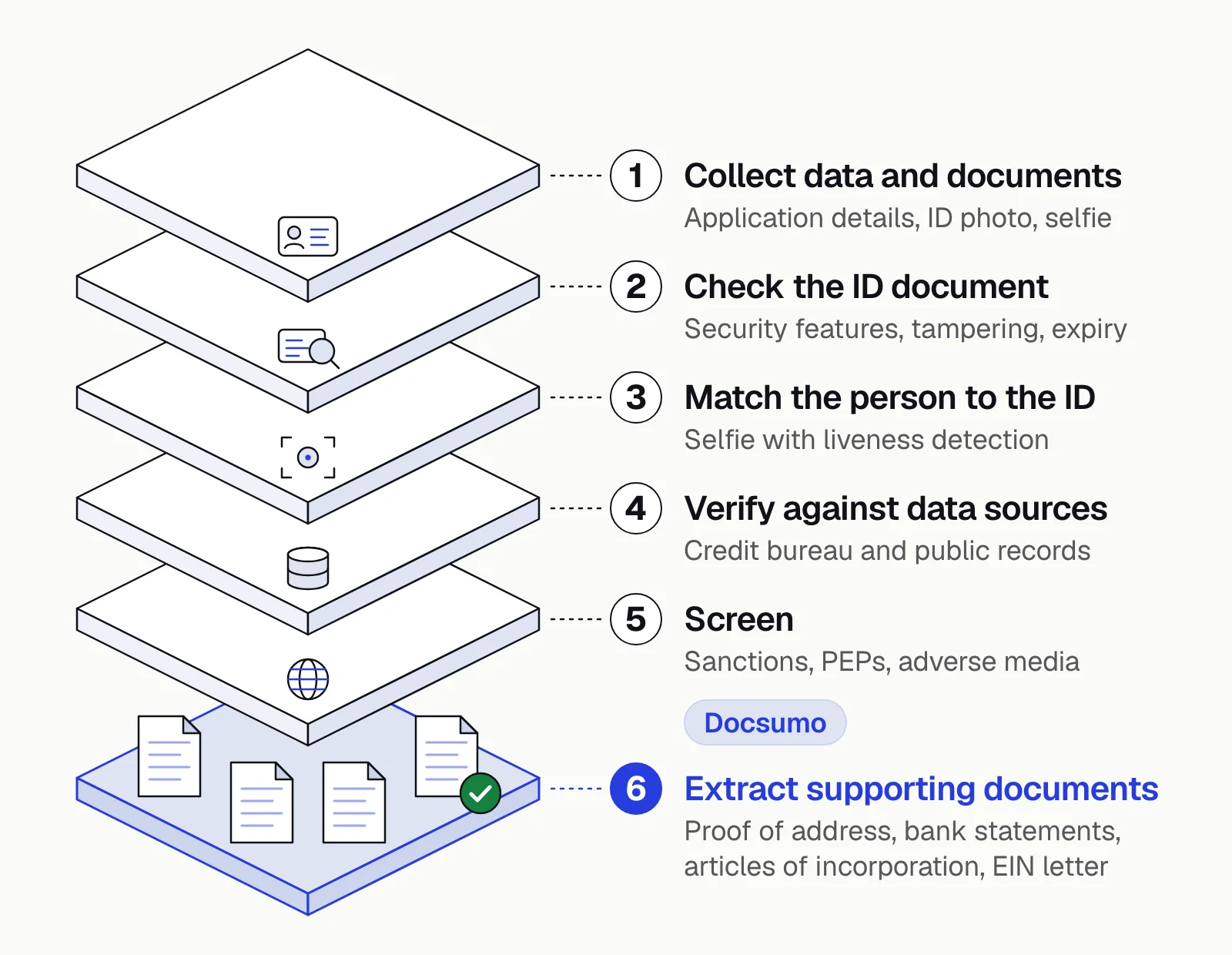
- Collect data and documentsThe customer enters their details and uploads an ID, often by phone camera, plus any supporting documents.
- Check the ID documentThe system reads the ID (OCR plus the barcode or MRZ), checks security features and signs of tampering, and confirms it isn't expired. From a US driver's license it takes the name, date of birth, address, license number and expiration date; from a passport, the name, passport number, nationality, date of birth and expiration date.
- Match the person to the IDA selfie with liveness detection is compared with the ID photo.
- Verify against data sourcesName, date of birth, address and ID number are checked against credit bureau, public records and other databases.
- ScreenSanctions (such as OFAC lists), politically exposed persons and adverse media.
- Extract supporting documentsProof of address, income or business documents are read and compared with the application.
- Score risk and decideClear matches are approved automatically; mismatches and potential hits go to an analyst.
- MonitorCustomer data and screening are refreshed over time, not just at onboarding.
Where document AI fits#
ID verification tools are built for photo IDs and selfies. A lot of KYC and KYB paperwork isn't an ID, and that's the layer document AI covers.
Utility bill
Proof of address. Fields: name, service address, provider, bill date.Bank statement
Proof of address, source of funds, account ownership. Fields: account holder, address, period, balances, transactions.Articles of incorporation or organization
Entity existence. Fields: legal name, state, formation date, registered agent.Operating agreement or shareholder register
Beneficial ownership. Fields: owners and ownership percentages, managers.IRS EIN letter or W-9
Business tax ID. Fields: legal name, EIN, entity type.Pay stubs and tax returns
Source of income or funds. Fields: employer, income, tax year.
Document AI reads these, extracts the fields and checks them against the application: does the address on the utility bill match the one entered, does the account holder on the bank statement match the customer, do the owners in the operating agreement match the beneficial ownership form? Docsumo extracts data with 99% field-level accuracy on 250+ document types and reports 64% lower fraud with cross-document validation.
Manual vs automated KYC#
Manual KYC
- Hours to days per file, often with back-and-forth
- Checks depend on the analyst doing them
- Fields keyed from each document by hand
- Analyst time spent on every file
Automated KYC
- Minutes for clean cases
- Same checks every time, with an audit trail
- Fields extracted and matched to the application
- Analyst time spent on exceptions and higher-risk customers
What to look for in KYC automation tools#
- Coverage of the ID types and countries your customers use.
- Document support beyond IDs: proof of address, business formation and financial documents.
- Configurable rules that reflect your BSA/AML program and risk appetite.
- Explainable results: why a case passed or failed, with evidence.
- Case management so analysts see all of a customer's documents and checks in one place. See Docsumo's case management.
- Audit trail and retention that satisfy examiners.
- Security: customer IDs are highly sensitive. Look for SOC 2 Type 2 reports and strong access controls; Docsumo's security page lists its certifications.
- Integration with your onboarding flow, core system and screening tools.
For vendor comparisons, see the best KYC document verification software.
The bottom line#
Automated KYC verification collects and checks identity information against your CIP and CDD requirements, screens customers, and sends only the unclear cases to an analyst. ID verification tools handle photo IDs and selfies; document AI handles the rest of the file, from utility bills to operating agreements. Together they make onboarding faster without weakening compliance. Learn more about IDP for financial services.
Book a demo with a few of your own onboarding files, or start a free trial.
Frequently asked questions#
What is automated KYC verification?
It's the use of software to verify a customer's identity and assess their risk during onboarding and afterwards. It typically combines ID document checks, selfie and liveness checks, database verification, watchlist screening and extraction of data from supporting documents.
What information is required for KYC in the US?
Under the Customer Identification Program rule, banks must obtain at least the customer's name, date of birth (for individuals), address and an identification number, such as a taxpayer ID, before opening an account.
How does identity verification for banks work?
A bank collects the customer's name, date of birth, address and ID number, then verifies them with documents (an unexpired photo ID such as a driver's license or passport, or certified articles of incorporation for a business) or with non-documentary checks against consumer reporting agency and public database records. A bank statement isn't a photo ID, so bank statement verification usually serves proof of address or account ownership: the account holder's name and address are matched to the application.
What is the difference between KYC and KYB?
KYC verifies individual customers. KYB (know your business) verifies business customers, including the entity's existence and good standing, its beneficial owners and the people who control it.
Can KYC be fully automated?
Most straightforward cases can be verified automatically. Mismatches, poor-quality documents, potential watchlist hits and higher-risk customers still need review by a person, and your BSA/AML program should define when.