ACORD 140 form: the property section, COPE data and automation
For commercial property underwriters, brokers and submission teams: what's on an ACORD 140, which fields drive the quote, and how to process property submissions without retyping them.

Key takeaways
- The ACORD 140 is the Property Section: a supplement to the ACORD 125 that describes each building and its contents so a carrier can quote commercial property.
- Each premises has a subject of insurance table (building, business personal property, business income) with amount, coinsurance, valuation, causes of loss, inflation guard, deductible and blanket number.
- Underwriters price property on COPE data: construction, occupancy, protection and exposure, which the form captures building by building.
- Amounts should reconcile with the statement of values, and additional interests such as mortgagees and lenders' loss payees must be recorded exactly.
- Automating ACORD 140 intake keeps each premises and subject row intact and flags gaps in COPE data before the risk reaches an underwriter.
On this page
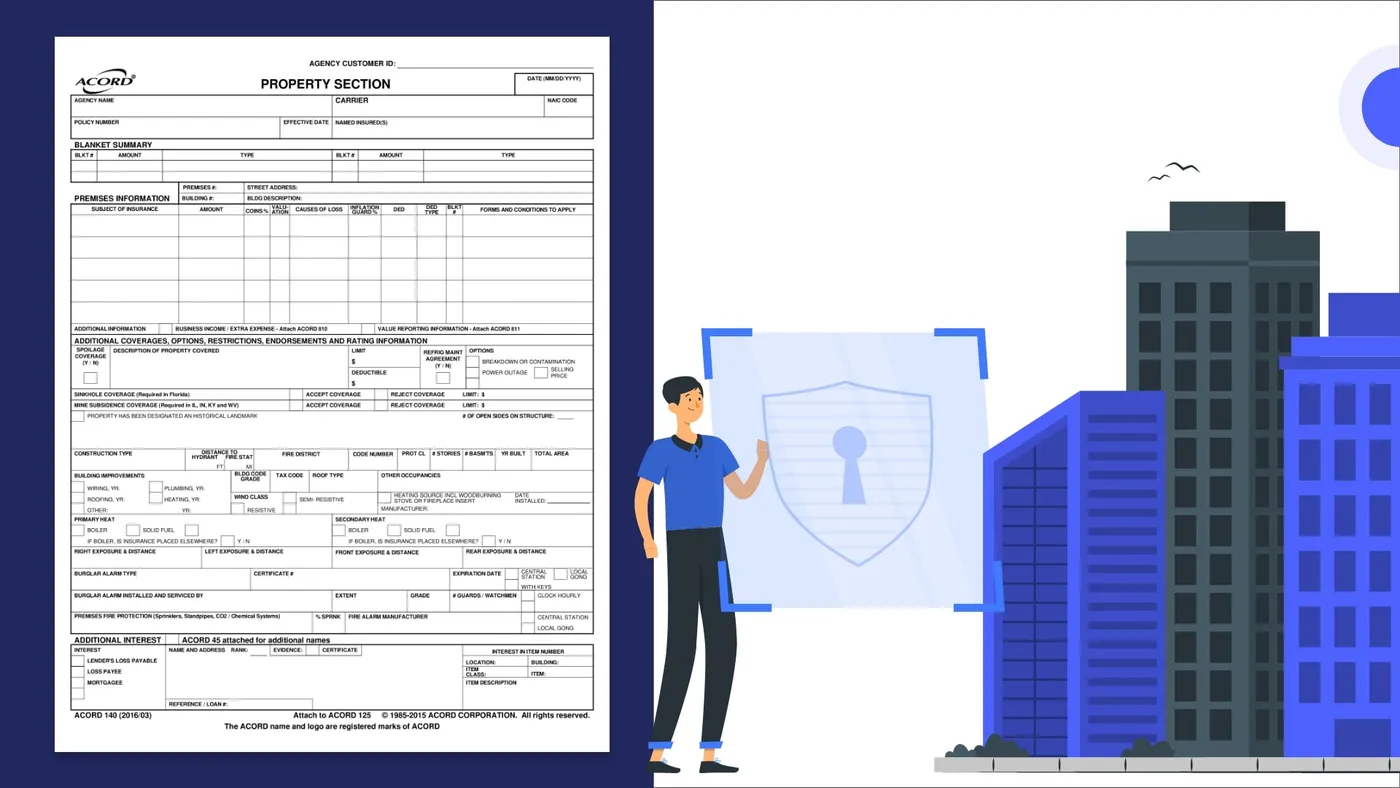
The ACORD 140 is the Property Section of a commercial insurance application: the form a broker attaches to the ACORD 125 to request a commercial property quote. For each building it records the values to insure, the coverage terms and the construction, occupancy, protection and exposure (COPE) details underwriters price from.
What is an ACORD 140 form?#
ACORD 140 is ACORD's standard Property Section. It attaches to the ACORD 125 application, alongside the sections for any other lines the broker wants quoted.
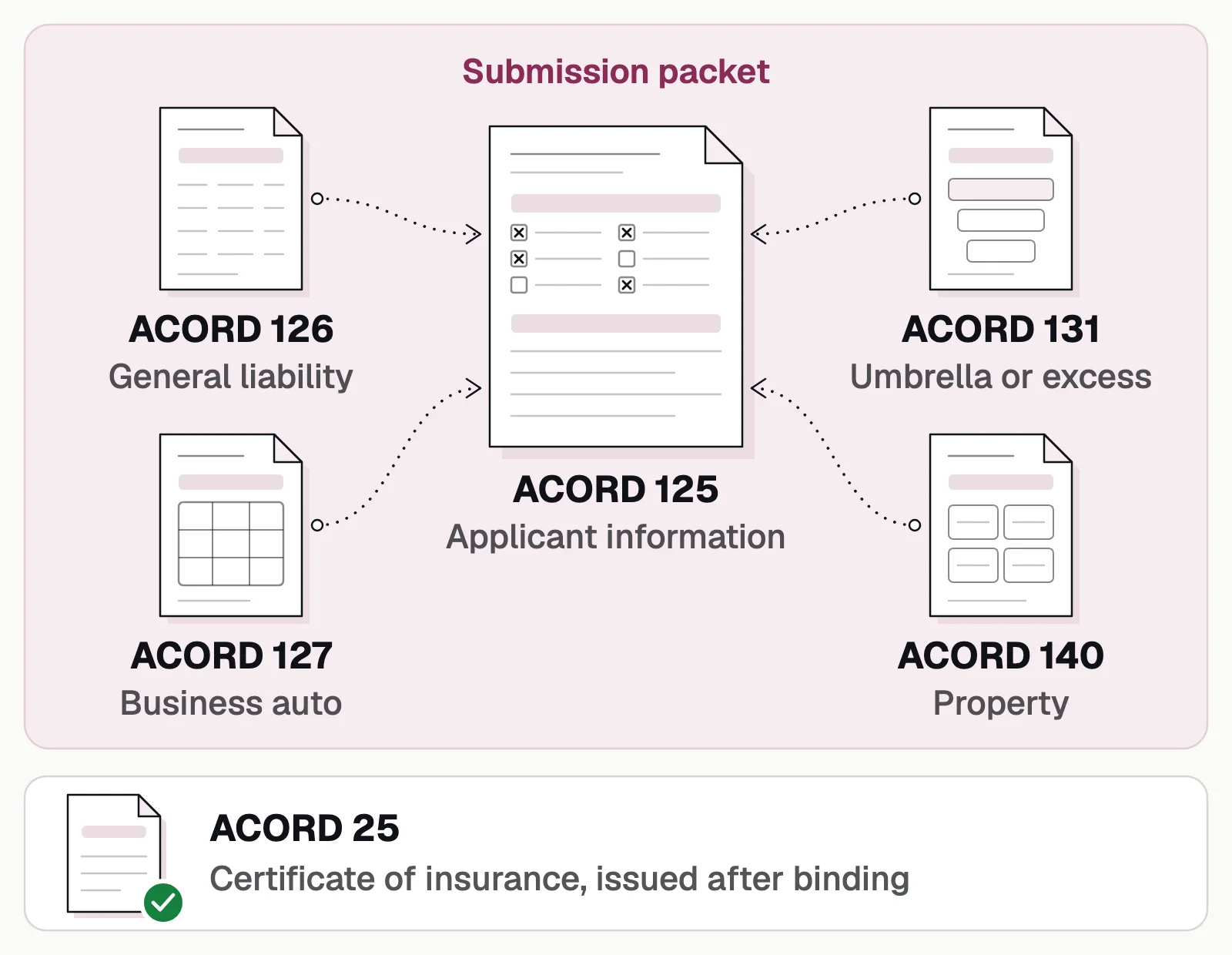
Each line checked on the ACORD 125 should have its section attached; the ACORD 25 comes only after binding.
The 2016/03 edition in the header image is still the current one in ACORD's forms index. Each building gets its own premises block (page 1 holds one, page 2 repeats it), and each block captures COPE, the four risk characteristics underwriters review:
Construction
Construction type, year built, stories, area, roof, wind class and heating, and when the wiring, plumbing, roof and heating were updated.Occupancy
How the building is used: its description and any other occupancies.Protection
Distance to the hydrant and fire station, protection class, sprinklers, fire and burglar alarms, and guards.Exposure
What stands on each side of the building, and how far away.
The sections of an ACORD 140, and what to extract#
Before rating, the form is split from the packet, read building by building and reconciled with the statement of values:
- ACORD 125 application
- ACORD 140 property section
- Statement of values
- Loss runs
- 01Classify and split
- 02Extract every building
- 03Reconcile values
- 04Refer exceptions
Besides the COPE fields, extract:
| Section | Fields to extract |
|---|---|
| Blanket summary | Blanket number, amount and type |
| Premises and subjects of insurance | Premises and building number, address; for each subject (building, business personal property, business income): amount, coinsurance %, valuation, causes of loss, inflation guard %, deductible, blanket number |
| Additional coverages | Spoilage, sinkhole (required in Florida), mine subsidence (required in IL, IN, KY and WV), historical landmark status |
| Additional interest | Mortgagee, lender's loss payable or loss payee; name, address and loan number; the item it applies to |
The checks to run on every ACORD 140#
Each check says what to do when it fails.
- Match to ACORD 125Named insured, effective date and every premises agree with the 125. If not, confirm with the broker.
- Statement of valuesAmounts reconcile, location by location. If not, flag the difference.
- Valuation and coinsuranceStated for each subject. If not, request them.
- COPE completenessEvery building has construction, year built, protection class, sprinklers and alarms, plus update years if it's older. If not, request them or an inspection.
- Catastrophe exposureLocation and construction fit your guidelines. If not, refer.
- Additional interestsNames and loan numbers are complete, with an ACORD 45 for extras. If not, request them.
- Attached formsThe ACORD 810 (business income) or 811 (value reporting) is attached where the form calls for it. If not, request it.
Commercial applications
Evidence of property insurance
ACORD 125: Commercial insurance application
Agents and brokers send it to carriers and MGAs, with the line sections.✓ 3 passedThe first section of a commercial submission: the applicant, its premises and the lines it wants quoted.
What Docsumo reads
- Applicant
- Keystone HVAC LLC
- FEIN
- ••-•••6120
- NAICS
- 238220
- Proposed term
- 2026-07-01 → 2027-07-01
- Sections attached
- GL, property, auto, umbrella
- Full-time employees
- 46
- Annual revenues
- 8,450,000
- Premises 1
- 2150 Liberty Ave, Pittsburgh, PA 15222
Checked against
- SubmissionEvery section ticked is attached✓ 4 of 4 in
- Every sectionApplicant, FEIN and proposed term✓ Same on all
- Your rulesNAICS code against the classes you write✓ Accepted
The rules each form is checked against are yours to set.
Why ACORD 140 is hard to process by hand#
One block per building
A multi-location submission runs long, and every row has to stay with its building.Values in a separate file
The statement of values, an ACORD 139 or the broker's own spreadsheet, is matched building by building.Codes and layouts
Short codes for valuation and construction, in scans and agency-system printouts.
How to automate ACORD 140 processing#
- CollectBroker email and portal uploads land in one queue, so submissions are processed in bulk.
- Classify and splitSeparate the ACORD 125, 140, statement of values and loss runs.
- Extract every buildingEach premises block, subject row and COPE field, scans included.
- CheckSet up the checks above as workflow steps: an AI step or your own Python code.
- Review exceptionsFailed checks and low-confidence fields go to a reviewer.
- Push clean dataTo catastrophe modeling, rating and policy systems through an API or webhook, or to Excel.
Docsumo is an intelligent document processing (IDP) platform that runs all six steps on ACORD forms and the rest of a commercial submission, with classification and splitting on the Business plan and cross-document validation on the Enterprise plan. It doesn't model catastrophe risk or rate the policy: data goes out through the API and webhooks.
- 99%field-level accuracy across 250+ document types
- 95%+of documents processed straight through, without manual review
- <5 minper document, down from 2+ hours
The bottom line#
The ACORD 140 turns a list of buildings into a priceable property risk: extract every row, complete the COPE data, reconcile the values and send underwriters only the exceptions.
Book a demo with a few of your own property submissions, or start a free trial.
Frequently asked questions#
What is an ACORD 140 form?
ACORD 140 is the Property Section, a standard ACORD form attached to the ACORD 125 commercial insurance application. It describes each location and building, the property to insure, the coverage terms requested and the building's construction, occupancy, protection and exposures. It's part of an application, not evidence of insurance: a lender or landlord usually gets that on the ACORD 28 or ACORD 27.
How do you fill out an ACORD 140?
Start from the ACORD 125, so the named insured, dates and premises numbers match. For each building, complete a premises block: every subject of insurance with its amount, coinsurance, valuation, causes of loss and deductible, then the construction, protection and exposure details. Attach an ACORD 810 or 811 where the form calls for one and an ACORD 45 for extra interests, then have the producer and applicant sign.
What does COPE mean on an ACORD 140?
COPE stands for construction, occupancy, protection and exposure. The form captures construction type, year built, stories and area; occupancies; fire protection, sprinklers and alarms; and exposures on each side of the building.
What causes of loss can be selected on ACORD 140?
The usual choices are basic, broad and special, which follow ISO's causes of loss forms. Basic and broad are named-perils forms: basic covers perils such as fire, lightning, windstorm and hail, and broad adds a few more, such as falling objects, weight of snow or ice and some water damage. Special covers any cause of loss the policy doesn't exclude.
What is coinsurance on ACORD 140?
It's the percentage of a property's value, usually 80%, 90% or 100%, that the insured agrees to carry. If the limit is lower than that share of the value at the time of a loss, the claim payment can be reduced.
Can ACORD 140 data be extracted automatically?
Yes. Document AI reads the ACORD 140, scans included, keeps each building's rows together and checks the values against the statement of values and the ACORD 125, so underwriters see only the exceptions. See ACORD form processing.
Sources
- ACORD Forms Index (rev. 9/8/2026)
- ACORD 140 Property Section (2016/03 edition, via BTIS)
- ACORD: Forms library
- IRMI: Construction, occupancy, protection, and exposure (COPE)
- IRMI: Causes of loss forms
- IRMI: Broad causes of loss form
- First Connect: ACORD 140 instructions
First published . Last updated .