Passport OCR: how to extract data from a passport's data page and MRZ
For KYC and onboarding teams at banks, lenders and fintechs, and the developers who build their onboarding apps. See what's on the data page, how MRZ OCR works and the checks to run.

Key takeaways
- Passport OCR reads a passport's data page into structured fields such as name, nationality, date of birth, passport number and expiry date. It reads both the printed fields, called the visual inspection zone (VIZ), and the machine readable zone (MRZ).
- Under ICAO Doc 9303, the international passport standard, the MRZ is two lines of 44 characters in the OCR-B typeface. The lines repeat the key printed fields. A check digit, computed from the field, comes after the passport number, the date of birth, the expiry date and the personal number. A composite check digit, computed from several fields together, ends line 2.
- The checks that matter are data checks. Recompute the check digits and compare the MRZ with the printed page. Confirm the passport is unexpired, and match the name and date of birth to the application.
- For US banks, a passport number and country of issuance can serve as a non-US customer's ID number under the Customer Identification Program (CIP) rule. A bank that relies on a passport records its type, number, place of issuance and dates of issue and expiry.
- Passport OCR checks the data, not the document. Confirming that a passport is genuine and belongs to the person presenting it is identity verification, a separate step.
On this page
Passport OCR is the automatic way to extract data from a passport. It reads the data page, including the two-line machine readable zone (MRZ) at the bottom. The output is fields such as name, nationality, date of birth, passport number and expiry date. Banks, lenders and fintechs use it to onboard customers and run KYC checks without retyping. The MRZ's check digits let software catch a misread passport number or date.
Below, we cover the data page, the MRZ character by character, the checks to run on every passport and where Docsumo fits.
What is passport OCR?#
Passport OCR is optical character recognition applied to one page of the passport. That page is the data page, the one with the holder's photo. ICAO Doc 9303 is the international standard for machine readable passports. It splits the data page into a visual inspection zone (VIZ) of printed fields for people and a machine readable zone (MRZ) for machines.
MRZ OCR: how software reads the machine readable zone#
The MRZ is two lines of 44 characters in the OCR-B typeface. It uses only capital letters, digits and the filler character <. The MRZ was designed for OCR software to read. So when people ask "what is OCR in a passport?", they usually mean the MRZ.
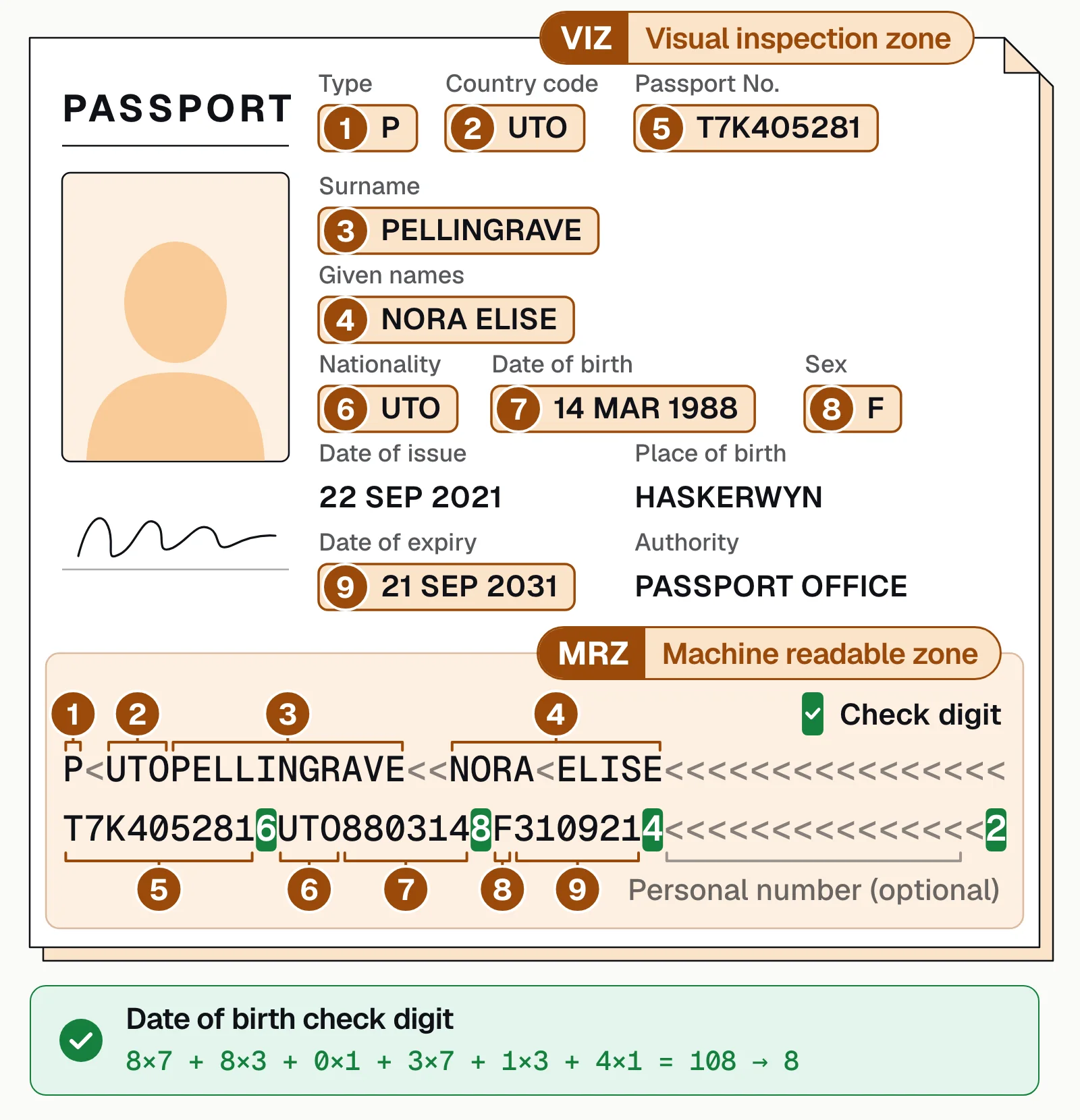
Every field sits at a fixed position, so MRZ OCR doesn't have to guess where anything is. Line 1 holds the document type, the issuing country code and the name. Two fillers (<<) separate the surname from the given names. Line 2 holds the passport number, nationality, date of birth, sex, expiry date, personal number and check digits. The table gives the position of each.
| Character position | Field on line 2 | In the Utopia sample below |
|---|---|---|
| 1–9 | Passport number | T7K405281 |
| 10 | Check digit for the passport number | 6 |
| 11–13 | Nationality | UTO |
| 14–19 | Date of birth (YYMMDD) | 880314 |
| 20 | Check digit for the date of birth | 8 |
| 21 | Sex | F |
| 22–27 | Date of expiry (YYMMDD) | 310921 |
| 28 | Check digit for the date of expiry | 4 |
| 29–42 | Personal number (optional) | Not used, so filled with < |
| 43 | Check digit for the personal number | < (the field is empty, so ICAO allows < or 0, and both count as 0) |
| 44 | Composite check digit, computed from positions 1–10, 14–20 and 22–43 together | 2 |
Software computes each check digit from its field. It multiplies each character's value by 7, 3 and 1 in a repeating pattern, adds the results and keeps the last digit of the total. The figure below works through the birth date. When a recomputed digit doesn't match, one character was usually misread. Dates hold only digits, so a letter O in a date is a misread zero.
The MRZ alone won't fill a KYC record. It has no issue date, it drops accents, and it cuts long names short. Read the printed page too, and compare the two. The specimen below is issued by Utopia (UTO), the fictional country ICAO uses for sample documents.
Fields you can extract from a passport#
The data page holds three groups of printed fields, and the MRZ repeats most of them. That repetition is what makes a passport easy to check.
Holder
Surname and given names, nationality, date of birth and sex, plus place of birth and a personal number where the issuing country includes them.Document
Document type (P for passport), issuing country code, passport number and issuing authority.Dates
Birth, issue and expiry. Birth and expiry dates are also in the MRZ with check digits; the issue date is printed only.
For US banks, these fields line up with the Customer Identification Program (CIP) rule. A passport number and country of issuance can serve as a non-US customer's ID number. A bank that verifies identity with a passport records the document type and its number. It also records the place of issuance and the dates of issue and expiry. The issue date isn't in the MRZ, so reading the MRZ alone won't fill that record.
How to extract data from a passport with OCR#
Whatever tool you use, passport extraction runs through the same stages, from upload to your KYC or onboarding system.
- App or portal upload
- Email attachment
- Phone photo or scan
- 01Classify the page
- 02Read the VIZ and MRZ
- 03Check digits and compare
- 04Review exceptions
- CollectCustomers upload a phone photo or scan in your app or portal, or send it by email; put every file in one queue. Ask for photos without flash, since glare on the glossy page washes out characters.
- Classify the pageFind the data page, and set aside other passport pages, visas or a different ID sent by mistake.
- Read both zonesOCR reads the printed fields and the two MRZ lines. Extraction maps each value to a named field such as surname, passport number or date of birth.
- CheckRecompute the MRZ check digits, then compare the MRZ with the printed fields and the application. On a worn or damaged page, a failed check digit points to the field to re-read.
- Review and deliverFields that fail a check or were read with low confidence go to a person, with the value highlighted on the image. Everything else goes straight to your KYC or onboarding system.
Checks to run on every passport#
These are data checks. They catch misreads and mismatches between the passport and what the customer told you; they don't prove a passport is genuine.
- Check digitsRecompute the digits after the passport number, birth date, expiry date and personal number, and the composite digit that ends line 2. A mismatch usually means a misread, so re-read the field or send it for review.
- ExpiryThe passport is unexpired on the day you rely on it. The CIP rule names unexpired government-issued ID, such as a passport, as a document banks may use. MRZ dates use two-digit years (YYMMDD), so set the century before comparing.
- MRZ matches the printed pagePassport number, name, birth date, sex and expiry agree. Allow for ICAO's rules. The MRZ drops accents and apostrophes, so Ö can become OE or O. It turns hyphens into < and truncates names that don't fit in 39 characters.
- Matches the applicationName and date of birth agree with what the customer entered, and the nationality and issuing country are what you expect.
- Nothing missingEvery field your records need was read, including the issue date, which only the printed page carries.
Here's a second Utopia specimen, with its check digits recomputed and its printed page compared with the MRZ.
| Field | Extracted value | Confidence |
|---|---|---|
| Document type | P (passport) | |
| Issuing state | UTO | |
| Passport number | Q72P41856 | |
| Date of issue | 2023-06-02 | |
| Date of expiry | 2033-06-01 |
| Field | Extracted value | Confidence |
|---|---|---|
| Surname | HOLLOWAY | |
| Given names | MAREN ELISE | |
| Nationality | UTO | |
| Date of birth | 1988-03-14 | |
| Sex | F |
| Field | Extracted value | Confidence |
|---|---|---|
| Passport number check digit | 0 · valid | |
| Birth date check digit | 8 · valid | |
| Expiry check digit | 3 · valid | |
| Composite check digit | 0 · valid | |
| Printed page matches MRZ | Yes |
How to automate passport data extraction#
A passport rarely arrives alone. It comes with an application and often proof of address such as utility bills or bank statements. Docsumo reads the data page with a pre-trained passport model and handles any other document type, so the whole file is read together. A Python code step you add to the workflow can recompute the MRZ check digits and compare the MRZ with the printed fields. Fields below a per-field confidence threshold go to your reviewers. They click a field to see its source on the page, and their corrections improve the model. Data goes to your KYC, onboarding or loan system through the API and webhooks. On the Enterprise plan, cross-document validation can check the passport's name and date of birth against the application and other documents. Case management, also on the Enterprise plan, keeps each customer's file together.
Docsumo works with the data on the page; it isn't an identity verification tool. It doesn't read the passport's chip, inspect security features or match a selfie to the photo. Teams that need those add an ID verification provider; see the best KYC document verification software. Docsumo runs in the cloud only and is SOC 2 Type 2 audited and ISO/IEC 27001:2022 certified. It doesn't use customer documents to train shared or third-party models; see security.
Our take. Judge passport OCR by the whole onboarding file, not by the one page. A perfect read of the passport helps little if its name and birth date don't match the application. So set up the checks between documents first, then tune how each page is read.
If your team still retypes passport details#
Passport OCR turns a passport's data page into fields you can use, and the MRZ makes the result checkable. Recompute the check digits and compare the MRZ with the printed page and the application. Read the issue date from the printed page, and send only the mismatches to a person. When you also need to know the passport is genuine and belongs to the person presenting it, add identity verification.
Book a demo with a sample onboarding file, or start a free trial.
Frequently asked questions#
What is passport OCR?
Software that reads a passport's data page, including the machine readable zone (MRZ). It turns the page into structured fields such as name, passport number, nationality, date of birth and expiry date. Banks, lenders and fintechs use it so staff don't retype passport details during onboarding and KYC.
What is OCR in a passport?
It usually means the machine readable zone, the two lines of capital letters, numbers and < symbols at the bottom of the photo page. They're printed in the OCR-B typeface so machines can read them, and they repeat the main printed details with check digits. The passport number opens line 2, followed by its check digit.
How do MRZ check digits work?
Give each character a value. Digits count as themselves, letters A to Z count as 10 to 35, and < counts as 0. Multiply the first value by 7, the second by 3 and the third by 1. Repeat 7, 3, 1 to the end of the field. Add the products and keep the remainder after dividing by 10. Take the birth date 880314, which is 14 March 1988. The sum is 8×7 + 8×3 + 0×1 + 3×7 + 1×3 + 4×1 = 108, so the check digit is 8.
Is passport OCR the same as identity verification?
No. Passport OCR reads and checks the data on the page. Identity verification also checks that the passport is genuine, for example through its security features or chip. It also checks that the person presenting it is the holder, usually with a selfie. KYC programs often use both; see automated KYC verification.
Can passport OCR read passports from any country?
Every passport issued to the ICAO standard uses the same MRZ format, so the MRZ reads the same way whatever the issuing country. Printed layouts and languages vary. Mandatory fields in a non-Latin script must also be transcribed or transliterated into Latin letters. The MRZ uses only A to Z, 0 to 9 and <.
What should I look for in passport OCR software?
Test it on your own phone photos and scans, including glare and worn pages. It should read both the printed fields and the MRZ and validate the check digits. Look for review of low-confidence fields and an API that delivers the fields to your systems. Ask for independent security audits such as SOC 2 Type 2. If you also need to confirm the passport is genuine, pair it with an identity verification tool.
Sources
- ICAO: Doc 9303, Machine Readable Travel Documents
- ICAO Doc 9303, Part 3: Specifications common to all MRTDs (MRZ characters, names, dates, check digits, the Utopia specimen code)
- ICAO Doc 9303, Part 4: Specifications for machine readable passports (data page zones, MRZ layout)
- 31 CFR 1020.220: Customer identification program requirements for banks (Cornell LII)
First published . Last updated .