Rent roll analysis automation: read every unit, check it against the T-12, feed your model
For CRE lenders, investors and asset managers who receive rent rolls in every layout: what a rent roll shows, how to read one, the checks that catch errors, and how to automate the extraction.

Key takeaways
- Rent roll analysis automation means extracting every unit or suite from a rent roll in whatever layout it arrives, checking the data, and loading it into your model.
- A rent roll is a snapshot of every unit on one date: tenant, lease dates, rent, deposit and balance due. The T-12 is the history, and underwriters need both.
- Read a rent roll for occupancy, lease expirations, concessions, delinquencies and rent against market, then tie it to the T-12.
- Rent roll software covers three kinds of tool: property management systems that produce rent rolls, extraction tools that read them from any system, and underwriting platforms that model the deal.
- Software does the keying and the checks. People review only the rows that fail, and the judgment calls stay with the analyst.
On this page
Rent roll analysis automation means using software to extract every unit or suite from a rent roll, whatever system or layout it came from, check the rows against the rent roll's own totals and the T-12, and send clean data to your underwriting model. Analysts stop retyping rows and spend their time on what the rent roll says about the property's income.
This guide covers what's on a rent roll, how to read one, the checks to run and how to automate the work.
What's on a rent roll#
A rent roll lists every unit (multifamily, self-storage) or suite (office, retail, industrial) in a property on one date, with its tenant, lease and rent, plus totals. There's no standard layout: each property management system exports its own, and sellers send them as PDFs, scans or spreadsheets.
| Field | What it tells you |
|---|---|
| Unit or suite, type, square feet | The unit mix, or the size of each commercial suite |
| Tenant and status | Occupied, vacant, on notice, or a model or employee unit |
| Lease start and end dates | When income can roll over, and which tenants are month to month |
| Contract rent and market rent | Rent in place, and the gap to market (loss to lease) |
| Concessions | Free rent or credits that lower effective rent |
| Other charges | Parking, pets, storage and utility reimbursements; for commercial suites, recoveries of taxes, insurance and common area costs |
| Security deposit | Money the owner holds for each tenant, which usually passes to a buyer at closing |
| Balance due | Rent in arrears, by tenant |
| Totals | Units, square feet, monthly rent and occupancy, which the rows should add up to |
How to read a rent roll#
Rent roll analysis asks two questions: how much income can the property count on, and where could it fall? Check these six things on every rent roll.
- OccupancyOccupied units against the total (physical occupancy), and the share of potential rent actually collected (economic occupancy, from the T-12). A wide gap points to concessions, delinquency or units that don't pay.
- Lease expirationsGroup leases by the month or year they end. If many end together, or many tenants are month to month, income could drop at once.
- ConcessionsFree months and credits in force now. Fannie Mae's multifamily guide deducts them from income as forgone rent.
- DelinquenciesBalances past due, by tenant. Ask for an aged receivables report: Fannie Mae's guide asks lenders to try to get one showing delinquencies at 30, 60 and 90 days.
- Rent against marketContract rent against market rent by unit type. A gap below market is upside; rent above market may not hold at renewal.
- The T-12Rents in place plus market rent for vacant units, times 12, against the T-12's gross potential rent, and occupancy against the T-12's vacancy loss.
Office, retail and industrial rent rolls add the lease type, rent per square foot, expense recoveries and options, so check them against the leases too.
Manual vs automated rent roll analysis#
Sellers send rent rolls from whatever system the property uses, sometimes hundreds of units long. Keying them is where manual analysis loses time and accuracy.
Manual
- Rows retyped from PDFs and scans, hundreds of units at a time
- Columns and date formats change with every property management system
- Totals and the T-12 tie-out checked late, or skipped on deadline
- Keying errors surface in the model or the credit memo
Automated
- Every row read in any layout, including tables that run across pages
- Columns mapped to one format: unit, tenant, dates, rent, deposit, balance
- Totals and the T-12 tie-out checked on every rent roll
- Only the rows that fail a check go to a person
- Seller rent roll PDF
- Scanned rent roll
- Spreadsheet export
- 01Extract every row
- 02Normalize columns and dates
- 03Check totals and the T-12
- 04Review exceptions
Reconcile the rent roll with the T-12#
The rent roll shows what the property is set up to earn today, and the T-12 shows what it earned over the last year. Lenders use both. Fannie Mae's multifamily guide, for example, builds gross rental income from a current rent roll (rents in place for occupied units plus market rent for vacant ones, times 12), then deducts vacancy, concessions and bad debt. The deduction is at least 5% of gross potential rent, and larger if the last three months' collections, annualized, fall further below gross potential rent.
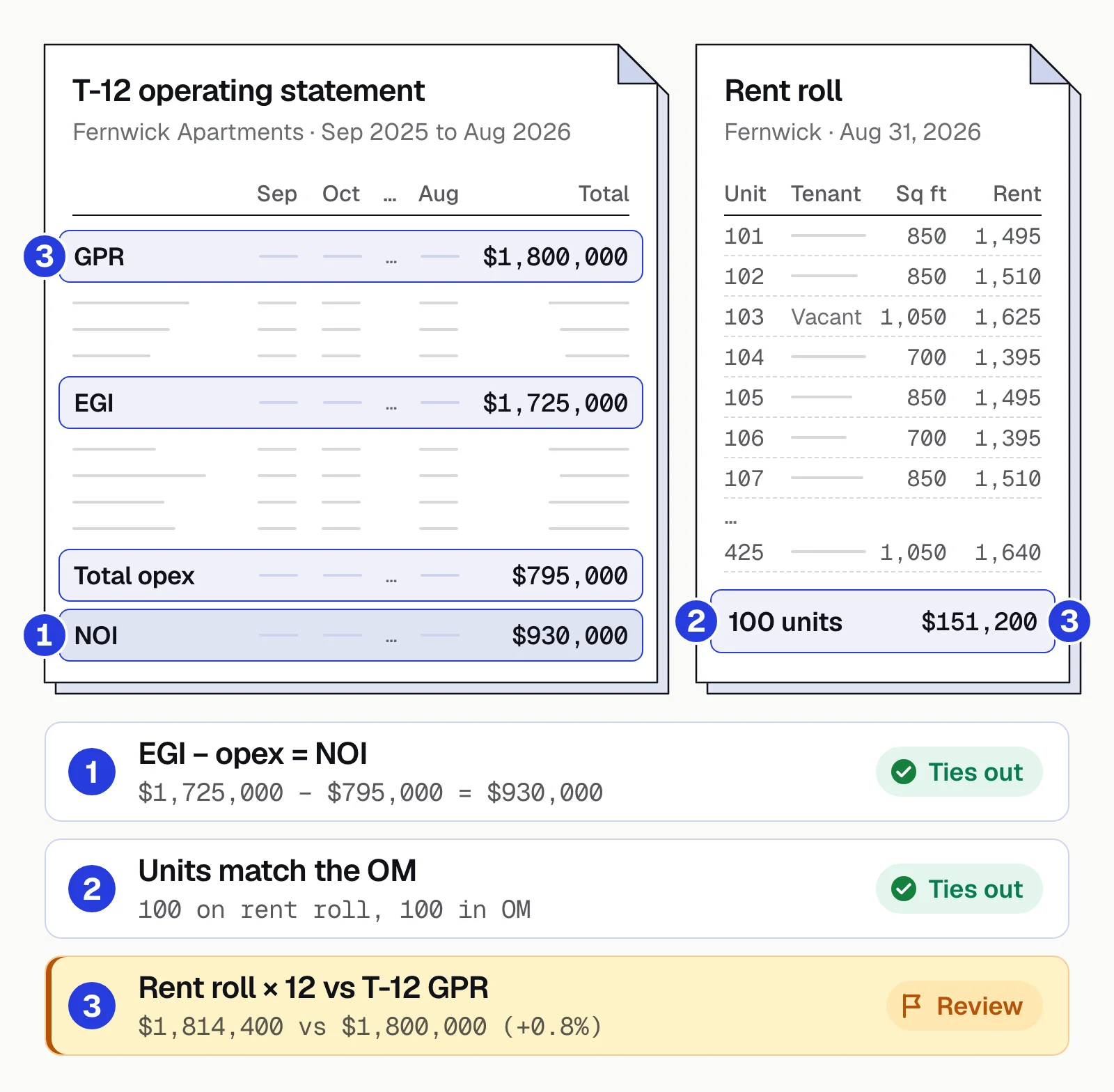
A small gap is normal when rents rose during the year. A large one needs an explanation before the loan is sized. Our guide to commercial real estate data extraction covers the full set of checks across the T-12, leases and OM.
Rent roll analysis software#
"Rent roll software" covers three kinds of tool, and only some of them read a seller's rent roll.
Property management systems
Produce the rent roll from their own ledger. Useful to the owner, but a buyer or lender only gets the export.Rent roll extraction
Reads rent rolls from any system, PDF or scan, and returns every row as data, with checks. Document AI platforms such as Docsumo sit here.Underwriting platforms
Build the model. Some parse rent rolls and T-12s themselves, others take data from an extraction tool. See our comparison of CRE underwriting software.
Docsumo is an intelligent document processing (IDP) platform. For CRE underwriting, it reads rent rolls in any layout, because language models structure what OCR reads, and joins unit tables that run across pages into one. Values below the confidence threshold you set go to your own reviewers with the source line highlighted, and on the Enterprise plan, cross-document validation checks values across the file. Data goes to your model or loan system through the API and webhooks, or downloads to Excel. Docsumo reaches 99% field-level accuracy on 250+ document types and 95%+ straight-through processing. It doesn't forecast rents or judge the property, and it isn't an outsourced analysis service: your analysts make the calls.
The bottom line#
A rent roll is only useful once it's in your model and you trust it. Automate the extraction and the checks (totals, dates, occupancy and the tie-out to the T-12), and spend analyst time on what the numbers mean: rollover, concessions, delinquencies and rent against market.
Book a demo with a few of your own rent rolls, or start a free trial.
Frequently asked questions#
What is rent roll analysis?
Rent roll analysis is reviewing a property's rent roll to judge its income: occupancy, lease expirations, concessions, delinquencies and rents against market. Lenders and buyers also tie it to the T-12 to confirm that the income on paper was actually collected.
What is rent roll software?
Three kinds of tool: property management systems that produce rent rolls from their own ledgers, extraction and analysis software that turns rent rolls from any system (often PDFs or scans) into data, and underwriting platforms that build the deal model, some of which parse rent rolls themselves. Buyers and lenders need a tool that reads other people's rent rolls, because every seller's comes from a different system.
How do you automate rent roll analysis?
Extract every row and total, normalize the columns and dates, run the checks (totals, lease dates, occupancy, rent against the T-12), then send clean data to your model. Software does the extraction and the checks, and the analyst makes the calls. See our guide to commercial real estate data extraction for the checks across the whole file.
What is the difference between a rent roll and a T-12?
A rent roll is a snapshot of every unit on one date: tenant, rent, lease dates and status. A T-12 is the property's income and expenses for the last 12 months. The rent roll shows what the property is set up to earn; the T-12 shows what it actually earned.
Can software read rent rolls in any format?
Template-based OCR breaks when the layout changes, and rent roll layouts change with every property management system. Document AI that uses language models reads each layout as it arrives, including unit tables that run across pages. Values the model is unsure about should go to a person, not straight into the model.
Sources
First published . Last updated .