Invoice OCR: how it works, where plain OCR falls short and how to get accurate data
For AP teams and developers evaluating invoice OCR: what OCR actually does on an invoice, how template OCR and AI-based extraction differ, how to measure accuracy fairly, and simple fixes that raise it.

Key takeaways
- Invoice OCR converts an invoice image or PDF into machine-readable text. On its own it doesn't know which number is the total or which rows are line items.
- Useful invoice processing adds field extraction (template-based or AI-based) and validation on top of OCR.
- Template OCR needs a template per vendor layout; AI-based extraction handles new layouts without setup and extracts line items as tables.
- Measure field-level accuracy on your own invoices, including line items and bad scans. Headline accuracy numbers on vendor test sets don't transfer.
- Simple fixes raise accuracy: scan at 300 dpi or higher, prefer native PDFs over scans, and capture invoices at the source by email instead of paper.
On this page
Invoice OCR is optical character recognition applied to invoices: it converts a scanned, photographed or PDF invoice into machine-readable text. On its own, OCR doesn't know which number is the total, which date is the due date or which rows are line items. That's why useful invoice processing adds a field extraction layer and validation on top of OCR, turning the text into structured data your accounting system or ERP can use.
This guide explains how invoice OCR works, how template OCR and AI-based extraction differ, how to measure accuracy fairly and what you can do to improve it.
How invoice OCR works#
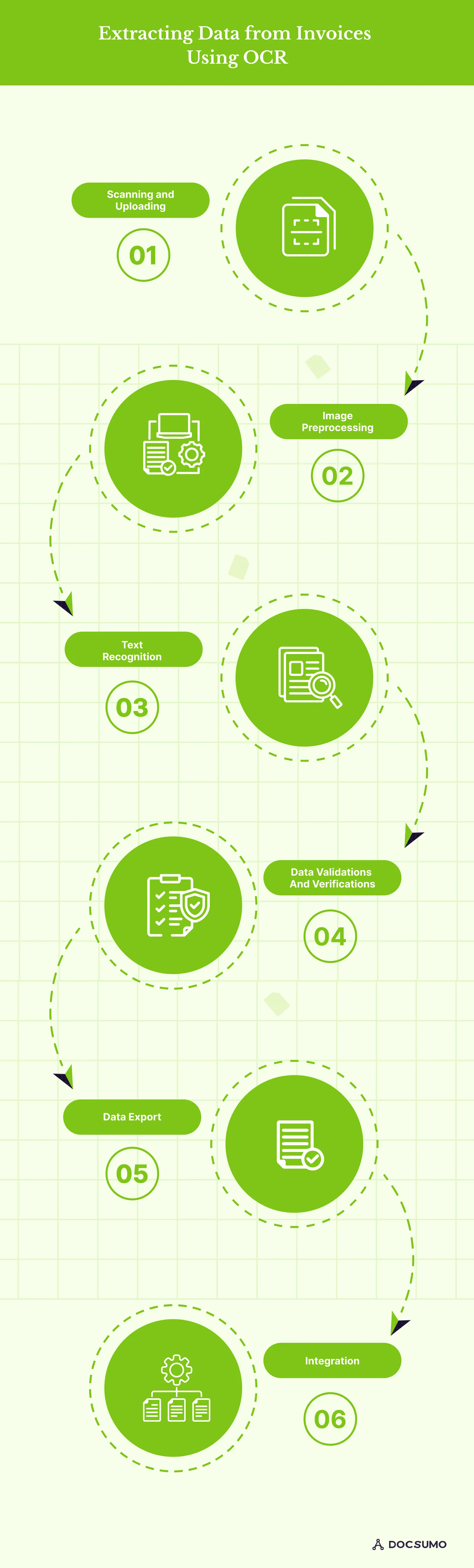
- Scan or upload. Paper invoices are scanned; PDFs and images arrive by email or portal.
- Preprocess. The image is straightened, cleaned of noise and adjusted for contrast.
- Recognize text. OCR finds lines and words and converts them to characters, with each word's position on the page.
- Extract fields. A second layer decides what each piece of text means: vendor, invoice number, dates, totals, line items.
- Validate. Values are checked: totals add up, the vendor exists, the invoice isn't a duplicate.
- Export and integrate. Data goes out as JSON, CSV or Excel, or straight into the ERP.
Steps 1 to 3 are OCR. Steps 4 to 6 are what make it invoice processing.
Plain OCR vs template OCR vs AI extraction#
| Plain OCR | Template OCR | AI-based extraction | |
|---|---|---|---|
| Output | Text with positions | Fields from fixed zones | Fields and tables with confidence scores |
| New vendor layout | Text only; someone still has to find the fields | Needs a new template | Handled without setup |
| Line items | Rows of text | Only if mapped in the template | Extracted as a table, across pages |
| Layout changes | No effect on text | Break the template | Usually handled |
| Best for | Search and archiving | A few stable, high-volume layouts | Many vendors and varied layouts |
Most AP teams deal with hundreds or thousands of vendor layouts, which is why AI-based extraction has replaced template OCR for invoices. Docsumo extracts invoice data, including line items, with 99% field-level accuracy.
What invoice OCR should extract#
- Vendor: name, address, tax ID, remit-to details.
- Header: invoice number, invoice date, due date, payment terms, PO number, currency.
- Line items: description, quantity, unit price, amount, tax per line.
- Totals: subtotal, discounts, freight, tax, total due.
For the full field list and output format, see invoice data extraction.
How to measure invoice OCR accuracy fairly#
Vendor accuracy claims are measured on their own test sets. What matters is accuracy on your invoices:
- Build a test set of 200 to 500 real invoices: top vendors, long-tail vendors, scans, photos and multi-page invoices.
- Create the correct answers for every field you need, including line items.
- Count errors per field, not per invoice. An invoice with 30 fields and one wrong value is 97% field-accurate but still needs a fix.
- Look at confidence scores. A good system knows when it's unsure. Check how many errors were flagged as low confidence and how many slipped through with high confidence.
- Measure straight-through rate: the share of invoices that pass every check with no human touch.
- Time the review of exceptions.
How to improve invoice OCR results#
- Get native PDFs. Ask vendors to email invoices generated by their accounting system rather than printing and scanning them.
- Scan at 300 dpi or higher. The Tesseract OCR documentation notes that it works best on images of at least 300 dpi. Use black-and-white or grayscale, and keep pages flat and straight.
- Avoid photos of invoices where you can; if you must use them, shoot flat, well lit and square to the page.
- Keep one invoice per file, or use a tool that splits multi-invoice PDFs.
- Add validation rules so extraction errors are caught before posting: totals, duplicates and vendor master lookups.
- Correct and feed back. Systems that learn from reviewer corrections get better on your recurring vendors.
Where invoice OCR fits in accounts payable#
OCR and extraction replace keying, the most manual step in AP. The savings are real: Ardent Partners' 2025 benchmarks put the average cost to process an invoice at $9.40, against $2.78 for best-in-class teams that rely on automation. The rest of the gains come from matching, approval routing and ERP posting built on top of clean data. See accounts payable automation and AI invoice processing.
Valtatech, a source-to-pay automation company, uses Docsumo to process invoices and cut costs by more than 65%, with 99%+ touchless invoices. Integration options are on the integrations page.
The bottom line#
OCR reads the invoice; extraction and validation make the data usable. Choose AI-based extraction if you have many vendor layouts, test on your own invoices with field-level accuracy, and improve inputs where you can. That combination is what turns invoice OCR into touchless invoice processing.
Frequently asked questions#
What is invoice OCR?
Invoice OCR is optical character recognition applied to invoices. It reads the text on a scanned or PDF invoice. Combined with field extraction and validation, it turns invoices into structured data for accounts payable.
Is OCR accurate enough for invoices?
OCR reads clean printed text very reliably, but invoice processing also needs the right value in the right field, including line items. That depends on the extraction layer and scan quality. Test on your own invoices and measure errors per field.
What's the difference between OCR and intelligent document processing for invoices?
OCR outputs text. Intelligent document processing adds classification, field and table extraction, validation and review, so the output is data your ERP can use. See IDP vs OCR.
Do I need OCR for PDF invoices?
Native PDFs created by accounting software already contain text, so OCR isn't needed to read them, but you still need extraction to identify fields. Scanned PDFs and photos need OCR first.
Can invoice OCR read handwritten invoices?
AI-based systems can read many handwritten values, with lower accuracy than printed text. Route handwritten fields to review until accuracy is proven on your documents.
Sources
- Tesseract documentation: Improving the quality of the output
- WEX: AP benchmarks citing Ardent Partners, Accounts Payable Metrics That Matter in 2025
First published . Last updated .