AI invoice processing: how it works, where it helps and how to start
For AP managers and controllers weighing AI for invoices: what the AI actually does at each step, how it differs from template OCR, what to measure, and how to roll it out.

Key takeaways
- AI invoice processing uses machine learning to read invoices in any layout, extract header and line-item data, check it against POs and vendor records, and route only exceptions to a person.
- Unlike template-based OCR, AI models don't need a template per vendor, so a new supplier or a changed layout doesn't break the process.
- The value is in validation, not just capture: duplicate checks, PO and receipt matching, tax and total checks, and vendor master lookups catch errors before payment.
- Ardent Partners' 2025 benchmarks put the average cost per invoice at $9.40, against $2.78 for best-in-class AP teams, and the average cycle time at 9.2 days against 3.1.
- Measure an AI rollout by straight-through processing rate, field-level accuracy, exception rate and cycle time, not by how many invoices were scanned.
On this page
AI invoice processing uses machine learning to read supplier invoices in any layout, pull out the header and line-item data, check it against purchase orders and vendor records, and send only the exceptions to a person. It replaces manual keying and template-based OCR, which breaks every time a vendor changes its invoice format. The result is faster, cheaper invoice handling with fewer payment errors.
This guide explains what the AI does at each step, how it compares with manual entry and template OCR, where it helps most, what to measure and how to roll it out.
What is AI invoice processing?#
AI invoice processing is the use of machine learning models, including computer vision and language models, to automate the accounts payable steps between receiving an invoice and posting it for payment. It covers four jobs:
- Reading: turning a PDF, scan, photo or email attachment into text, including tables and handwriting.
- Understanding: working out which value is the invoice number, which is the due date and which rows are line items, on layouts the model hasn't seen before.
- Checking: validating totals and tax, matching to POs and receipts, looking up the vendor and catching duplicates.
- Routing: sending clean invoices on for approval and posting, and exceptions to a reviewer.
The first two are often called intelligent document processing. The last two are what turn extraction into accounts payable automation.
Manual entry vs template OCR vs AI#
| Manual entry | Template OCR | AI invoice processing | |
|---|---|---|---|
| New vendor layout | No setup, but slow | Needs a new template | Handled without a template |
| Line items | Keyed by hand | Only if the template maps them | Extracted as a table |
| Scans and photos | Readable by people | Accuracy drops on skewed or low-quality scans | Trained on scans; flags low-confidence fields |
| Validation | Depends on the reviewer | Usually none | Rules, PO matching and duplicate checks |
| Improves over time | No | No | Learns from reviewer corrections |
How AI invoice processing works#
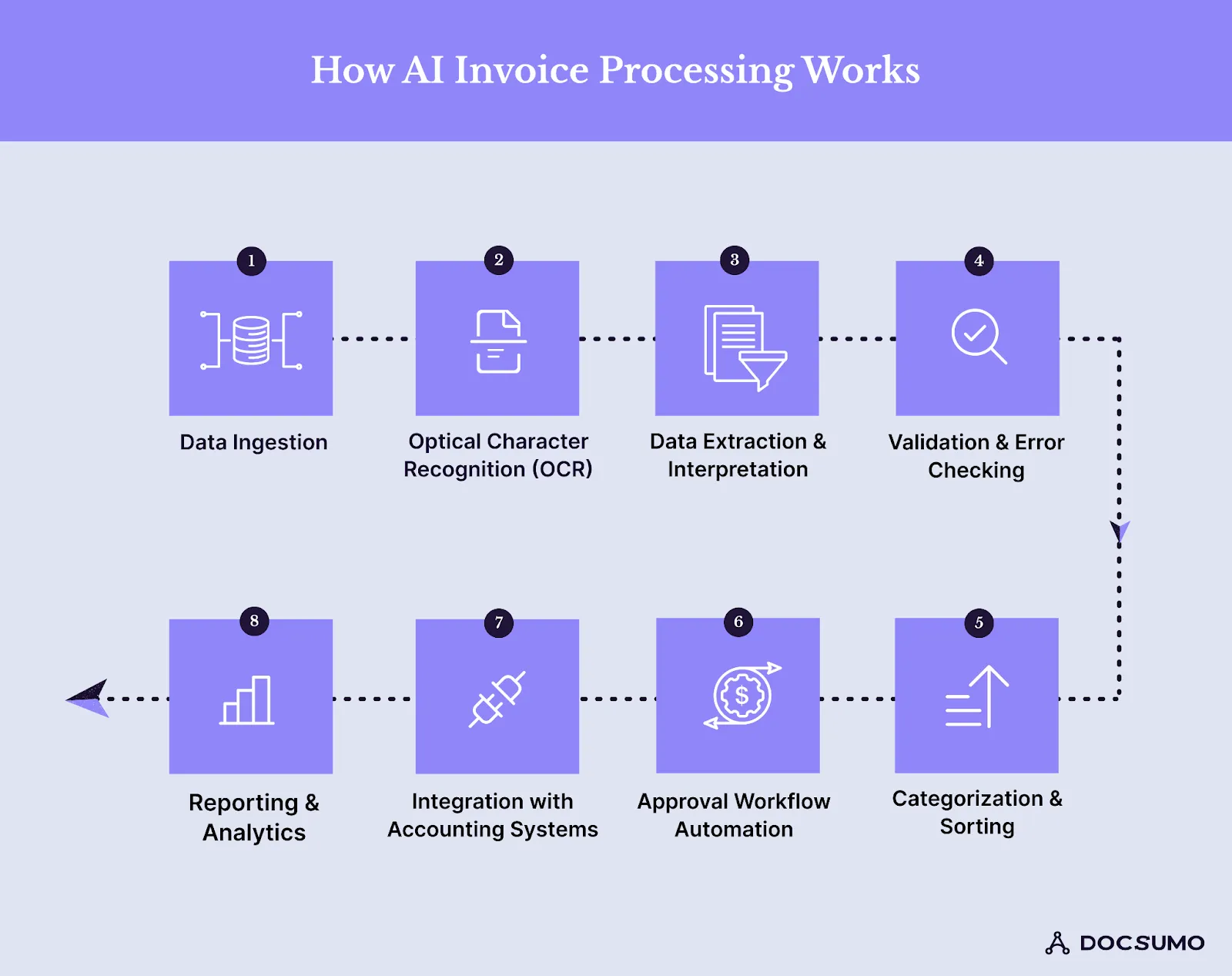
1. Ingestion
Invoices arrive from an AP inbox, supplier portal, scanner or API. The system pulls them in automatically, splits multi-invoice PDFs and separates invoices from attachments such as delivery notes or statements.
2. Reading and classification
OCR converts each page to text with its position on the page. A classifier then labels the document: invoice, credit memo, statement, receipt. Credit memos and statements need different handling from invoices, so this step matters.
3. Extraction
The model identifies each field and its value: vendor name and address, remit-to, invoice number and date, due date, PO number, currency, subtotal, tax, freight, total and the line-item table with descriptions, quantities, unit prices and amounts. Each value comes with a confidence score. Docsumo extracts invoice data with 99% field-level accuracy.
4. Validation
This is where AI earns its keep. Typical checks:
- Line items add up to the subtotal, and subtotal plus tax and freight equals the total.
- The vendor exists in the vendor master, and the remit-to bank details match what's on file.
- The invoice number hasn't been paid before for this vendor (duplicate detection).
- Quantities and prices match the PO and the receiving record (2-way or 3-way matching).
- Required fields for tax are present.
5. Coding and routing
Invoices are coded to GL accounts, cost centers or projects from the PO, the vendor's history or rules. Clean invoices go to the right approver by amount and department; exceptions go to a review queue with the failing field highlighted.
6. Posting and learning
Approved data is posted to the ERP or accounting system through integrations or an API. Corrections made by reviewers feed back into the model, so the same mistake is less likely next time.
Where AI helps most in accounts payable#
| Use | What the AI does | Why it matters |
|---|---|---|
| Data capture | Extracts header fields and line items from any layout | Removes keying, the largest share of manual AP time |
| PO and receipt matching | Compares invoice lines with PO and goods receipt lines | Stops overbilling and short shipments from being paid |
| Duplicate detection | Compares vendor, number, amount and date across all invoices, including near matches | Prevents paying the same invoice twice |
| Fraud signals | Flags new or changed vendor bank details, unusual amounts and lookalike vendors | AP is a target: 76% of US organizations saw attempted or actual payments fraud in 2025 (AFP) |
| GL coding | Suggests accounts and cost centers from history | Cuts coding errors and approver back-and-forth |
| Approval routing | Routes by amount, entity and department; chases late approvers | Shortens cycle time and helps capture early-payment discounts |
What the numbers look like
Ardent Partners' 2025 benchmarks put the average cost to process an invoice at $9.40 and the average cycle time at 9.2 days. Best-in-class AP teams, which rely heavily on automation, process an invoice for $2.78 in 3.1 days.
Docsumo customers see the same pattern. Valtatech, a source-to-pay automation company, cut costs by more than 65% and processes more than 99% of its invoices touchless. Across customers, Docsumo reports 95%+ straight-through processing and under 5 minutes per document, down from more than 2 hours.
What to measure#
Pick a baseline before the rollout and track the same numbers after:
- Straight-through processing rate: the share of invoices that go from receipt to posting with no human touch.
- Field-level accuracy: the share of extracted fields that were correct, measured on your own invoices.
- Exception rate: the share of invoices that need a person, split by reason (no PO, price variance, missing approver, low confidence).
- Cycle time: days from receipt to approval and to payment.
- Cost per invoice: fully loaded AP cost divided by invoices processed.
- Duplicate and erroneous payments caught: a direct measure of money saved.
How to implement AI invoice processing#
- Map the current process. List invoice sources, volumes, the share with POs, approval rules and your ERP.
- Collect a test set. Pull a few hundred real invoices across your top vendors, long-tail vendors and bad scans.
- Run a trial and measure field-level accuracy on that set, including line items. Check how low-confidence fields are shown to reviewers.
- Write validation and routing rules. Start with totals, duplicates, vendor master checks and PO matching; add GL coding rules next.
- Connect the ERP. Pull vendors and POs in; push approved invoices out. Test on a sandbox company first.
- Go live on a slice. Start with one entity or vendor group, keep a person on every exception, and widen auto-approval as the numbers hold.
- Review monthly. Track exception reasons and fix the biggest one each month, whether it's a rule, a vendor or a model issue.
Check security before any invoice leaves your systems: invoices carry bank details and pricing. Docsumo is SOC 2 Type 2, HIPAA and GDPR compliant.
The bottom line#
AI invoice processing is worth doing when it goes past capture. Reading invoices in any layout removes the keying; validation, matching and duplicate checks are what stop bad payments; and routing only exceptions to people is what lowers cost per invoice. Test it on your own invoices, measure field-level accuracy and straight-through rate, and expand as the numbers hold.
Frequently asked questions#
How is AI used in invoice processing?
AI reads incoming invoices, identifies fields such as vendor, invoice number, dates, line items, tax and totals, and checks them against purchase orders, receipts and vendor records. It flags duplicates and mismatches and routes clean invoices for approval and posting.
What is the difference between OCR and AI invoice processing?
OCR converts an image into text. AI invoice processing also understands which text is which field, handles layouts it hasn't seen before, validates the values and learns from corrections. Template OCR needs a template for every vendor layout.
Can AI approve invoices automatically?
AI can auto-approve invoices that pass your rules, for example a clean 3-way match under a set amount from a known vendor. Anything outside those rules should go to an approver. Most teams start with human approval and widen the rules as accuracy is proven.
How accurate is AI invoice data extraction?
Accuracy depends on the model and the documents. Measure it at the field level on your own invoices during a trial. Docsumo reports 99% field-level accuracy across 250+ document types.
Does AI invoice processing work with my ERP?
Most platforms push validated invoice data to ERPs and accounting systems through APIs, webhooks or native connectors, and pull vendor and PO data back for matching. Check the integrations list for your system.
Sources
- WEX: AP benchmarks citing Ardent Partners, Accounts Payable Metrics That Matter in 2025
- AFP: 2026 Payments Fraud and Control Survey (press release)
First published . Last updated .