Accounts payable process: each step, and how to automate it
For accounts payable (AP) teams that process supplier invoices. Follow each step from purchase order to payment, see who handles it, and learn which steps to automate first.

Key takeaways
- The accounts payable process runs from the purchase order to the payment. In between, AP captures each invoice, checks it and matches it to the order and the delivery before it's approved.
- In a 3-way match, the invoice has to agree with the purchase order and the goods receipt. An invoice that bills for more than arrived goes to an approver, not straight to payment.
- A sponsored analyst report from Ardent Partners puts the average cost to process an invoice at $9.84. Processing takes 8.2 days on average, and 18.4% of invoices are exceptions that need a person.
- In the AP automation process, you automate capture and validation first. Matching and approvals come next, then payments and reconciliation.
- Build controls in from the start. Confirm bank changes by phone, check for duplicates and set approval limits. Give vendor setup, approvals and payments to different people, and keep an audit trail.
On this page
- The steps in the accounts payable process
- One order through the accounts payable workflow
- Accounts payable KPIs to track
- How to improve the accounts payable process
- Controls to build into the AP process
- How to automate the accounts payable workflow
- Where do your invoices wait the longest?
- Frequently asked questions
The accounts payable process is how a business checks and pays the invoices its suppliers send. For each purchase, it runs from the purchase order to the recorded payment. In between, the accounts payable (AP) team captures the invoice, which means getting its data into the system, and checks it. The team matches the invoice to the order and the delivery, then gets it approved for payment.
To automate the process, start with the invoice steps. Capture and checks come first, then matching and approvals, then payment and reconciliation. For the accounting entries behind these steps, see how to record accounts payable.
The steps in the accounts payable process
The process has nine steps. Vendor setup happens once for each supplier, and the other eight repeat for every purchase. The purchasing and receiving teams handle the order and the delivery. The AP team handles the invoice steps, approvers sign off, and AP or treasury sends the payment.
The diagram shows the last six steps, the ones each invoice goes through. The purchase order and goods receipt feed into them. The table lists all nine.
- Purchase orders
- Goods receipts
- Supplier invoices
- Vendor statements
- 01Capture
- 02Validate
- 03Match
- 04Approve
- 05Pay
- 06Reconcile
| Step | Who handles it | What automation does |
|---|---|---|
| Vendor setup | AP or the vendor master team | Extracts W-9 and bank documents, checks tax IDs and flags bank changes for a call to a known contact at the vendor |
| Purchase order | The requester and purchasing | Reads or imports the PO so the invoice can be matched to it |
| Goods receipt | The receiving team, or the person who ordered a service | Reads the delivery slip or receiving record for matching |
| Invoice capture | AP | Pulls every channel into one queue and extracts fields and line items |
| Validation | AP | Checks vendor, duplicates, math and tax before anyone sees the invoice |
| Matching and coding | AP | Matches to the PO and receipt within tolerances; codes non-PO invoices by rules |
| Approval | The budget owner | Routes the invoice for approval with its checks attached |
| Payment | AP or treasury | Schedules payment on terms or for a discount, by ACH, virtual card or check |
| Recording and reconciliation | AP and accounting | Posts to the ledger, matches supplier statements to it, and reports cycle time and exceptions |
Invoices without a PO skip the purchase order and goods receipt steps. Someone still has to choose the GL code and the approver, because there's no order to copy them from. Before you automate anything, write down which GL code and which approver each kind of non-PO invoice gets.
One order through the accounts payable workflow
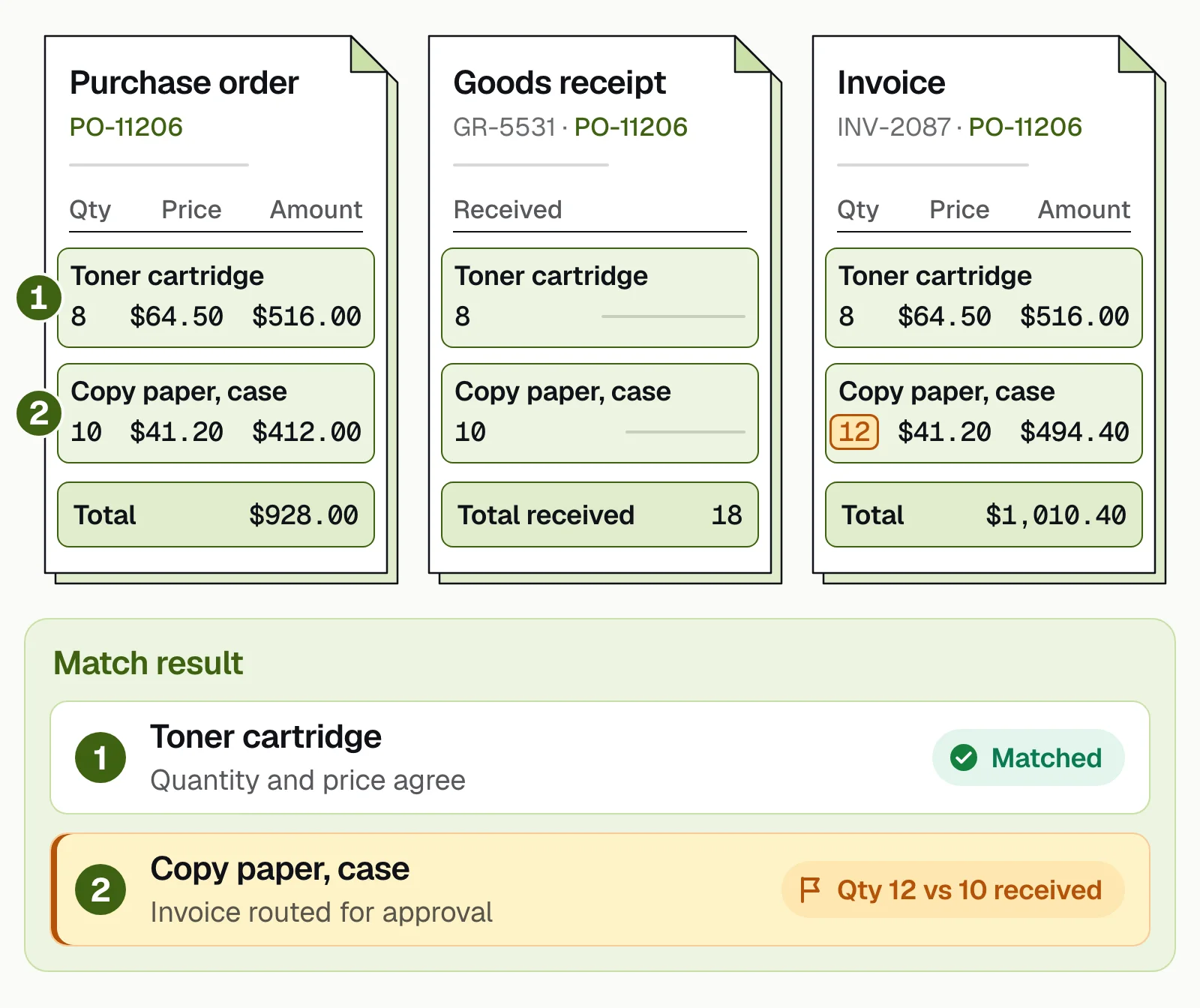
Follow one order through the steps. Purchase order PO-11206 asks a supplier for 8 toner cartridges at $64.50 each and 10 cases of copy paper at $41.20 a case. The order comes to $928.00. When the delivery arrives, the receiving team logs 8 cartridges and 10 cases on goods receipt GR-5531.
The supplier's invoice, INV-2087, arrives in the AP inbox. It shows the order number, PO-11206. Capture reads the header and both lines. Validation confirms the supplier is in the vendor master and that INV-2087 hasn't been received before. Each line adds up, and so does the $1,010.40 total.
The 3-way match finds the problem. The toner line agrees with the order and the receipt. The paper line bills 12 cases, but the order and the receipt both say 10. That's $82.40 more than the order, so the invoice goes to an approver with the reason attached. 2-way vs 3-way matching explains how the match works.
The approver decides what happens next. If only 10 cases arrived, AP asks the supplier for a corrected invoice for $928.00. If 2 more cases really arrived, the receiving team corrects its record. Then the approver can approve the full $1,010.40. The invoice is then paid on the supplier's terms. At month end, AP compares the supplier's statement with the ledger, and the payment should appear on both.
Docsumo, our product, reads and checks the documents in this workflow. It reads invoices, POs, receiving records and W-9s, whether they arrive by email, upload or API. It flags duplicate invoices and sends the fields it isn't sure about to a person for review.
Docsumo also matches vendor statements to the ledger. You can add a workflow step that suggests GL codes. On the Enterprise plan, Docsumo looks up vendors in your master data and matches invoice lines to the PO and receipt. On the Business plan, it routes invoices for approval by the rules you set. Data goes to your ERP through an API and webhooks. Docsumo doesn't create POs or pay vendors.
Accounts payable KPIs to track
Measure the process before you change it, so you can show what improved. Four numbers tell you how the process is doing. They are cost per invoice, processing time, exception rate and the share of invoices that pass with no one touching them.
Ardent Partners' State of ePayables 2025, a sponsored analyst report, gives averages for accounts payable processing. It puts the cost to process an invoice at $9.84 and the processing time at 8.2 days. On average, 18.4% of invoices are exceptions that need a person. The AP teams Ardent rates as top performers process invoices at 79% lower cost and 79% faster than their peers.
Start with cost per invoice. Put in your own volume and cost below.
What invoice processing costs you
Put in your own numbers. The cost and exception-rate defaults are the 2025 averages across AP teams.
- Cost today, per month
- Cost with automation, per month
- Difference per month
- Difference per year
How it's worked out
- Cost today is invoices per month times the cost of one invoice.
- With automation, an invoice that still needs a person costs what it costs today, and the rest cost only the software.
- It leaves out late-payment fees and missed early-payment discounts, which usually make the gap bigger.
Source: Ardent Partners, State of ePayables 2025: AP benchmarks (sponsored analyst report, Jan 2026)
The benefits of AP automation also show up in two numbers the calculator leaves out. Those are the early-payment discounts you take and the duplicate payments you stop. Add both to the calculator's result, then take off the cost of setting up the software and training your team. The calculator already takes off the monthly software cost. Automated invoice processing has a fuller business case, and accounts payable metrics covers the numbers that move working capital.
How to improve the accounts payable process
Fix the process before you automate it. If nobody is sure who approves what, software won't know either. Write down who approves each kind of invoice, and up to what amount. Write down the GL code for each common purchase too. Then make sure the receiving team logs each delivery on the day it arrives. A late receipt makes a correct invoice fail the match.
Give every exception an owner. An invoice that fails a check needs a reason, a person to fix it and a deadline. Without them, it waits in someone's inbox until the supplier calls about a late payment. Count last month's exceptions by reason, and fix the biggest group first. Missing POs, price differences and unknown vendors are common reasons.
Keep the tools connected. When capture, approval and payment run in separate tools that don't share data, someone has to retype the invoice data between them. Test each change on real invoices before you roll it out, messy ones included. Then tell approvers, AP staff and suppliers what changes for them, such as a new address for invoices or a new approval email.
Controls to build into the AP process
A faster process should still leave a record of why each payment went out. These controls keep every payment tied to an approved invoice.
- Verified bank changesConfirm every vendor bank change with a call to a known contact. Until that call confirms the new bank details, don't send payments to them.
- Duplicate checksBefore an invoice is paid, flag it if it repeats one already received. See duplicate invoice detection.
- Separation of dutiesDifferent people create vendors, approve invoices and release payments.
- Approval limitsSet limits by role and amount, and enforce them in the system rather than by email.
- An audit trailEvery change and approval is logged. See audit trails.
- Secure providersInvoices and vendor records carry bank details, so choose software with SOC 2 Type 2 compliance.
How to automate the accounts payable workflow
Automate the invoice steps in the order they happen. Capture and validation pay back fastest, because extraction removes the typing and the checks stop bad payments before anyone approves them. OCR for accounts payable shows what capture reads and which checks need your own records. Matching and approvals come next, then payments and reconciliation. Capture can go live first, while matching, approvals and the ERP connection take longer. Rolling out in phases keeps the risk low.
- Measure where you startCount invoices by channel and the share with a PO. Record cycle time, exception reasons and cost per invoice.
- Clean the vendor masterRemove duplicate vendors, verify bank details and collect missing W-9s.
- Automate capture and validationSend every invoice to one queue. Extract the fields and line items, then run the duplicate, vendor and math checks.
- Add matching and approvalsMatch invoices to POs within your tolerances, set coding rules and route approvals.
- Connect the ERP and paymentsPost approved invoices and payment data through an API and webhooks. Test in a sandbox first.
- Automate reconciliation and reportingReconcile supplier statements and build the reports your controller reads.
- Review every monthFix the top exception reason. While accuracy stays high, let more kinds of invoices pass with no one touching them.
Our take. Automate the invoice before anything else in the process. It's the document that decides each payment, and it arrives every day, in volume. Once invoices go through capture and checks without retyping, add the documents around them. POs and receipts come next for matching, then W-9s at vendor setup and statements at month end.
These are Docsumo's results, including two from Valtatech, which processes supplier invoices for its clients.
- 95%+of documents processed straight through, without manual review
- <5 minper document, down from 2+ hours
- 65%+lower data processing costs at Valtatech
- 99%+of invoices processed touchless at Valtatech
Where do your invoices wait the longest?
Pull last month's invoices and note the date each one reached each step. The gaps between those dates show where invoices wait. If they wait before anyone reads them, start with capture. If they wait for approvers, fix the approval rules before you buy anything. Either way, test tools on your own invoices, line items included. The best accounts payable automation software compares the main ones, and accounts payable automation shows Docsumo's approach.
Book a demo with a batch of your own invoices, or start a free trial.
Frequently asked questions
What are the steps in the accounts payable process?
It starts with vendor setup and a purchase order. When the goods arrive, the receiving team records them. AP then captures the invoice, checks it and matches it to the PO and the receipt. After approval, AP pays the supplier, records the payment and reconciles the supplier's statement.
What is full-cycle accounts payable?
It's the whole AP cycle, from setting up a vendor to paying the invoice and reconciling the payment. A full-cycle AP role handles every step, not only invoice entry.
What is a 3-way match in accounts payable?
A 3-way match checks that the invoice agrees with the purchase order and the goods receipt. It compares quantity, price and amount, within the tolerances you set. A 2-way match compares only the invoice and the PO.
What are the golden rules of accounts payable?
There's no official list, but most AP teams keep a few rules. Pay an invoice only when it matches the order and the receipt, or when the right person approves it. Confirm every bank change with a known contact, keep vendor setup apart from payment approval, and check for duplicates before each payment run.
Which accounts payable tasks can be automated?
Most of the routine ones. Software can capture invoices, check vendors and duplicates, match invoices to POs and receipts, suggest GL codes and route approvals. It can also schedule payments, send remittance advice and reconcile supplier statements, while AP staff handle the exceptions and the decisions.
How much does AP automation save?
It depends on your volume and starting point. Ardent Partners' State of ePayables 2025, a sponsored analyst report, puts the average cost to process an invoice at $9.84. In the same report, top-performing AP teams process invoices at 79% lower cost than their peers. The saving comes on every invoice, so it grows with your invoice volume.
Sources
First published . Last updated .