2-way vs 3-way matching: how invoice matching works in accounts payable
For AP teams and controllers: what 2-way, 3-way and 4-way matching compare, which purchases need which, how to set tolerances and what automation changes.

Key takeaways
- 2-way matching checks an invoice against its purchase order: within tolerance, the price billed can't exceed the PO price and the quantity billed can't exceed the quantity ordered.
- 3-way matching adds the receiving record, so you pay only for goods that arrived. 4-way matching adds inspection, so you pay only for goods that were accepted.
- Use 2-way for services and subscriptions, 3-way for physical goods and 4-way for inspected goods. Invoices with no PO can't be matched, so approval is their control.
- Tolerances decide how many invoices stop for review: set them by vendor, item or category, cap a percentage with an amount and review them regularly.
- Automated matching keeps the same rules. It extracts the lines from invoices, POs and receipts and matches them, so AP works only the exceptions.
On this page
2-way matching checks a supplier invoice against its purchase order, and 3-way matching also checks it against the receiving record, so you pay only for goods that actually arrived. Both are forms of invoice matching, the accounts payable control that holds an invoice until its documents agree within the tolerances you set.
This guide covers what each match compares, how a 3-way match runs, the exceptions it raises, how to set tolerances and how matching is automated.
Which match does this purchase need?
What are 2-way, 3-way and 4-way matching?#
Each level adds one document and one rule to the level before it. The rules below are how Oracle Payables defines each level, and every rule applies within the tolerances you set.
2-way match: invoice and PO
The price billed must be at or below the PO price, and the quantity billed at or below the quantity ordered. It catches prices and quantities above the order but can't tell whether anything arrived. Typical use: services, subscriptions and repeat orders from trusted vendors.3-way match: adds the receipt
The quantity billed must also be at or below the quantity received, as logged on the goods receipt (also called a receiving report or GRN). It stops payment for goods that haven't arrived. Typical use: physical goods.4-way match: adds inspection
The quantity billed must also be at or below the quantity accepted after inspection. It stops payment for units that failed inspection. Typical use: manufacturing inputs and other goods inspected on arrival.
A purchase order is the buyer's approved order to the supplier: items, quantities and prices, agreed before anything ships. The invoice is the supplier's request for payment, and the receipt records what actually came in. For how POs are raised and approved, see the purchase order process.
How a 3-way match works#
In purchase invoice processing, matching sits between capture and approval (see automated invoice processing for the whole flow). A three-way match runs line by line: each invoice line is paired with its PO line and its receipt, then compared.
- Supplier invoice
- Purchase order
- Goods receipt
- 01Extract every line
- 02Pair lines by PO line
- 03Compare within tolerance
- 04Approve or hold
Below, the toner line matches on all three documents, but the invoice bills 12 cases of copy paper when 10 were received, so the whole invoice goes to an approver instead of straight to payment.
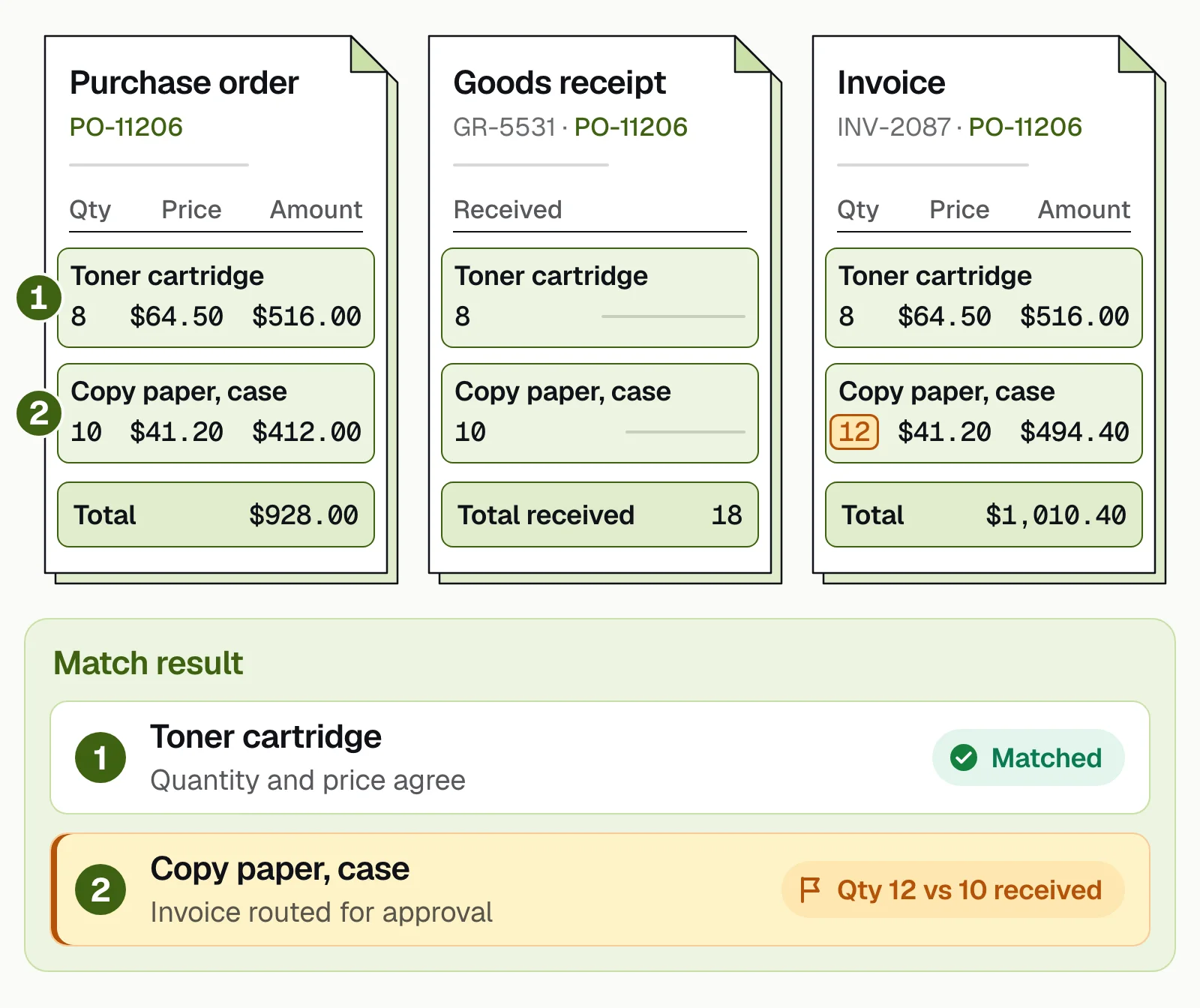
An invoice that matches the PO and the receipt on every line, within tolerance, can be approved without a person; this one bills two cases that weren't received, so it goes to an approver.
Common matching exceptions and who resolves them#
When the documents don't agree within tolerance, the invoice is held (Oracle calls it a matching hold) until someone resolves the difference. Exceptions are routine. Ardent Partners' State of ePayables 2025, a sponsored analyst report, puts the average invoice exception rate for AP departments at 18.4%.
| Exception | Usual cause | Who resolves it |
|---|---|---|
| Price above the PO | A price change nobody added to the PO, or a billing error | The buyer updates the PO or asks for a corrected invoice |
| Billed more than received | A partial delivery, or a receipt not posted yet | Receiving confirms the count; AP waits for the rest or asks for a credit memo |
| No receipt at all | Goods arrived but nobody logged them, or nothing arrived | Receiving posts the receipt or confirms nothing came |
| Lines don't pair up | Different item codes or units of measure (cases vs units) on the invoice and the receipt | AP or the buyer maps the line, then records the vendor's item code for next time |
| Charges not on the PO | Freight, fuel or handling fees added by the supplier | The buyer approves or disputes them |
| Duplicate invoice | A resend, or the same bill by email and on paper | AP rejects the copy |
A repeat invoice is better caught before it reaches matching: see duplicate invoice detection.
How to set matching tolerances#
A tolerance is the variance you accept before an invoice is held. ERPs let you set it as a percentage, an amount or both, and vary it by vendor or item. In Microsoft Dynamics 365, for example, a line with both a percentage and an amount tolerance fails if it exceeds either one. Tolerances are a policy choice, not a standard figure, so set yours from your own exception data.
- Set tolerances by vendor, item or categoryOne global number is too loose for some purchases and too tight for others.
- Cap a percentage with an amount1% of a $500,000 order is $5,000. A not-to-exceed amount keeps a small percentage from becoming a large overpayment.
- Start tight, then loosen with evidenceIf approvers pass the same variance unchanged every time, widen that tolerance; if errors get through, tighten it.
- Match lines, not only totalsOffsetting errors can leave the total right and two lines wrong.
- Give charges their own toleranceFreight and fees that weren't on the PO shouldn't ride inside the price tolerance.
- Review quarterlyLook at exception rates and approved variances by vendor, and adjust.
Automating 2-way and 3-way matching#
Matching is only as good as the data it compares: the invoice's line items, the PO lines and the quantities received. By hand, that means keying lines and laying three documents side by side. With automation, extraction reads the lines, the match runs on every invoice, and people see only the exceptions.
Docsumo, our product, is an intelligent document processing (IDP) platform. For accounts payable automation, it reads invoices, purchase orders and receipts, line items included. On the Enterprise plan, its cross-document checks match each invoice line to the PO and the receipt on quantity, unit price and amount. It also flags duplicate invoices, sends fields it's unsure about to a person and, on the Business plan, routes invoices for approval. Data goes to your ERP through API and webhooks. It doesn't create POs or pay vendors.
The demo below shows 3-way matching in Docsumo, which is on the Enterprise plan.
- 99%field-level accuracy across 250+ document types
- 95%+of documents processed straight through, without manual review
- 99%+touchless invoices at Valtatech
The bottom line#
Use a 2-way match where there's nothing to receive, a 3-way match for goods and a 4-way match where goods are inspected; invoices with no PO need approval instead. Set tolerances by vendor or category and review them against your exception data. Automation keeps the same rules and removes the keying, so AP spends its time on the invoices that don't match.
Book a demo to see matching on your own invoices, POs and receipts, or start a free trial to test extraction.
Frequently asked questions#
What is invoice matching?
Invoice matching is the step in purchase invoice processing that compares a supplier invoice with its purchase order, and often with the receiving record, before the invoice is paid. If prices or quantities don't agree within tolerance, the invoice is held until someone resolves the difference.
What is the difference between 2-way and 3-way matching?
2-way matching compares the invoice with the purchase order on price and quantity. 3-way matching also compares it with the goods receipt, so the quantity billed can't exceed the quantity received. Of the two, only the 3-way match confirms delivery.
What is three-way matching, and why is it important?
Three-way matching checks a supplier invoice against its purchase order and the goods receipt before it's paid, so the quantity billed can't exceed the quantity received. It matters because it's the match that confirms delivery: an invoice can agree with its PO while the goods arrived short or not at all, and checking the receipt stops payment for anything that didn't come in.
When should you use two-way matching?
When there's nothing physical to receive, such as services, software subscriptions and maintenance contracts, or for low-risk repeat orders where the PO is enough evidence. For goods, a 3-way match is the safer default.
What is 4-way matching?
4-way matching adds an inspection or acceptance record to the 3-way match: the quantity billed can't exceed the quantity accepted after inspection. It's used where goods are inspected before they're accepted, such as manufacturing inputs.
What tolerance should you set for invoice matching?
It's a policy choice, not a standard figure. Set tolerances by vendor, item or category, pair a percentage with an amount cap, and start tight. Loosen a tolerance only where approvers keep accepting the same variance, and review them at least quarterly.
Sources
- Oracle Fusion Cloud Procurement: Match approval level options
- Oracle Payables: Two-, three- and four-way matching
- Microsoft Learn: Accounts payable invoice matching overview (Dynamics 365 Finance)
- Ardent Partners: State of ePayables 2025, AP benchmarks and best-in-class performance (sponsored analyst report, Jan 2026)
First published . Last updated .