What is OCR (optical character recognition)? How it works and its types
For anyone evaluating document automation: a plain-English definition of OCR, how it works, what an OCR'd PDF is, the types of OCR, and why OCR alone isn't enough to automate business documents.

Key takeaways
- Optical character recognition (OCR) is technology that converts images of text, from scans, photos or image-only PDFs, into machine-readable text you can search, edit and process.
- OCR works in stages: preprocessing, text detection, character recognition and post-processing. Modern engines use neural networks that read whole lines.
- The main types of OCR are printed-text OCR, ICR for hand-printed characters, IWR for whole handwritten words, handwriting recognition for cursive, OMR for checkboxes, scene-text OCR and zonal OCR.
- An OCR'd PDF is a searchable PDF: the page image with an invisible text layer behind it, so you can search, select and copy the text.
- OCR outputs text, not meaning: it doesn't know which number is the invoice total. That's the job of intelligent document processing.
On this page
OCR (optical character recognition) is technology that converts images of text into machine-readable text. It takes a scanned page, a photo or an image-only PDF, finds the text, recognizes each character and returns text you can search, copy, edit and feed into other software. That makes it the first step in digitizing paper and in automating data entry from invoices, bank statements and forms.
This guide covers how OCR works, what an OCR'd PDF is, the types of OCR, the documents it can read, its limits, and how it fits into document automation.
How OCR works#
Most OCR engines follow the same path from a picture of a page to text.
- Scan
- Photo
- Image-only PDF
- 01Preprocess
- 02Find the text
- 03Recognize lines
- 04Correct
- PreprocessThe engine converts the image to black and white, straightens skew and rotation, and removes noise and background.
- Find the textLayout analysis finds blocks, lines and words, separates text from images and tables, and works out the reading order.
- Recognize linesA trained model reads each line. Older engines matched character shapes against stored patterns; modern engines, including Tesseract since version 4, use neural networks that read whole lines as sequences.
- CorrectDictionaries and language models fix likely errors, such as "0" read as "O".
- OutputPlain text, text with positions and confidence scores, or a searchable PDF.
For the algorithms behind each step, see text recognition algorithms.
OCR in three lines of Python
With the open-source Tesseract engine installed, the pytesseract library runs OCR on an image in Python:
from PIL import Image
import pytesseract

print(pytesseract.image_to_string(Image.open("scanned_page.png")))
The output is plain text, in reading order. It won't tell you which line is the invoice number. See our Tesseract OCR guide for setup and options.
What does OCR mean in a PDF?
An OCR PDF, or searchable PDF, is a scanned page with an invisible layer of recognized text behind the image, placed where the words sit on the page. It looks the same as the scan, but you can search, select and copy the text; without OCR, a scanned PDF is only a picture of each page. Tesseract's documentation describes its PDF output the same way: the image plus a separate searchable text layer.
OCR output formats
Besides plain text and searchable PDFs, many OCR engines output formats that keep each word's position on the page, and often a confidence score: hOCR (HTML), TSV, ALTO XML and PAGE XML, all of which Tesseract can write, or JSON from cloud OCR APIs.
Types of OCR#
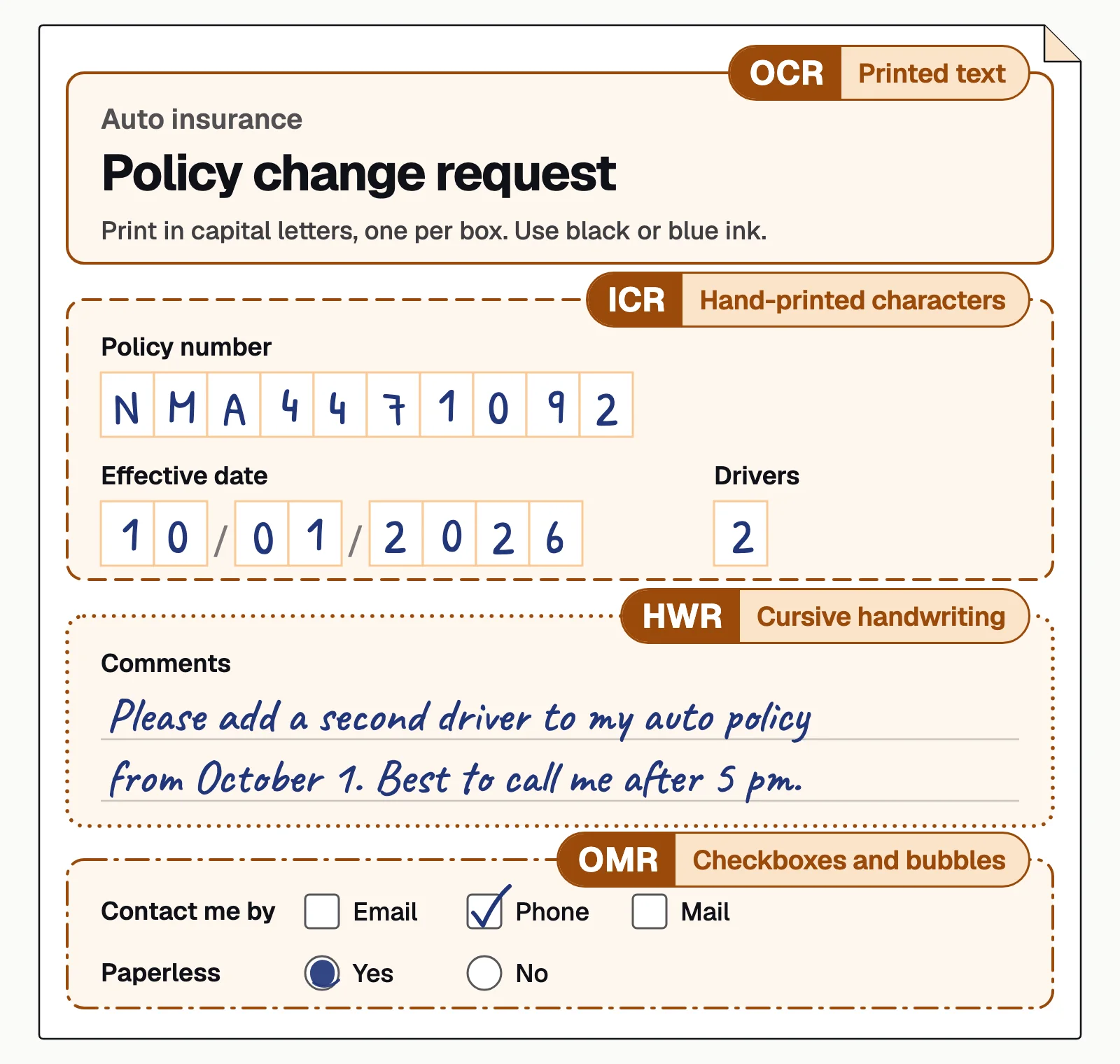
OCR is a family of techniques, each built for a different kind of mark on the page:
Printed-text OCR
Machine-printed characters in invoices, statements and books. The most common and most accurate case.ICR (intelligent character recognition)
Hand-printed characters, usually one per box in a form field. See intelligent character recognition.IWR (intelligent word recognition)
Whole handwritten words or phrases rather than single characters, often matched against a dictionary of expected words.Handwriting recognition (HWR or HTR)
Cursive and free-form writing in notes, letters and records. See handwriting recognition.OMR (optical mark recognition)
Whether a checkbox or bubble is filled in, on surveys, tests and forms.Scene-text OCR
Text in photos of the real world: signs, labels, packaging and license plates.Zonal OCR
Text in fixed areas of a known form, read from the same box on every copy. See zonal OCR.
Four of them often share one page:
What documents can OCR read?#
OCR document processing works on almost anything with text on it. What changes from one document to the next is how accurate it is.
Printed documents
Letters, contracts, reports and books. Clean print on a good scan reads best.Business documents
Invoices, receipts, bank statements and pay stubs. OCR reads the text; extraction software names the fields.Forms and applications
Loan, tax and claim forms mix printed labels, typed or hand-printed entries and checkboxes.Handwritten documents
Block capitals read well; cursive and crowded writing cause most errors.ID documents
Passports and driver's licenses, including the machine-readable zone at the bottom of a passport's photo page. See passport OCR.Tables
Statements and rate sheets. Merged cells and tables that run across pages need layout analysis to keep each row together.Multilingual documents
Engines load a model per language or script, and Tesseract recognizes more than 100 languages. Several languages in one line are harder. See multilingual OCR.Photos and images
Phone photos, screenshots and images inside PDFs, where angle, glare and blur cut accuracy.
That's why OCR shows up in lending (bank statements, pay stubs, tax forms), accounts payable (invoices and receipts), insurance (ACORD forms and claims), healthcare, legal and logistics, and in everyday apps such as mobile check deposit.
Benefits of OCR#
- Searchable archives. Scanned documents become full-text searchable.
- Less retyping. Text can be copied or passed to other systems instead of keyed by hand.
- Accessibility. Screen readers can read OCR'd documents aloud to people with visual impairments.
- Less paper. Digitized records take less space and are easier to back up and share.
- Preservation. Libraries and archives use OCR to make historical collections searchable.
Limits of OCR#
OCR is good at reading characters and bad at understanding documents. Here is the same invoice as OCR text, as layout regions and as named fields:
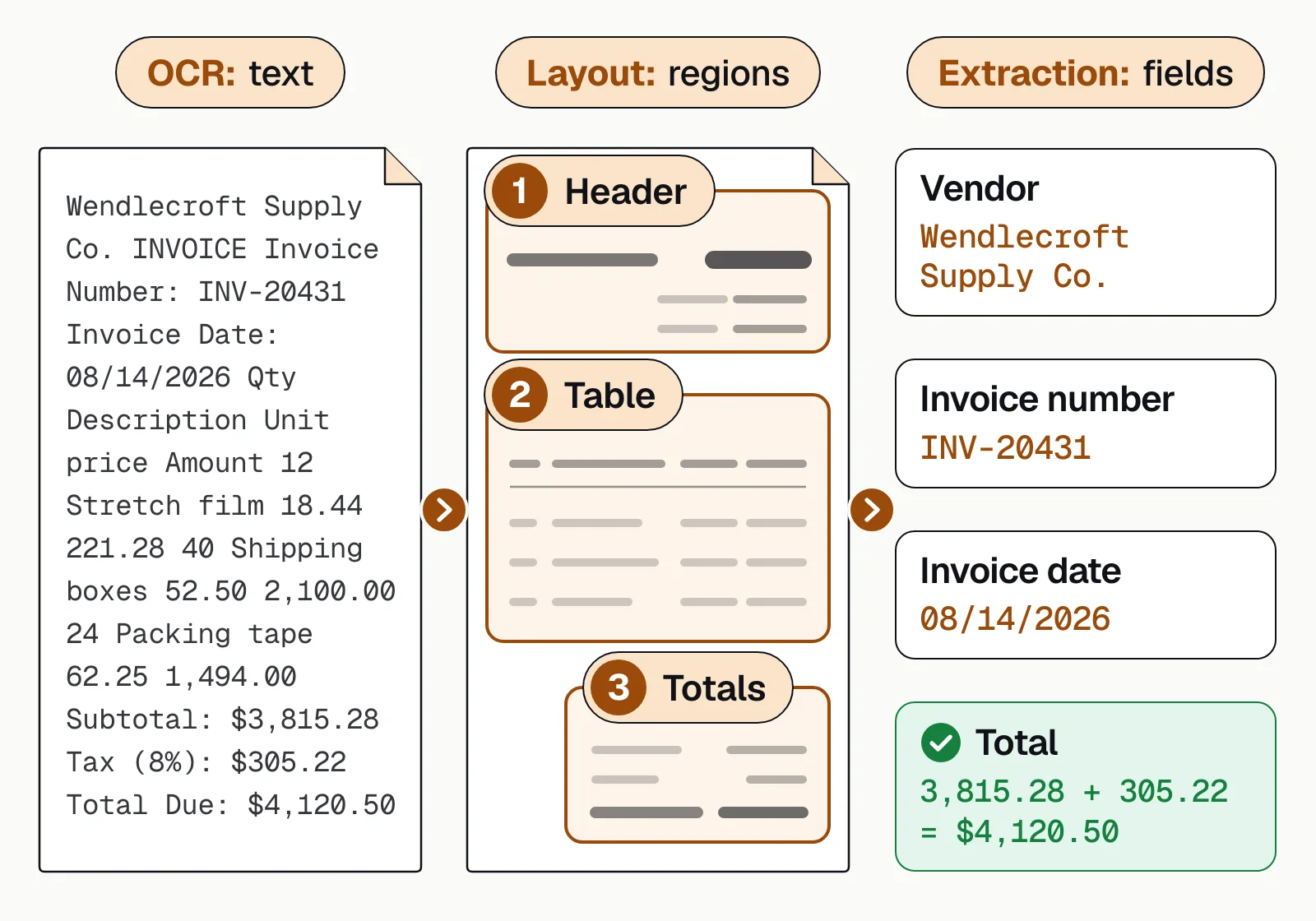
- No meaning. OCR returns text, not fields. It doesn't know that "4,120.50" is the amount due.
- Layout sensitivity. Tables, multi-column pages and forms can come out in the wrong order.
- Image quality. Blur, low resolution, skew, stamps and faint print cause errors. Tesseract's documentation says it works best on images of at least 300 DPI.
- Handwriting. Accuracy drops sharply for messy or cursive writing.
- No checks. OCR doesn't know if a total doesn't add up or a date is impossible.
The hard cases are also where engines differ: in our 2025 OCR benchmark on 120 documents, the three systems tested were furthest apart on old scans, stamps, vertical text and small tables. Read OCR accuracy for how to measure it.
From OCR to intelligent document processing#
To automate business documents, OCR needs to be combined with more:
- Classification to know what each document is.
- Layout-aware extraction to find fields and tables on any layout.
- Validation to check totals, dates, names and cross-document consistency.
- Human review of low-confidence fields.
- Integration to send clean data to your systems.
That combination is intelligent document processing (IDP). Docsumo is an IDP platform: it reads printed and handwritten documents and sends low-confidence fields to a person, with 99% field-level accuracy on 250+ document types and 95%+ straight-through processing. It isn't a desktop tool for editing PDFs or making searchable files. For how OCR got here, read the history of OCR.
The bottom line#
OCR turns pictures of text into text. It's mature and widely available, but it's only the first step: to turn documents into reliable data, pair it with classification, extraction, validation and review.
Book a demo with a few of your own documents, or start a free trial.
Frequently asked questions#
What does OCR stand for?
Optical character recognition. It's the technology that recognizes printed or handwritten characters in an image and converts them into digital text.
What are the types of OCR?
The main types are printed-text OCR, intelligent character recognition (ICR) for hand-printed characters, intelligent word recognition (IWR) for whole handwritten words, handwriting recognition for cursive, optical mark recognition (OMR) for checkboxes and bubbles, scene-text OCR for photos, and zonal OCR for fixed areas of a form.
What does OCR mean in a PDF?
An OCR PDF, or searchable PDF, is a scanned page with an invisible layer of recognized text behind the image. It looks the same as the scan, but you can search, select and copy the text. A scanned PDF without OCR is only a picture of the page.
Can OCR read handwriting?
Many modern engines can read hand-printed text, often called ICR, and some read cursive. Accuracy is lower than for print and depends heavily on writing quality. See intelligent character recognition.
Is OCR the same as AI?
Modern OCR uses AI, specifically neural networks trained to recognize characters. But OCR alone only reads text. Understanding which text is which field, and checking it, needs further AI models, which is what intelligent document processing adds.
What is the difference between OCR and IDP?
OCR converts images to text. IDP uses OCR, then classifies documents, extracts specific fields and tables, validates them and sends them to your systems. See IDP vs OCR.
Sources
- GitHub: Tesseract OCR (engine, languages and output formats)
- GitHub: pytesseract (usage examples)
- Tesseract documentation: Command line usage (searchable PDF output)
- Tesseract documentation: Improving the quality of the output
- Wikipedia: Intelligent word recognition
First published . Last updated .